
The ability to pin a post on X is a valuable feature that can significantly boost your visibility and engagement on the platform.
It makes the X post the first thing visitors see when they land on your X profile page.
In this Inspire To Thrive blog article, I will explain the why and how of pinning a post on X and provide a step-by-step guide to using this feature.
Stay tuned to unlock the full potential of your X profile and elevate your online presence.
Estimated reading time: 10 minutes
Table of Contents
Key Takeaways
- Pinning a post on X boosts visibility and engagement by keeping important content at the top of your profile.
- To pin your post, select a post, click on the three dots, and choose ‘Pin to your profile.’
- Change your pinned post regularly to prevent it from becoming stale and losing impact.
- Utilize X Analytics to measure the success of your pinned posts for a better social media strategy.
- Follow best practices, such as timing your pins, diversifying content, and staying engaged with audience insights.
Understanding The Importance of Pinned Posts on X
Pinning a post on X is a smart move that can significantly impact the visibility and engagement of your content.
By doing this, you ensure that your post stays prominently displayed at the top of your profile, making it the first thing visitors see when they land on your page. But don’t let it get stale!
Change it up often. I can’t tell you how many times I see profiles that have the same post from years ago.
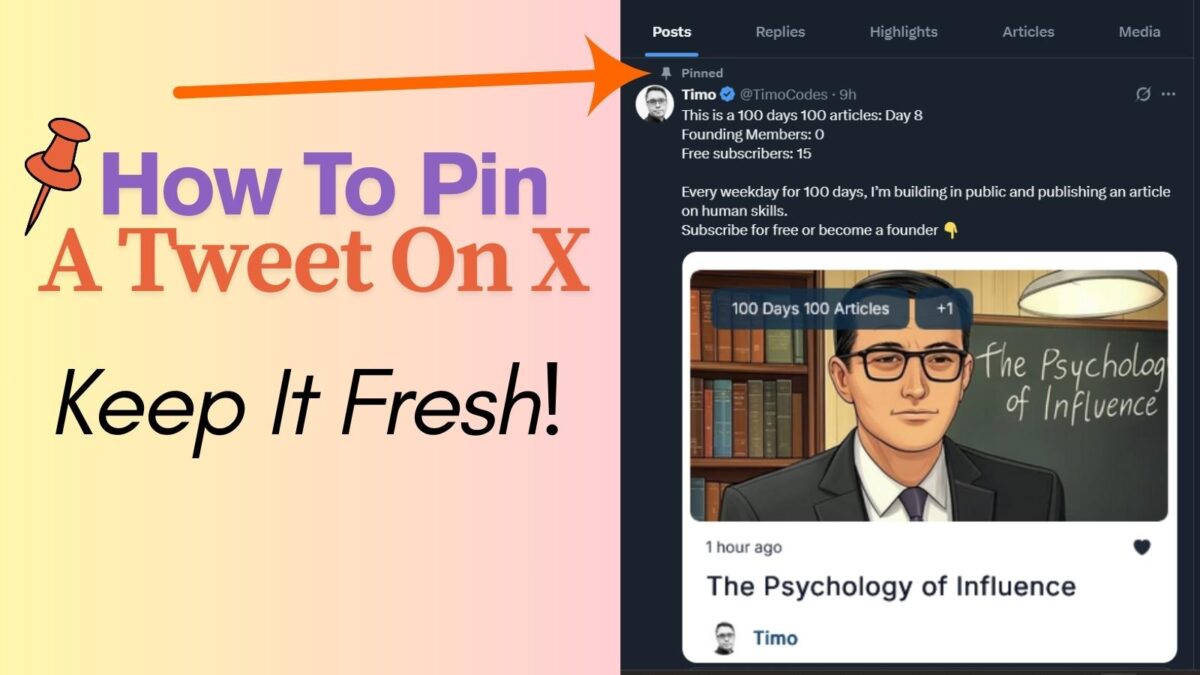
Deciding Which One To Pin
Pinpointing a post that perfectly aligns with your current goals or promotions is the first step to making it stand out.
By selecting a post that is not only engaging but also aligns with your messaging, you set the stage for maximum impact.
Step 1: Select the Best Post
Scan through your posts and pick the one that you want to highlight to all your profile visitors. Consider which post captures the essence of your brand or the message you want to amplify.
Once you have found the ideal post, it’s time to move on to the next step.
Step 2: Click on the Three Dots
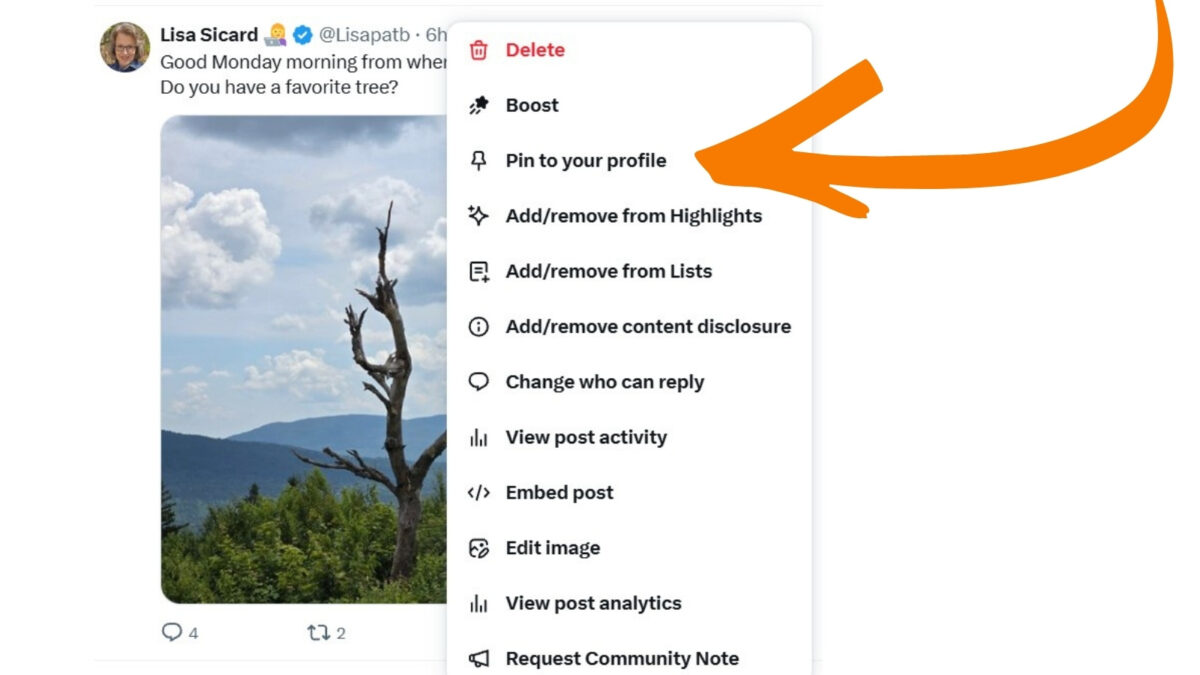
Located at the bottom of your chosen post, the three dots serve as your gateway to unlocking the ‘Pin to your profile’ feature.
Simply click on these dots to reveal a dropdown menu with various options. Options include the coveted ‘Pin to your profile’ selection.
Step 3: Pin the Post
After selecting the ‘Pin to your profile’ option from the dropdown menu, your post will now be prominently displayed at the top of your X profile.
This ensures that every visitor to your profile will immediately see the pinned post. This makes it a focal point of your X presence.
The Update That Makes It More Valuable
Pinning a post has become crucial due to a recent change to their algorithm. This tweak will ensure all your followers see your pinned posts.

The new rule allows only one post every 48 hours to prevent system manipulation. But I’ve noticed that in April of 2026, this rule no longer applies.
This simple yet powerful function allows you to showcase:
- Key announcements.
- Promotions.
- Important messages to your audience.
- Latest blog posts.
Whether you’re a business looking to highlight a special offer or an individual looking to share a significant update, pinning a post can help you cut through the noise and capture attention.
Boosting Engagement
When you pin a post on X, you grab the attention of your followers right from the get-go. These messages stand out and are more likely to be interacted with, whether through likes, reposts, or replies.
This increased engagement not only boosts your visibility but also signals to X’s algorithm that your content is valuable. Potentially leading to a wider reach and greater impact within your X community.
By strategically using the pin feature on X, you can ensure your most critical content stays front and center. Therefore, driving both visibility and engagement in a simple yet powerful way.

Increasing Visibility
Pinning a post on X is like putting a spotlight on your most important content. It acts as a virtual billboard. Thus, ensuring that your key message or announcement doesn’t get lost in the sea of posts that flood your profile.
By keeping vital information pinned at the top, you make it easily accessible for anyone visiting your profile. It increases the chances of it being noticed and engaged with.
4 Best Practices for Effective Pinning
On X, pinning a post can significantly boost your visibility and engagement with your audience.
However, to make the most of the “how to pin a post on X” feature, it’s crucial to follow best practices for its effective use.
1. Timing is Key
When it comes to pinning a post on X, timing plays a crucial role. Consider the optimal timing to reach the maximum audience and generate the desired response.
You want your pinned post to be visible when your audience is most active and likely to engage. Analyze your audience insights to determine the best times to pin your posts for maximum impact.
By strategically timing your pins, you can ensure that your content gets the attention it deserves.
2. Diversify Your Pinned Content
Keep your audience engaged and cater to different preferences by diversifying the type of content you pin.
Experiment with a mix of images, videos, blog posts, infographics, and quotes to keep your X content fresh and appealing to a wide range of followers.
By offering variety in your pinned content, you can maintain high engagement and effectively reach different segments of your audience.
However, by considering the optimal timing for pinning and diversifying the types of content you place at the top of your feed, you can optimize the impact of your pinned posts on X.
Experiment with different strategies to see what works best for your audience and tailor your approach to maximize engagement and reach.
3. Measuring Success and Iterating
Understanding how to measure the success of your pinned posts on X is key to refining your social media strategy.
By using X Analytics, you can track key metrics and gain insights to enhance your pinning strategy for better engagement and visibility.
4. Utilize X Analytics
X Analytics offers a wealth of data to help you evaluate your pins’ performance. Start by navigating to your X Analytics dashboard and selecting the posts tab. (Only if you are a subscriber on X can you use analytics.)
Here, you can view key metrics such as impressions, engagements, reposts, likes, and more, specific to your pinned posts, as long as you have a subscription account today.
Analyzing these metrics allows you to identify trends, understand what content resonates with your followers, and pinpoint areas for improvement.
For instance, if a particular pinned post received high engagement, consider the elements that made it successful and replicate those strategies in future pins.

Audience Insights
Use audience insights in X Analytics to understand your followers’ demographics, interests, and online behavior. This information is invaluable for tailoring your content to suit their preferences and boost engagement.
Remember, monitoring your account’s performance is an ongoing process. Continuously adjust your pinning strategy based on:
- X Analytics data.
- Test different approaches.
- Optimize for superior results.
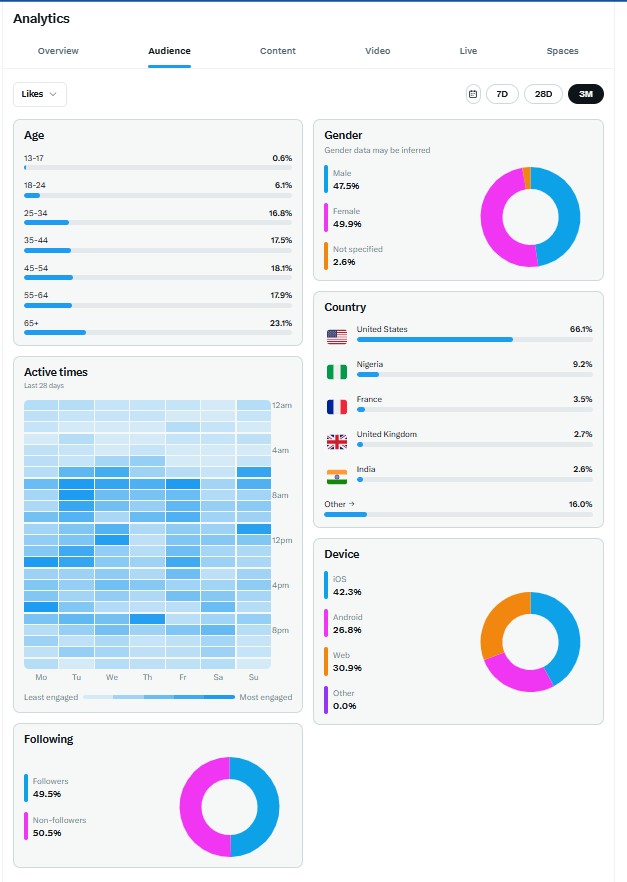
By staying attentive to the metrics and being agile in your approach, you can enhance your X presence and connect more effectively with your audience.
Tips For Measuring Your Pinned Post If You Do Not Have An X Subscription
If you do not have a subscription, there is another way to evaluate your pinned posts.
Look below to see how many impressions were served and how many likes, reposts, and comments were received on the pinned post.
You can see from the post pin below that it had 12,000 impressions, meaning it was seen 12,000 times in the feed. It was liked 148 times and shared 3 times with 3 comments.

Summary: How Pinned Posts Boost Your Visibility
Pinning a post is a powerful strategy to boost your social media presence and engagement on X. By putting a post to the top of your profile, you can ensure that important content stays visible to your audience, driving more traffic and interactions.
Above all, take advantage of this feature today to stand out in the fast-paced X platform. Maximize your X impact by leveraging the pin feature; don’t let it get stale, and watch your presence on X soar.

Frequently Asked Questions About How to Pin a Post on X
You can pin an X post from your own profile in a few quick steps. Open the post you want to feature, click or tap the three-dot menu, then choose Pin to your profile, and confirm. After that, the post stays at the top of your profile until you remove it or replace it with a different one.
No, you can only pin your own post to your profile. If you want to highlight someone else’s content, you can repost, quote, or reply to it, but X won’t let you pin another user’s post on your profile.
X only allows one pinned post at a time. So, when you pin a new one, the old one is automatically replaced. Because of that, it’s smart to choose a post that matches your current goal, whether that’s traffic, sales, a launch, or your best evergreen content.
A pinned post helps you control the first impression people get when they visit your profile. For example, you can use it to highlight a lead magnet, promote a blog post, share a product launch, or point people to your most important update. Since new visitors often check your profile before following you, a strong top-placed post can guide them to take the next step.
Yes, you can remove it at any time from the same three-dot menu on the pinned post. Once you select Unpin from profile, your profile goes back to showing your regular post order. That makes it easy to swap pinned posts as your offers, campaigns, or content priorities change.
Disclosure: This Inspire To Thrive blog post contains affiliate links. I may earn a commission from qualifying purchases at no extra cost to you. Some sections were drafted with AI tools and carefully reviewed/edited by me.

- Link Whisper Review: Best Plugin To Boost Your Internal Links - October 14, 2026
- FlexClip Video Editor Review: Easy-to-Use Tool for Consistent & Professional Videos - October 14, 2026
- Instagram SEO Tips to Help Bloggers Get Discovered - October 12, 2026
Enjoy this content? Help me show up more often in Google by adding Inspire To Thrive as a Preferred Source:




I like the idea of changing pinned posts on X to keep things fresh.
Pinning posts consistently – versus pinning one for months – puts eyeballs on fresh, new content consistently.
I will move in a new direction after reading this post.
Thanks for the helpful nudge Lisa.
Yes, it does help to gain exposure to different pieces of content on your site. Or it could be a special offer, etc. Just remember, many who visit it may be new to your content and to you as well over on X. Enjoy your day Ryan!