
Instagram isn’t just for family photos and memes anymore. Around 9 out of 10 teens say they’ve seen explicit or graphic content on social platforms, according to the Cyberbullying Research Center. You’ll find that Instagram is a leader in this area, with nearly 70% of kids aged 13 to 17 reporting direct exposure to explicit content on Instagram or violent material on the app at least once.
These numbers give you a clear picture of how often kids encounter adult content while scrolling. If you’re managing a brand, running a family account, or thinking about your child’s safety, you can’t afford to ignore how easy it is for explicit content to surface.
In this blog post, I will explore practical strategies, apps, and settings to help you avoid explicit content on Instagram, so you can enjoy a safer and more positive browsing experience.
Not only may you want to avoid even partial nudes on Instagram in your feed or in messages, but you may also want to be sure your kids are not exposed to them either.
What you will learn in this blog post:
- How to limit sensitive content
- How to block and report
- How to set up teen privacy
Estimated reading time: 11 minutes
Table of Contents
What You Need To Know
- Porn and sexually suggestive content can appear on Instagram through Explore, hashtags, search results, DMs, Stories, and comments, even though it is against Instagram rules.
- Turn on Instagram tools that limit exposure, start with Restricted Mode, Sensitive Content controls, Hidden Words, and stricter message and comment settings.
- Make teen accounts private, review followers and following lists, and limit who can message, tag, or mention the account.
- Report and block explicit accounts right away, do not engage with suspicious DMs or links.
- If you need stronger protection, use a parental control or monitoring app to filter content and track activity.
Related: What the Meta settlement means for your Instagram strategy in 2026.
Is There Explicit Content On Instagram?
Yes, at times you may find explicit content on Instagram. There are rules against it, but sometimes images get past the filtering mechanisms.
With the popularity of Instagram today for younger people, Instagram has become a platform not only for sharing pictures and connecting with family and friends, but sadly for the distribution of pornographic content.
The allure of Instagram’s visually stimulating network has made it an attractive medium for sharing partial nude photos and videos.
| 3.07 billion users | |
| YouTube | 2.7 billion users |
| 3 billion users | |
| 3.3 billion users | |
| TikTok | 1.9 billion users |
| 1.4 billion users | |
| Telegram | 1+ billion users |
| Messenger | 1+ billion users |
| Snapchat | 970 million users |
The stats above are from global monthly active users on top social media platforms as of August 2026.
The Increase of Explicit Content on Instagram
Instagram’s wide user base and the ease of sharing visuals have led to a surge in the availability of pornographic type material on the platform.
Despite Instagram’s policies against explicit content, users have found ways to bypass these restrictions, contributing to the sharing of such content.
Setting Up Parental Controls and Privacy Settings
Instagram’s parental controls and privacy settings are vital tools for regulating content exposure and interactions on the platform.
By utilizing these features, you will be able to avoid Instagram porn and create a safer environment for yourself or your children.
Those aged 13-16 with accounts set up are automatically set to private. If a user is over 16, their Instagram account is public by default, and they can choose to make their account private at any time.
Instagram’s Sensitive Content Policy
Instagram considers any content that may be sexually explicit or suggestive, such as pictures of people in see-through clothing, as sensitive. (They remove content that contains adult nudity or sexual activity.)
However, you will read in the news that celebrities are still posting partially nude photos on social networks.
A Quick Set-Up Checklist
- Set the account private
- Limit DMs
- Turn on Hidden Words
- Use Restricted Mode
- Report and block
What the 2026 Meta Settlement Changes for Parents Mean
The August 2026 multistate settlement with Meta adds default teen protections on Instagram and Facebook: a combined two-hour daily time limit, nighttime blocks from midnight to 6 a.m., muted notifications during school hours, stronger age checks, and alerts when a teen messages a suspicious account or opens a second profile.
Those rules help, but they do not automatically remove explicit posts from Explore, Reels, DMs, or comments.
Until every new control is live on a teen or brand account, use the settings in this guide: Restricted Mode, Hidden Words, private accounts, and tighter message permissions. For what the settlement means for your posting and account strategy, read What the Meta settlement means for your Instagram strategy in 2026.
Utilizing IG’s Restricted Mode to Avoid Explicit Content on Instagram
Enabling Restricted Mode on Instagram provides a basic level of control over the content that is visible on the platform. This feature filters out potentially sensitive material such as Instagram nudes that may not be suitable for all audiences.
To activate this feature, go to your profile, click on the three horizontal lines, select “Settings,” tap “Account,” and then choose “Restricted Mode.”
Once enabled, Restricted Mode helps filter out explicit content from the Explore page and other areas of the app.
Enabling Comment Filters and Blocking Accounts
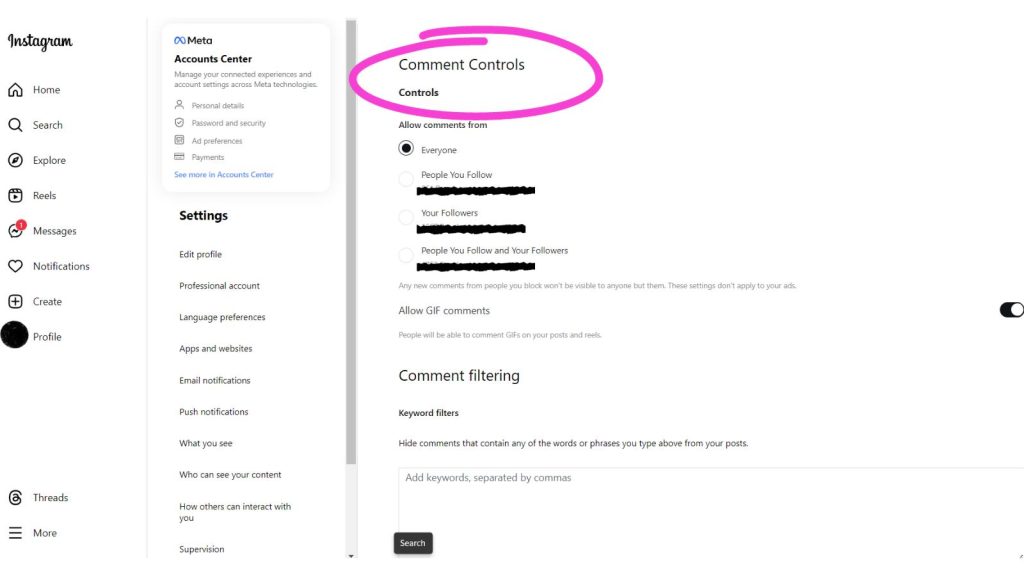
Comment filters help prevent offensive or inappropriate comments on your posts.
To enable this feature, navigate to “Settings,” select “Privacy,” and then tap on “Comments.” From there, you can activate filters to block specific words, phrases, or emojis.
Additionally, the “Block” feature allows you to restrict interactions with specific accounts by preventing them from commenting on your posts, sending direct messages, or viewing your content.
Adjusting Account Privacy Settings to Avoid Shady Content on Instagram
Adjusting privacy settings is crucial for controlling who can view and interact with your content. In the “Privacy” section of Instagram settings, you can manage your account’s visibility and interactions. You can set your account to private, limiting your content to approved followers only.
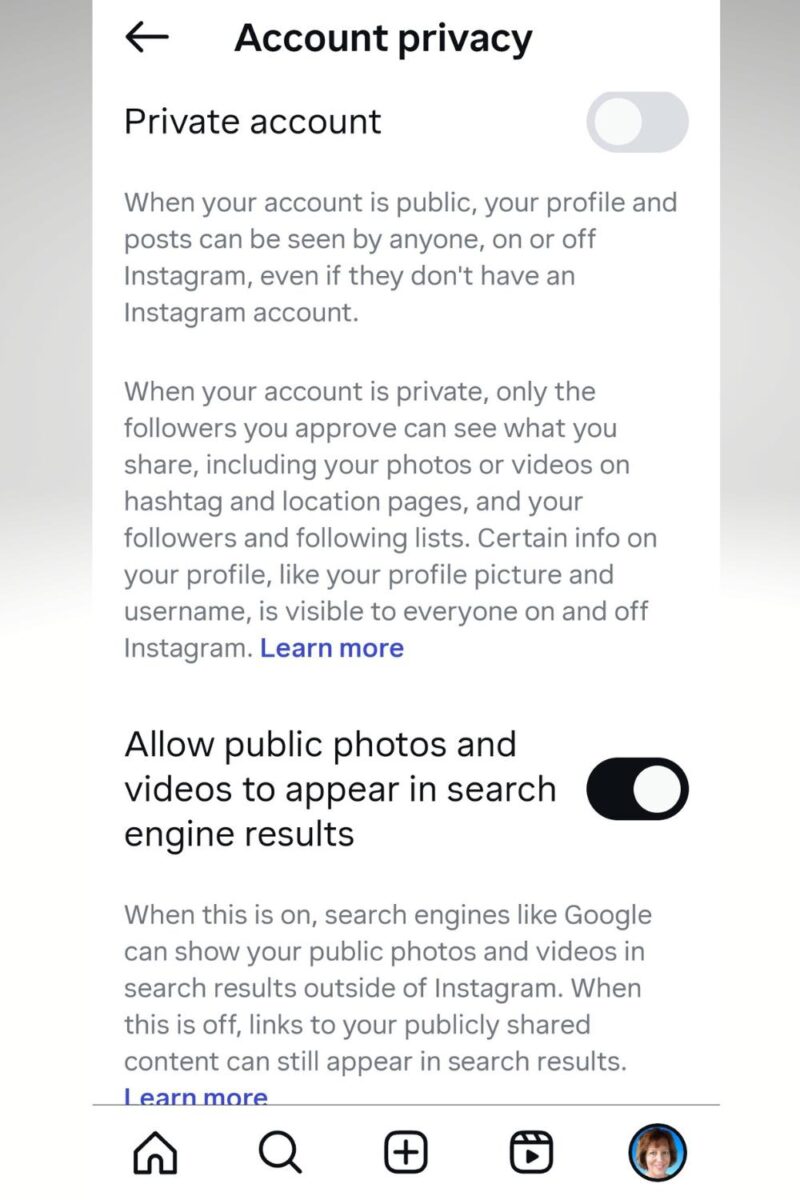
Furthermore, you can control who can send you messages, comment on your posts, and mention you in their comments. However, be aware that some tools and apps can still see private users’ posts or stories on Instagram.
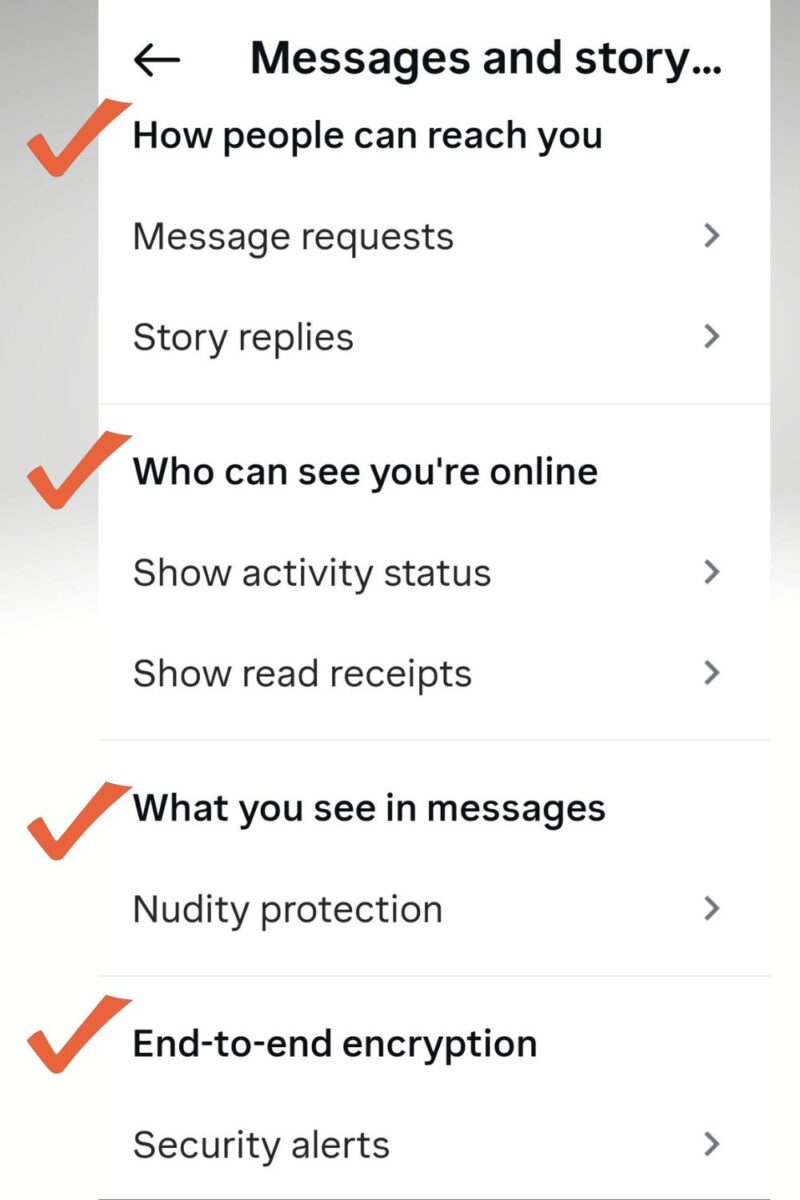
If you do not see this option, search Settings for ‘Restricted’ or ‘Sensitive content’.
By effectively using parental controls and privacy settings on Instagram, you can create a safer, more secure experience for all users, especially when managing content consumption and interactions.
Regularly Monitoring and Discussing Instagram Activity
Regular monitoring of a young user’s Instagram activity is essential in ensuring their online safety. You can utilize available monitoring tools and features to track your child’s interactions and content consumption on the platform.
By regularly discussing the content and accounts your children engage with, you can provide guidance and address any concerning behavior or exposure to Instagram nudes and explicit content.
This proactive approach enables you and other parents to intervene and educate your children about responsible online behavior.
How Do You Filter Specific Keywords and Phrases in Instagram Comments?
Want to keep your Instagram comments clean and on brand? Filtering out unwanted words or phrases only takes a few steps.
- Start by opening your Instagram profile and tapping the hamburger menu (the three lines in the top right).
- Pick Settings and privacy from the menu. Scroll down until you find Hidden words under the “How others can interact with you” section.
- Next, select Manage custom words and phrases. Here’s where the magic happens: enter every term or phrase you want to block, separating each with a comma. Instagram will now automatically hide comments that include any of your chosen words or phrases.
- For a simple cleanup, you can toggle on “Hide comments” and even use the “Advanced comment filtering” option to catch more unwanted spam or off-topic chatter.
- Save your changes, and you’re done.
This quick setup helps you control what shows up in your comment section, so your brand’s conversations stay positive and focused. Try updating your blocked words now or revisit them anytime your needs change.
How Does the Mute Feature on Instagram Work?
The “Mute” feature on Instagram lets you hide posts and stories from accounts you follow without unfollowing them. When you mute someone, their content won’t show up in your main feed or stories, but you’ll still stay connected and can check their profiles if you want.
If you’ve noticed more suggestive or adult material popping up, muting those specific accounts can help clean up your Instagram experience. This gives you more control over what you see every day.
You block unwanted images or videos without causing social drama from unfollowing someone. For anyone trying to avoid porn or overly sexual content on Instagram, muting works like a personal filter.
Don’t feel bad about using it. Tap the three dots on a post, select “Mute,” and Instagram will handle the rest.
This small step helps you keep your feed safe, comfortable, and focused on what inspires you.
Using Third-Party Apps and Software to Avoid Explicit Content on Instagram
Exploring Content Filtering and Monitoring Apps
When it comes to avoiding unwanted content on Instagram, third-party apps and software can be valuable tools. Content filtering and monitoring apps allow users to control the types of content that appear in their feeds.
These apps often come with customizable settings that let users filter out specific keywords, hashtags, or even entire categories of content.
By exploring the available options, you can find the app that best aligns with your preferences and needs.
Installing Parental Control Software To Avoid Explicit-Type Content on Instagram
For those looking to monitor and restrict access to certain content on Instagram, installing parental control software can be a practical solution.
These software options offer features such as content filtering, time restrictions, and activity monitoring. By setting up these tools, users can create a safer, more controlled environment, especially for younger users of the platform.
By allowing customization of settings and providing detailed reports, parental control software adds an extra layer of protection against unwanted content, such as Instagram nudes.
Summing Up: Explicit Content on Instagram
Avoiding porn on Instagram requires proactive measures such as using content filters, reporting inappropriate content, and being mindful of the accounts and hashtags you follow.
By staying vigilant and utilizing the platform’s safety features, users can create a more secure and enjoyable Instagram experience.
Remember, it’s essential to prioritize online safety for you and your family while using any social media platform.
Have you dealt with porn on Instagram or any other social media platform today? Do you have any porn bots liking your IG stories?

Frequently Asked Questions: Avoiding Explicit Content on Instagram
Yes. Instagram bans adult nudity and sexual activity, but explicit and suggestive posts still appear when accounts bypass filters using coded hashtags, blurred images, or link-outs.
Instagram recommendations are based on engagement signals (accounts you view, follow, like, save, or search for). If an account interacts with suggestive posts or related hashtags, the system may show more of that content, and some content also slips through moderation.
Use Restricted Mode, adjust Sensitive Content controls (when available), turn on Hidden Words, and tighten comment and message settings. Also, set the account to private (especially for teens) and limit who can tag, mention, and DM.
Open the post or profile, tap the three dots, choose Report, then pick Nudity or sexual activity (or the closest option shown). After reporting, block the account so it cannot message, comment, or show up again.
Stay calm, close the page, and tell them not to interact further. Check the device for malware if anything downloaded, update passwords if needed, and review privacy settings so the same type of content is less likely to appear again.
Enjoy this content? Help me show up more often in Google by adding Inspire To Thrive as a Preferred Source:




Anytime user numbers get into the billions this is the unfortunate side effect of going mainstream. Practical strategies as always. You need to know the details to remain one step ahead of your kids. Or to remain one step ahead of adult content spammers.
I’d also limit my kids screen time to enhance this effect. The less time spent online the less likely they are to be up to cyber no good. Phones would go into a bin overnight or even a lock box if the addiction seemed too great LOL. I go offline from 11 PM to 1 PM or 2 PM daily. I’m still alive and well. 🙂
I would agree, Ryan, and 11 pm is a bit late to turn them off; it should be more like 8 or 9 pm! Parents should be in control, but it’s easier to let the kids have the devices, and when they get addicted, it’s much harder to take them away. Yes, I usually don’t look at my phone before 5 am and after 7 pm. It feels freeing to not be so attached to it.
Hello, Lisa,
This is a serious issue and thanks to you for bringing up this issue. Instagram is filled up with soft porn and sometimes porn content. It can be dangerous for children and parents need to take care of it. You have shared some practical tips like filtering comments and words and also parental lock. Thanks for sharing this helpful post.
Regards,
Vishwajeet Kumar
Hi Vishwajeet, thank you for taking the time to read and comment on this one. It really is a serious issue. I know they are trying to clamp down on it but spammers and other hackers still find a way to get through.