
Instagram SEO tips help your profile, captions, Reels, and hashtags show up when people search.
In this post, you’ll learn how to choose the right keywords, optimize your profile and captions, use hashtags and alt text properly, and create content that gets discovered, so more people can find your blog.
These tips are especially useful for bloggers and small business owners who want to drive traffic from Instagram without relying only on the algorithm.
Estimated reading time: 10 minutes

Table of Contents
Key Takeaways
- Place the words readers search in your profile, captions, Reels, and image descriptions.
- Clarify who you help in your profile and where visitors should go next.
- Give each post one clear topic, then add details that support it.
- Measure saves, shares, profile visits, and website taps, not reach alone.
Instagram Search Engine Optimization That Helps Your Blog Get Found
Instagram evaluates wording in your username, profile name, bio, captions, hashtags, and image descriptions. It also responds to what people engage with, search for, save, share, and watch.
Instagram search isn’t Google SEO. It’s part of social media SEO, and its results don’t work the same way as Google search results. Instagram considers text relevance and user response, but it doesn’t publish a fixed list of ranking factors.
Both platforms reward relevance, helpful answers, and an easy experience. Use the language your ideal reader uses, not jargon that only makes sense inside your business.
Choose Search Terms Your Ideal Readers Already Use
Type a topic into Instagram search and watch the suggested phrases appear. This is a practical form of keyword research that shows how social search works.
Then check blog comments, Google Search Console, direct messages, and questions people ask repeatedly. These sources can reveal search intent and the wording your readers use.
Choose target keywords that reflect your intended reader’s language and problem. “Easy home office ideas” tells people far more than “workspace inspiration.” The phrase must match what you actually show or teach. Otherwise, people may click and then move on quickly.
How Instagram Search Suggestions Work in 2026
When you start typing in the Instagram search bar, it shows suggestions based on what people are currently searching for. These suggestions can include accounts, hashtags, places, and keywords.
Pay attention to the phrases that appear; they often reflect real search demand. Use those ideas in your captions, bio, and hashtags instead of guessing.
Make Your Profile Explain Your Blog in Seconds
Your profile name and profile bio are searchable, so make them clear. On a professional account, add a readable username, helpful category, and location details when relevant.
Clear information helps public profiles explain their focus to visitors. This might include blogging advice, small-business marketing, budget travel tips, or guidance for e-commerce and local businesses. Use location tags when your work serves a specific area.
Tell visitors who you help and what they’ll find. Then use a single focused link so profile visits have an obvious next step.
Optimize Instagram Posts, Reels, and Hashtags for Search
Put your main phrase naturally near the opening of your post captions. Add it to on-screen Reel text and spoken audio when it fits. Write descriptive alt text, too.
The first caption line matters because it appears before people tap “more.” Give them a useful reason to stop scrolling. A clear topic beats a clever but vague hook almost every time. Clear topic signals can also support discovery on the Instagram Explore page. Topic clarity, engagement, and viewer behavior are ranking factors that may influence discovery, but no single signal guarantees reach.

Write Captions That Answer a Real Question
Open with the problem, give a quick answer, then offer a next step. If your post is about blog promotion, explain one tactic before asking readers to save it or visit your related post.
Don’t repeat the same keyword like a broken record. Use close, natural terms instead. Comments, shares, reposts, saves, and watch time can tell Instagram that the post delivered what people wanted.
Use Focused Hashtags and Descriptive Alt Text
Use a small mix of broad, niche, and specific relevant hashtags. Check the current results first. If a tag is unrelated, spam-filled, or doesn’t fit the post, leave it out.
Alt text is an accessibility feature first. Keep it accurate and useful. Instagram’s own guidance also stresses that alt text should clearly describe the image, while hashtags belong in captions, as explained in this alt text reminder. Accurate descriptions and matching on-screen wording support text relevance by reflecting the actual visual.
For an SEO checklist carousel, write descriptive alt text such as: “Orange and white carousel listing blog SEO checklist steps beside a laptop with a visible pen and coffee cup.” Keep it factual, short, and readable.
Make Reels Easy to Understand Without Sound
Hook viewers in the first few seconds with a clear promise. Use readable text overlays, captions, and simple speech. Show the result early rather than making people wait.
Spoken language, readable overlays, and video subtitles make video content understandable without sound. Trending audio alone doesn’t create search relevance. For e-commerce brands, a product-demonstration Reel should teach one useful step and point people toward more help. Use location tags only when the post genuinely serves a local audience.
👉 Try this Instagram Reels creation workflow when you need ideas that don’t feel like ads.
Build Discoverability With Consistent, Helpful Content
One optimized post can help. A clear pattern over time helps more. Build a repeatable content strategy around the questions your target audience asks you.
A solo creator can keep it simple each week:
- Research one audience question.
- Create one carousel or Reel that answers it.
- Share supporting Stories and invite replies.
- Review the results before planning the next post.
Create Content Clusters Around Your Blog Topics
Turn one blog topic into several connected posts. Improve discoverability by covering the same topic from useful angles. A beginner SEO article could become a keyword carousel, a Reel about page titles, and Stories that answer common questions.
For e-commerce brands, one product or buying question can become a carousel, Reel, and supporting Story sequence. This approach also works for bloggers and small businesses.
Keep language consistent across your bio, captions, and visuals. Pin useful posts, group Stories, and make your profile link relevant to the topic. Repetition of the subject is good. Repetition of the exact caption is not.
Use Instagram Insights to Improve What You Publish
Use Instagram Insights to review reach, follows, and Reel watch behavior. Track engagement metrics such as accounts engaged, profile activity, saves, shares, and website taps.
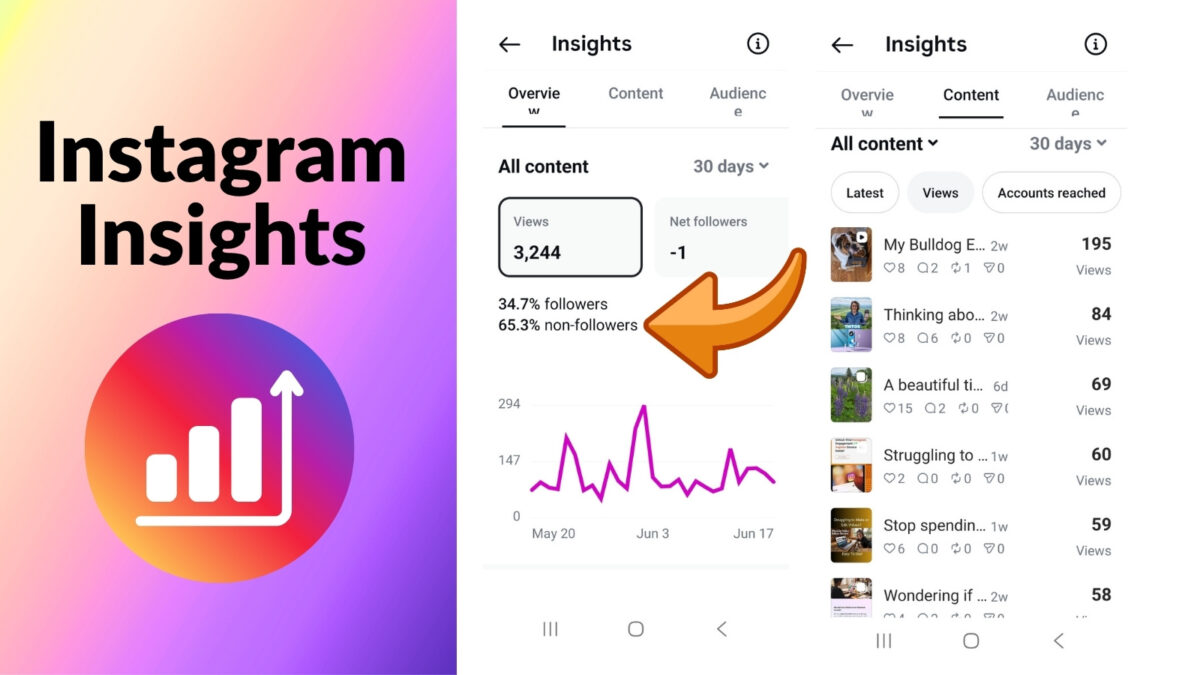
Compare similar topics and formats over time to identify patterns among ranking factors. Don’t judge one post in isolation. Watch behavior, saves, and shares provide algorithmic signals about usefulness, but they don’t guarantee wider distribution.
High organic reach feels good, but qualified engagement and blog clicks matter more. If a post gets saves but few taps, strengthen the call to action. If a Reel loses viewers early, fix the hook.
👉 A post that attracts the wrong audience is not a win, even when the reach number looks impressive.
Real Example from My Own Account
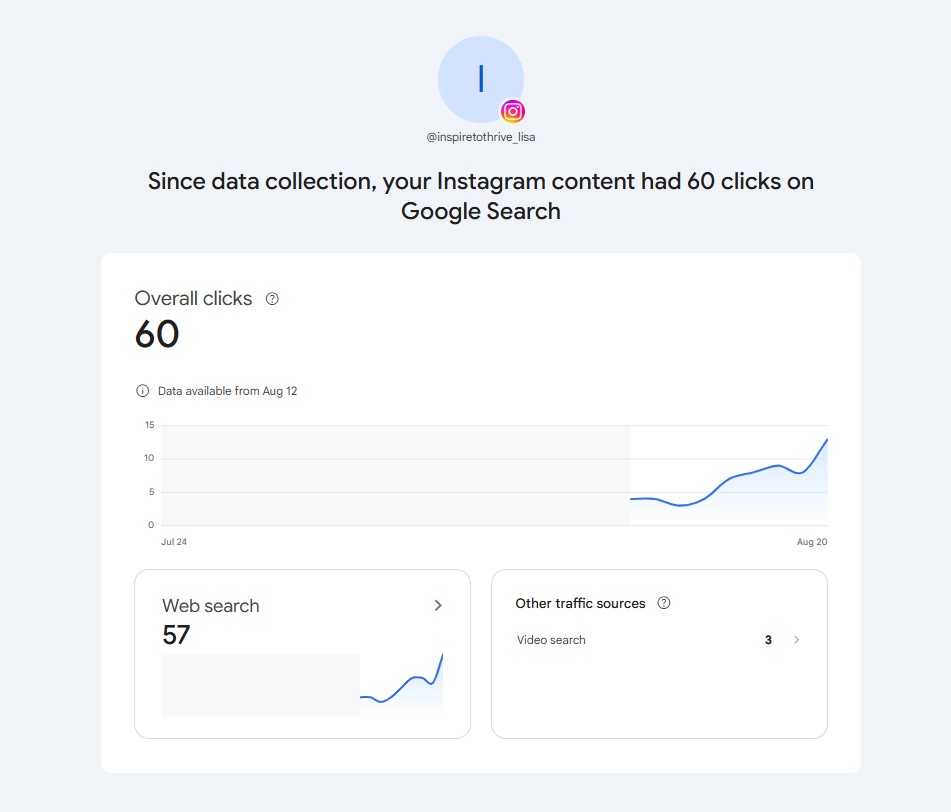
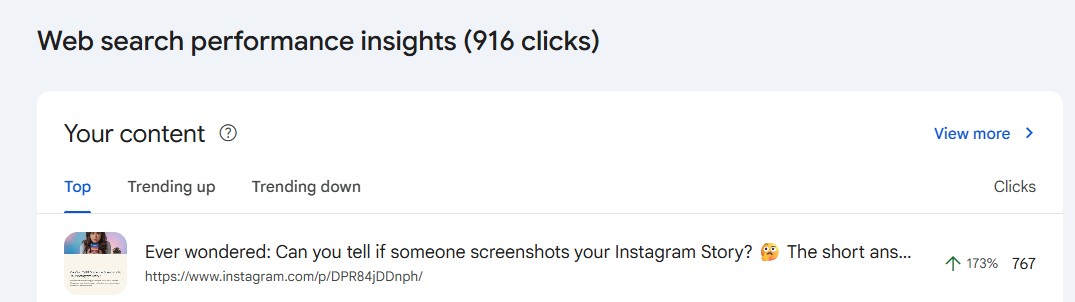
In the last 28 days, Google has sent 57 clicks to my Instagram content from web search. The top-performing posts and Reels are ranking for searches like:
- “Can you see if someone screenshots your Instagram Story?”
- “How do I find my Instagram URL / web address?”
This is Instagram SEO in action: clear topics, keyword-aware captions, and content that answers questions people are already typing into Google.
Why Posts About Instagram Story Screenshots Get Discovered
One of the top-performing posts on my Instagram answers a simple question: “Can you tell if someone screenshots your Instagram Story?”
It works because people are actively searching for that answer. As of 2026, Instagram still does not notify you when someone takes a screenshot of a Story. You can see who viewed it, but there’s no way to know who took a screenshot. That clear, direct answer matches what people are looking for in search.
Posts that answer a specific question people are already asking tend to get more visibility, both on Instagram and in Google.
Common Instagram SEO Mistakes That Limit Reach
Vague bios, keyword stuffing, copied captions, unrelated hashtags, and poor visuals make discovery harder.
Unrelated hashtags, vague profiles, and weak destination pages can undermine relevance and user response, so don’t treat ranking factors as guarantees. Ignoring comments or posting for “everyone” instead of one clear audience creates the same problem.
Don’t forget the destination page. Content optimization means making the landing page fulfill the promise made by your Instagram post. It should load quickly on a phone, be easy to scan, and match that promise, especially for e-commerce brands linking to product pages.
These Instagram search optimization basics can help you review whether the page is useful and technically sound for visitors from Google search results.
5 Instagram SEO Fixes You Can Do Today
- Update your bio so it clearly says who you help and what you offer.
- Add relevant keywords to your next caption (naturally, not stuffed).
- Use 3–5 focused hashtags instead of a long generic list.
- Add descriptive alt text to your latest post or Reel.
- Check Instagram search suggestions for one of your topics and note the phrases people use.
Frequently Asked Questions
It can improve discovery, profile visits, and website taps. Traffic still depends on your offer, call to action, trust, and how well the linked blog page answers the visitor’s question.
There isn’t one permanent number that works for every account, but no more than 5. Use a focused set that adds context, then test combinations and monitor reach and engagement.
Use both when they help people understand the topic. Captions should provide the main context, while on-screen text should stay easy to read. Add captions to videos when possible.
Some posts can gain visibility quickly. More often than not, it takes several weeks of consistent posting and testing for your profile and topic focus to become clearer.
Yes. E-commerce brands can adapt it to product education, buying questions, comparisons, and helpful customer content without making every post promotional.
Put One Instagram SEO Improvement to Work
Start with one audience question this week. Update your profile or optimize your next post around the words people use when searching for that answer.
Useful content, clear language, accessibility, and consistency strengthen social media SEO more than keyword stuffing. Check Instagram Insights after publishing, then use what you learn to make the next post stronger.
This audience-first process can support bloggers, service providers, and e-commerce brands alike.
Have you optimized your Instagram account for SEO? I’d love to hear about it in the comments below. 👇
Disclosure: This Inspire To Thrive blog post contains affiliate links. I may earn a commission from qualifying purchases at no extra cost to you. Some sections were drafted with AI tools and carefully reviewed/edited by me.

- Best Instagram Story Viewers in 2026: Free Tools + Honest Limits - October 22, 2026
- Which Instagram Monitoring App Wins? EyeZy vs Peekviewer - October 20, 2026
- How to Use Social Media for the Best Black Friday Deals of 2026 - October 19, 2026
Enjoy this content? Help me show up more often in Google by adding Inspire To Thrive as a Preferred Source:



All the tips above rock, Lisa. Easy to understand content backed by highly targeted hashtags worked a bit for me in the past. Good to see I am still on the right track. IG is for users who want simple, clear text – not too much either – backed with a crisp photo. We need both to SEO optimize properly on the platform.
Hi Ryan, yes, and be sure to use alt text for images; that’s one that is often overlooked, even by me at times, and then I go back and edit to include them. Thanks for coming by on this one, and have a great day!