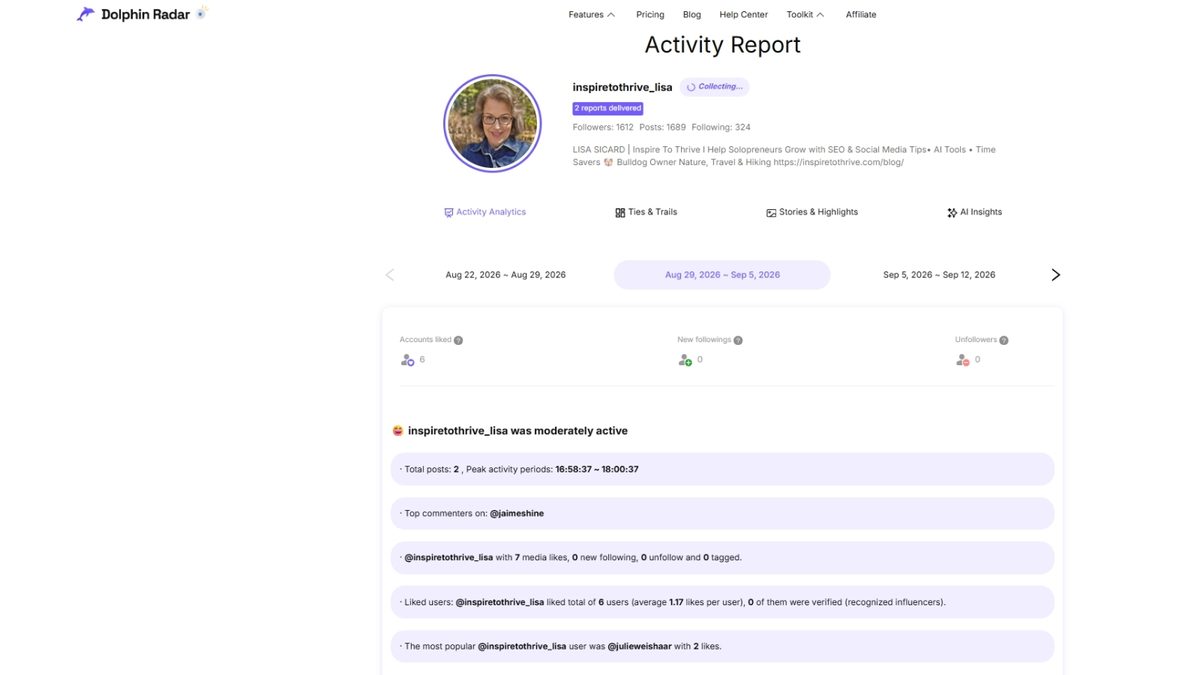
I ran Dolphin Radar on a public Instagram account for two weeks in August 2026. The first useful report took about a week. I got new followers, unfollowers, and like activity. I did not get DMs, private accounts, or a list of who viewed the profile.
That last part matters. Dolphin Radar is a weekly public-data tracker. It is not a “who viewed my Instagram” app. If that is what you want, it cannot do it. I wrote that up separately: see who views your Instagram profile.
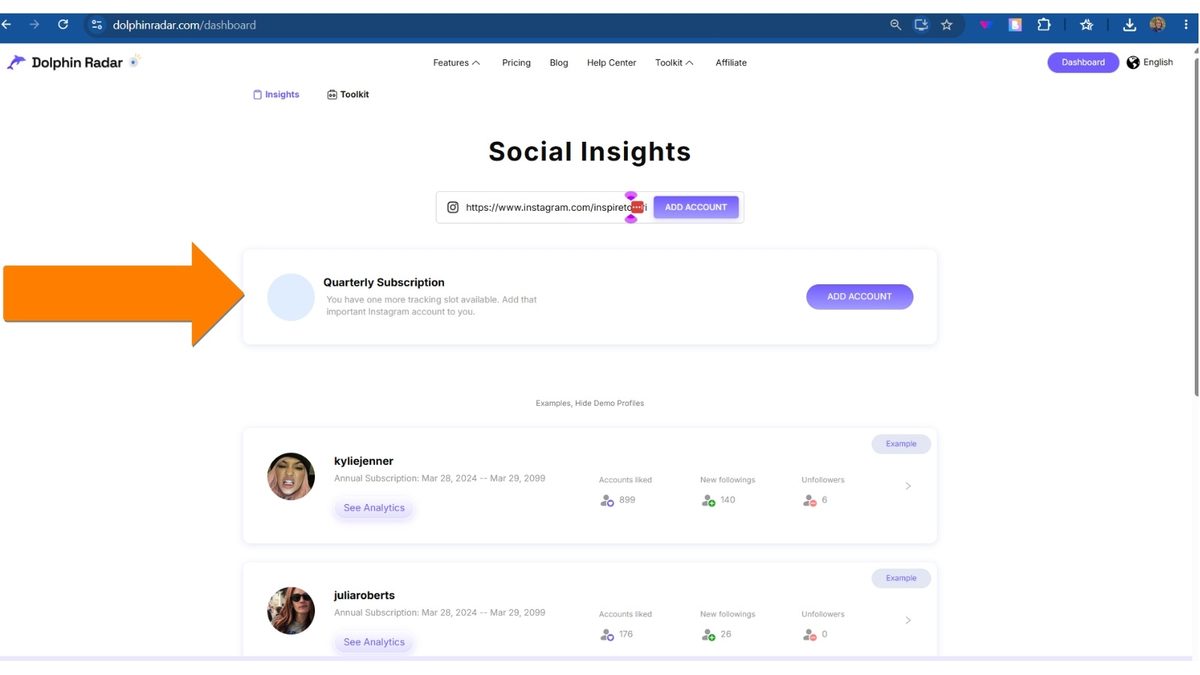
The annual plan was $32.99 for one username. Screenshots of the first report and the dashboard are below.
Estimated reading time: 11 minutes
Table of Contents
Key Takeaways
- I tested Dolphin Radar for two weeks in August 2026 on a public Instagram account.
- The first useful report took about a week. It showed new followers, unfollowers, and likes. It did not show DMs, private accounts, or who viewed the profile.
- The annual plan was $32.99 for one username. No free plan.
- Updates are weekly, not live. It never asked for my Instagram password.
- Treat any tracker that wants your login as a no. Skip it if you want visitor names or a story spy tool. Use it if you want a cheap weekly snapshot of one public handle.
Is Dolphin Radar safe and legit?
From the two weeks I used it, it never asked for my Instagram password. It only needed a public username. That is the baseline I use for any tracker. If a tool wants your login, skip it.
What I treat as legit here:
- Public profiles only
- No password
- Weekly reports, not live stalking
- One paid username per plan
What I would not trust, from this tool or any other:
- Claims it can open private accounts
- Claims it shows who viewed your profile
- Claims it reads DMs
Instagram does not give that data to third-party sites. Dolphin Radar did not show it in my test either.
Anonymous story viewing: Dolphin Radar markets story-related features. In my run, I focused on follows, unfollows, and likes. I did not get a reliable “watch any private story with no trace” result. If a site promises that as the main hook, treat it as a different product and a higher risk. See the plan I used.
What Dolphin Radar did — and did not — do in my test
Did:
- New followers and unfollowers on a public account.
- Like activity.
- A weekly snapshot after about seven days.
- A usable dashboard without an Instagram login.
Did not:
- Private accounts.
- Who viewed the profile.
- DMs.
- Real-time alerts (weekly only).
- More than one username on the plan I bought.
Dolphin Radar Overview
What it tracks: Dolphin Radar monitors public Instagram accounts and shows you:
- New followers.
- Unfollowers.
- Accounts the person has liked.
- Follow/following activity over time.
Reports update weekly, so the longer you track an account, the more useful the data becomes.
Pricing: (as of 2026)
- Monthly: about $4.49.
- Quarterly: about $10.99 (roughly $3.66/month).
- Annual: about $32.99/year (roughly $2.75/month).
Each subscription covers one Instagram account. There is no free plan — you pay to start tracking.
Who it’s best for: Instagram users who want ongoing insights into a specific public account (competitor, influencer, or someone they’re curious about) and don’t need real-time updates. It’s especially useful if you like seeing like activity and longer-term patterns rather than just a one-time follower check.
Quick pros & cons from my experience: Pros
- Clean dashboard.
- Tracks likes (something many free tools skip).
- Affordable on the annual plan.
- No need to log into Instagram.
Cons
- Weekly updates only (not real-time).
- One account per subscription.
- Takes about a week to collect meaningful data, and you may need to upgrade the plan to get everything.
What An Instagram Follower Tracker Should Actually Tell You
A tracker is useful when it can answer simple questions using clear Instagram Analytics signals.
You want to know what changed, when it changed, and what you posted around that time. That’s how you stop guessing.
The best insights are outcome-based:
- Are you attracting the right people with Audience Insights, or random accounts?
- Are certain posts causing steady follows or quick unfollows?
- Are you building real two-way connections with a solid Engagement Rate, or just collecting numbers?
This tool is built around this kind of Instagram Analytics clarity, including Audience Demographics, so you can check changes in minutes and get back to creating.
The updates that matter most: new followers, unfollowers, and mutuals
Recently followed are accounts that started following you since your last check. Unfollowers are accounts that stopped. Mutuals are people you follow who also follow you back.
Why it matters: If you notice a cluster of Unfollowers after a hard-sell promo, you can soften your next posts with a helpful tip carousel. If Mutual Followers grow after you reply to Stories, you’ve got a clear outreach signal to repeat.
Quality checks: spotting suspicious or low-value accounts fast
Not every follow is a win. Quick quality checks with Bot Detection help you keep your read on growth clean. Watch for patterns like Fake Followers and Ghost Followers: accounts with no profile photo, odd strings in usernames, empty feeds, or bios packed with spammy text.
➡️ The point isn’t to chase vanity numbers. It’s to understand whether your content is pulling in real people who might read, reply, and buy later.
How a Dolphin Radar Tracker Works
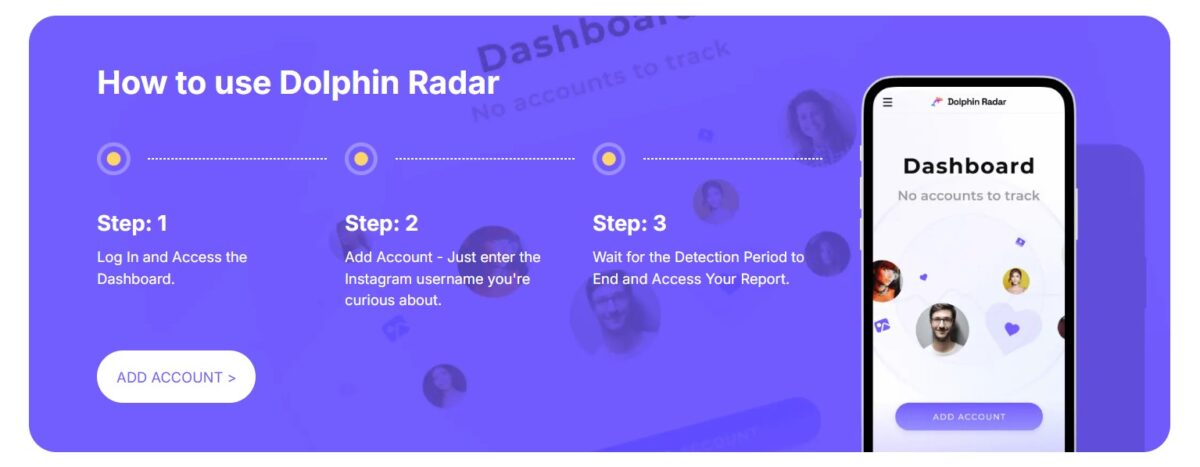
Manual tracking is slow. You scroll, forget what you saw last week, and guess. Dolphin Radar replaces that with a weekly snapshot: who’s new, who left, and like activity, in order. It is not live. The first useful report takes about a week.
A simple weekly routine you can stick with (with an Instagram follower tracker)
Pick one day and keep it light:
- Check new followers and unfollowers.
- Note the biggest change day.
- Write down what you posted that day (Reel, carousel, Stories) and review post performance plus story engagement.
- Scan for suspicious accounts, then ignore the noise.
- Choose one small test for next week.
Turn follower changes into smarter content choices
Once you spot spikes, dips, and lost followers, you can make cleaner calls. If Reels bring in new followers but they don’t stick around, tighten your bio and pin a “start here” post.
Or if carousels lead to steady mutuals through profile interactions, post more how-to slides, and end with a question. If Stories drive replies but not follows, add a simple follow prompt after your best tip.
Use Tracking Data Without Hurting Trust or Your Account
Use follower data like a weather report, not a scoreboard. Look for trends over weeks, not single moments, using API-compliant tools that respect the platform’s Terms of Service.
Don’t call people out for unfollowing, and don’t share private info about individual accounts.
Privacy and permission basics you should follow
Keep it respectful: avoid posting screenshots of follower lists, don’t harass unfollowers, and skip shady automation that follows and unfollows for you. Track Public Profiles ethically while always respecting Private Accounts under privacy rules.
Common mistakes that waste time (and what to do instead)
- Check hourly; check weekly on the same day and time; or shift to competitor analysis.
- Obsessing over one unfollow: Track the weekly net change.
- Buying followers: Improve your content hook and bio instead.
- Changing your niche every week: Test one variable at a time.
Dolphin Radar Tracker vs Other Tools
Not every “Instagram follower tracker” solves the same problem. Some are built for one-off checks, some for ongoing monitoring, and some lean hard into AI analysis. Here’s a clear side-by-side so you can pick the right tool for your situation.
| Feature | Dolphin Radar | IGDetective | Lurk | Free Browser Extensions |
|---|---|---|---|---|
| Best for | Weekly reports + AI insights | Real-time checks + AI chat | Fast alerts + multiple accounts | Quick free snapshots |
| Pricing | $4.49/mo or $32.99/yr | Free tier + ~$30/mo | $1 first week, then $19/wk or $79.99/yr | Free |
| Refresh speed | Weekly | On-demand + daily | Hourly + push alerts | Manual only |
| Anonymity | No login needed | Fully anonymous | Fully anonymous | Local in browser |
| Key features | Follows, likes, stories, AI insights | Chronological follows, Gossip Chat | Real-time alerts, story viewer | Snapshot compare |
| Platforms | Web | Web | Web + iOS + Android | Chrome |
| Main limitation | 1 account per plan | Free tier is limited | Can get expensive weekly | No automatic updates |
| Try it | Try The Plan I Used at Dolphin Radar | — | — | — |
Why Use a Dolphin Radar Tracker
- Want the deepest AI insights and don’t mind waiting a week? → Dolphin Radar is the strongest choice. It’s especially useful if you’re doing competitor research or want inspire on top of the follow data.
- Need to check changes often and talk to an AI about what you’re seeing? → IGDetective. The combination of on-demand refresh, daily auto-updates, and Gossip Chat makes it convenient for ongoing personal monitoring of a few accounts.
- Want fast alerts on multiple accounts and don’t want to log in anywhere? → Lurk. It’s the only option that combines real-time-ish push notifications, unlimited public accounts, and full cross-platform support (phone + web) without asking for Instagram credentials.
- Just need a free, occasional check, and you’re fine doing the work yourself? → A solid browser extension (Follower Watch, FollowDiff, or similar). Take a snapshot today, another in a few days, and compare. Zero cost, data stays local, but you’ll have to remember to check.
Important reality check for all of them: None of these tools can access private accounts, DMs, or anything Instagram keeps hidden. They only work with public data. Any service that claims otherwise is either overpromising or risky. Always use them ethically and respect people’s privacy.
Who should skip Dolphin Radar?
- Private accounts. It only reads public data. A locked grid will not show followers, unfollowers, or likes.
- Anyone who wants names of profile visitors. Instagram does not give Dolphin Radar — or any app — a “who viewed this profile” list. That is a different myth: who viewed my Instagram profile.
- Anyone who will not pay for one username. There is no free plan. Each subscription tracks one public account. If you only need a one-off check, a free browser snapshot is enough.
If those three describe you, do not buy it. If you want a weekly public report on new followers, unfollowers, and likes for one handle, it is built for that.
Conclusion: Dolphin Radar To Save Time On Instagram
Dolphin Radar is worth it if you want a cheap weekly report on one public username: follows, unfollows, likes. It is not worth it if you want visitor names, private grids, or live alerts.
I still use it that way. I do not use it as a spy app. For the “who viewed me” question, use the other guide. Reels audio issues or account deletion are separate posts, too.
Set a weekly check-in on your calendar, review the patterns, export reports, and then run one small test on Hashtag Performance the next week. Over time, your follower growth starts to feel less like guesswork and more like a plan.
Frequently Asked Questions
It behaved like a normal public-data tool in my August 2026 test: paid plan, public username, no Instagram password, weekly report. That is legit tracking. It is not a back door into private accounts.
Safer than tools that ask for your password. I would not call any third-party Instagram tracker risk-free. Stick to public data and do not paste anyone’s follower list online.
Yes, on a public account, in the weekly report — not instantly.
No. Instagram does not provide that list to this tool. Details: who viewed your Instagram profile.
No. Good tools (including Dolphin Radar) only need the public username. They never ask for your password.
No. These tools use only publicly available information, so the account receives no notifications.
Yes. Like activity was in my dashboard.
The company advertises story-related features. That was not the part I relied on. I would not buy it only for anonymous story viewing.
No. Legitimate trackers only work on public profiles. Any tool claiming otherwise is a red flag.
It varies: Dolphin Radar sends weekly reports, some tools offer daily or on-demand refreshes, and free browser extensions only update when you manually check.
Disclosure: This Inspire To Thrive blog post contains affiliate links. I may earn a commission from qualifying purchases at no extra cost to you. Some sections were drafted with AI tools and carefully reviewed/edited by me.

- Website Bounce Rate: What It Means in 2026 (and How to Improve It) - October 26, 2026
- Is It Too Late for Holiday SEO? What Still Works in November - October 25, 2026
- Is Benable Legit? My Honest Benable Review & Earnings Proof - October 24, 2026
Enjoy this content? Help me show up more often in Google by adding Inspire To Thrive as a Preferred Source: