
Tired of staring at your screen and wondering how to turn a blog post into a video? With Fliki AI, you can paste your text, pick a voice, and get a ready-to-share video in a few minutes. That means more content for YouTube, Instagram, and your site, without learning complex software.
In this Inspire To Thrive Fliki AI review and tutorial, you’ll learn how to use Fliki step by step, plus smart use cases for your blog or small business.
Estimated reading time: 15 minutes
Table of Contents
Fliki AI Key Takeaways
- Fliki AI turns text and scripts into videos in minutes, so bloggers and small businesses can create more content with less editing work.
- The tool offers AI voiceovers, customizable voices, brand kits, and a large stock media library, allowing you to keep videos on-brand without advanced editing skills.
- Fliki supports over 80 languages and dialects and includes a Video Translator, which you can use to repurpose content for global audiences.
- Users can record the screen and face, auto-remove silences, and generate subtitles, making Fliki useful for tutorials, online courses, and product walkthroughs.
- Fliki has a free plan with no credit card required, plus paid tiers that add longer video duration, more voices, more images, and features such as custom voices and voice cloning.
Understanding AI for Video Creation
Welcome to the world of Fliki AI, where creating videos for your blog is a breeze. It has saved me countless hours weekly creating videos for social media accounts.
Let me show you in this Fliki AI review how artificial intelligence can revolutionize your video editing process. You can take your blog or business to the next level with this Fliki AI!
Automated Video Editing With Fliki AI
Fliki takes the hassle out of video editing by automating tasks such as trimming, adding transitions, and applying effects seamlessly. Imagine the time you’ll save by letting artificial intelligence handle these processes, allowing you to focus on creating engaging content for your audience.
Efficiency meets creativity with Fliki AI, making video editing a smooth, swift experience for bloggers and small business owners at all levels.
You can choose from different-sized videos for YouTube, shorts, Pinterest pins, or Meta reels. You can pick different sound effects, music, and voices, as well as graphics and videos for each clip.
Below is an example from Inspire To Thrive’s Pinterest account. This particular video used the AI video format.
Fliki AI Comparisons to Other Video AI Tools
Fliki AI stands out among video AI generators for its user-friendly interface and wide range of features. Compared with competitors such as Synthesia, FlexClip, HeyGen, Pictory, InVideo, Lumen5, and Magisto, Fliki offers seamless text-to-video conversion and a robust library of stock media.
Unlike Synthesia, Fliki allows more customization without requiring technical know-how. Pictory is known for text summarization, but Fliki excels in comprehensive script-to-video capabilities.
InVideo has a strong template library, yet Fliki’s design flexibility gives it an edge. Lumen5 and Magisto focus on automation, but Fliki balances automation with creative control.
I also tried HeyGen, but the cost was almost double, and now I can do the same thing with Fliki, which lets me clone my voice and choose from more options in 2026.
This blend of innovation and accessibility makes Fliki a great choice for creators seeking efficiency and creativity in video creation at a reasonable cost.
New Text to Video Features
Creating tutorials has never been easier. Forget about juggling different apps and complicated workflows—our new Record & Edit feature brings everything together in one place. Here’s what’s included:
- Record & Edit includes: screen recording, face recording, silence removal, and automatic subtitles.”
- Smart AI Editing: Automatically remove silences, sync your own visuals, and improve audio quality, making your tutorials look professional with minimal effort.
- Automatic Transcriptions and Subtitles: AI-generated transcriptions and subtitles are created in seconds, making your videos more engaging and accessible.
Whether you’re working on how-to guides, online courses, or product walkthroughs, Record & Edit helps you produce high-quality tutorials faster than ever.
Customization and Personalization
With this Fliki video generator, customization knows no bounds. Bloggers and small business owners like you can tailor your videos with unique branding elements, captivating text overlays, and even audio enhancements.
This level of personalization not only adds a professional touch to your videos but also helps in maintaining a distinctive identity for your blog or business.
Stand out from the crowd by effortlessly infusing your personal style into every video, without being in front of the camera. (However, I recommend you do get in front of the camera from time to time.)
Let your creativity flow and explore the endless possibilities that this tool offers to enhance your video creation process. Elevate your blog content with the power of automation and customization, all at your fingertips.
How Many Languages and Dialects Does Fliki Support?
You can now make your videos speak to a global audience with Fliki AI’s multi-language dialect feature. It’s a timesaver for anyone looking to reach a wide range of viewers without the hassle of manual translations.
Ready to expand your audience like never before? The Video Translator feature transforms your text into high-quality videos in over 80 languages.
With AI-driven voices, Fliki ensures your content isn’t just another upload—it’s an experience. Tap into your creativity with our vast media library and craft videos that connect across continents.
Upload your video, select the language and dialect you need, and Fliki AI takes care of the rest. It’s quick and accurate, letting you break language barriers effortlessly.
Now, you can connect with people from different regions and cultures, expanding your reach like never before. Don’t let language be a barrier; let Fliki AI help you communicate with the world.
Customize AI Voices
Fliki lets you customize AI voices to fit your needs. You can tweak tones, accents, and styles to match your brand or project. You can pick from many different male or female voices.
▶️ Now in 2026, you can clone your own voice on the app!
Whether you need a formal voice for a business presentation or a friendly tone for customer support, Fliki AI has you covered. No need to stick with generic voices; make them unique to stand out.
This tool is handy for content creators, businesses, or anyone looking to add a personal touch to their audio content. Save time and effort while ensuring your voiceovers sound just right.
Fliki AI’s Stock Media Library
Fliki’s stock media library is a treasure trove for content creators. It offers a vast collection of high-quality images, videos, and audio clips. Everything is organized and easy to search.
The platform integrates smoothly with your projects, letting you find and use the perfect media in minutes. Whether you’re crafting a social media post or a detailed presentation, Fliki AI ensures you have top-notch assets at your fingertips.
This library can save you time and elevate your work, making it look polished and professional.
Benefits of Using Fliki AI for Blog Video Creation
Bloggers are constantly seeking innovative ways to capture their audience’s attention and drive engagement. One groundbreaking solution revolutionizing the world of blog video creation is Fliki AI.
Let’s review the numerous benefits that this offers bloggers looking to streamline their video production process.
Time Efficiency
Fliki serves as a time-saver for bloggers by significantly reducing the time spent on video production. With its cutting-edge technology and seamless interface, bloggers can now create high-quality videos in a fraction of the time it would traditionally take.
By leveraging its power, bloggers can embark on a quest to enhance their content strategy and effortlessly produce captivating videos, all while saving precious time to focus on other crucial aspects of their blogs.
A few days ago, I made a week’s worth of Pinterest video pins with Fliki in 30 minutes. It was easy to go from text to video in minutes.
Professional-Looking Videos
One of the pivotal advantages of incorporating AI into blog video creation is the ability to craft professional-looking videos with ease.
Fliki AI’s advanced features and intuitive tools empower bloggers to produce polished and visually appealing content that resonates with their audience.
By leveraging its capabilities, bloggers can unleash their creativity and transform their video content into a captivating visual experience that keeps viewers thrilled and coming back for more.
Increased Content Output
Not only does the tool enhance the quality of blog videos, but it also boosts the frequency of video uploads, leading to increased viewer engagement.
By leveraging this innovative technology, bloggers can streamline their video production process and scale up their content output.
This increased content frequency creates a burstiness that attracts more viewers, maximizes reach, and establishes bloggers as influential voices in their niche.
With Fliki AI, you can unlock the full potential of your video content strategy and propel your blog to new heights of success.
Benefits of Fliki AI for Business Videos
Fliki AI offers a bunch of benefits for business videos. First, it speeds up content creation by automating the editing process. You save time and can focus on your message.
It’s affordable, too, cutting costs while still delivering high-quality results. With easy-to-use tools, even less tech-savvy team members can jump in and create compelling videos.
Plus, Fliki AI supports 80+ languages, opening doors to global audiences. Want to keep your brand consistent? Fliki AI helps you stick to your brand style effortlessly with their brand kits.
With a brand kit, you can define your brand’s fonts, colors, watermark, and other brand details, which are automatically applied to your videos each time you produce a new one.
Does your current video process feel outdated or slow? Give Fliki a try for FREE and see the difference.
Case Studies and Testimonials
When it comes to exploring the real impact of Fliki AI on video creation, nothing speaks louder than the success stories from bloggers and businesses that have integrated this innovative tool into their workflows.
Let’s look into a few captivating case studies and testimonials that illuminate the transformative power of Fliki in video production.
Blogging with Fliki AI: A Showcase of Efficiency
Imagine a lifestyle blogger who frequently shares fashion and beauty tips through engaging videos. Before discovering this video creation tool, this blogger spent hours editing and refining each video, delaying content delivery and reducing overall productivity.
However, once Fliki AI entered the scene, video creation became a breeze. By leveraging its automated features and intuitive interface, our lifestyle blogger created a week’s worth of Pinterest pins in 30 minutes.
Therefore, saving valuable time that could be redirected towards crafting more compelling content for their audience.
Business Success with Fliki AI: Enhancing Brand Visibility
For a small e-commerce business looking to enhance its online presence through captivating product videos, it proved to be a game-changer.
By tapping into Fliki’s AI-powered capabilities, the business was able to create professional-quality videos efficiently and affordably.
This not only elevated the visual appeal of their products but also boosted customer engagement and conversion rates.
Testimonials from satisfied customers highlighted the seamless integration of the tool into the business’s marketing strategy, emphasizing how it catalyzed growth and success in a competitive digital landscape.
Testimonials: Voices of Approval and Appreciation
“I never knew video creation could be this effortless and effective until I started using Fliki AI. It’s like having a professional editor at my fingertips!” – Sarah, Lifestyle Blogger.
“Fliki AI has been a game-changer for our business. Our video content has never looked better, and our customers love the immersive experience it provides.” – Mark, Small Business Owner.
“I have been using Fliki for a few weeks now, and I highly recommend this platform to anyone looking for a nice and solid TTS solution. The user interface is very simple and easy to understand, and the quality of some of the AI voices is just amazing. This easily becomes my number one go-to TTS platform (and I’ve used a bunch of other TTS apps before). Well done, Fliki :-)” Steve Y from Getapp.
The praise for Fliki underscores its ability to simplify complex tasks, empower creativity, and deliver tangible results for bloggers and businesses alike.
Drawbacks of AI For Video Creation
AI for video creation has its drawbacks.
- One major issue is the lack of personal touch in the content. AI-generated videos may come across as robotic and impersonal, lacking the human element that viewers often connect with.
- The quality of AI-created videos can vary, leading to inconsistencies in the final product. Another downside is the potential for errors in interpreting context or tone, which could result in inappropriate or nonsensical content.
- Reliance on AI for video creation may reduce creativity and originality, as the technology is constrained by pre-existing algorithms and datasets.
Getting Started with Fliki AI
Fliki AI offers you a convenient solution for creating engaging videos for your blog content.
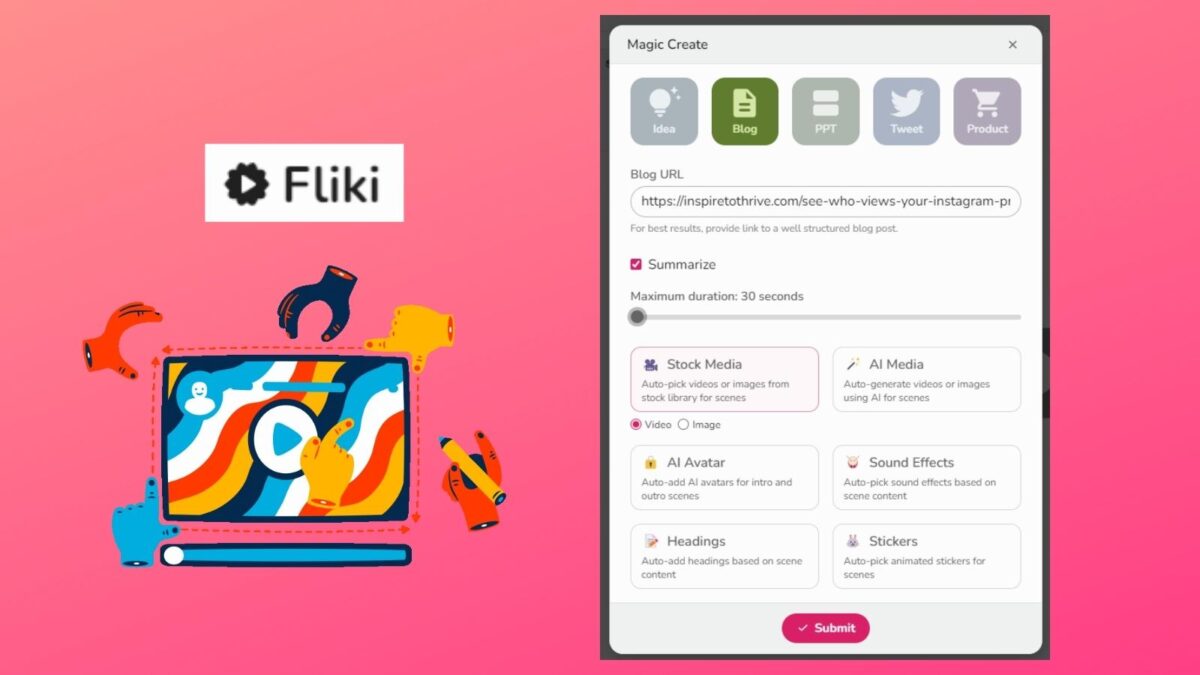
To get started with integrating Fliki AI into your video creation process, follow these steps: (You can sign up for FREE to try it!)
Setting Up Your Fliki AI Account
- Sign Up: Begin by signing up for a Fliki AI account on their website.
- Choose a Plan: Select a plan that suits your video creation needs.
- Navigate the Dashboard: Familiarize yourself with the dashboard layout and functionalities.
Creating Your First Video
- Select a Template: Choose a video template that aligns with your blog content.
- Customize Content: Add your blog or business text, images, and other elements to personalize the video.
- Experiment with Features: Explore the editing features and effects to enhance your text-to-video.
Optimizing Your Video Creation Process: Text to Video
- Bulk Video Creation: Utilize Fliki AI’s batch processing feature to create multiple videos simultaneously.
- Utilize AI Suggestions: Benefit from AI-generated recommendations for improving video engagement. You can also edit images and videos for each section.
- Collaborate with Team Members: Invite collaborators to streamline the video creation process.
Troubleshooting Common Issues
- Technical Support: Reach out to Fliki AI’s customer support for assistance with any technical issues. They do get back to you quickly, as I’ve found out.
- Check FAQs: Refer to the frequently asked questions section on the Fliki AI website for quick solutions.
Maximizing Benefits of Fliki AI
- Regular Updates: Stay up to date on new features and enhancements from Fliki AI. There have been many in the past few months.
- Monitor Performance: Track the performance of your Fliki AI-created videos to refine your strategy.
- Share Feedback: Provide feedback to Fliki AI to help improve the platform.
By following these steps and leveraging Fliki AI’s capabilities, you can streamline your video creation process and effortlessly enhance the visual appeal of your blog content.
Fliki Pricing
You can start for FREE to try this AI tool for creating text-to-video. I began that way until I started making more video content and needed the extra credits.
It’s not expensive to go pro either, as I have here with Inspire To Thrive. Note too that you do NOT need to input a credit card to try it for FREE, I love that.
The prices below reflect the yearly plan, which are 25% off the monthly pricing structure.
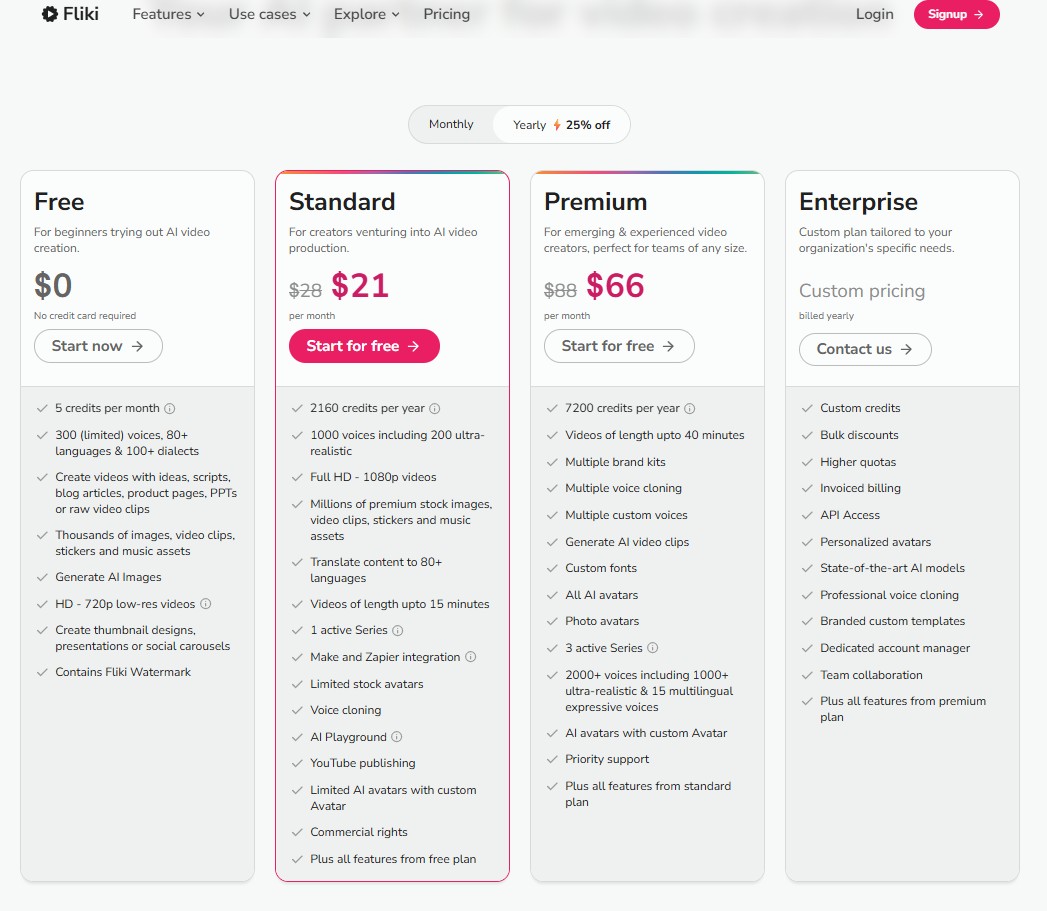
With the standard plan, you will receive more time and an additional 700 voices to choose from. Your videos can be up to 15 minutes. If that is not long enough, you can choose premium for up to 30 minutes of video time.
Another advantage of going with standard or premium is the number of images you can choose from for your video creation. I highly recommend you go at least with the standard plan for $28 per month.
With a paid plan, you will get custom voices and voice cloning for your video creation.
Conclusion: Fliki AI Review
This Fliki AI review for your blog’s video content creation can be a game-changer in saving you valuable time and effort. With their user-friendly interface and advanced video editing capabilities, you can quickly generate engaging videos that enhance your blog posts or promote your business.
Take a leap today and experience its seamless integration into your blogging workflow. I love using it to create video pins for Pinterest, YouTube, X, LinkedIn, and Instagram reels.
What did you think of this Fliki AI review? Have you tried it yet for your blog or business? I use it daily for all my social channels and for my Inspire To Thrive clients.
Frequently Asked Questions About Fliki AI Video Creation
Fliki AI is an AI-powered video creation tool that turns text into video. It is ideal for bloggers, small business owners, and marketers who want to repurpose blog posts, social content, or scripts into videos without spending hours on editing. Users can create videos for blogs, YouTube, Pinterest, X, LinkedIn, and Instagram reels.
You paste in your text, choose a template, and select visuals and a voice. Fliki AI then matches your script with stock media, adds captions or text overlays, and generates AI voiceovers. You can edit each clip, change images or videos, and adjust timing so the final video matches your style and message.
Fliki AI combines text-to-video, AI voiceovers, stock media, and robust customization into a single tool. Compared to tools like HeyGen, Synthesia, Pictory, InVideo, Lumen5, and Magisto, it offers more control over the look and feel without requiring technical skills. Users get brand kits, flexible design options, a large media library, and support for 80+ languages, which helps it stand out from more template-only or automation-heavy tools.
Yes, Fliki AI supports over 80 languages and dialects through its Video Translator feature. You can upload or create a video, pick a language and dialect, and Fliki generates an AI voiceover that matches your choice. You can also customize voices with different tones, accents, and styles, and pick from many male and female options.
Yes, Fliki AI is designed for non-editors. The interface is simple, the templates guide you through each step, and the AI handles tasks such as trimming, transitions, audio enhancements, and subtitles. You can still fine-tune clips, swap media, and adjust voice settings, but you do not need prior video editing knowledge to publish a professional-looking video.
Fliki AI offers a free plan that lets you test text-to-video without adding a credit card. Paid plans, such as Standard and Premium, add more monthly video time, more voices, longer video limits, and a larger image pool. On an annual plan, the Standard plan is around $21 per month and supports videos up to 15 minutes, while higher tiers allow longer videos and advanced voice features such as custom voices and voice cloning.
Yes, Fliki AI provides tutorials and customer support to help you get the most out of the tool.
Disclosure: This Inspire To Thrive blog post contains affiliate links. I may earn a commission from qualifying purchases at no extra cost to you. Some sections were drafted with AI tools and carefully reviewed/edited by me.

- Best Social Media Automation Tools: Agorapulse vs Buffer (2026) - September 20, 2026
- Why Making A Personal Connection Is Marketing Gold Dust - September 19, 2026
- What Is My Instagram URL? How to Find and Copy Your Profile Link - September 19, 2026
Enjoy this content? Help me show up more often in Google by adding Inspire To Thrive as a Preferred Source:



I appreciate the detailed explanation of how Fliki AI works. The step-by-step guide was particularly helpful for someone like me who is not very tech-savvy.
Thanks Kelly and I’m glad you found it helpful. It’s a great and easy tool to use. Welcome to Inspire To Thrive and have a great day.