
I have two profiles in the same industry, but they couldn’t be more different. One has about 28,000 followers, and the other has about 2,000. I almost wanted to unfollow everyone to save time.
I preferred cleaning them up manually rather than taking aggressive mass action. The biggest difference is the promise each profile makes. When my personal profile became more focused on personal topics rather than sharing every blog link, the growth graph turned around. A focused account is easier for people to understand and follow.
Table of Contents
Key Takeaways
- Give each X account a clear purpose, so people know what to expect when they follow.
- Review followers and following manually instead of using aggressive mass-unfollow tools.
- Use X analytics to monitor audience changes, active times, top content, and video performance.
- Look for irrelevant, inactive, or suspicious accounts, but avoid removing people based on a single signal.
- Review your pinned post at least once a month so it still represents your account today.
Two X Accounts, Two Different Purposes
My personal account can still talk about social media. But it isn’t all about my blog anymore. I keep blog links and business-related information more on my Inspire To Thrive X account.
The personal account is more personal. That change made my X experience easier to understand and manage. It also clarified what people could expect when they followed it.
I’ve been on X since 2009, so I had a lot of old followers to sort through. I didn’t want to unfollow everyone and start with a clean slate, even though I thought about it. I’m doing it little by little instead.
I already walked through the exact X steps in “How to Remove Followers on X,” so this post focuses on how I decided whom to remove and what I pinned afterward.
Checking X Analytics During the Cleanup
On both accounts, I checked the analytics after reviewing inactive accounts and getting more focused. Most metrics were up on the business account, though reposts had not increased in the same way.
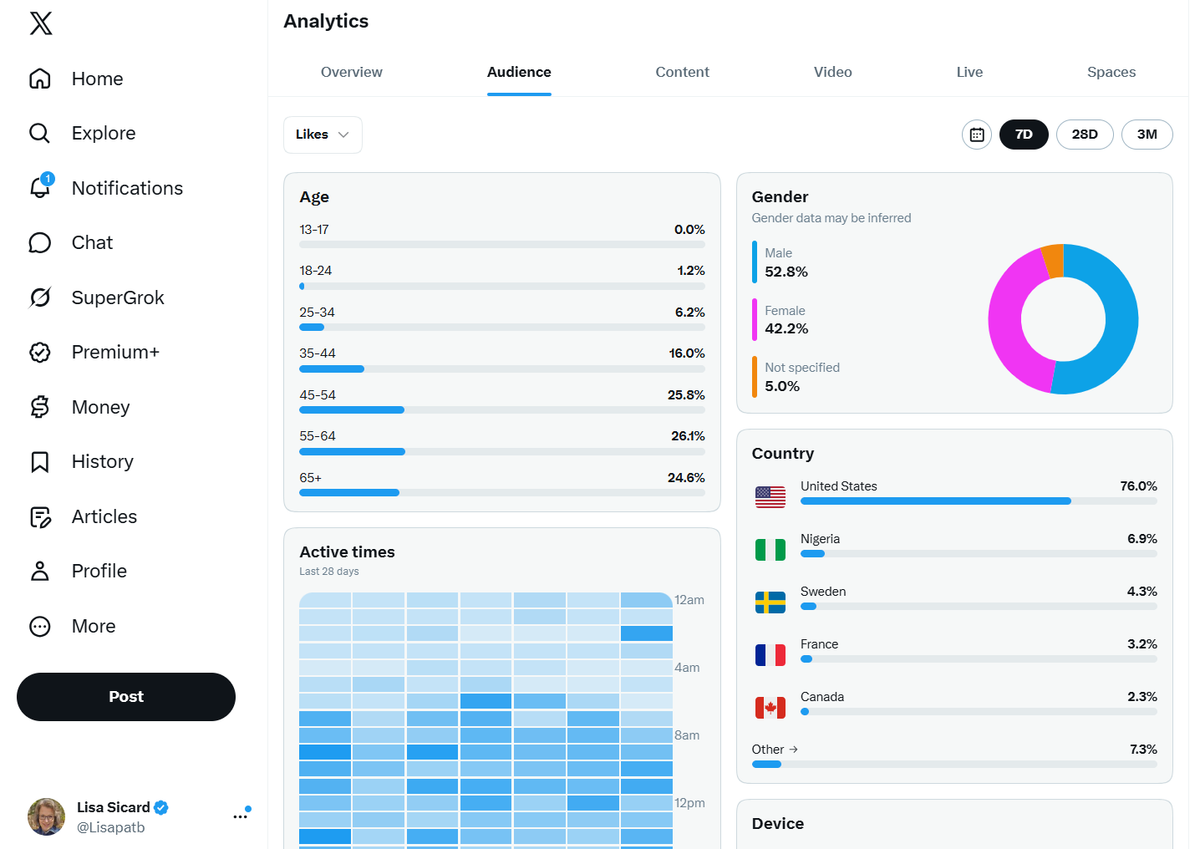
I also looked at the audience details. The audience was getting older; more people were from the United States; and females were catching up to males on one count. I don’t judge an account by a single demographic shift. If a country suddenly jumps up, I may look at some of those followers to see whether they are real accounts.
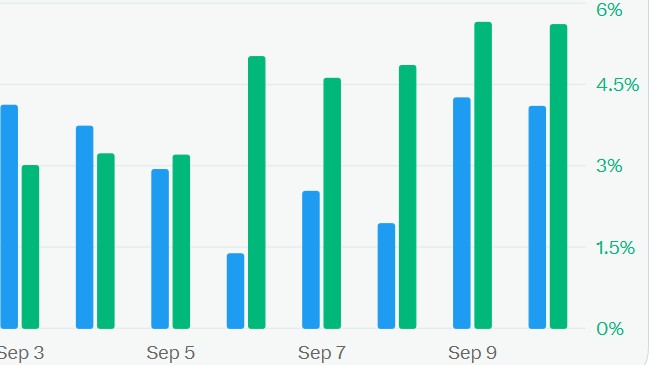
What I Check in Analytics vs. Unfollow Everyone
The analytics section gives me a few things to look at:
- Who makes up the audience, including age, location, and gender.
- When followers are active, because those times can change.
- Which content has done best.
- Whether videos are getting more attention than other posts.
On my larger account, video was doing well. Stella, my dog and the Inspire To Thrive mascot, performs well everywhere. I haven’t posted much video lately, and I haven’t gone live or started Spaces in a while. I’ve joined Spaces, but I haven’t started them on that account yet.
How I Review Followers and Following
I start in the follower list, not a verified-accounts view. Then I review accounts one at a time.
If someone is in a completely different niche and doesn’t fit what I’m talking about, I may remove them. I don’t automatically remove every account I’m unsure about. Sometimes it’s better to leave it for now and come back later.
The cleanup is manual:
- Open the follower list and look at the account.
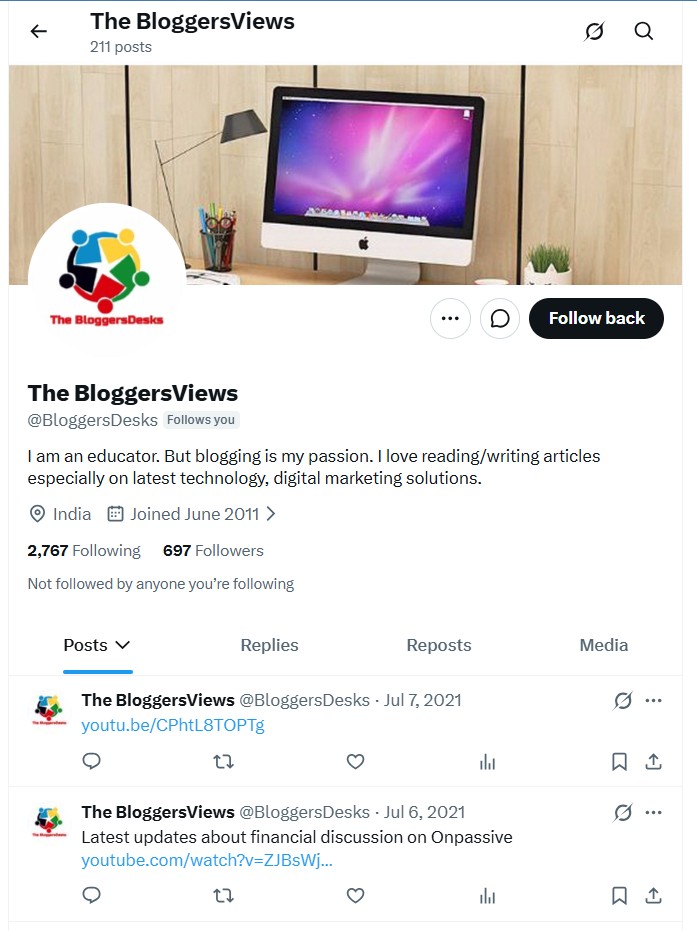
- Check the profile, recent posts, replies, and whether the niche makes sense.
- Look for signs of inactive accounts, old activity, missing profile details, or suspicious behavior.
- Select “Remove follower” when the account is clearly irrelevant or suspicious.
For accounts I follow, X documents how to unfollow directly from the X following list in its help for common following issues. I prefer reviewing the X following list one account at a time. I’m deliberately avoiding a mass unfollow on X or trying to bulk unfollow X accounts all at once. I try to spend no more than about an hour a day when I can.
Respect platform limits and work gradually to avoid getting banned. For account security, I don’t hand my credentials to third-party tools or a Chrome extension that promises to automate the process.
The follower list can be reviewed again later, so there’s no need to rush.
Slow and steady wins the race. I still have a lot of followers and following accounts to review.
What I Look for Before Removing an Account
These are not automatic removal rules. They’re signals I notice while reviewing a questionable account in my follower list.
A private account with the little lock may not be someone I want to follow. If they don’t want to be public, they may not engage in the same way.
A bio filled with hashtags often looks like an older account on X. Lots of flags can also show that someone I knew through blogging, SEO, or marketing now posts mostly political content. I don’t keep an irrelevant account just because they follow you back.
Long strings of letters or numbers in a username are another thing I watch for. Sometimes those accounts have only a couple of followers, no real profile photo, or a name that seems to be trying to copy a well-known person. I also protect my privacy and security by not giving login credentials to a Chrome extension just to speed up the review.
I also notice unfamiliar followers after commenting on Elon Musk’s posts. Those comments can bring in many accounts you don’t know, so it’s worth reviewing them.
Don’t Leave an Old Pinned Post Up Forever
As I went through accounts, I saw people with a pinned post from 2012, but their next post was from only a couple of hours ago. That pinned post is one of the first things a visitor sees, so it should still make sense for the account today.
I try to change mine weekly. It doesn’t have to be changed every day or every week, but I would update it at least once a month.
Check your pinned post at least once a month.
For the business account, I may pin a blog post with information in between. On my personal account, the pinned post can stay more personal. If you need the steps, see how to pin a post on X.
Frequently Asked Questions: Should I Unfollow Everyone and More
No, a complete reset is not necessary for most accounts. Gradually reviewing followers and following accounts can help you keep valuable connections while removing irrelevant ones.
Open the follower list and review accounts one at a time. Check the profile, recent posts, replies, niche, and signs of inactivity or suspicious behavior before selecting “Remove follower.”
It is safer to avoid third-party tools or browser extensions that request your login credentials or promise to automate mass actions. Work gradually, respect platform limits, and review accounts manually instead.
Check your pinned post at least once a month. It should reflect what your account is about today rather than pointing visitors to an outdated post from years ago.
Look at audience details such as age, location, and gender, as well as active times and top-performing content. Video performance can also show whether adding more video may help your account.
Keep Your X Account Focused vs. Unfollowing Everyone
Cleaning an X account isn’t about wiping out everyone overnight. For me, it’s about slowly removing inactive accounts and irrelevant connections, checking what the analytics show, and keeping the profile promise clear.
A busy feed doesn’t always mean a growing account. Focus and steady cleanup help you clean up your feed. A current pinned post can also improve your X experience and make the account feel more like the account you want people to follow.
I’d love to hear about your process and whether you cleaned up your X followers and those you follow on X. 👇
Disclosure: This Inspire To Thrive blog post contains affiliate links. I may earn a commission from qualifying purchases at no extra cost to you. Some sections were drafted with AI tools like the Right Blogger from my YouTube video to blog, and carefully reviewed/edited by me. Learn more about that Right Blogger Tool here.
If you still want a tool, I would recommend Fedica to clean up your X account. I have used it in the past and am an affiliate. It does a lot more now with multiple social media accounts.

- Is It Too Late for Holiday SEO? What Still Works in November - October 25, 2026
- Is Benable Legit? My Honest Benable Review & Earnings Proof - October 24, 2026
- Instagram Privacy Settings: What Others Can and Can’t See - October 24, 2026
Enjoy this content? Help me show up more often in Google by adding Inspire To Thrive as a Preferred Source:




Slow and steady is the way to go Lisa. Smart move.
I mass unfollowed once yet manually over some time. I avoided suspension by operating my account like a human being. Look at handles. When did the individual last publish an update? Does the person engage? Is it even a person? Unfollow if the handle does not pass the smell test. But as you noted, pump the brakes because unfollowing too many accounts too quickly flashes red flags.
Hi Ryan, I do remember you did that! Yes, I had used some tools in the past, but they didn’t look at each account in the same way we do. Not only do I need to pump the brakes for that, but also for my poor wrist and to avoid carpal tunnel. Have a great day, Ryan, and thanks for coming by.