Have you ever opened a YouTube video for one answer, then realized it is more than an hour long? USUM is an AI YouTube summary extension and YouTube video summarizer that helps you find the useful parts without spending all day scrubbing through a video.
It is handy for creators, bloggers, small business owners, and anyone who uses YouTube to keep up with SEO, social media, AI, or marketing, as I do. You can scan a recording for key insights, then watch the sections that matter most and save time.
As an AI assistant, USUM uses artificial intelligence to summarize YouTube videos before you commit to the full recording.

Estimated reading time: 8 minutes
Table of Contents
Key Takeaways
- USUM is an AI YouTube summary extension that helps you scan long videos for key insights before watching the full recording.
- Its chapters, timestamps, transcripts, subtitles, and comment digests make it easier to find relevant sections and understand the surrounding context.
- Custom prompts can guide research, while unexpected topics and viewer comments may reveal new content ideas.
- USUM can support bloggers, marketers, creators, and business owners researching SEO, social media, AI, Reddit, and other fast-changing topics.
- Summaries are a starting point, so important claims should be checked against the original video and other reliable sources.
Stop Wasting Time Searching Long YouTube Videos
YouTube is full of helpful interviews, tutorials, podcasts, and expert discussions. Finding one point inside a long video can take longer than the answer itself.
USUM works as a YouTube video summarizer. Scan key insights to save time before watching the full source. You may see USUM compared with Eightify, but this article focuses on USUM’s workflow.
A video may cover several subjects, but you may only need information about social media trends, Reddit, targeted content, or a new AI tool. Instead of manually searching through an hour of video, USUM helps you find a useful starting point.

👉 A summary is most useful when it helps you decide what deserves your full attention, not when it replaces the original source.
What USUM Shows You on YouTube
USUM on the Chrome Web Store is a Chrome extension that works as a YouTube video summarizer. It uses AI to organize the information inside each video.
Once you open a video, you can review the key insights, video transcripts, subtitles, chapters, and comments. Its transcript generator makes the spoken content easier to scan. You can also use custom prompts to guide your review. Rather than watching everything from start to finish, you can see what is being discussed before investing the time.
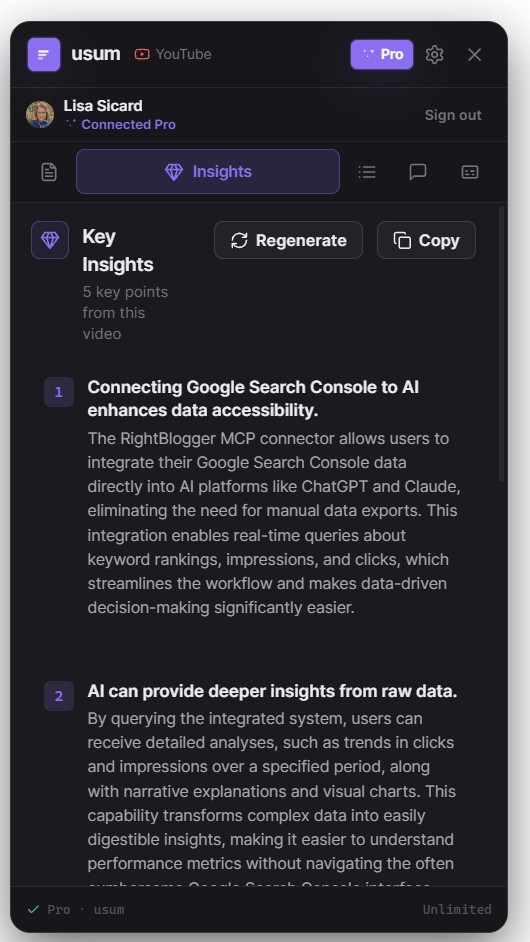
You may compare AI tools such as ChatGPT and Claude, Google Gemini, NoteGPT, and Eightify. Eightify is another option for video summaries, but each tool presents information differently. This is especially helpful when a video covers a lot of ground.
In one example, USUM pulled out topics such as moving from a content creator to a business owner, creating targeted content, and using text-only Facebook posts.
Use Chapters and Timestamps to Get Right to the Point
A YouTube video summarizer can turn a long video into a quick, useful outline. In one marketing discussion, chapter topics included shifting traffic, surviving changes in search models, Reddit and subreddits, AI for social media, tracking attribution, and trends.
The displayed key insights help you decide which chapter to open. Timestamped navigation lets you jump to the section you need instead of watching the entire video first.
When comparing options, check whether they offer chapters or timestamp navigation. Eightify is one tool to review for those features, and Eightify should be checked against your specific research needs.
Here’s a simple way to use it:
- Open a YouTube video you want to research.
- Scan the insights and chapter names in USUM.
- Choose the topic that answers your question.
- Use the timestamp to jump to that part of the video.
- Review video transcripts or subtitles if you need more context.
A long video can still be worth watching. But you can save time by checking its key sections before committing to every minute.
Find Ideas You Did Not Expect To See
One useful part of a video summary is finding additional key insights you didn’t know were included. A “newsletter agent” stood out in one video and became a topic worth revisiting.
The transcript can also surface unfamiliar phrases, such as “data core,” so you can hear the speaker’s full explanation. USUM works as an AI assistant for scanning, but context still matters.
USUM also includes comments and comment digests. Comments reveal viewer questions, notable points, and potential content ideas. Compared with Eightify, USUM keeps transcript and comment context together, making it an alternative to Eightify for deeper research. Like Glasp, it helps you notice the community insights around a video, not just its summary.
A Practical Research Tool for Bloggers and Marketers
Social media, blogging, SEO, and AI change fast. If you manage several blogs or create content for clients, a YouTube video summarizer can improve productivity when full viewing isn’t realistic.
USUM helps you identify key insights from discussions about blog performance, AI overviews, social media content, and Reddit strategies. You can save time evaluating videos, then focus on the speakers, examples, and sections most relevant to your work.
For SEO research, keep the reader’s intent in mind. A summary may point you toward a good idea, but the final content still needs to answer the question people came to Google or YouTube to solve. Check important claims against the original video and reliable web articles.
👉 Time is money as I always say, especially when you are researching content ideas, client topics, and marketing changes every week.
Quick Comparison
| Feature | USUM | Glasp | NoteGPT | Eightify |
|---|---|---|---|---|
| Research workflow | Summaries, chapters, and timestamps for focused research | Notes and highlights for saved content | AI-assisted video notes and summaries | Eightify for quick video reviews |
| Content discovery | Helps surface useful sections and unexpected ideas | Organizes insights across sources | Supports structured information gathering | Eightify for fast scans |
| SEO use | Useful for comparing topics, speakers, and search intent | Helpful for collecting reference notes | Useful for turning videos into working notes | Eightify for concise overviews |
| Client work | Makes recurring video research easier to manage | Supports shared research libraries | Helps prepare summary material | Eightify for rapid content checks |
Start With the Free USUM Option
The video mentions free and pro account options. Review the available choices on the USUM Chrome extension page and try a long video from your research list. Check whether Notion export and multilingual support are available with the plan you’re considering.
Test the insights, chapters, timestamps, transcript, and comments. Compare plan features and pricing with options such as Eightify, then note which tools save time during research.
👉 You can try it for FREE for 7 days!
Frequently Asked Questions
USUM is an AI YouTube summary extension and video summarizer for scanning long YouTube videos. It organizes key insights, chapters, transcripts, subtitles, timestamps, and comments to help you find useful information faster.
USUM lets you review a video’s main topics before watching the entire recording. You can then use chapters and timestamps to jump directly to the sections most relevant to your question.
Yes, USUM provides access to video transcripts and subtitles, including comment information and comment digests. These features can add context and help surface viewer questions or unexpected ideas.
USUM can help bloggers, marketers, creators, and business owners scan discussions about SEO, social media, AI, Reddit, and content strategy. You should still review the original video and verify important claims before using them in published work.
No, USUM is best used as a research and navigation tool rather than a replacement for the original source. Its summaries help you decide which parts deserve your full attention.
Make YouTube research work better for you
USUM is a YouTube video summarizer and AI assistant that helps you decide what to watch without replacing the source. Scan the main ideas, find the right timestamp, and focus on the parts that can help you most.
When information moves quickly, faster scanning improves learning efficiency, giving you more time to create, publish, and act on what you learn.
Have you tried it out yet? I’d love to hear about your experience. Please leave a comment below 👇
I’ve been spending hours a week watching YouTube videos about
👉 You can try it for FREE for 7 days!
Disclosure: This Inspire To Thrive blog post contains affiliate links. I may earn a commission from qualifying purchases at no extra cost to you. Some sections were drafted with AI tools and carefully reviewed/edited by me.

- Website Bounce Rate: What It Means in 2026 (and How to Improve It) - October 26, 2026
- Is It Too Late for Holiday SEO? What Still Works in November - October 25, 2026
- Is Benable Legit? My Honest Benable Review & Earnings Proof - October 24, 2026
Enjoy this content? Help me show up more often in Google by adding Inspire To Thrive as a Preferred Source: