
If you need a social media scheduler or a full management suite, this Agorapulse vs Buffer comparison will help you choose.
I have used both. Buffer is the simple calendar I still use for some channels. Agorapulse is the suite I use when I need inbox, reporting, and team features. This post breaks down features, pricing, and who each tool is for.
Estimated reading time: 12 minutes

Table of Contents
Key Takeaways
- Agorapulse is best for agencies and teams that need publishing, social inbox, monitoring, and reporting in one place (with approvals and collaboration).
- Buffer is best for individuals and small teams who want a simple scheduler with a clean calendar, basic collaboration, analytics, and a free plan.
- Pricing starts at $79 per month (billed annually) for Agorapulse Standard, and $0 for Buffer Free.
- Pick the right tool faster by matching your need: full management and reporting (Agorapulse), or simple publishing and analytics (Buffer).
September 2026 Update: I used to include Missinglettr in this comparison. It no longer works reliably, support went quiet, and I stopped using and promoting it. This review is now Agorapulse vs Buffer.
The rest of this comparison remains for historical context and for readers who may still be evaluating other options. My current recommendations focus on Agorapulse and Buffer.
Best Social Media Automation Tools
Social media marketing automation involves using specialized software to reduce time spent on manual social media tasks.
It can be as simple as scheduling your posts or as complex as curating content, generating analytics reports, and tracking customer journeys.
All On Autopilot!
These automation apps make life easier and save you time, so you can focus on other strategic business management goals. You’ll get to share relevant content on socials even when it seems impossible.
Now that you know what social media automation is all about, you may decide to use Buffer or Agorapulse (if you’re familiar with these tools).
If not, continue reading. I’ll help you make the right decision.
Agorapulse Review in This Agorapulse vs Buffer Comparison

Agorapulse is one of the best social media management tools today, especially for agencies and enterprises with huge social media marketing processes.
Using Agorapulse saves you lots of time. I have used the marketing tool for 7+ years and talk about its awesomeness.
Here’s why
Agorapulse is an affordable alternative to Sprout Social and supports four core social media management functionalities
- Publishing.
- Monitoring.
- Inbox management.
- Detailed reporting.
- Canva integration for graphics
- Allows you to put the first comment on LinkedIn, Facebook, and YouTube. In the first comment, you can include the link, as most social media sites push down posts with links in their algorithms.
The tool works on almost every social media platform and has a simple dashboard and interface. This ease of use makes it suitable for beginner social media automation users.
A thin, left-hand sidebar menu gives you access to different product sections. You can also compose new posts, invite team members, add new profiles, view notifications, view help docs, and contact support easily.
As a new user learning how to use Agorapulse, you’ll have to set up your account using the setup wizard. One of the key steps is to tell the tool about your organization/team and connect team members’ profiles.
Agorapulse Features

New AI Feature: Archie by Agorapulse
Agorapulse’s AI tool Archie helps you quickly surface your best-performing posts from the past three months on any connected network. Instead of digging through reports, Archie highlights the content that already resonated with your audience so you can easily repost it or reword it for fresh engagement.
It’s a practical way to recycle proven winners without starting from scratch, making it especially useful for busy solopreneurs and small teams who want to keep momentum going with less creative effort.
Some Agorapulse Key Features include;
- Accommodates more than 40 social media profiles and 8+ users.
- Supports Facebook, Instagram, X, LinkedIn, Google My Business (now called Places), and YouTube.
- You have unlimited scheduled posts per month, and you can schedule your posts in bulk.
- Content labels and tagging are available.
- Integrated social media calendar.
- Inbox functionality like advanced filtering, priority tagging, automated responses, etc.
- Mentions, keywords, and hashtag monitoring
- Assign and approve posts before they go live.
- Share calendars with non-Agorapulse users. Ideal for reports if you’re working for a client.
- Social CRM functionalities.
- Ad comments monitoring.
- Facebook competitors and team members are tracked and monitored.
- You can easily duplicate posts once they are posted. A great timesaver!
- Storage structure.
- A browser extension that lets you share any post you like on social media.
Is Agorapulse Free? A Detailed Agorapulse Pricing
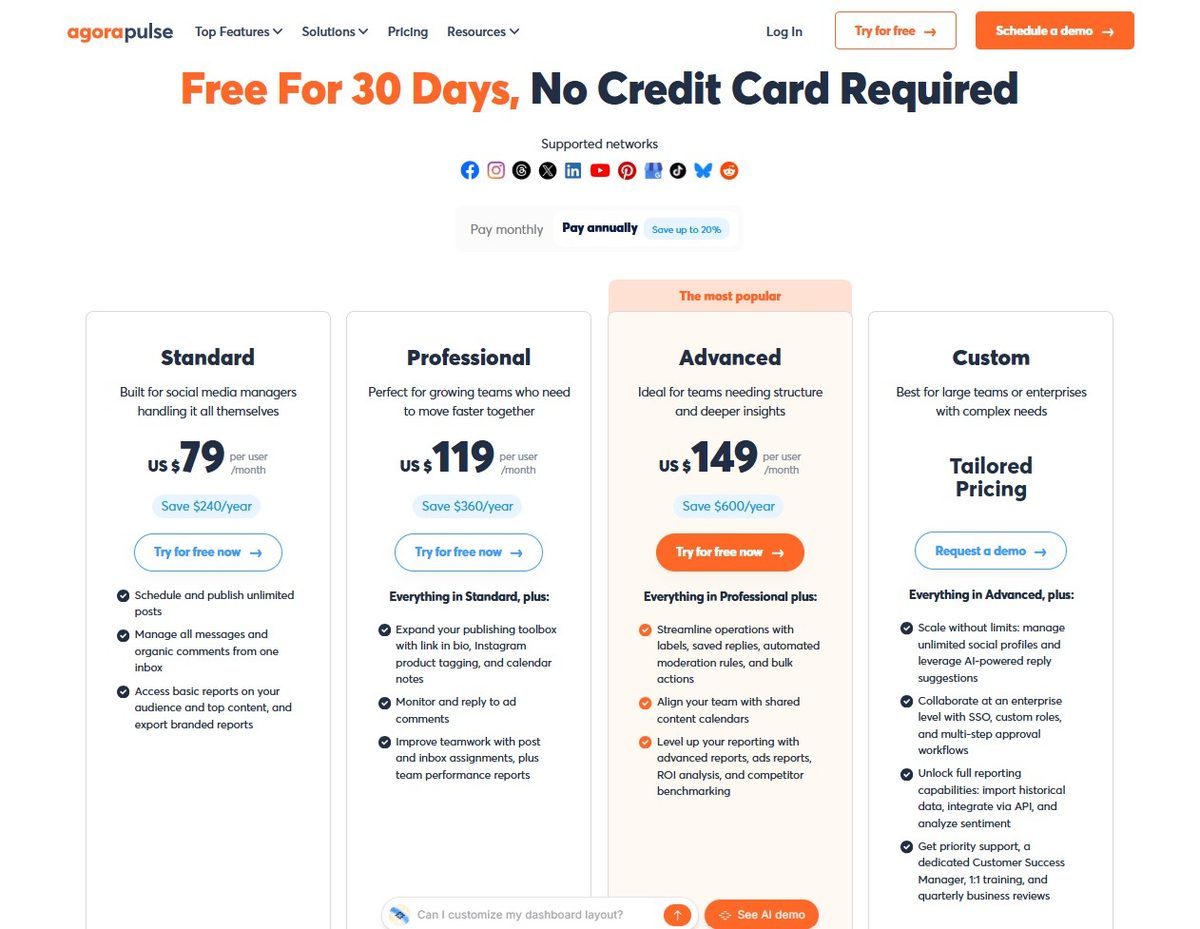
Agorapulse pricing is per user. Paid plans include 10 social profiles. Extra profiles cost more. Always check their live pricing page before you buy; names and free-tier limits have changed before.
- Free / trial: Agorapulse has offered a limited free option (1 user, 3 profiles) and a short trial. Confirm what live today is. Don’t build a client workflow on the free tier until you see it in your own account.
- Standard: $79 per user per month when billed annually ($99 month-to-month). This is the starting paid plan in the table above. Scheduling, inbox, and basic reports.
- Professional: $119 per user per month billed annually ($149 month-to-month). Adds first comment, simple approvals, assignments, and more team workflow.
- Advanced: $149 per user per month billed annually ($199 month-to-month). Adds shared calendars, stronger reports, competitor benchmarking, and bulk/moderation tools.
- Custom: Quote from Agorapulse. Unlimited profiles, multi-step approvals, and enterprise extras.
Agorapulse is the higher bill. You pay per person. Buffer pays per channel. That is the real cost difference in this comparison.
Buffer Review in This Agorapulse vs Buffer Comparison

Buffer is another social media automation tool considered the most intuitive, affordable, and authentic way to reach more people on social media.
The Buffer tool enables you to:
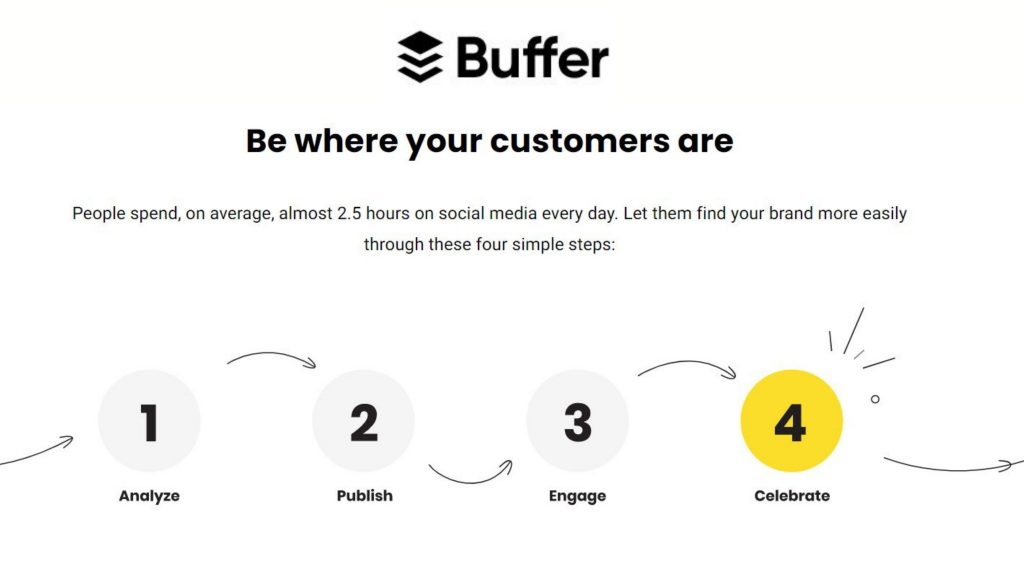
- Measure and analyze social media performance metrics in a few clicks.
- Collaborate and publish social media posts easily.
- Engage your customers twice as fast.
- Monitor your growth and celebrate your progress.
Buffer Review
I have been using Buffer since 2013 and published an extensive review of the Buffer social media automation tool after trying a couple of alternatives.
It was the first social media management tool I used, and I still have an account today where I schedule Inspire To Thrive BlueSky posts.
Buffer is great for social media management for small- to medium-sized businesses with a limited social media marketing budget and time. The software pricing is structured so you pay only for what you need.
If you’re only interested in publishing and analyzing posts, you can purchase the plan that offers only that. You can also purchase a package that supports growth monitoring and assessment.
Buffer is easy to use, no matter how many social networking sites you manage.
The dashboard and user interface are structured to make it easy for you too.
- Identify specific social sites
- Scroll through queued posts.
- Switch between drafted posts.
- View analytics
- Do every other thing you need to do on the platform.
Buffer registration is easy. Once you’re done signing up, the next step is to set up and authorize Buffer to access and use your social media accounts.
The Buffer setup process is straightforward, and you don’t have to worry about your password safety, as the tool is secure.
You can connect your Facebook pages and groups, personal and business X accounts, LinkedIn profiles and pages, Pinterest boards, etc.
Lastly, to get the most out of Buffer, you need to sign up for a paid plan at a discount.
Buffer Features
Some Buffer Key Features include:
- Simple cross-posting.
- Integrates with almost every social platform.
- Straightforward calendar view.
- Adding other team members for easy collaboration and delegation.
- Easy setup of posting schedule for each of your social accounts.
- You can pick different days and times to post.
- Pick specific times to post each weekday.
- You can create posts from scratch or curate them using the Buffer extension.
- You can add relevant texts, images, videos, and links to your posts.
- Buffer supports emojis so that you can use your favorite emojis in posts.
- You can check and compare your most essential metrics.
- You can sort your recent history to see your biggest hits.
Buffer Social Media Automation Tool Cost
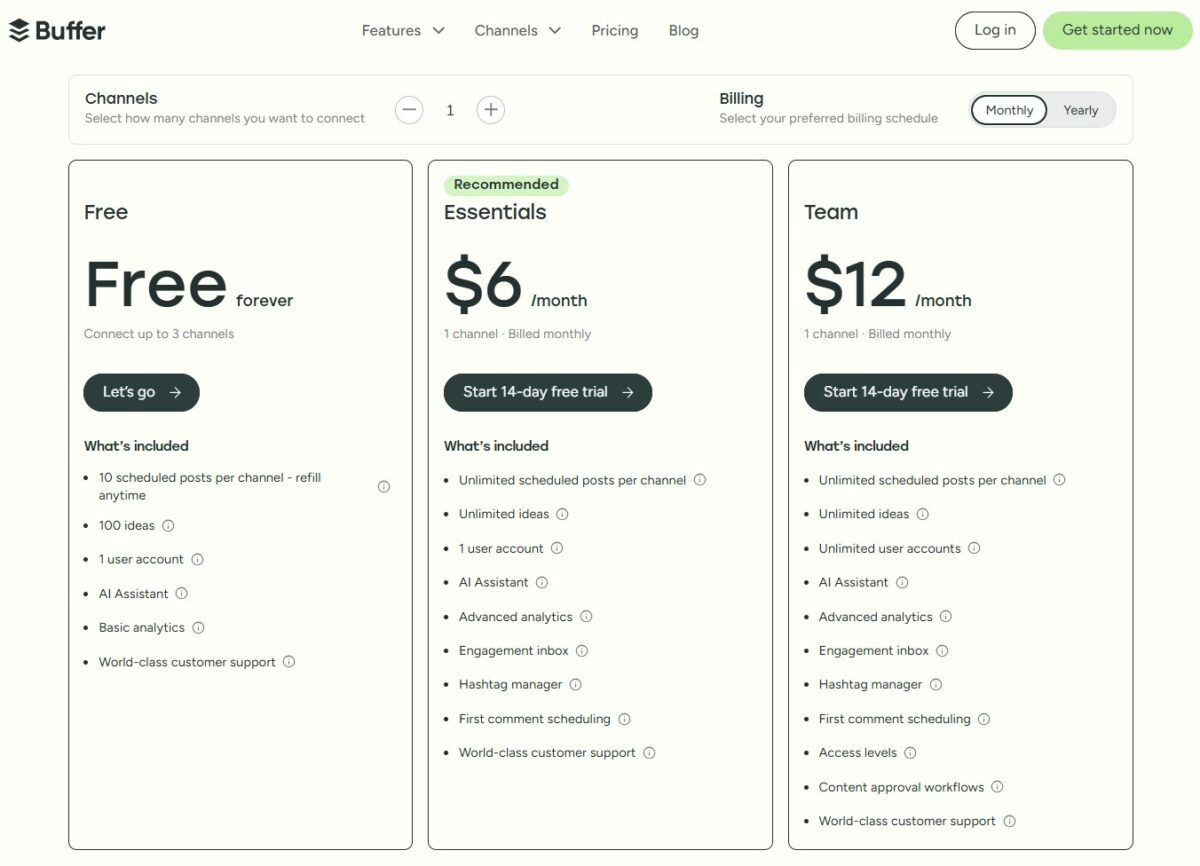
Buffer cost is affordable and structured to suit your unique needs. Whether you want to use the tool monthly or yearly, there’s something for you.
Buffer plans include:
- Buffer Free plan, which is $0 and suitable for individuals and businesses getting started with social media. This empowers you to manage up to three channels. (I use it for my X scheduling.)
- Buffer Essentials plan, which is $6 monthly (billed at $5 monthly when billed annually). This is suitable for professionals in publishing, analytics, and engagement tools.
- Buffer Team plan, which is $12 monthly (billed at $10 monthly when billed annually). This is suitable for teams who want unlimited user seating, collaboration, and reporting.
Agorapulse vs Buffer: Side-by-Side Comparison
Having used and/or discussed extensively with colleagues who have used each of these best social media automation tools, here is what I have to say:
Suitability
- Agorapulse covers scheduling plus inbox, monitoring, and reporting. It’s the better fit for agencies and teams managing multiple accounts.
- On the other hand, Buffer is ideal for solopreneurs and MSMEs who might want to manage multiple accounts.
Agorapulse vs Buffer Pricing
Two social media marketing automation software offer free trials you can use to test.
- Agorapulse targets agencies and large corporates, and this is reflected in its pricing, which ranges from $79 to over $119 per month. You can try it FREE for 30 days.
- Depending on your package, buffer pricing ranges from $0 to $120. Buffer offers a free plan for people who want to use it.
Company Details
- Agorapulse was founded in 2011 in Paris, France.
- Buffer was founded in 2010 in the United States.
Best Social Media Automation Tools Reviews
- Agorapulse has an average rating of about 4.6 on software review platforms.
- Buffer has averaged a 4.5 rating across all software review platforms.
Table Showing a Side-by-Side Comparison of Agorapulse and Buffer.
| Feature | Agorapulse | Buffer |
|---|---|---|
| Best for | Teams and agencies that need publishing, inbox, monitoring, and reporting in one place | Individuals and small teams who want a simple scheduler, calendar, and analytics |
| Free plan | 30-day trial (confirm current free tier on their site; it has come and gone) | Yes — 3 channels, 10 scheduled posts per channel |
| Paid starting price | $79/user/month (Standard, billed annually) | $5/channel/month (Essentials, billed annually) |
| How pricing scales | Per user (10 profiles included on paid plans) | Per connected channel |
| Schedule months ahead | Yes | Yes |
| Invite others/team seats | Yes (priced per user) | Yes on Team plan (unlimited members) |
| Reply to comments/inbox | Yes — full social inbox | Yes — Community inbox (added after older comparisons said no) |
| Social listening | Add-on (Advanced Listening), not on every plan | No full listening suite |
| AI writing/editing | Yes (Writing Assistant; Archie-style “best posts” on your account) | Yes (AI Assistant) |
| First comment on posts | Yes (Professional and up) | Yes (paid plans) |
| Image/asset library | Yes | Limited — more of a composer than a media library |
| In-app analytics | Yes — stronger reporting, ROI, and competitor tools on higher plans | Yes — cleaner, simpler analytics |
| Approvals | Yes (Professional+) | Yes on Team |
| Canva / creative tools | Canva integration | Composer + basics |
Wrapping Up: The Best Social Media Automation Tools with Agorapulse vs Buffer Comparison
To wrap up, I’ll share the advice I always give to anyone who wishes to adopt marketing software. Ask yourself a series of questions whose answers will help you choose the best social media automation tools that’ll suit you most.
Here is how to choose the best social media automation tool among Agorapulse vs Buffer. Ask yourself:
- What is your social media marketing goal?
- Which platform do your target prospects use most?
- Which social media marketing tasks do you wish to automate?
- Do you want a unique solution or a one-size-fits-all solution?
- What is your experience level with social media automation?
- And finally, which tool can your marketing budget afford while still achieving your marketing goals?
For most solopreneurs, the Agorapulse vs Buffer choice comes down to inbox and reporting versus a simple calendar.
Frequently Asked Questions About Agorapulse vs Buffer
Yes. Both schedule posts and show analytics. Agorapulse is built as a full social suite (inbox, monitoring, team reporting). Buffer is built as a simple scheduler with a clean calendar and a real free plan.
Agorapulse has offered a limited free tier (1 user, 3 profiles) and a trial in the past. Paid plans start at about $79 per user per month when billed annually. Confirm the current free option on their pricing page before you count on it.
Yes. Buffer Free covers up to 3 channels with 10 scheduled posts per channel. Paid Essentials starts at about $5 per channel per month when billed annually.
Agorapulse is stronger for day-to-day management: unified inbox, assignments, listening add-ons, and deeper reports. Buffer is stronger if you want fast publishing, a simple calendar, and lower cost as a solopreneur.
Pick Agorapulse if you manage clients or a team and need inbox + reporting in one place. Pick Buffer if you mainly need to schedule posts, stay consistent, and keep the bill small.
Yes. Older comparisons said no. Buffer now has a Community inbox for comments and replies. Agorapulse’s inbox is still the more complete option for teams.
No. I stopped using and promoting it after it stopped working reliably and support went quiet. This review is Agorapulse vs Buffer only.
Disclosure: This Inspire To Thrive blog post contains affiliate links. I may earn a commission from qualifying purchases at no extra cost to you. Some sections were drafted with AI tools and carefully reviewed/edited by me.

- What the RightBlogger AI Agent Can Fix on Your Blog - September 22, 2026
- Yoast SEO Plugin: 6 Ways It Still Makes Blogging Easier - September 22, 2026
- Twitter Cards in 2026: Making Your Posts On X Stand Out - September 22, 2026
Enjoy this content? Help me show up more often in Google by adding Inspire To Thrive as a Preferred Source:




This table is very useful. It’s nice to see them juxtaposed like that because what each tool kills it at is clear. Missinglettr is great for automating content drip campaigns, and Agorapulse really shines at being a one-stop shop for social media management. Of course, Buffer is a go-to for scheduling and analytics. Much depends on your specific needs, but this guide helps with the choices. Thanks for the in-depth analysis!
Welcome to Inspire To Thrive Rozgar. I just updated the table to keep it relevant and with the latest updates. I’ve loving Missing Lettr these days the most. Thanks for coming by and have a great day.
Very good comparison! I can see why Buffer is still my favorite after all these years. It’s the most affordable and gives me exactly what I need as a content creator with multiple accounts. Thanks Christopher.
Thank you Ileane,
Yes. Buffer is super helpful in terms of giving one exactly the features they need.
I’m glad to hear it’s your favorite.