The RightBlogger AI Agent can review blog updates while you’re asleep, then leave you with a list of changes to review. RightBlogger’s Site Agent powers AI blog automation, helping streamline your content workflow. It checks SEO titles, sentence clarity, and links that may need attention.
You can start evaluating these background audits with a free trial. The big thing is reviewing the changes before they go live. You still have the final say.

Estimated reading time: 7 minutes
Table of Contents
Key Takeaways
- RightBlogger’s AI Agent audits existing blog content for SEO titles, meta descriptions, sentence clarity, internal links, and potentially broken outbound links.
- The agent can work in the background and send pending recommendations on a recurring schedule, helping streamline blog maintenance and content workflows.
- Every suggestion includes a reason and should be reviewed in context before you approve it, especially when changes affect your writing voice or search intent.
- AI-reported broken links and other recommendations can be incorrect, so manually verify important updates before deleting, replacing, or publishing them.
- RightBlogger can save time by showing you where to focus first, but you remain responsible for the final edit and approval of every important change.
How the RightBlogger AI Agent Finds Improvements
The RightBlogger AI SEO Agent checks existing blog content and surfaces possible updates. RightBlogger’s Site Agent operates across each connected site.
On my three blogs, including my example from the Small Biz Tipster, a new email usually arrives every three days with pending changes for each blog.
These suggestions can include:
- Meta descriptions and titles that need a better fit in the search results.
- SEO titles that are one or two characters too long.
- Sentences that can be reworded or expanded.
- Strategic internal links.
- Outbound links the agent believes may be broken.
The agent also works with Google Search Console data. Google Search Console helps inform search engine optimization and identify opportunities from ongoing keyword research.
Reviewing the Pending Changes
Each RightBlogger suggestion comes with a reason, so you can review it before applying it to a blog post. It factors in “MyTone” and other brand preferences to protect your writing voice.
One recommendation changed wording from “per quarter” to “in 2026.” A link was also added as part of that update.
Another suggestion caught an SEO title that was being cut off mid-word in the search results. The explanation was clear: the trimmed title was cutting off the page’s promise.
Restoring the complete phrase improved search engine optimization and made the title read properly again.
Those are solid types of changes to approve after reading them in context. RightBlogger keeps a human in the loop before fixes go live, so you can confirm the style and intent.
👉 A title that gets chopped off in search can leave readers with an incomplete idea of what the page offers.
What the Audit Report Shows
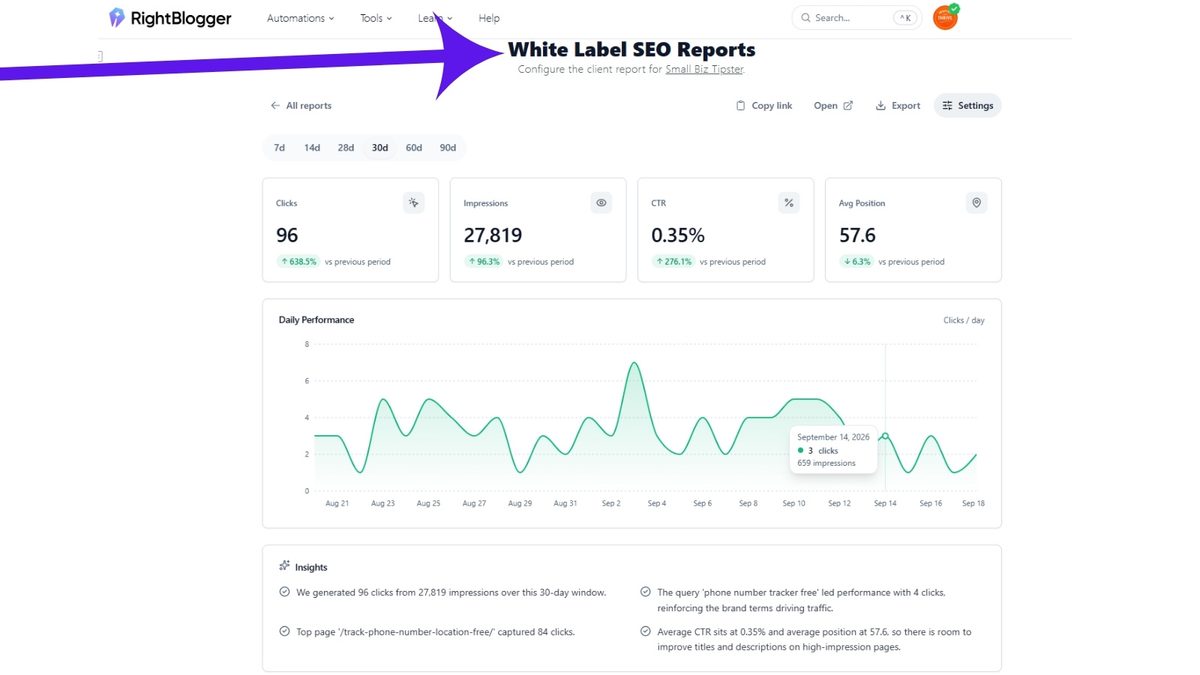
On the Small Biz Tipster blog, one RightBlogger report showed:
- 38 pages improved.
- 21 sentences rewritten.
- 25 audits run,
You can open the detailed RightBlogger report to see the work behind those numbers. In this case, the AI SEO agent reworded sentences, suggested links, added a sentence in places, and identified broken outbound links.
It also works with built-in AI tools, including the Content Planner and utilities that generate posts for social sharing.
It isn’t only about a summary number.
👉 Bloggers testing these diagnostic audits during a free trial can drill down into each page recommendation. You can see what changed or what still needs your attention.
Some Changes Still Need a Human Review
Not every suggestion can be completed automatically. RightBlogger couldn’t apply one recommendation because the post was brand new, so it needed a manual review afterward.
Sometimes a blog post is edited after the agent makes its suggestion. This can happen whether you drafted it with an article writer or monitored it through the AI Brand Monitor.
Open the post yourself, read the recommendation, and compare it with your current version.
AI can find useful updates, but it doesn’t know every change you made after its last scan.
Before creating promotional assets for social sharing, check that the revised text still reflects your authentic writing voice. That’s why some suggestions remain unapplied.
👉 After using their AI agent for about 4 to 6 months, I still double-check changes when something doesn’t look right.
Always Check Reported Broken Links with the RightBlogger AI Agent
On the Inspire to Thrive site, RightBlogger flagged several affiliate links as broken links. Before removing anything, I checked them manually. Sure enough, the links were working.
That was a good reminder that autonomous AI tools and Autoblogging can speed up blog management, but manual verification still matters. Check important links before deleting, replacing, or syndicating content for social sharing.
I emailed RightBlogger’s founders, Andy and Ryan, about the issue, and Indie got back to me quickly. Users testing the platform on a free trial can benefit from that same responsive founder support when unexpected link flags appear.
Always check important edits and links yourself before approving them.
That same hands-on approach is part of using AI for blogging. AI can speed up the work, but your own review still matters.
The Three-Day Blog Review Routine
The RightBlogger Site Agent runs on a repeating schedule, and the next review here was set for Wednesday. Aligning audits with your regular publishing schedule keeps content primed in the Content Planner and ready for subsequent social sharing.
When the email arrives, open the pending changes and review the clear wins first.
An improved SEO title or useful internal link may be easy to approve. For anything needing context, open the post and inspect it manually.
👉During a free trial, RightBlogger can work in the background while you’re away. You’re still responsible for the final edit and keeping your publishing schedule on track.
Frequently Asked Questions
The agent reviews existing blog posts and identifies possible improvements to SEO titles, meta descriptions, sentences, and links. It can also use Google Search Console data to help surface optimization opportunities.
The Site Agent runs on a repeating schedule, and reports may arrive about every three days for connected sites. The exact timing can depend on the site’s review schedule.
No. Suggestions remain pending until you review and approve them, keeping a human in the loop. You have the final say over which changes go live.
It can flag outbound or affiliate links that may be broken, but those reports are not always correct. Check important links manually before removing or replacing them.
RightBlogger uses MyTone and other brand preferences to help keep recommendations consistent with your voice. You should still read each change in context to confirm that the wording and intent feel right.
The Best Part of the RightBlogger AI Agent
The RightBlogger AI Agent can find updates across older blog posts, rewrite sentences, suggest links, and flag titles that need work. As part of modern content creation, RightBlogger works as an AI writing tool for keyword research and selective Autoblogging.
It can save you time by showing you where to look first. Try a free trial to test its automated audit capabilities firsthand.
RightBlogger’s paid pricing plans offer unlimited AI words, while their “MyTone” helps keep your writing voice consistent. But don’t approve changes blindly without double-checking them yourself.
👉 Read the suggestions, check your links, and make the final call on every important update.
Disclosure: This Inspire To Thrive blog post contains affiliate links. I may earn a commission from qualifying purchases at no extra cost to you. Some sections were drafted with AI tools and carefully reviewed/edited by me.
Enjoy this content? Help me show up more often in Google by adding Inspire To Thrive as a Preferred Source: