
Do you want to know what others are saying about you or your brand online? I used to recommend a standalone listening tool for that. I’m no longer an affiliate with Brand24, and I already use Agorapulse for publishing, inbox, and reports. So this page is now about Agorapulse social listening: mentions, keywords, sentiment, and alerts in the same dashboard I use every day.
I’ve used Agorapulse for years for clients and for Inspire To Thrive. Listening used to mean a second login. Now I keep monitoring next to the inbox and the reports I already send to clients.
Estimated reading time: 6 minutes

Table of Contents
Online Reputation Management (without a second tool)
Agorapulse is a full social media management platform: schedule, reply, report. Advanced Listening is the add-on that monitors conversations about your name, brand, competitors, or industry across social media, news, blogs, and forums.
You set keyword searches with filters (language, location, sentiment, source).
Results can feed the same workflows and branded reports you already use. Facebook and Instagram mentions also land in the unified inbox, so you’re not hunting in two places.
It is different from tools that only schedule posts.
Need the full platform comparison (scheduling, inbox, pricing vs Buffer)? See Agorapulse vs Buffer (2026).
How Agorapulse Social Listening Works
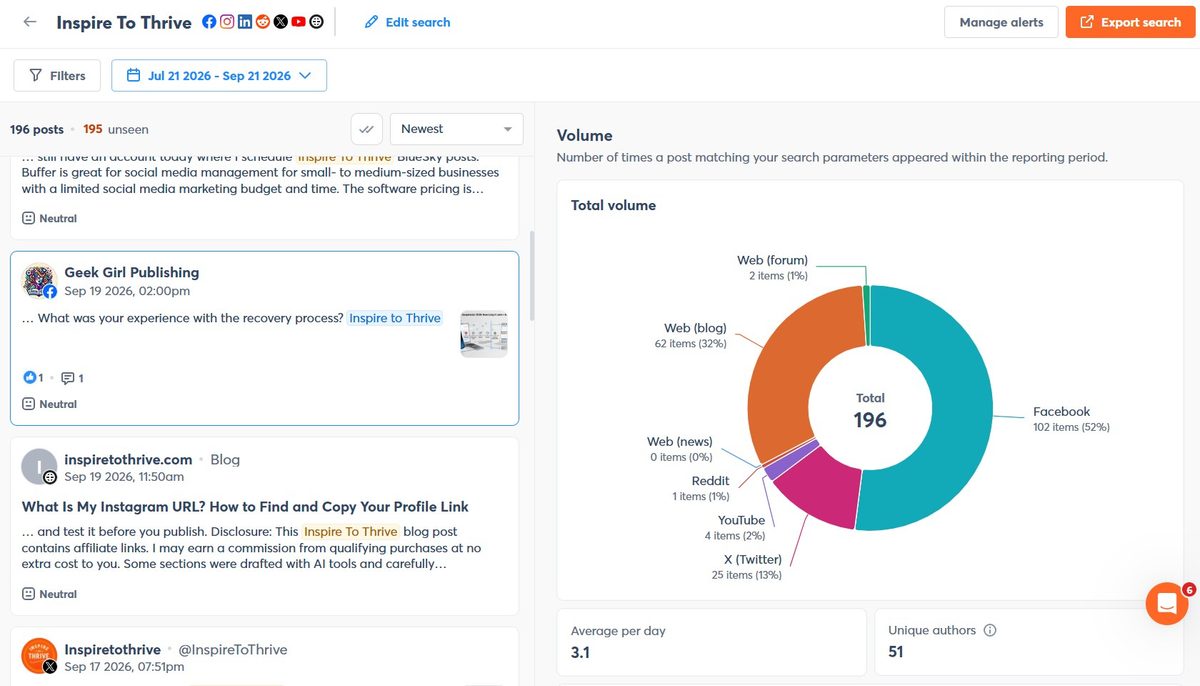
Have you ever been mentioned in a blog, a podcast recap, or a social thread and never saw it? Google Alerts miss most of that. A listening search plus email/in-app alerts is how you catch it while a reply still matters.
You can:
- Track brand and competitor keywords.
- Watch sentiment shift (positive/negative/neutral).
- Spot volume spikes before they become a “storm”.
- Drop findings into client reports with your logo.
Today, people expect a fast reply. I still send clients a short “you were mentioned here” note when a mention is worth acting on.
Archie by Agorapulse
Archie is Agorapulse’s AI helper for your own posts, not a replacement for Agorapulse social listening. It surfaces your best-performing content from the last few months on connected networks so you can reshare or rewrite winners instead of starting from zero.
I use listening to see what people are saying about the brand, and Archie when I need a proven post to publish next. Different jobs, same login.
Customized reports for you and your clients
This is why I stayed in Agorapulse. I already pull white-label reports for social results. Listening data can sit next to that instead of a separate PDF from another vendor.
Don’t dump every chart on a client. Pick the keywords that matter (your projects), set include/exclude terms, then share volume, sentiment, and a handful of high-value mentions.
Start simple. Support is solid if you need help building the first search.
Sentiment and volume (the scores that matter)
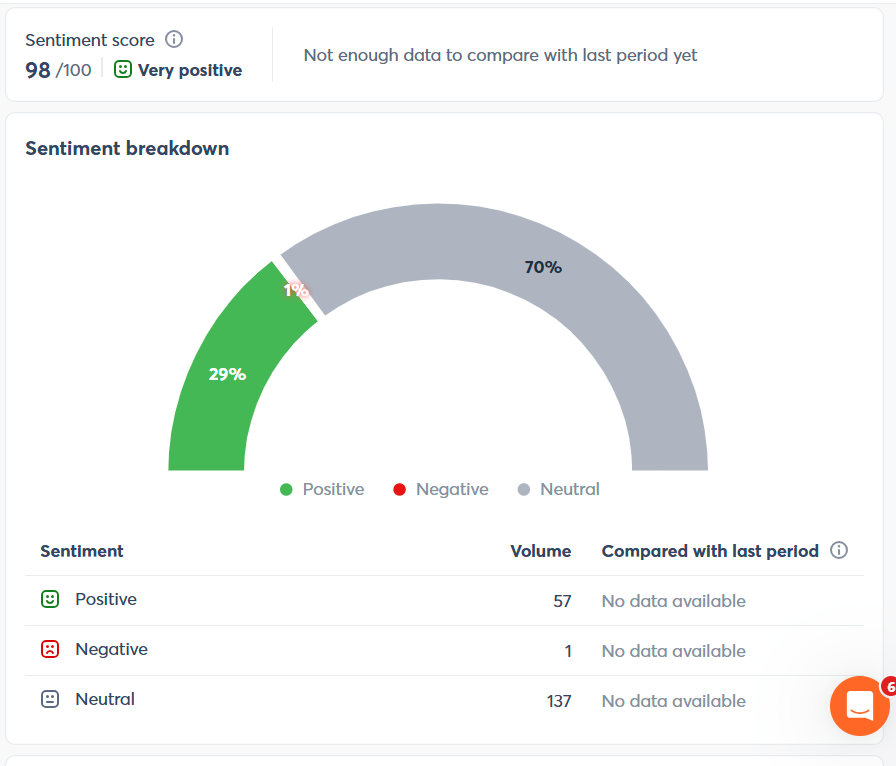
Agorapulse classifies sentiment on matching posts and shows volume and engagement over time. Use that the same way I used influencer/sentiment scores before: filter to the mentions that are actually worth a reply or a report slide.
You can set alerts on total volume, positive volume, or negative volume so a spike emails the team instead of sitting in a dashboard you check once a week.
Alerts instead of “storm” emails
When mention volume or negative sentiment jumps, configure an alert on that search. That’s the practical version of a storm alert: you find out why it spiked and whether you need to reply from the inbox the same day.
Mobile app
Agorapulse has iOS and Android apps. Desktop is still better for building searches and reports. The app is for a quick glance and replies when you’re away from the desk.
Pricing (2026)
Confirm live numbers on Agorapulse’s pricing page before you publish—they change plan names.
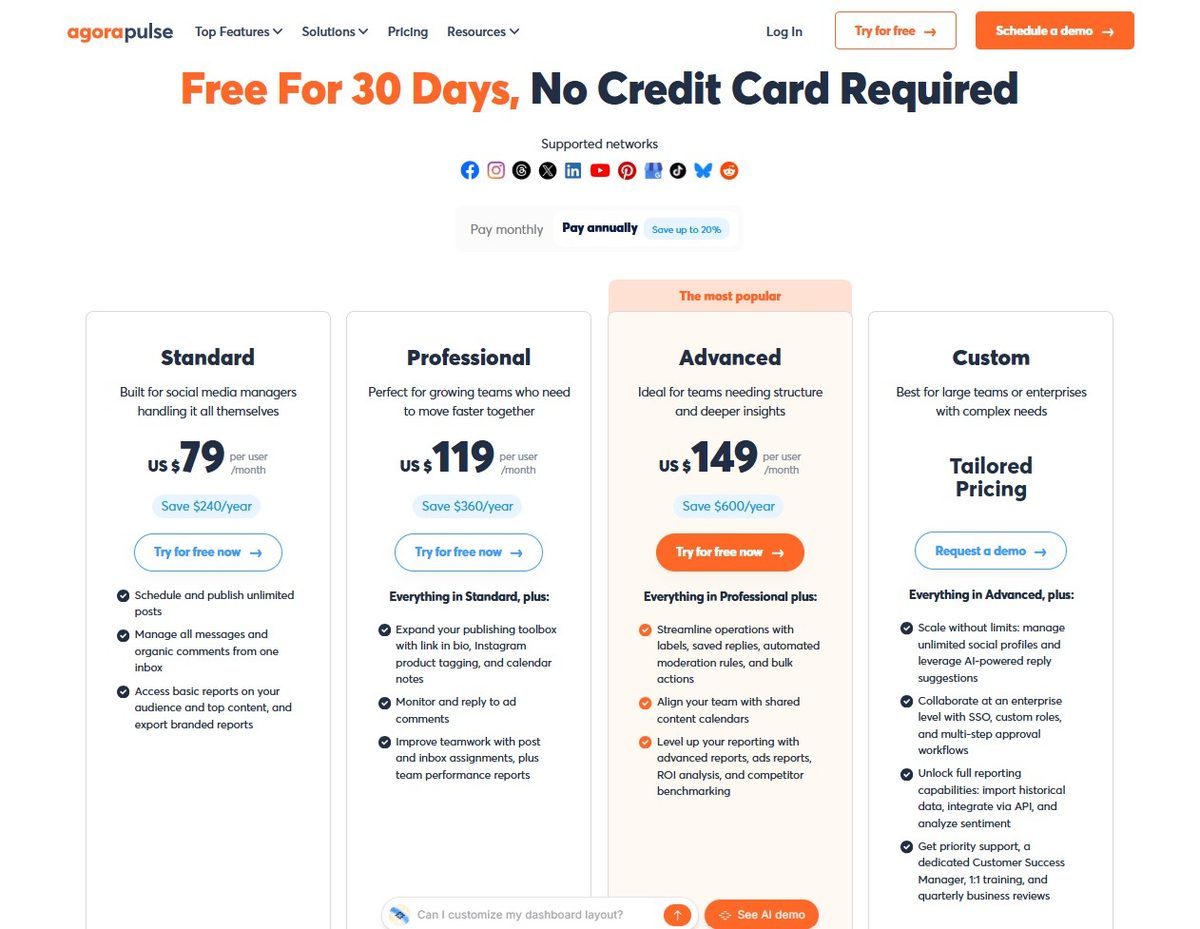
- Trial: 30 days, no credit card
- Standard: $79/user/month billed annually ($99 month-to-month) — scheduling, inbox, basic reports, 10 profiles
- Professional: $119/user/mo annual ($149 monthly) — team workflow, assignments, first comment, etc.
- Advanced: $149/user/mo annual ($199 monthly) — shared calendars, stronger reports, competitor benchmarking
- Custom: quote
Advanced Listening is an add-on (priced per search; public docs have used about $100/search/month). Existing customers often get a short listening trial. X/news sources can be limited on that trial; check current help docs.
You pay per user, not per brand. Extra social profiles cost extra. That is the real cost difference vs. a listening-only tool.
In Conclusion
If you already schedule and report in Agorapulse, adding listening there is cleaner than keeping a second brand-monitoring login. If you only need listening and nothing else, a dedicated tool can still make sense; but I no longer promote Brand24, and this page now reflects what I actually use.
Are you using any social listening today? What’s your strategy? Tell me in the comments.
Try Agorapulse free for 30 days (no credit card).
I am an affiliate of Agorapulse. I use it for my own brands and for client work. Listening is an add-on; confirm current add-on pricing in your account.
FAQs
Yes. Scheduling and inbox are in the core plans. Broader web/social listening is Advanced Listening, an add-on.
Inbox covers comments and DMs on connected profiles. Use Advanced Listening when you need keywords, untagged mentions, news, blogs, and sentiment outside those profiles.
Paid plans start at $79/user/month, billed annually. Listening is priced per search (confirm current add-on rate in your account). 30-day FREE trial, no card.
Yes. Build searches per brand/keyword and drop results into white-label reports you already send.
Brand24 is listening-only. Agorapulse puts listening next to publishing, inbox, and reports. I’m no longer a Brand24 affiliate.
Yes, via the Agorapulse app. Build searches on desktop; use the app for alerts and replies.
Disclosure: This Inspire To Thrive blog post contains affiliate links. I may earn a commission from qualifying purchases at no extra cost to you. Some sections were drafted with AI tools and carefully reviewed/edited by me.
Updated September 21, 2026: This review now covers Agorapulse social listening. I am no longer a Brand24 affiliate.
Enjoy this content? Help me show up more often in Google by adding Inspire To Thrive as a Preferred Source:



I have never known about this kind of thing until now. This looks like a valuable tool to add that will keep me up to date on my brand’s journey!
Hi Paul, yes, it’s a fabulous tool. I use it for personal names and brand names. You can learn a lot with it and they offer a FREE trial. Thanks for your input and have a fabulous day.
Thank you Lisa for recommending our tool and inspiring others to try it and… to thrive!
#TeamBrand24 couldn’t be happier!
You are most welcome Kalina, I’ve been using it for about 3 years and love it. I really love the updates with podcasts, twitch and the new reports. Thank you!
Hello Lisa,
Now-a-days, Social media has completely transformed the marketing landscape. Experts are taking benefits densely from social platforms in every aspects.
Brand24’s flexible listening parameters and ability to scour the web for nearly any mention of a brand, it goes above and beyond being a mere social monitoring tool.
Eventually, thanks for exploring additional information regarding this tool.
With best wishes,
Amar Kumar
Hi Amar, you are right about social media. I love the new feature that includes podcasts and twitch as well as their new reports that are easy to read though I would say not to give a client too much info, one of mine was overwhelmed with the info. Thanks for your shares and support Amar!
I have never used Brand24 but I think after reading this review that this is the right time to make use of this platfoem.
Will report how my findings went .
Hi Ken, welcome to Inspire To Thrive. Oh yes, do try it out FREE for the 14 day trial. I’m sure you will love it! Thanks for coming by and have a great day.
Wonderful tool Lisa, definitely on my shortlist to buy.
I intend to use it track down brand mentions that can be turned into links.
Very worthwhile activity.
Hi Nikola, It is an awesome tool and I love the upgrades and reports they now offer. I especially love the podcasts that you can learn your mentions from. You are on it with the links Nikola. Thanks for coming by and for the shares on social! Have an awesome day and weekend!
Hey Lisa,
This is a great tool and the way you review about this tool is awesome. Thanks for this awesome review.
Hi Alfredo, Welcome to Inspire To Thrive. I LOVE the Brand24 tool. I find out places I didn’t know I was mentioned in. Have you tried it? Thanks for coming by and have a great day.
Hi Lisa,
I have been following Brand 24 a long time now, but I have never had the time to look into it to discover how it works. That makes your post a useful resource to me. And since the reporting looks like Agorapulse, it must be a fantastic social media monitoring tool. I will have to look into it.
Thank you for sharing!
Hi Moss, it’s a great tool and invaluable! I use it for clients and myself. I love the new reporting tool as I shared mine in this post. I hope you took a moment to look at it. You are most welcome and don’t hesitate Moss to ask me about it. Have a great day there!
I was searching for Brand24 hence why I found this blog. I have heard a few good reviews about it and will be giving it a try
Hi Alan, welcome to Inspire To Thrive. I’m glad you found me via Brand24. It’s a great tool that I’ve been using for over 3 years now and I love their new reporting tools. I hope you give it a try for the 14 day trial. Have a great day.
Hi, Lisa!
Thank you so much for writing this blog post. The tool looks interesting to me. Well, I used a couple of alert tools. Google Alert is one of the those. It was okay.
Tweetdeck was another that I tried. It was the Twitter-specific, though.
However, the Brand24 seems cool. But $49 per month is probably an amount that everyone might not be willing to pay, especially if someone is a beginner in blogging.
Furthermore, I enjoyed the blog post. I’m glad I stopped by and found out about this awesome tool.
Thank you, again!
Hi Hassaan, you are welcome. And welcome to Inspire to Thrive. Google alerts are great but they don’t catch all the social mentions or blog mentions. I agree on the price with you, I hope they offer a mini paid version around $10/mo. That seems to be a sweet spot for many bloggers with other tools out there being offer at that range. Thanks for your feedback Hassaan and I hope you try out the free trial too. Have a great weekend!
HI Lisa,
As you know, I am still fairly new to using social media, so pretty much everything about it is new to me. Brand 24 sounds pretty cool to get alerts when someone mentions you.
I’ve actually started turning off notifications on my iPhone so I can get more done. I’ll check my notifications once in the morning and then work on my blog and my freelancing business. I won’t check my social sites again until later in that afternoon after all my work is done.
Since using this method, I’ve been more productive. However, now it’s taking me several hours to respond to people’s tweets or get back to anyone who mentions me. I am sure this doesn’t look very good.
I really don’t get a lot of mentions, because my social sites are still growing. However, I may have to look into this later on down the road as my social followings start to increase.
Thanks for sharing this with us, have a great day,
Susan
Hi Susan, yes but you seem to be catching on fast Susan too. You are on to something with turning those notifications off. I have all off except for Twitter and a few close contacts on Facebook. Sometimes it feels good to just leave the phone in another room or home when you go out once in a while.
I hope you check out the free trial on this Brand24 as you may receive more mentions that you realize. I know I did. Thanks for coming by Susan and have a wonderful weekend – I hope it’s a long one for you too!
Hi Lisa,
Sounds really cool to me. Especially as mentions of myself and BFP seem to be popping up all over with my guest posting and blog commenting campaigns in overdrive. Any tool that makes it easier to track what folks are saying about you only makes it easier to build bonds, to make friends, to offer support, to gauge feedback and to get clearer with your brand direction.
Thanks for sharing.
Ryan
Hi Ryan, it is a really cool tool. I bet you would find mentions you were not even aware of from others! I really like their mobile app too and hope they expand on the mobile app. You surely are everywhere these days Ryan. Thanks for taking the time to come by and comment. Enjoy the rest of your week.
thanks for giving such a useful information about social listing tools, your article is really very helpful thanks for this post
Hi Gaurav, you are welcome. I hope you do take Brand24 for a test drive and please let us know how you like it!
Hi Gaurav, you are welcome. I hope you do take Brand24 for a test drive and please let us know how you like it!
Hey Lisa,
It seems to be an effective tool. Even I miss the tweets when people mention me.
It would be great to try such kind of useful tool.
The most important thing is to monitor your profile score and the ways which can be chosen to leverage Twitter.
Thanks for the info.
Enjoy the day.
~Ravi
Hi Ravi, yes, that’s for sure, it is easy to miss some mentions on Twitter too. I love the mentions on blogs and other areas even more. Check out their 14 day free trial and test drive it Ravi. Thanks for coming by and have a great day!
So nice to read your review of our tool! Thank you so much. We’re happy that you like it, find it useful, and worth recommending.
Greetings!
PS. We really like reading your blog, Lisa. Keep up the good work!
Thanks Gloria for coming by. I wanted to use your tool for a while before writing on it. I really am enjoying it and learning a lot from the stats it is providing. Thank you again!
Happy Monday, Lisa! Wow, Brand24 sounds like an awesome tool! Have you liked your stats you’ve seen so far? I mean, is the application worth going premium?
I would love to hear more about your findings as your trial goes. Will you have a followup?
Great to learn about new tools, my friend. Hope you’re enjoying your Monday (and your visitors).
B
Hi Bren, thanks. It is and I do. I do think the premium version is worth it. You can find out so much information from their dashboard. You will know with the 2 week free trial. I will do a follow-up for sure! Thanks for coming by Bren and have a great day ahead. (You can probably tell I was busy being grandma yesterday)…
Hi Lisa,
This is the first time I hear about Brand24. Thanks for telling us about and for showing us all we get from using this tool. I’m going to check it out. I’ve been hooked on Followerwonk lately, hehe. I just like messing with the tools and their features. I’m becoming a big ole nerd, lol.
Congratulations on being recognized as a Twitter influencer! I doesn’t surprise me at all!
Great post, Lisa. I’ve already got this scheduled to share later this morning. Have a great week!
Cori
Hi Cori, You are welcome. I had not heard of them either until they contacted me on Quora. I love their services. And just the other week the mobile app became available. You a nerd? Wow, you have become one I think.
Thanks for that Cori, I learned it via Brand24. You too Cori, I have my granddaughter in town this week. She’s still sleeping. Have a great day and week ahead there.