
Feeling drained by Instagram’s endless feed and the pressure to perform online? Millions are hitting the same walls and are choosing to delete or deactivate their accounts for good reason.
Wondering how long it takes to delete an Instagram account? Deletion takes minutes to request, but Instagram keeps the account hidden for a 30-day grace period and full removal can take up to 90 days. In this complete 2026 guide, you’ll learn the exact, up-to-date steps to permanently delete your Instagram account through Accounts Center, how it differs from temporary deactivation, and how to download your data first so nothing important is lost.
Ready to break free and start thriving beyond the scroll? In this Inspire To Thrive blog post, I will uncover the reasons for this delay and shed light on its implications for you.
Estimated reading time: 14 minutes
Table of Contents
Key Takeaways
- Instagram requires a 30-day waiting period before deleting Instagram accounts to encourage users to reconsider their decision.
- This waiting period helps protect user data, prevent impulsive decisions, and reduce fraudulent activity.
- Users can back up their data before deletion and choose alternative options, such as temporarily deactivating their account, if they aren’t ready to delete it.
- During the 30 days, users can reactivate their accounts by logging in; their data remains inactive but recoverable.
- Understanding the reasons behind the waiting period helps users make informed decisions about managing their Instagram presence.
The importance of Account Retention
Instagram, like any other social media platform, aims to retain its user base. By implementing a 30-day wait period for account deletion, Instagram encourages users to reconsider their decision and potentially keep their accounts active.
This retention strategy not only helps Instagram maintain a strong user base but also allows users to explore alternative solutions before permanently deleting their accounts.
User Data and Privacy Concerns
One crucial aspect of the wait period is the protection of user data and privacy. Instagram wants to ensure that users have sufficient time to:
- Download their data.
- Review their past activities.
- Make an informed decision before deleting their accounts.
Preventing Impulsive Decisions
- The 30-day wait period serves as a buffer, helping prevent impulsive decisions.
- Users might hastily decide to delete their accounts during moments of frustration or emotional distress.
- Instagram gives users time to reflect on their choices, potentially leading to more rational decision-making.
Reducing Fraudulent Activities
Fraudulent activities, such as hacking or impersonation, can have a significant impact on Instagram’s user community. The 30-day wait period acts as an additional security measure to combat such activities.
If an account is compromised or a user’s credentials are stolen, the wait period provides an opportunity to regain control of the account before potentially irreversible actions, such as permanent deletion, occur.
Encouraging Reconsideration and Reactivation
Instagram strives to maintain an engaged and active user community. By implementing a 30-day wait period, the platform encourages users to reconsider their decision and potentially reactivate their accounts.
During this waiting period, users may receive notifications, relevant content, or even support from Instagram, reminding them of the benefits of staying connected and engaged within the Instagram community.
How to Permanently Delete Your Instagram Account in 2026 (Step-by-Step with Screenshots)
Instagram now requires all deletions and deactivations to go through Accounts Center. The process is straightforward and takes just a few minutes. Below are clear instructions for the mobile app (the most common method), along with fresh screenshots I captured on my phone.
Additionally, I’ll provide alternatives to deleting your Instagram account and share valuable tips for managing your Instagram presence without deleting it.
Download Your Instagram Data Before Deleting
Before deactivating your Instagram account, make sure to download your data. First, open the Instagram app and tap on your profile picture.
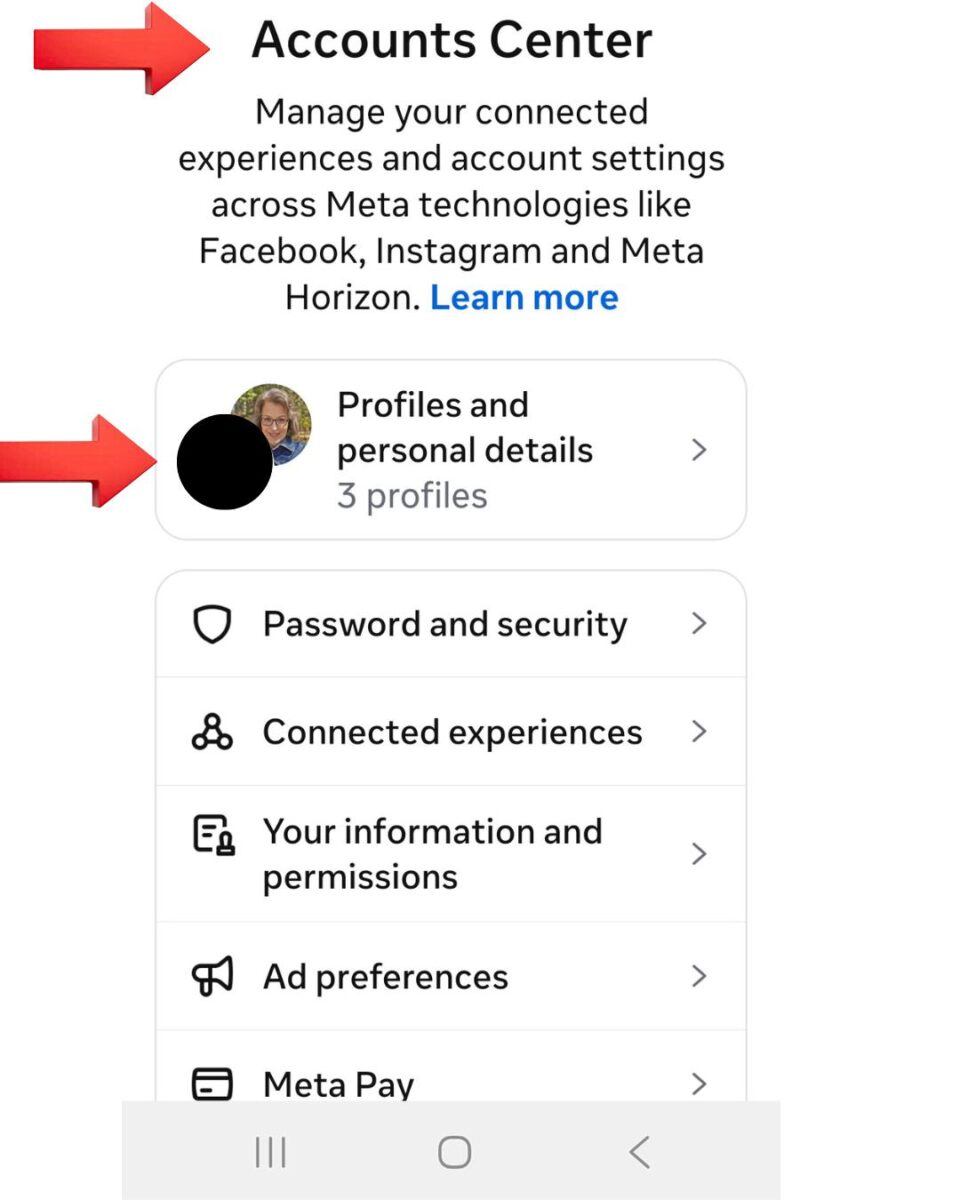
Go to Settings, then go to Accounts Center.
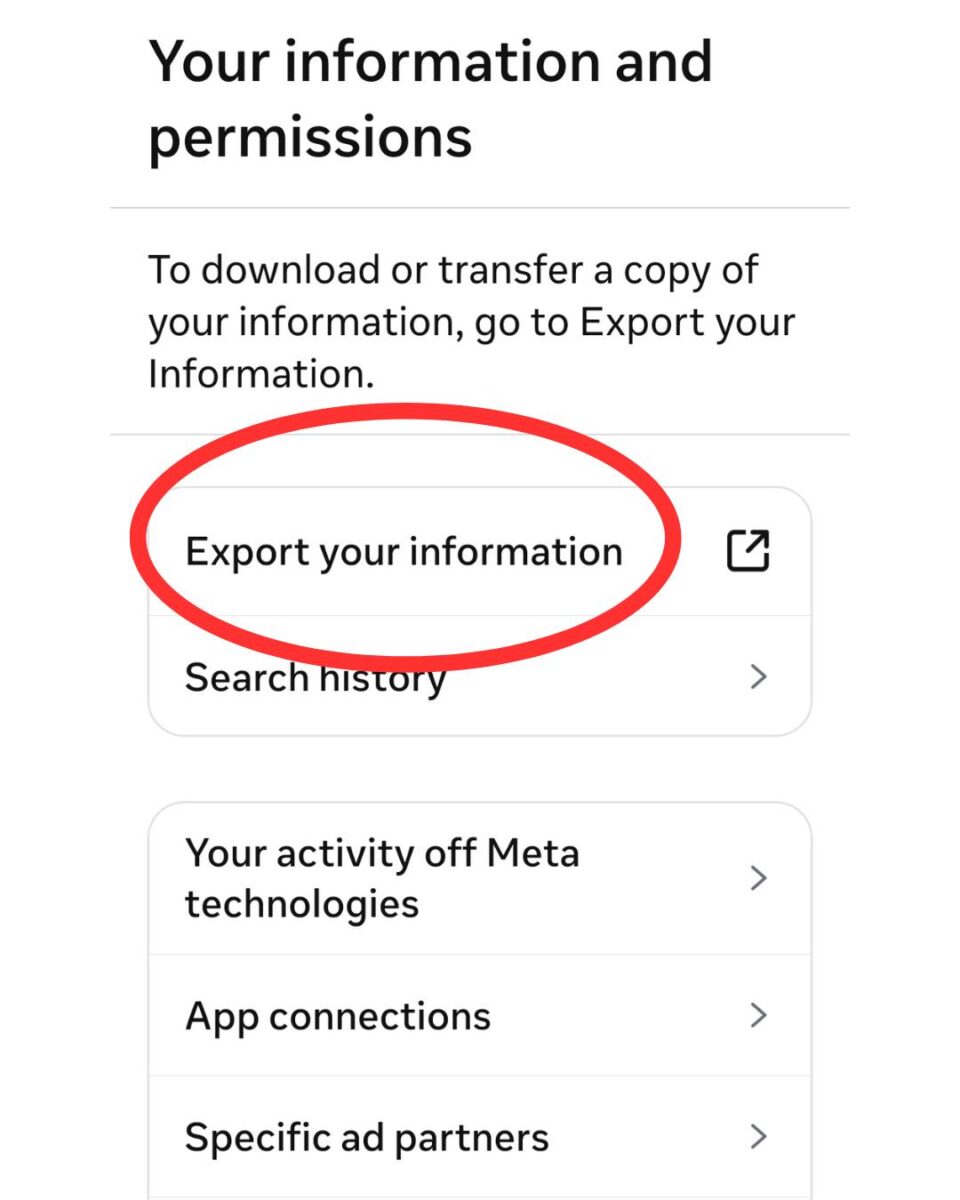
Next, go to Export Your Information.
Then choose whether to download current or scheduled information.
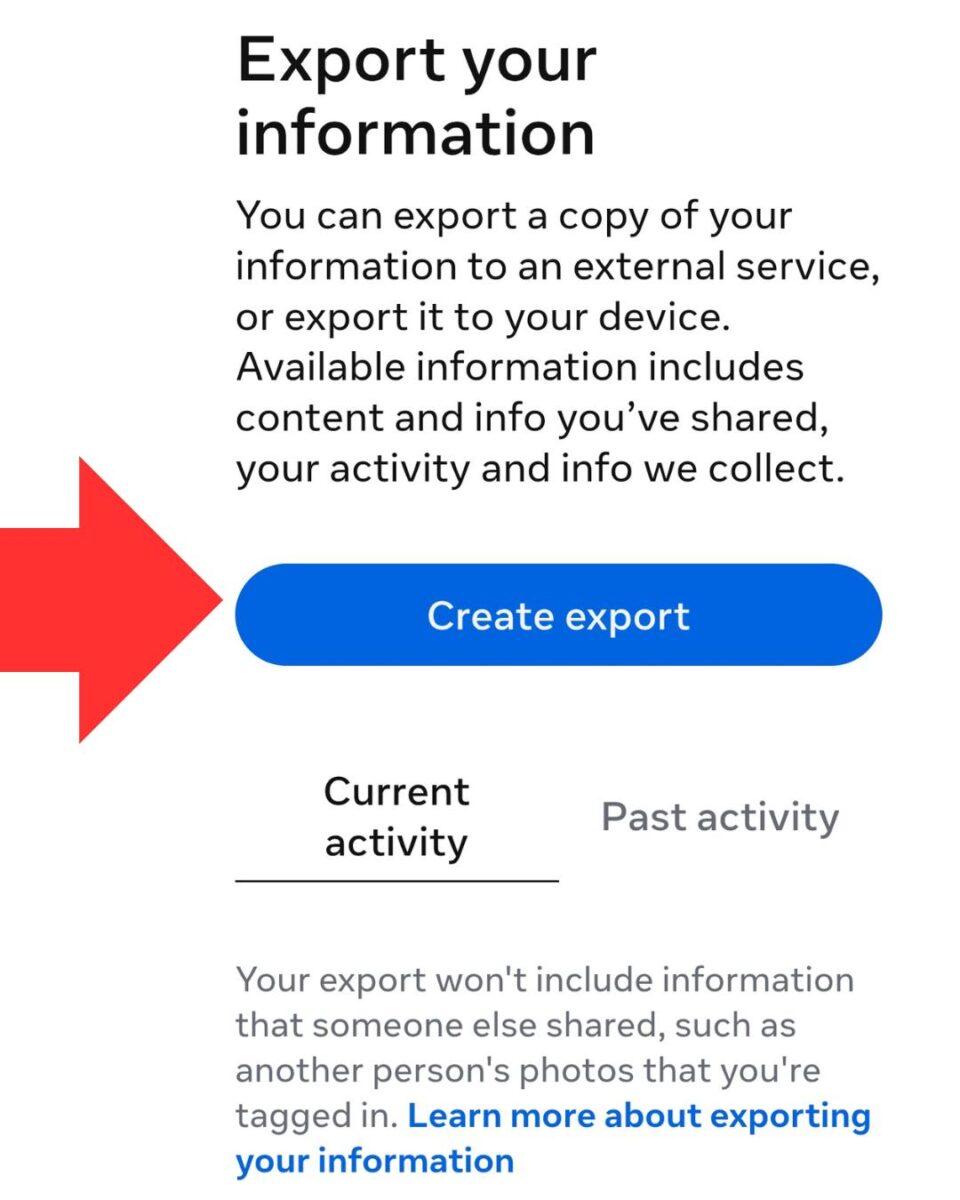
Next, choose your Profile.
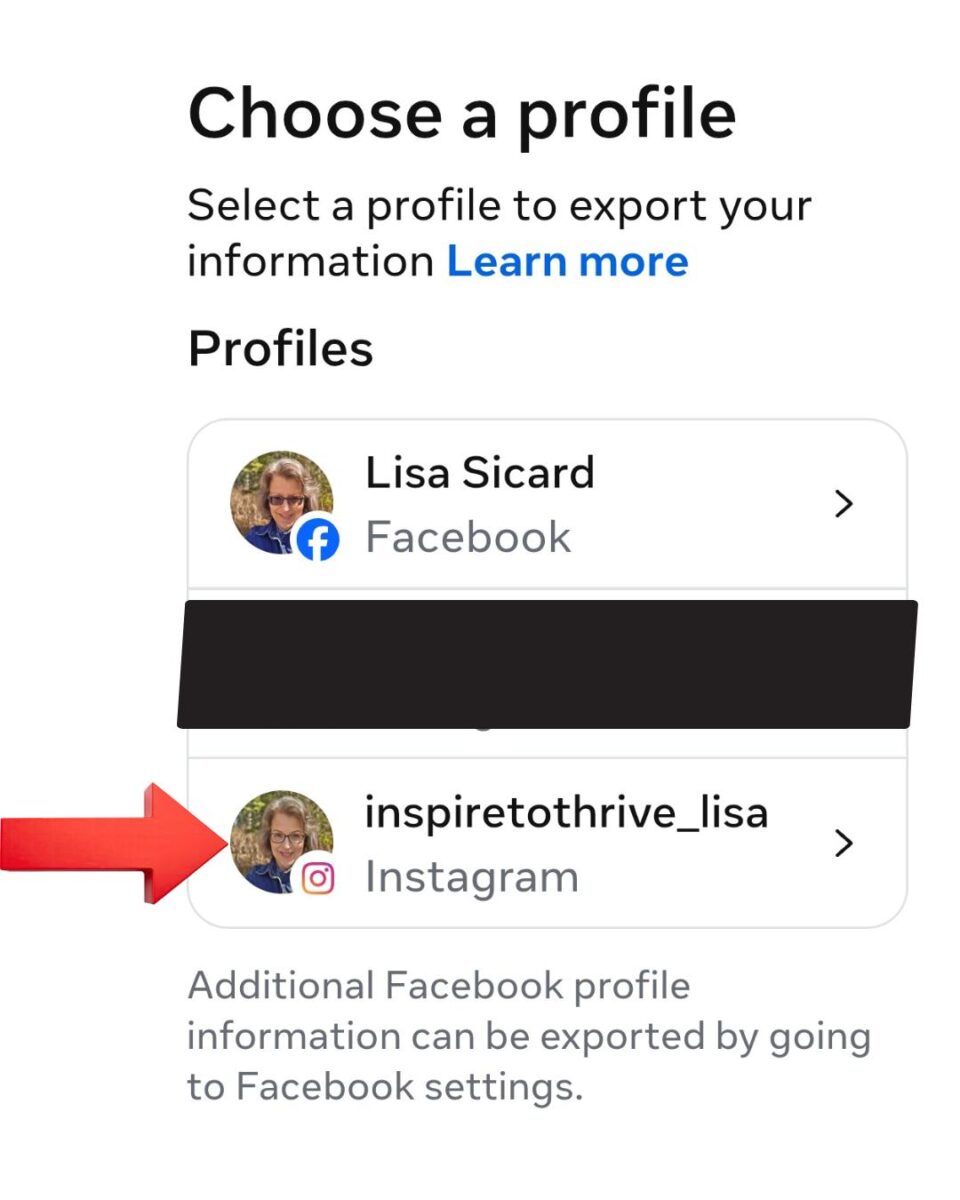
Then choose where to export.
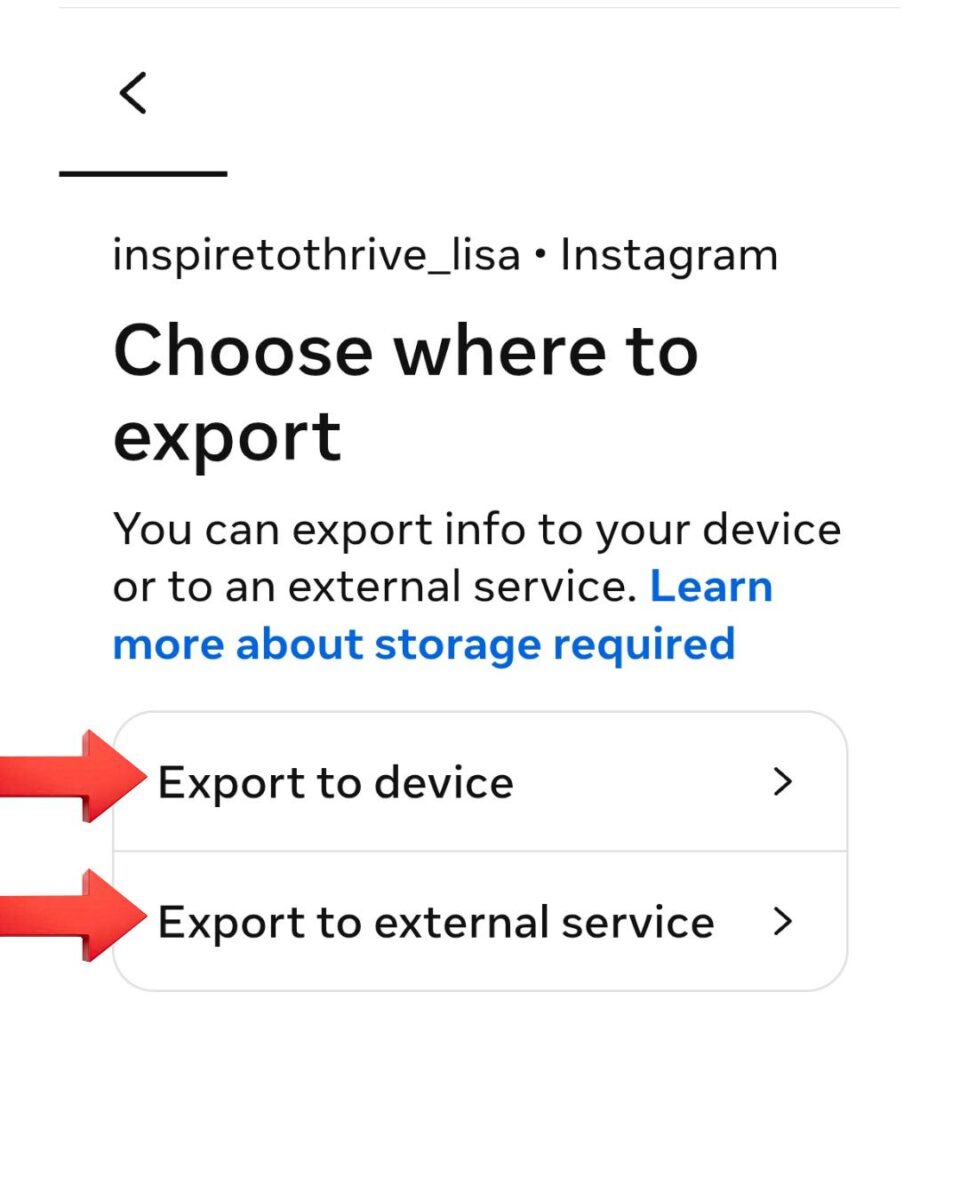
Lastly, confirm your report. You only have 4 days to do it.
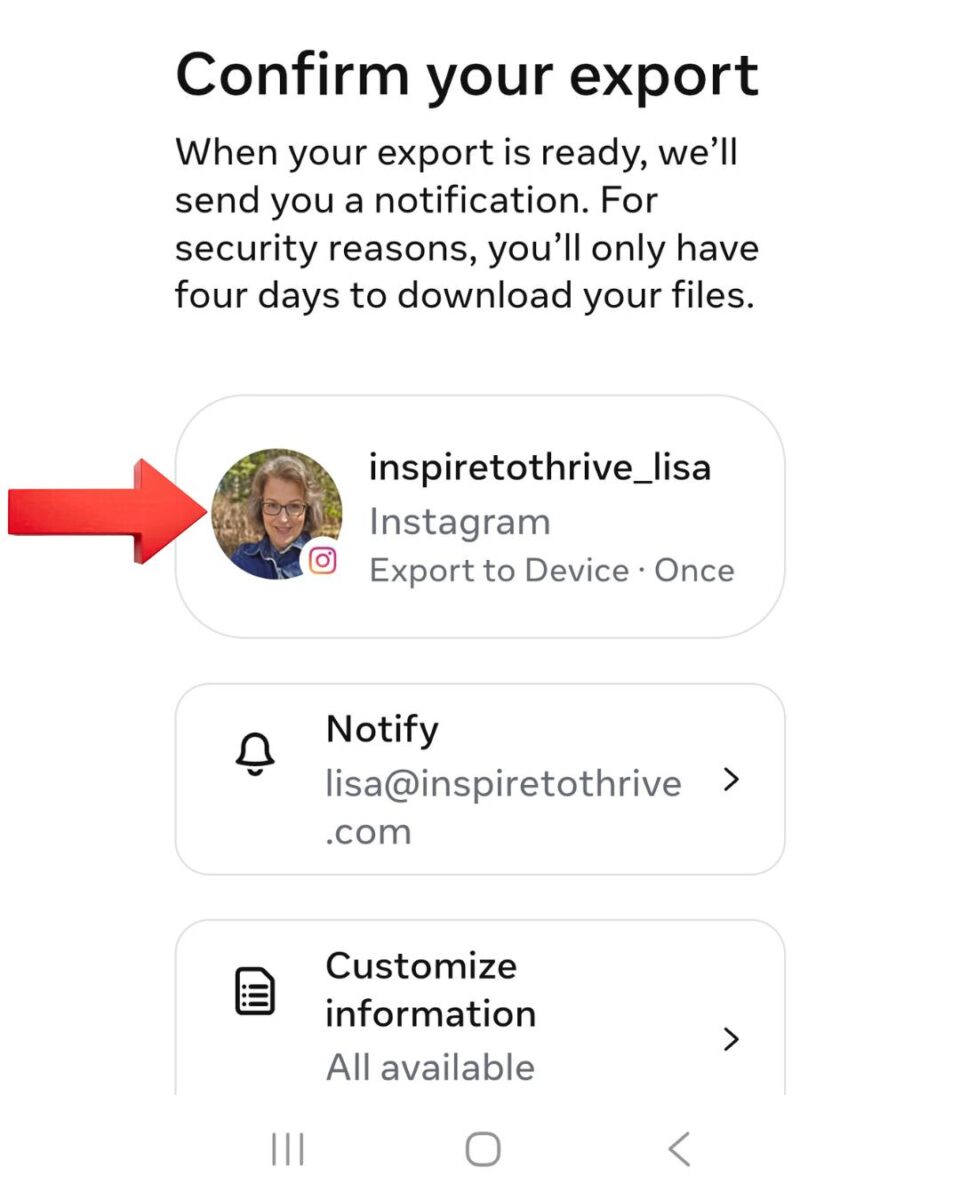
Instagram will send a link to your email within 48 hours if you choose email delivery instead of downloading. Click the link, and you’ll get a zip file containing your photos, comments, and other data.
Either way, save this downloaded file to a safe location. Now you can deactivate your IG account without losing any important data.
Step-by-Step Guide To Deleting Your Instagram Account
On Mobile App (iPhone or Android)
- Open the Instagram app and log in to the account you want to delete. Tap your profile picture in the bottom right corner.
- Tap the menu icon (three horizontal lines) in the top right. (Screenshot 1: Profile screen showing the menu)
- Tap Settings and privacy.
- Tap Accounts Center (usually near the top of the list).
- Tap Personal details.
- Tap Account ownership and control.
- Tap Deactivation or deletion. (Screenshot 2–4: Navigating through Accounts Center screens)
- Select the Instagram account you want to permanently delete.
- Choose Delete account and tap Continue.
- Select a reason from the dropdown menu, enter your password when prompted, and tap Delete [Your Username] to confirm. (Screenshot 5–6: Final confirmation screens)
Important: During the next 30 days, you can still cancel the deletion by simply logging back into your account.
On Desktop or Web Browser
- Go to instagram.com and log in.
- Click More (bottom left or in the menu) → Settings.
- Click Accounts Center.
- Go to Personal details → Account ownership and control → Deactivation or deletion.
- Select your account → Delete account → Continue.
- Choose a reason, enter your password, and confirm.
Pro Tip: Take these steps on the device you’re most comfortable with. The screens look nearly identical on mobile and web.
Download Your Data First (Strongly Recommended) Before deleting, go to Accounts Center → Your information and permissions → Download your information to request a copy of your photos, videos, messages, and more. This is your only chance to save everything.
Alternatives To Deleting An Account
Now, if you’re not yet ready to part ways with Instagram permanently, there are alternative options to explore:
- Temporary Deactivation: Instead of deleting your account, you can temporarily deactivate it. This option allows you to take a break from Instagram without losing your profile, photos, or followers. To do this, go to your account settings, select “Temporarily disable my account,” and follow the prompts.
- Privacy Settings: If privacy concerns or unwanted interactions are the reasons behind your decision, consider adjusting your privacy settings. You can make your account private, so only approved followers can see your posts and stories. Additionally, you can block or mute specific accounts to minimize any negative experiences.
- Content Management: Sometimes, the issue lies in the content you consume or the accounts you follow. Take some time to curate your feed by unfollowing accounts that no longer align with your interests. You can also use the “Restrict” feature to control interactions with certain followers without outright blocking them.
Delete Instagram Account vs. Deactivate: Which Should You Choose?
Before taking action, understand the key differences. Deactivation is temporary and reversible. Deletion is permanent after a 30-day grace period.
| Feature / Action | Permanently Delete | Temporarily Deactivate |
|---|---|---|
| Is it reversible? | No – permanent after 30 days | Yes – anytime by logging back in |
| Your profile & content | Hidden immediately, permanently deleted after 30 days (full removal up to 90 days) | Hidden immediately, fully restored on reactivation |
| Username availability | Released after deletion – someone else can claim it | Stays reserved for you |
| Data & posts | All content scheduled for permanent deletion | Everything saved and restored |
| Best for | Complete privacy break, quitting Instagram for good | Temporary break, mental health reset, or testing life without IG |
| Grace / waiting period | 30 days (you can cancel by logging in) | No limit (but Instagram limits frequent deactivations to once per week) |
Not sure? Start with deactivation. You can always delete later if you decide it’s the right move.
What Happens After You Delete Your Instagram Account?
Once you confirm deletion, Instagram immediately hides your profile, posts, stories, comments, likes, and followers from public view. Here’s the exact timeline:
- First 30 Days (Grace Period): Your account is not visible to others, but it is not yet permanently gone. You can cancel the deletion at any time simply by logging back in with your username and password. During this window, your content remains subject to Instagram’s Terms of Use and Privacy Policy, but no one else can see it.
- After 30 Days: Your account and all associated information (photos, videos, DMs, followers, etc.) are scheduled for permanent deletion. At this point, recovery is no longer possible.
- Up to 90 Days for Full Removal: It can take up to 90 days for Instagram to completely erase your data from its active systems. Even after that, backup copies may remain for a limited time for legal, safety, or technical recovery reasons (e.g., disaster recovery or terms violations). These backups are not accessible to you or anyone else.
Other Important Details:
- Your username will eventually become available for someone else to claim (unless it’s taken quickly).
- Direct messages you sent to others may still appear in their chats as “from a deleted account” or disappear over time.
- Any content you shared on other websites (embeds, tags, etc.) will show errors or “User not found.”
- If your account was removed for violating Instagram’s rules, the username may not be reusable.
Deleting your account is a big step toward reclaiming your time and focus. Many people report feeling lighter and more present in real life once the decision is final.
The Impact On User Engagement and Platform Growth
From a business perspective, the 30-day wait period contributes to the platform’s overall growth and engagement. By discouraging immediate account deletion, Instagram ensures a more stable user base, allowing for better user interaction, content creation, and community building.
This ultimately benefits both Instagram and its users by creating a more vibrant and active social media experience. While the 30-day wait period for deleting Instagram accounts may initially seem inconvenient, it serves multiple important purposes.
It encourages you to reconsider, protects your data and privacy, prevents impulsive decisions, combats fraudulent activities, and promotes engagement and growth on the platform.
Now that you know what happens during and after deletion, you might wonder why Instagram built in this 30-day waiting period. Here’s the reasoning behind it:
Why Does Instagram Have a 30-day Wait Period Before Deleting An Account?
Instagram’s 30-day waiting period isn’t meant to frustrate you — it serves important purposes for both users and the platform. Here’s what it really accomplishes:
- Gives you time to change your mind – Many deletions happen in moments of frustration or overwhelm. The grace period acts as a safety net, so you can log back in and cancel if you decide it’s not the right choice.
- Protects against impulsive or unauthorized actions – If your account is hacked or you delete something in haste, you have 30 days to regain control before everything is permanently lost.
- Allows you to download your data – You have a clear window to export photos, videos, messages, and other content before it’s scheduled for permanent removal.
- Helps Instagram manage data responsibly – Full deletion can take up to 90 days. The wait period gives the platform time to process the request securely while keeping your content hidden from others during the transition.
Bottom line: During these 30 days, your account is hidden but not yet erased. You can cancel the deletion at any time simply by logging back in. After 30 days, the process becomes irreversible.
Tips for Managing Your Instagram Presence Without Deleting Your Account
If the thought of deleting your Instagram account still makes you hesitant, here are some valuable tips to help you manage your presence more effectively:
- Set Boundaries: Allocate specific time slots for engaging with Instagram. This way, you can prevent it from becoming a time-consuming distraction.
- Unplug Regularly: Take occasional breaks from the platform to focus on real-life connections and activities. Disconnecting from the virtual world can be refreshing and help you maintain a healthier balance.
- Be Selective: Follow accounts that inspire, motivate, and educate you. Surrounding yourself with positive and meaningful content can enhance your Instagram experience.
- Engage Authentically: Engage with other users genuinely by leaving thoughtful captions and comments, asking relevant questions, and starting meaningful conversations. Building genuine connections can make your Instagram experience more enjoyable.

By following these tips, you can better manage your Instagram presence without deleting your account. Remember, the decision to delete or keep your Instagram account ultimately depends on your personal preferences and circumstances.
Conclusion: To Delete an Instagram Account
In conclusion, the 30-day waiting period to delete an Instagram account may seem frustrating at first, but it serves a purpose. Instagram wants to ensure that you have ample time to reconsider your decision before permanently deleting your account.
This waiting period allows you to reflect on the impact of deleting your Instagram presence, especially considering the potential loss of connections, memories, and digital content.
While it may be inconvenient to wait 30 days, it ultimately allows Instagram to prioritize your safety and gives you a second chance to change your mind.
So, if you’re considering deleting your Instagram account, take this time to reflect on your decision and ensure it aligns with your long-term goals.
FAQs About Instagram’s 30-Day Account Deactivation Policy
Instagram gives users 30 days to change their minds. Many people decide they don’t want to lose their accounts after all. The grace period also helps Instagram protect against accidental deletions and hacking.
Yes, you can reactivate your account within the 30-day window. Just log back in, and your account will be restored.
Your data remains temporarily inactive. Instagram keeps it in case you decide to reactivate your account.
No, your account won’t be visible to others during this period. It will look like the account has been deleted, even though you can still restore it.
Yes, the 30-day deletion policy applies to all types of accounts on Instagram. This includes personal profiles, business accounts, and creator accounts.
No, the 30-day waiting period is fixed. You can’t speed it up or request a shorter time frame.
If your account was hacked and deleted, contact Instagram support immediately. They can help you recover your account within 30 days. Always enable two-factor authentication to protect your account.
No, Instagram doesn’t notify your followers when you deactivate your account. They won’t see your profile or posts during the 30-day period.
Yes, you can download your data from Instagram before you delete your account. Go to your settings, select “Privacy and Security,” then “Export Data.”
You can’t use the same username for a new account until the original account is permanently deleted.
Disclosure: This Inspire To Thrive blog post contains affiliate links. I may earn a commission from qualifying purchases at no extra cost to you. Some sections were drafted with AI tools and carefully reviewed/edited by me.

- Ground News Pricing: Are Pro, Premium, and Vantage Packages Worth It? - October 11, 2026
- Instagram Repost Feature: What Happens When You Share? - October 11, 2026
- What’s the Real Secret to Successful Affiliate Marketing? - October 10, 2026
Enjoy this content? Help me show up more often in Google by adding Inspire To Thrive as a Preferred Source:



This article seems to delve into a significant aspect of Instagram’s account deletion process. Understanding why Instagram waits for 30 days before permanently deleting accounts is crucial for users and businesses alike.
I look forward to reading the insights and explanations provided in this article, as it sheds light on Instagram’s policies and practices, which have a direct impact on user experience and account management. Thanks for addressing this important and often overlooked aspect of social media platforms.
Welcome to Inspire To Thrive Novels. I’m glad look forward to reading it all. Thanks for coming by and have a great day.
Hello Lisa,
very helpful post. I had deleted my previous Instagram account and wanted to start things from scratch. After a few months, I have started my Instagram account. The 30-day deletion period definitely helps users who want to change their decision. Thanks for sharing the all points.
Regards,
Vishwajeet Kumar
Hi Vishwajeet, did you find it easy to do? I had one reader say that if she deleted one it would not let her run her Facebook. Thanks. Appreciate your coming by on this one.