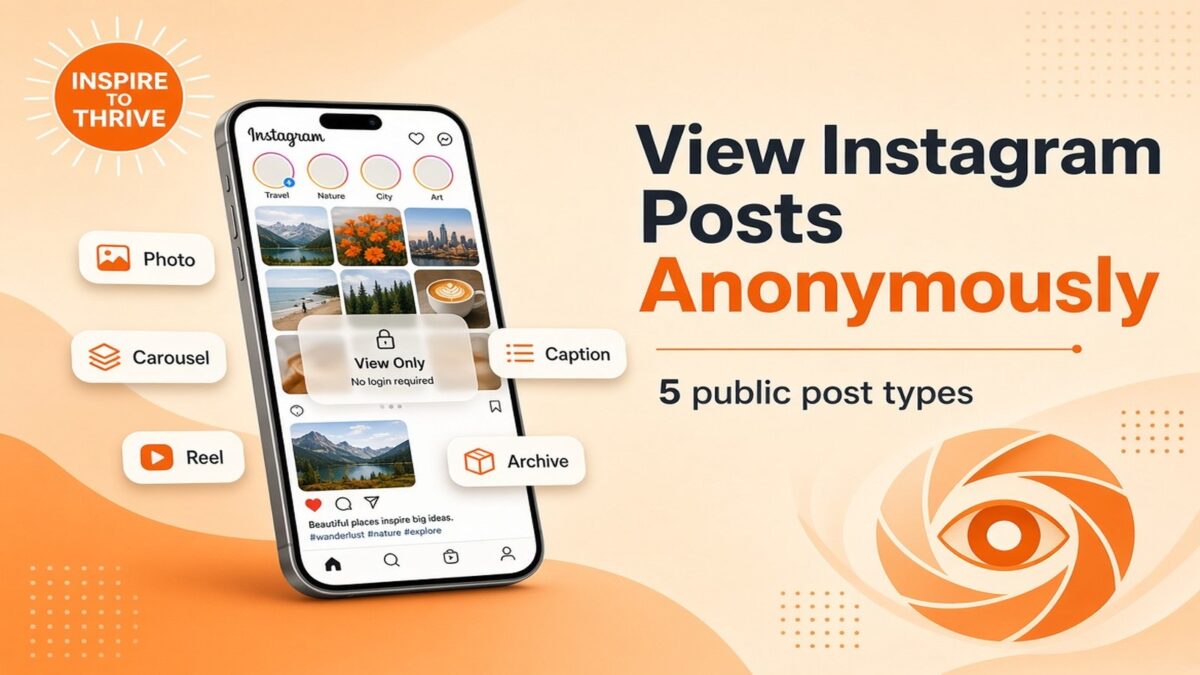
People who want to view Instagram posts anonymously are usually looking at public photos, carousels, Reels, older grid posts, or captions, not private accounts.
This article covers five types of public Instagram posts I would check that way, and why each one is useful. It is not a guide to private accounts. Meta is clear that public content can be visible to people who are not signed in, while private accounts stay limited to approved followers. An anonymous post viewer does not change that.
I am using FollowSpy’s Post Viewer as an example because it is built around public usernames and does not require an Instagram login. The five takes below are about photos, carousels, Reels, older posts, and posts where captions and comments matter.
In every case, the same rule applies: look at what is already public, and do not stretch it into something the post does not show.
Estimated reading time: 8 minutes
Table of Contents
How to View Instagram Posts Anonymously on Public Accounts
1. Photo Posts From Public Profiles
If I wanted to check a public Instagram profile without signing in, a photo post would be the simplest place to start. It can show a product, location, person, event, or visual change without requiring interaction.
Meta says public Instagram content can be visible to anyone, including those not signed in to a Meta product.
I would still separate anonymous viewing from private-account access. If an Instagram account is private, only approved followers can see what that account shares, so an anonymous post viewer is not a way around the owner’s privacy setting.
FollowSpy’s Post Viewer is described for public Instagram usernames, and its current page says it can display public photos without requiring an Instagram login.
That is why I would view Instagram posts anonymously on a public profile first.
2. Carousel Posts With Several Images or Videos
Carousel posts are useful when one thumbnail does not tell the full story. If I wanted to understand a trip recap, a before-and-after sequence, an event gallery, a product launch, or a set of screenshots, I would want to move through the whole post quietly.
In that situation, I could check this Instagram post viewer tool, since FollowSpy says its Post Viewer includes carousels from public accounts, as well as photos and reels.
The full carousel matters because of context. The first slide may be a cover, while later slides can contain details, text, or extra photos. I would rather see the complete public post than judge it based on a single grid preview.
I would also avoid assuming that anonymous carousel viewing means access to hidden content. The privacy boundary still matters.
👉 Meta explains that private Instagram accounts limit shared content to approved followers, whereas public content is visible more broadly.
3. Reels I Want to Watch Without Using My Instagram Account
A Reel is the post type I am least willing to judge from a cover image. The useful part is usually in the first few seconds of the video: a tutorial step, a product demo, a location, or a voiceover that the thumbnail does not show.
That is when I would view Instagram posts anonymously rather than open the app. I can watch the public Reel, read the caption, and stop there. No like, no follow, no comment.
FollowSpy lists Reels in its public Post Viewer and says no Instagram account or password is required. It also says captions can appear with the post, which helps when the video mentions a date, product, or place that never shows on screen.
I still treat this as public content only. If the Reel is on a private account, a post viewer will not be able to open it, and I would not expect them to.
4. Older Posts I Want to Look Back On
Sometimes the newest post is not the one I care about. If I were trying to understand how a public profile changed over time, I might look further back through its visible posts.
That can be useful when topics, branding, or event updates changed over time.
I would mainly use older posts to build context rather than draw a conclusion from a single image. A sequence can show recurring topics or the first visible change.
FollowSpy says its Post Viewer loads public posts 12 at a time, page by page. That can help when I want to move beyond the latest grid and inspect more of the visible posting history without signing into Instagram.
The page does not state that every historical post will always be available, so I would not promise complete archival access.
I would also remember that the amount of content I can see depends on what remains publicly available. Meta lets Instagram users control whether their account is public or private, so a change in privacy can change who can see shared content.
I would therefore treat an anonymous post viewer as a way to browse accessible public material, not as a permanent archive.
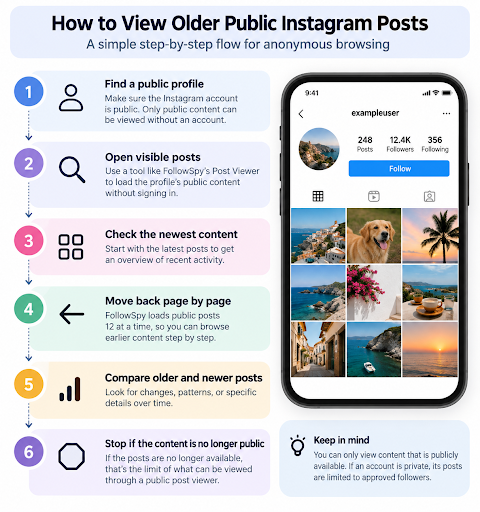
I would be looking at visible material for context, not trying to bypass a restriction. If the content is no longer public, I would treat that as the end of what can be checked via a public post viewer.
5. Posts Where Comments and Captions Matter
A post is not always just the image or video. For a public announcement, creator update, product post, or discussion, I might care just as much about the caption and reactions. FollowSpy says its Post Viewer can display captions, likes, and comments for public posts.
I would use those extra details carefully. A caption can explain what the post is about, while comments may add questions, reactions, corrections, or follow-up information from other users.
None of that automatically proves what happened offline, so I would treat it as public social media context rather than as evidence of something the post does not establish.
Before I relied on a post, I would run through a short checklist. It would help me separate what is actually visible from what I might be tempted to assume.
- I check whether the profile is public.
- I read the full caption instead of relying on the thumbnail.
- I note the post date when timing matters.
- I separate the account owner’s words from other people’s comments.
- I avoid treating likes or comments as proof of a personal relationship or private event.
FollowSpy confirms that its Post Viewer can surface public captions, likes, and comments, while Meta confirms that visibility still depends on whether the Instagram account is public or private.
Social Media Activity
That last point matters because social-media activity is easy to overread. A visible like can show interaction with a post, but it does not explain motive, relationship status, or private communication.
If the answer is not in the public content, I would leave it unknown rather than fill the gap with a guess.
I would also distinguish post viewing from Story viewing. This article focuses on public photos, carousels, and reels available through FollowSpy’s Post Viewer. FollowSpy separately provides an Instagram Story Viewer that is designed for anonymous viewing of public Stories without requiring an Instagram login.
Private or Not?
Meta says public Instagram content can be visible to people on or off its products, while private account content is limited to approved followers. FollowSpy’s Post Viewer is also specifically framed around public usernames.
So if I wanted anonymous access to a public post, I would choose the format based on what I needed. A photo gives one visual, a carousel adds sequence, a Reel adds motion, older posts add context, and captions or comments can explain the media.
I would still keep one rule in place throughout: public information can provide context, but it should not be stretched into conclusions that the post itself cannot support.
Conclusion
If I needed to view public Instagram content without using my own account, I would choose the format that best matches the question.
- A single photo is the fastest visual.
- A carousel gives sequence.
- A Reel adds motion and often a caption.
- Older posts add history.
- Captions, likes, and comments add wording and reaction; not proof of a private relationship or event.
FollowSpy’s Post Viewer is designed for public photos, carousels, and Reels, with captions and comments when visible. It is not a private-account tool, and it is not a complete archive of everything an account ever posted.
Meta’s public-versus-private line still decides what anyone can see.
Use a public post viewer as observation, not interaction. Read the caption, note the date, separate the owner’s words from other people’s comments, and stop when the content is no longer public. That keeps the habit useful and honest.
See public examples on Instagram: inspiretothrive_lisa
Disclosure: This Inspire To Thrive blog post contains affiliate links. I may earn a commission from qualifying purchases at no extra cost to you. Some sections were drafted with AI tools and carefully reviewed/edited by me.
Enjoy this content? Help me show up more often in Google by adding Inspire To Thrive as a Preferred Source: