Getting more eyes on your posts on X isn’t just luck in 2026’s competitive creator landscape; it takes the right tools and strategies. The X Highlights tab remains one of the smartest, underused features for Premium and Premium+ users that you shouldn’t overlook.
By showcasing your best posts (and replies) in a dedicated tab on your profile, you amplify visibility, drive more impressions, and create a stronger first impression for new visitors. Whether you’re building a personal brand like Inspire To Thrive or promoting affiliate offers and client wins, this tool gives you direct control within an algorithm-driven feed.
Here’s what I’ve learned using the X Highlights tab since becoming a subscriber (you do need X Premium to access it). In my own testing this year, it’s helped surface high-performing content, like practical social media tips and authentic Stella videos, that continue to deliver impressions long after the initial post.
Estimated reading time: 12 minutes
Table of Contents
What Are X Twitter Highlights?
X Twitter Highlights is a feature on X (formerly Twitter) that lets you pin your most important or engaging content right at the top of your profile. With Highlights, you can showcase key posts or replies (not just standard tweets) in a special section, similar to a digital portfolio.
Think of it as a quick way to guide new visitors to your best moments, top resources, or posts that show what you’re about. Whether you want to promote a product, share a testimonial, or display a popular thread, Highlights makes it easy for anyone scrolling your profile to see what matters most without having to dig.
If you’re serious about building credibility and making connections, using Highlights gives people an easy path to the content you want them to notice first. Try picking out posts that get the most engagement or tell your story and add them to your Highlights for maximum impact.
Here’s a look at my own X Highlights tab in 2026. I rotate in my top-performing posts on social media strategies, personal rural life content, and small business wins.

Overview of the X Twitter Highlights Tab Feature
The Highlights tab allows you to pin your top posts in one curated section of your profile. Think of it as a personal portfolio of your brightest moments on X (formerly Twitter).
Instead of relying on others to scroll through endless posts, you hand-pick what they see first. It simplifies discovery for your audience and ensures that your best work doesn’t get lost in the fast-paced timeline.
When someone visits your profile, they’ll immediately notice your selected highlights. Whether it’s a viral post, a thought-provoking thread, or a video, the tab lets you control your profile’s narrative.
Key functions of the Highlights feature include:
- Curating top posts: Select posts that represent your best ideas, achievements, or popular posts.
- Pinned visibility: Keep these posts at the forefront instead of letting them fade into an endless feed.
- Improved first impressions: Showcase what matters most when new followers or potential collaborators check you out.
The Highlights tab doesn’t just display posts; it organizes them into a space that feels deliberate and polished. If you’ve ever wished your content could stand out more, this feature was made for you.
Purpose of the Highlights Tab
The core idea behind the Highlights tab is discovery. With so much content shared every day, getting noticed can feel impossible on the X Twitter stream. The Highlights tab provides users with a tool to amplify their visibility without relying solely on algorithms or luck.
Here’s how it helps with discovery:
- Captures new visitors’ attention: When someone lands on your profile, your best posts are front and center. This increases the chances they’ll engage with your content.
- Tells your story at a glance: The Highlights serve as a snapshot of who you are and what you stand for on X Twitter.
- Drives focused engagement: Instead of random likes on older posts, highlights direct attention to specific posts, boosting impressions and interaction rates.
Think of the tab as your X Twitter résumé. Scrolls and likes are nice, but if your audience doesn’t remember you, what’s the point? By showcasing top-tier content, you guide them toward what matters, making both your brand and message stick.
If you are juggling multiple posts or trying to grow quickly, the Highlights tab can feel like a cheat code. It’s not random anymore; you’re in control of how your content gets noticed.
How the Highlights Tab Boosts Impressions
Do you ever feel like your posts aren’t getting the attention they deserve? The X Twitter Highlights tab might be your new secret weapon.
By making your top-performing content more visible, this feature can supercharge your profile’s impressions.
Attracting More Views: How Highlights Catch Users’ Attention
First impressions matter. The Highlights tab positions your best posts right where visitors can’t miss them, front and center. When someone lands on your profile, instead of scrolling through a cluttered timeline, they’re greeted with your hand-picked highlights. This grabs attention immediately, especially for new visitors.
Why does this matter? People have limited time and short attention spans. The Highlights tab eliminates the guesswork from the algorithm, ensuring your most compelling content is what they see first.
It’s like putting your greatest hits on display in a gallery—users can’t help but notice no matter what time of day or night.
For instance, if one of your tweets went viral or sparked a lot of interaction, adding it to Highlights ensures it continues to draw eyes long after it appeared in feeds. Every view adds up, boosting your overall impressions.
Encouraging Engagement: How the Tab Prompts Users to Interact More
The Highlights tab doesn’t just improve visibility; it actively drives engagement. Why? Highlighted tweets are often your most interesting, shareable, or discussion-worthy posts. By organizing them in one place, you’re inviting viewers to dive deeper into your content.
Visitors are more likely to like, comment, or repost when engaging with standout tweets. That’s because the content already has social proof—it’s relevant, popular, or just plain entertaining.
Think of this as rolling out the red carpet for your audience.
Added bonus: when users interact with your highlighted content, this boosts their reach even further. Engagement begets impressions, creating a ripple effect that can lead to even more visibility.
You can read the full blog post mentioned in the above video here.
Showcasing Popular Content: Featuring Top Posts for Higher Impressions
The Highlights tab is all about showcasing the best of the best. By featuring your top-performing posts, you’re essentially giving them a second life. Without this feature, even your greatest content can get buried in the endless flow of text posts.
Imagine having a post that resonated with hundreds or thousands of users. Normally, it would fade into the background after a few days. With the Highlights tab, you can keep it in the spotlight while impressions keep rolling in.
This approach works especially well for content that tells a story or adds value, such as:
- A viral meme or joke that captured attention.
- An informational thread that earned retweets and replies.
- A heartfelt or personal moment that gained traction.
By gathering these high-impact tweets in one place, your audience doesn’t have to search for the good stuff. It’s right there, waiting for them. And the result? A steady climb in profile impressions.
Wouldn’t you want all your hard work to keep paying off? The Highlights tab ensures you get the ongoing visibility your tweets deserve.
Updates on X Twitter Highlights Tab
The Highlights tab on X Twitter continues to evolve, offering users smarter ways to amplify their best content. With each update, it becomes a more effective tool for boosting impressions and engagement.
User Feedback and Improvements
The recent enhancements to the Highlights tab didn’t happen in a vacuum—user feedback played a huge role. X Twitter has been actively listening to its community, and it shows.
- What users love: Many users praised the Highlights tab for instantly boosting profile impressions. They called it a “one-stop shop” for their best content, helping them grow their reach without overhauling their strategy.
- Where users saw gaps: Early feedback highlighted the need for bulk selection and better analytics. Creators and brands wanted an easier workflow and more detailed metrics.
X responded with updates tailored to these requests, reflecting a clear commitment to rolling out practical improvements. But they didn’t stop there; more customization options and mobile-friendly designs also came directly from user suggestions.
The takeaway? The Highlights tab isn’t static. It’s evolving, and much of that momentum comes from user-driven ideas. So, if there’s something you think could be better, chances are X Twitter is paying attention.
By acting on community input, X has made the Highlights tab feel like a tool designed by users, for users. And it’s not slowing down; future updates are already on the horizon.
How to Use the X Highlights Tab Effectively
The X Highlights tab (formerly Twitter) is more than just a place to pin posts; it’s a strategic tool for controlling your profile narrative and boosting impressions. Here’s a practical, step-by-step guide tailored for solopreneurs and small business owners.
Step 1: Add Posts to Your Highlights Tab
- Go to any of your own posts (or replies) on X.
- Tap the three dots (⋯) in the top right of the post.
- Select “Add to Highlights”.
- The post will now appear in the dedicated Highlights tab on your profile.
👉 Pro tip: You can do this from both mobile and desktop. It works on original posts and replies.
Step 2: Optimize Your Content for Highlights
Not every post belongs here. Choose ones that:
- Have strong engagement (likes, reposts, replies)
- Deliver real value (tips, threads, how-tos)
- Align with your brand — e.g., social media strategies, rural Maine life, Stella videos, or affiliate wins
👉 Personal example: I include my top-performing practical tips and authentic dog/rural clips that continue driving traffic to Inspire To Thrive.
Step 3: Keep Your Highlights Fresh
- Stale content hurts more than it helps. Review and rotate monthly:
- Remove older or lower-performing items
- Add seasonal or timely posts
- Aim for 6–12 highlights max for the best visitor experience
Step 4: Track Results with X Analytics
- Impressions on highlighted posts
- Profile visits from the Highlights tab
- Engagement rate
👉 Use the data to refine what you showcase. In my testing this year, regular updates have helped sustain impressions on older content.
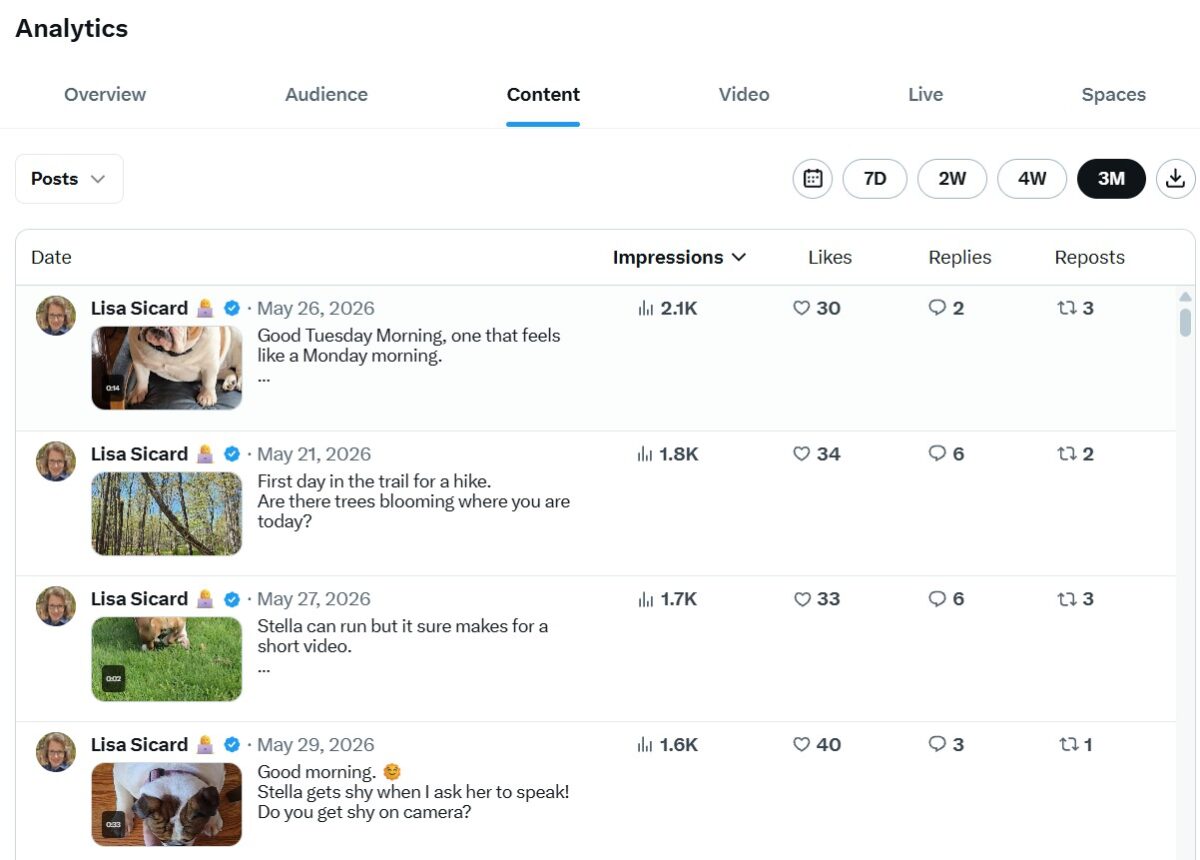
Tracking data may seem tedious, but it’s one of the most effective ways to stay ahead. After all, how can you optimize if you don’t know what’s driving results?
Conclusion: Embrace the X Highlights Tab in 2026
The X Highlights tab has proven itself as more than just a feature; it’s a practical strategy for standing out in today’s fast-moving creator economy. If you’re serious about boosting impressions, growing engagement, and turning profile visitors into followers or customers, this tool puts you in control of your narrative.
By thoughtfully selecting and rotating your top-performing posts, whether it’s a viral thread on small business tips, a real-life rural adventure, or a high-engagement dog video, you give your audience the best of what you offer right at the top of your profile.
It’s especially powerful for solopreneurs and small businesses like yours: no more hoping the algorithm favors your content. You curate the experience, build credibility faster, and create a lasting portfolio that works 24/7.
Ready to give it a try? Head to your X profile, start adding your strongest posts to Highlights today, and track the difference in your analytics.
Have you used the Highlights tab yet? Drop your results or questions in the comments; I’d love to hear how it’s working for you in 2026!
FAQs: X Twitter Highlights Boosting Your Impressions
The Highlights tab is a dedicated section on your profile where you can hand-pick and showcase your best posts, latest videos, and replies. It acts like a curated portfolio, making it easy for visitors to see your top content without scrolling through your entire feed.
Highlighted posts stay visible longer and get more attention from profile visitors. This increased engagement signals value to the algorithm, helping your content (and overall profile) reach more people over time.
Anyone who visits your profile can see it. It’s especially effective for new followers, potential clients, or collaborators checking you out for the first time.
Yes. Use X Analytics (available with Premium) to monitor impressions, likes, replies, and profile visits. In my experience, strong Highlights often lead to sustained impressions on older posts.
No. It’s completely separate; your normal posting and timeline remain unchanged. Highlights only appear in the special tab on your profile.
Focus on your highest-performing content: viral threads, practical small business tips, authentic rural Maine videos (like Stella moments), affiliate promos, or client wins. Choose posts that best represent your brand and drive results.
There’s no strict public limit, but I recommend keeping it to 6–12 items. A concise, high-quality selection keeps visitors engaged without overwhelming them.
On any post, tap the three dots → select “Add to Highlights” (or “Remove from Highlights”). It’s quick and works on both mobile and desktop.
Review and rotate your Highlights monthly. Swap in fresh, seasonal, or high-performing content. Track analytics regularly and align it with your current goals, whether that’s driving blog traffic, promoting affiliates, or showcasing rural life content.

Disclosure: This Inspire To Thrive blog post contains affiliate links. I may earn a commission from qualifying purchases at no extra cost to you. Some sections were drafted with AI tools and carefully reviewed/edited by me.

- Best Instagram Story Viewers in 2026: Free Tools + Honest Limits - October 22, 2026
- Which Instagram Monitoring App Wins? EyeZy vs Peekviewer - October 20, 2026
- How to Use Social Media for the Best Black Friday Deals of 2026 - October 19, 2026
Enjoy this content? Help me show up more often in Google by adding Inspire To Thrive as a Preferred Source: