Do you want to see exactly how often AI tools like Microsoft Copilot are citing your content? With the free AI Performance report in Bing Webmaster Tools, you can easily track AI citations for your site.
This powerful dashboard shows your cited pages, grounding queries, citation trends, and more, all without paying for another SEO tool.
In this step-by-step Inspire To Thrive guide, you’ll learn how to access the report, understand your AI visibility data, and use it to improve your content strategy as a blogger or small business owner.

Estimated reading time: 0 minutes
Table of Contents
Key Bing Takeaways
- Access Free AI Insights: Use the AI Performance report in Bing Webmaster Tools to track how often your content is cited in AI-generated answers across Microsoft Copilot.
- Analyze Grounding Queries: Identify the specific search phrases and user intents that trigger AI systems to reference your content, allowing you to optimize for future visibility.
- Maintain Technical Health: Regularly run Bing Site Scans to resolve technical errors. Crawl issues can prevent search engines from correctly identifying and attributing your content.
- Diversify Your Data: Compare Bing’s unique AI citation data with Google Search Console insights to get a holistic view of your content’s performance across different search environments.
Find Your Website Citations and Cited Pages
Inside Bing Webmaster Tools, open the AI Performance report to monitor your site’s total citations. You can analyze this data by query or by page. It makes it easier to identify the specific articles that AI systems pull from most frequently.
The report provides clear insights into your total citations and the average cited pages, helping you understand how often your content is leveraged.
A cited page is a strong indicator that your content answers a user’s question effectively. Do not ignore these metrics. Instead, analyze what that page covers, how it is structured, and whether you have related posts that could answer similar questions to build more authority.
Bing’s AI Performance report provides free visibility into citations that you won’t find in Google Search Console, offering unique transparency for publisher content.
Bing explains that the report tracks how your information is used in AI-generated answers across Microsoft Copilot and other partner experiences. These visible citations help you track how your brand is represented in AI responses. Check the official AI Performance report details regularly, as this feature continues to evolve to support site owners.
How to Track AI citations in Bing Webmaster Tools via Grounding Queries
Click into your citation data to analyze your page-level citation activity and see exactly when your content is being referenced most frequently. Monitoring these dates is critical because a page may experience high citation volume in June but a drop in July. It is a signal to review that content for relevance.
You can also examine your grounding queries, which are the specific search phrases that prompted the AI to cite your page as a reliable reference. Bing organizes these queries by intent and topic, providing clear insight into why your content was chosen.
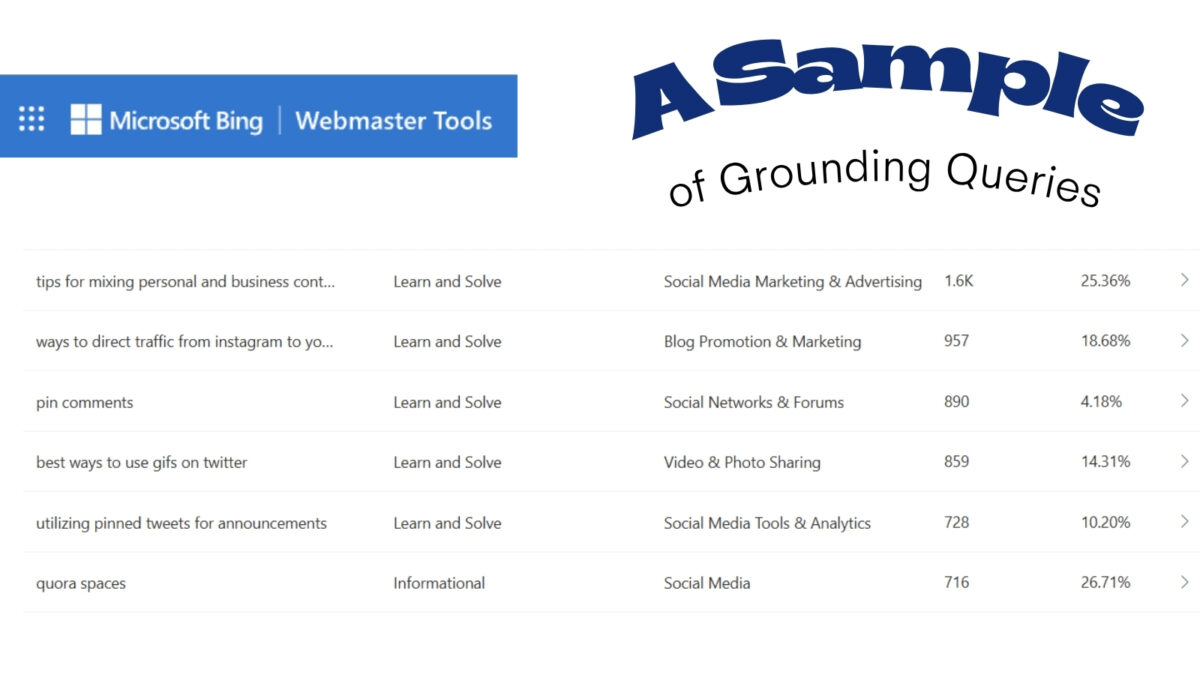
By understanding these grounding queries, you gain a better starting point for future updates.
To improve your source attribution and increase your chances of being featured, consider the principles of Generative Engine Optimization. Since AI models prioritize clarity, ensure your content addresses the user’s question early and provides a direct, comprehensive answer.
👉 If the grounding queries indicate that users are searching for information, make sure your page solves the problem clearly and immediately. You don’t want to bury the most helpful information halfway down the page.
Run a Bing Site Scan for Errors
Bing Webmaster Tools includes a Site Scan feature that is well worth checking each month. It identifies specific errors and warnings that may not surface on other platforms, helping you maintain optimal crawl health.
Regularly utilizing this tool is an effective way to protect your AI search visibility. Technical issues often prevent search engines from correctly attributing your content to AI-generated answers.
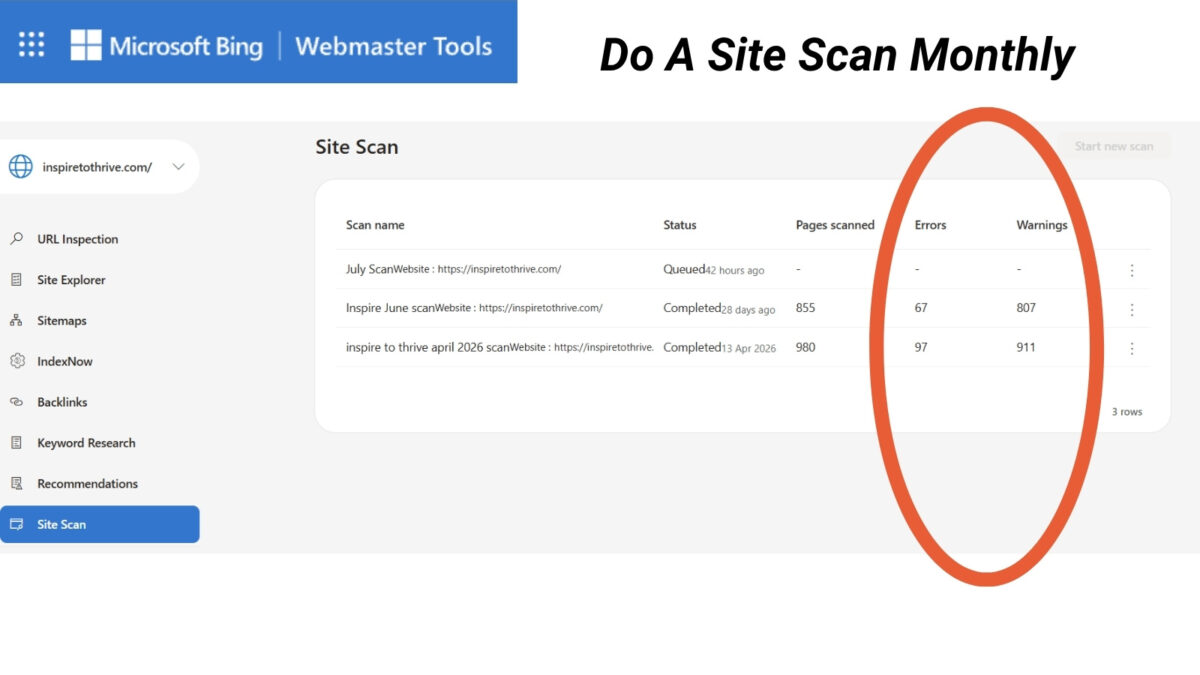
When you encounter errors, do not let them persist for months. Run a new scan, review the findings, and address any issues that affect your site. Beyond manual scans, you should also leverage IndexNow to ensure the immediate indexing of new or updated content.
By fixing broken pages, resolving crawl issues, and clearing technical errors, you ensure that search engines can easily find and rank your best content.
👉 For more on verification, sitemaps, crawling, and regular scans, see this Inspire To Thrive guide to Bing Webmaster Tools.
Compare Bing Search Performance With Google
It is important to remember that your top-performing pages on Bing will not always align with your top pages on Google. This is perfectly normal, as different search engines often prioritize different content for the same topic.
Evaluating your search performance across multiple platforms provides a more balanced view of your total organic traffic and overall content visibility.
Tracking data from both platforms helps you understand how your publisher content is discovered:
- Bing may surface unique keyword opportunities and different page rankings compared to other engines.
- Using Google Search Console allows you to monitor how your site appears in traditional search results.
- Monitoring AI performance data provides insight into how your site is cited within AI-generated answers and grounding queries.
Do not rely on a single report to gauge your success. By comparing these sources, you can identify where your content visibility is strongest. It will also show where your publisher content is being attributed effectively across both traditional SERPs and AI-generated answers.
Set Up Bing Webmaster Tools and Use Keyword Research
Getting started with Bing Webmaster Tools is straightforward. Simply verify your site ownership, submit your sitemap, and review your crawl controls. If you already use Google Search Console, the setup process will feel familiar.
Once your account is ready, navigate to the keyword research tool. Search for a topic or brand term related to your site to review suggested questions, related keywords, impressions, and top-ranking pages.
👉 These insights are incredibly valuable, as they help you optimize your content for Microsoft Copilot and other partner search experiences.
If a narrow phrase does not provide enough data, try searching for a broader term. A specific product phrase might show limited results. The main product name often reveals questions and related searches that you can use to inform your future content strategy.
Those question-based keywords are especially helpful when you are planning new blog posts, videos, or FAQ sections. By using Bing Webmaster Tools to identify these queries, you can align your content with the actual language your audience uses. It is better than relying on assumptions.
Frequently Asked Questions: How to Track AI Citations in Bing Webmaster Tools
To access this feature, log into your Bing Webmaster Tools account and look for the “AI Performance” report in the left-hand sidebar menu. This dashboard displays your total citations and specific page-level activity regarding how your content appears in AI-generated responses.
Grounding queries are the specific search terms or phrases a user inputs that cause the AI to rely on your content as a source. By analyzing these queries, you can understand exactly what your target audience is asking. It helps you refine your content to better address those informational needs.
No, the AI Performance report is completely free for all verified site owners using Bing Webmaster Tools. It provides a unique, transparent look at your site’s AI presence that is currently unavailable on many other major search console platforms.
It is best practice to review your AI performance metrics at least once a month as part of your regular SEO maintenance tasks. Regular monitoring helps you identify trends in your citation volume and catch and fix significant drops in content relevance early.
Final Thoughts: Use the Data to Keep Content Fresh
You do not need expensive, complex software to begin monitoring your AI citations and overall search performance. Bing Webmaster Tools, Google Search Console, and your own analytics data provide a comprehensive foundation for your strategy.
Make it a habit to regularly check your citation dates, grounding queries, and site scan issues. As you review this data, start monitoring your citation share as a key performance metric to understand how often your content is referenced over time.
AI citations are a vital area where your helpful content can gain new reach. Bing offers a transparent, free way to track that growth.
By prioritizing these insights, you can improve your AI search visibility and ensure your brand remains a reliable authority. Ultimately, Bing Webmaster Tools provides the most actionable source attribution data available to creators today. It’s completely FREE TO use!
Have you looked up your blog or website’s stats on Bing Webmaster Tools? I’d love to hear about it in the comments below. 👇

Disclosure: This Inspire To Thrive blog post contains affiliate links. I may earn a commission from qualifying purchases at no extra cost to you. Some sections were drafted with AI tools and carefully reviewed/edited by me.
Enjoy this content? Help me show up more often in Google by adding Inspire To Thrive as a Preferred Source: