WordPress security became a practical concern when spam traffic, aggressive crawlers, fake bots, brute-force login attempts, and suspicious visits kept targeting this WordPress website. It wasn’t one big scary event. It was steady noise that made me look closer.
The Wordfence plugin gave me a way to see what was hitting the site and take more control. This is my honest look at why I chose Premium, especially for blocking bot traffic from selected countries. Not every WordPress site needs a paid security plugin, but some sites reach a point where the upgrade makes sense.
Estimated reading time: 14 minutes

Table of Contents
Crucial Findings
- Wordfence Premium adds real-time firewall rules and Threat Defense Feed intelligence. It’s one layer of a broader WordPress security routine.
- Country blocking helped reduce spam bots and unwanted login activity from selected locations.
- The IP blocklist can stop known malicious addresses before they cause more trouble.
- The $149 annual plan includes a 60-day audit log and ticket-based support.
- Wordfence Central provides centralized management for connected sites.
- Backups, updates, strong passwords, two-factor authentication, and limited admin access still help prevent security issues.
- You can review current pricing and features for Wordfence Premium here.
Why Wordfence Premium Made Sense for My WordPress Site
The free version is a solid starting point for WordPress security. I used it before upgrading, and it provides WordPress websites with useful protection. Among WordPress security plugins, it covers many everyday risks without adding another monthly cost.
Wordfence Premium adds current firewall rules, a malware scanner, and threat intelligence from the Threat Defense Feed. The scanner can inspect core files, plugins, themes, and other parts of the site. Free users receive many comparable protections later, after a delay.
If you’re considering the upgrade, you can see current Wordfence Premium pricing and features here.
Premium is still self-managed. You install the plugin, add the license key, review alerts, and choose your settings. You can also view connected sites through Wordfence Central. It isn’t the same as hiring someone to manage security for you.
The firewall is a Web Application Firewall that filters web requests to your site. It isn’t a replacement for endpoint security on your personal computers. Login security also depends on strong passwords, account controls, rate limiting, and stronger options such as passkeys.
Store owners should also check how their security setup interacts with WooCommerce integration.
Security software helps surface security issues and lower risk. It doesn’t replace tested backups, software updates, or careful user management. Think of it like a good lock on your business door. You still need to close the windows.
Real-time threat updates help close the protection gap
A new vulnerability can spread fast once attackers know about it. Waiting 30 days for firewall rules to take effect may be fine for a quiet hobby site. It can feel like a long wait for a growing blog that attracts consistent traffic.
The Threat Defense Feed supplies current threat intelligence as new threats emerge. With Premium, current protection rules and current malware signatures reach the site sooner. Free users may receive a given malware signature after the usual delay.
That difference doesn’t mean every attack is stopped. No security tool can promise that. Still, getting updated threat information quickly gave me more confidence. I wasn’t relying only on last month’s information while bots tested today’s weak spots.
The IP blocklist, scans, and spam checks target noisy traffic
The Real-Time IP Blocklist works as an IP blocklist for known malicious sources. Wordfence says the list contains more than 40,000 IPs associated with malicious activity. I can also review an individual IP address when a request looks suspicious.
The plugin can rate-limit or block aggressive crawlers, scrapers, vulnerability-scanning bots, fake Googlebots, and repeated login attempts. Those requests create malicious traffic, fill reports with junk, and waste server resources.
👉 This combination of filtering and login security helps reduce noisy activity.
I review each security scan for changes to plugins, themes, and core files. The dashboard also provides live traffic details, while an audit log records important activity and changes. That makes it easier to connect an alert with something that happened on the site.
Historical records remain useful when I need to understand when a setting changed or an account took an action. The audit log can provide that context instead of leaving me to guess later.
Premium’s added scans and spam-related checks made the daily security picture easier to understand. For multi-site installations, Wordfence Central provides a practical way to view and manage connected sites. I could focus less on suspicious requests and more on content, SEO, and running the business.

How I Used Country Blocking to Cut Down Spam Bots
Country blocking became one of the biggest reasons I chose Premium. It supports login security by restricting traffic from selected countries, either from the login page or across the entire site.
That level of control matters when reports show repeated automated activity from places where you have no readers, customers, contributors, or business reason to receive traffic. It isn’t about making assumptions about people in a location. It’s about looking at the actual traffic patterns on your site.
Wordfence uses a commercial geolocation database stored on your WordPress server. That allows fast country lookups when a visitor or bot makes a request. Country rules also complement the current intelligence in the Threat Defense Feed, rather than replacing it.
Start with login-page protection whenever possible. A full-site block can affect legitimate visitors you didn’t expect.
Before creating a rule, I recommend reviewing live traffic, Google Analytics, server logs if available, and the audit log. Look for a repeated pattern, not a single bad request. For connected sites, Wordfence Central can help you review existing rules in one place.
A WooCommerce integration may also require access from regions you didn’t expect. Customers, payment services, and other store tools can come from different countries.
Why blocking selected countries can reduce unwanted requests
A normal reader visits a post, looks around, and perhaps signs up for a newsletter. Automated malicious traffic often repeats the same requests at high volume, probes login pages, scrapes content, or tries known vulnerable URLs.
Country blocking can reduce login attacks, spam attempts, and repeated brute force activity when a site doesn’t need to serve a certain region. That can mean fewer suspicious requests and cleaner reports.
It can reduce some security issues, but it isn’t a complete security plan. Attackers can use VPNs, proxies, cloud servers, and compromised devices in other countries. A country rule is one filter, not a magic wall.

How to configure country blocking without hurting real readers
Use a measured process before blocking anyone. Before using country blocking, confirm the pattern affects a region, not just one IP address:
- Review your traffic and firewall reports for repeated harmful activity.
- Identify countries where your site has no real audience, customers, or partners.
- Choose whether to protect only
wp-login.phpas part of your login security or block access to the full site. - Apply the rule, then monitor live traffic, alerts, and visitor feedback. If your sites are connected, use Wordfence Central to compare the rule and review results.
- Keep an emergency admin access plan in case you block your own route into the site.
If you work with writers, clients, or contractors overseas, make exceptions before you turn a rule on. Don’t block an entire country because of one bad IP address. Check the pattern first.
Wordfence Free vs Premium: What I Paid For
Wordfence Premium was listed at $149 per year as of August 2026. Prices can change, so check the official Wordfence pricing page before you buy.
After purchase, I activated the subscription with a license key.
For me, the decision wasn’t only about features. It was a broader WordPress security choice. I wanted less bot noise, current protection, and more control over login traffic.
| Feature | Wordfence Free | Wordfence Premium |
|---|---|---|
| Firewall protection | Delayed firewall rules and signatures | Real-time updates |
| Malware scanner | Delayed signature updates | Current signatures |
| Premium IP Blocklist | No | Yes |
| Country blocking | No | Yes |
| Security audit log | Limited | Includes 60 days of history |
| Centralized administration | Available through the central dashboard | Available through the central dashboard |
| Support | Community resources | Ticket-based support |
The Threat Defense Feed provides more current threat intelligence, which was important for my site. The audit log also makes it easier to review historical activity when troubleshooting unusual events.
Wordfence Care and Response cost more than the Premium plan. Care is $590 per year and includes hands-on help and incident response during business hours. Response is $1,250 per year and adds 24/7 incident response.
Those are managed service options, not the self-managed Premium plan I chose.
When the no-cost Wordfence plan may be enough
The free version can be enough for a small, low-risk WordPress website with limited traffic and few users. It is also a good fit if you keep WordPress updated, use reliable backups, and don’t need immediate threat intelligence or location-based controls.
Don’t upgrade only because a paid option exists. Review your scan results and firewall activity first.
👉 A newer personal blog with little spam may be fine using the no-cost plan for quite a while.
When Premium becomes easier to justify
Premium made more sense when I saw repeated bot traffic and login attempts. It may also be a good fit if your site has business content, customer data, multiple contributors, or fast-growing traffic.
Other factors include stronger login security, concern about delayed rules, and the need for direct support. Stores should also consider checkout protection and WooCommerce integration requirements before choosing their tools.
For several contributors or properties, Wordfence Central can simplify oversight. This isn’t fear-based marketing. It’s a risk-and-time decision.
A good security plugin belongs in a sensible set of WordPress security plugins, not as your only line of defense.
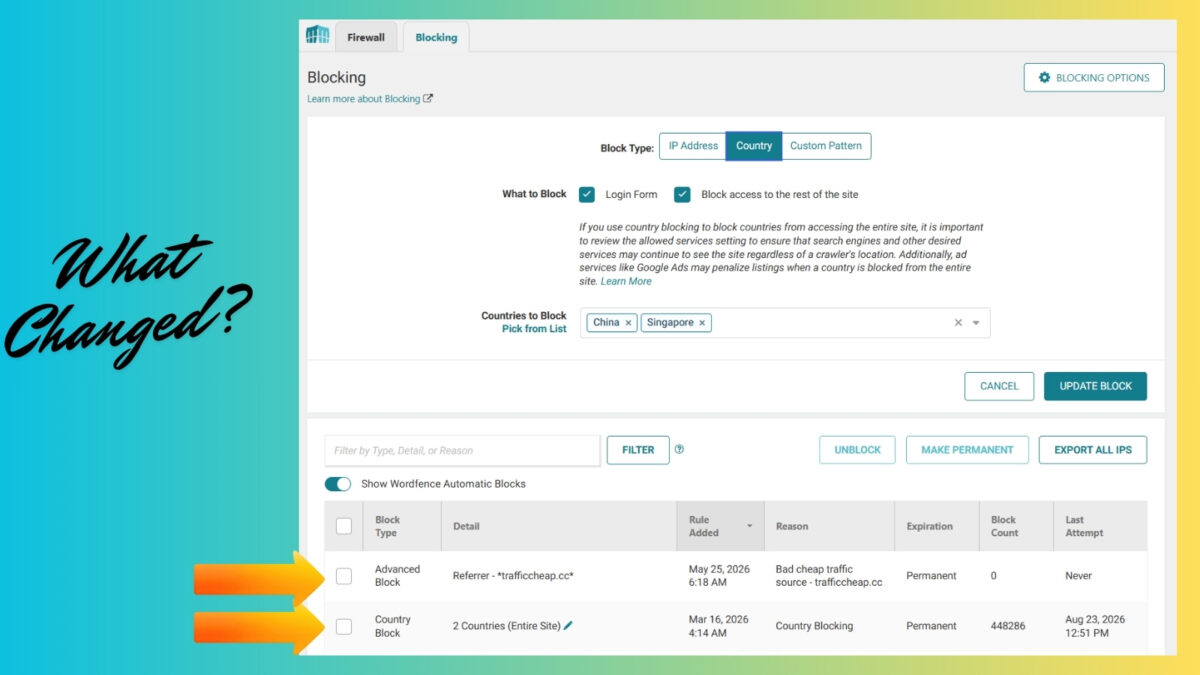
What Changed After Installing Wordfence Premium on Inspire To Thrive
Installing the Wordfence plugin through WordPress was quick. I entered my license key through the legitimate Wordfence account process and connected the site to Wordfence Central.
The bigger job was reviewing the settings with care. A plugin can be installed in minutes, but security rules deserve more attention than a quick click-through.
After activation, the live traffic dashboard showed fewer suspicious requests. The Threat Defense Feed also helped keep my WordPress website up to date with threat data.
I saw a dramatic reduction in spam and suspicious traffic. I won’t claim a universal percentage because this was an observational result, not a controlled measurement.
Fewer unwanted requests made it easier to focus on publishing posts, improving SEO, and handling business tasks. It also reinforced a simple truth: WordPress security needs a short, regular routine, not a once-a-year panic session.
The settings I would review first
After activation, review the firewall rules and confirm the firewall status. Check the security scan schedule and results, including findings from the malware scanner.
Review login security, two-factor authentication settings, rate limiting, country blocking rules, IP allowlists and blocklists, email alerts, and scan exclusions. Test country blocking after changing the rule so legitimate readers can still access the site.
Check core files during scans and investigate any unexpected changes. Look at repeated source requests and note whether the same IP address appears across multiple reports.
Make changes one at a time. An overly strict rule can block legitimate readers, contributors, or even you. Check your reports after each change to understand what caused the result.
Use strong, unique passwords for every account. Limit administrator access to people who truly need it. Passkeys are an optional modern sign-in method, not a requirement. If you use passkeys, keep another trusted recovery method available.
Strong login security protects administrator accounts from more than simple password attacks. Turn on two-factor authentication and review account activity regularly. Store backups before plugin updates, too, because recovery is much easier when your backup has already been tested.
If you run a store, test the WooCommerce integration after security changes. Check customer sign-in, checkout, and administrator workflows before considering the changes complete.
Security results need regular review, not a set-it-and-forget-it approach
I check firewall and scan alerts on a regular schedule. I also review live traffic for repeated requests, unusual behavior, and patterns from the same sources.
A security alert should be triaged rather than ignored. Wordfence Central lets me review alerts and settings from a centralized dashboard, which is useful for managing site activity outside the individual installation.
The Premium audit log keeps 60 days of history. That is useful when you need to see what changed and when.
👉 Keep WordPress, themes, and plugins updated. Review core files when a scan reports unexpected changes, and check whether a new malware signature explains the finding.
Those small habits support better management of security issues. They are like brushing your teeth, a little effort that helps prevent a painful problem later.

Frequently Asked Questions
Does Wordfence Premium stop all spam and bot traffic?
No. It can block many known threats, aggressive crawlers, scrapers, and suspicious requests. Its IP blocklist can help with known malicious sources, but no plugin catches every bot. A security alert also needs review and doesn’t automatically prove a compromise. Check the source IP address and current malware signature data before deciding what to do.
What does Wordfence’s Web Application Firewall protect?
The Web Application Firewall checks incoming requests and can block suspicious patterns before they reach your site. It helps protect against common attacks, but it isn’t a complete defense against every threat.
Can country blocking accidentally block legitimate visitors?
Yes, country blocking can affect a reader, client, or contributor in a blocked country. Start by protecting the login page, review your traffic data, and create exceptions where your business needs them.
Is Wordfence Premium worth it for a small blog?
It depends on your traffic, site value, and risk level. The free plan may be enough for a low-traffic personal blog, while a business site may value faster protection updates, country controls, and support.
How do I activate or renew Wordfence Premium?
After purchase, enter your license key in the Wordfence settings. Check the license status there when renewal time approaches, and follow the prompts to continue coverage. After purchase from the official Wordfence Premium page, enter your license key in the Wordfence settings.
Does Wordfence slow down a WordPress website?
Security scans and firewall checks use server resources. Good hosting and sensible settings can reduce performance concerns. Monitor live traffic and site speed after major changes, especially when hosting resources are limited.
How can I improve login security with Wordfence?
Use strong passwords and two-factor authentication for administrator accounts. Passkeys may provide another login option, while limiting login attempts can reduce brute force attacks.
Can Wordfence replace endpoint security?
No. Wordfence protects the WordPress installation, not the laptops or phones used to access it. Device-level endpoint security remains important for protecting administrator accounts and sensitive files.
What other WordPress security steps should I use with Wordfence?
Use reliable backups, timely updates, strong passwords, limited administrator accounts, secure hosting, and a recovery plan. WordPress security depends on these habits, and Wordfence doesn’t replace them.
Can I monitor connected sites with Wordfence Central?
Yes. Wordfence Central can help you review security activity and manage connected sites from one dashboard. It can be useful when you maintain multiple sites.
My Final Thoughts on Wordfence Premium
I chose Wordfence Premium because Inspire To Thrive needed stronger WordPress security for spam traffic and bots. The Threat Defense Feed, more frequent scans, a useful audit log, and direct support made the price easier to justify.
A smaller or newer blog may not need Premium yet. A security plugin is only one layer of protection, so review your WordPress website’s traffic patterns and risk. Compare the free and paid features, then choose the protection level that fits your site’s real needs.
Smaller sites can reasonably stay with the free option until their traffic, business needs, or risk profile changes.
Compare the free and paid features, then choose the protection level that fits your site’s real needs. If Premium makes sense for your site, you can get Wordfence Premium here,
Disclosure: This Inspire To Thrive blog post contains affiliate links. I may earn a commission from qualifying purchases at no extra cost to you. Some sections were drafted with AI tools and carefully reviewed/edited by me.

- Best Instagram Story Viewers in 2026: Free Tools + Honest Limits - October 22, 2026
- Which Instagram Monitoring App Wins? EyeZy vs Peekviewer - October 20, 2026
- How to Use Social Media for the Best Black Friday Deals of 2026 - October 19, 2026
Enjoy this content? Help me show up more often in Google by adding Inspire To Thrive as a Preferred Source: