
Struggling with SEO? Don’t fret. The Yoast SEO WordPress plugin is still one of the easiest ways to handle on-page SEO without spending all day in a technical dashboard.
I use Yoast SEO Premium on Inspire To Thrive. It helps me write cleaner posts, keep internal links from getting sloppy, preview social shares, and handle the technical bits I used to put off. You don’t need to know code to set it up.
I also use Rank Math on other blogs. Both are solid. This post is about what Yoast actually does for a working blogger, not a “this is the only plugin” pitch.
Disclosure: I applied to the Yoast affiliate program. If I’m approved and you purchase through my links, I may earn a commission at no extra cost to you. I still use Yoast SEO Premium here on Inspire To Thrive and Rank Math on other sites I manage. I’ll update this page with my tracking links once they’re live.
Estimated reading time: 7 minutes

Table of Contents
Why It Still Makes SEO Easier
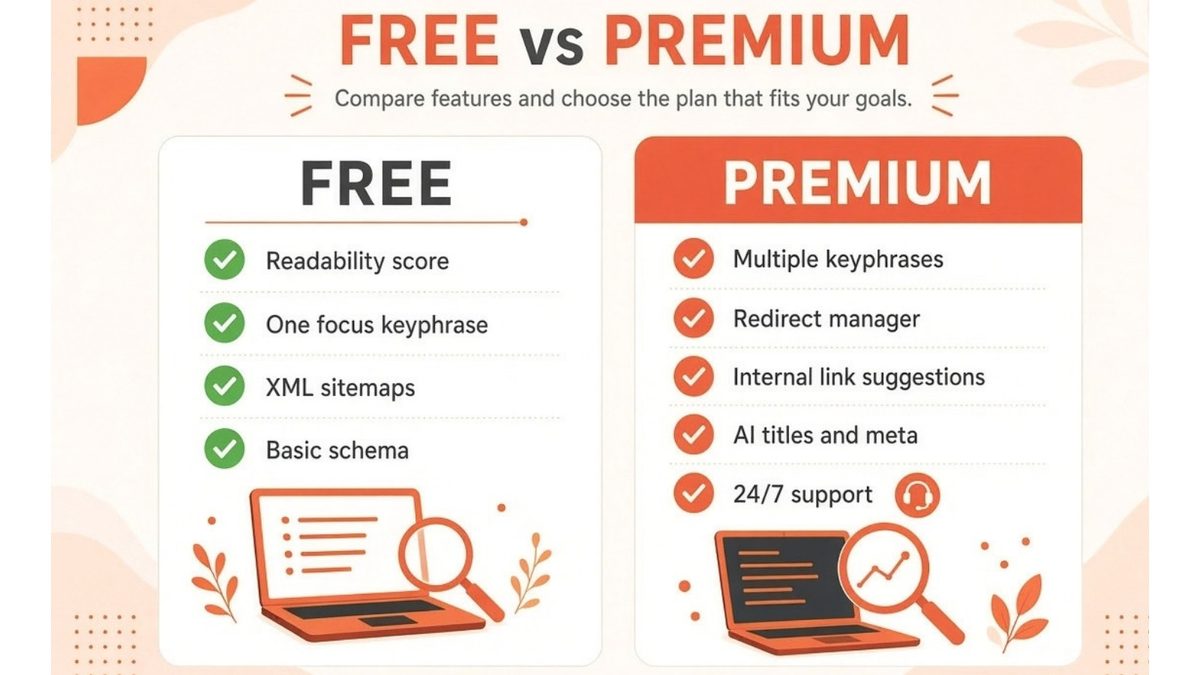
The free version already covers a lot: focus keyphrase checks, readability, sitemaps, and basic schema.
Green dots are a guide, not a grade from Google. After you write with the panel open for a few months, you stop chasing every orange light and just use it as a second set of eyes.
Premium is what I use when I want more than one keyphrase, redirect help inside WordPress, internal link suggestions, and the newer AI title/meta tools. (I’ve been using this plugin on Inspire To Thrive for 14 years.)
6 Reasons I Still Keep Yoast SEO Plugin On This Site
1. You write better web copy
Yoast rates readability and flags long sentences, missing transition words, and hard-to-scan paragraphs. The free version has this. Premium lets you optimize for more than one keyphrase on the same post.
You want mostly green when you publish. You do not need a perfect score on every post.
2. You link better
Premium suggests internal links as you write and surfaces orphaned content in the dashboard. That matters more than another keyword tool.
If you have posts sitting with no incoming links, start here: how I fix orphaned content.
Outbound links to useful sources still help readers and keep the post from feeling closed off.
3. Social shares look the way you meant them to
Preview the Facebook / Open Graph image and text before you hit publish. Same idea for Pinterest, LinkedIn, and X. This one feature has saved me from sharing a post with a missing image more times than I want to admit.
4. Content insights keep you on topic
Premium’s content insights show related words and phrases so the post stays on the subject you meant to cover. I still check Google Trends myself. The plugin is a check, not the whole keyword strategy.
5. It handles technical SEO you’d rather not touch
Schema, sitemaps, robots editing from WordPress instead of FTP, and crawl settings live in the plugin. I used to try to “just quickly edit robots” the hard way. Don’t. Back up first, always.
Yoast now also leans into AI search readiness: structured data, lllm.txt-style guidance, and Premium options around which AI bots can use your content. That’s a 2026 problem the old version of this post didn’t have.
6. AI features for titles and meta (the part I actually use)
I like the AI suggestions for SEO titles and meta descriptions. You get options, you pick one, you edit it so it still sounds like you. Rank Math has similar AI help on the other sites I run.
Premium can also draft titles and metas in bulk from the editor. Review every suggestion before you save.
👉 AI is a first draft, not the published line. Don’t forget to put YOU or your brand voice in the post.
What Else the Premium Yoast SEO Plugin Does
Redirects: Create 301s inside WordPress. When you delete or change a URL, it prompts you instead of leaving a 404.
Search Console integration: Useful when you’re pruning or updating older posts.
RSS extras: Add a short line at the start or end of feed items so scraped content still points back to you.
Permalink cleanup: Helps stop junk query strings from creating duplicate-looking URLs.
Current price: Yoast SEO Premium is listed at around $118.80 per year, per site (ex VAT).
Local, News, and Video SEO used to be separate add-ons. Those are now bundled into Premium on the current plan.
Yoast vs Rank Math (still my honest take)
I recommend Yoast here because I use it on this site and the workflow fits how I write. I also recommend comparing it to Rank Math if you manage more than one site or you want more features in the free tier.
I’m not picking a winner for every blog. Use the one you’ll actually keep updated.
Your Turn on Yoast SEO Plugin
If you use Yoast (free or Premium) or you switched to something else, tell me what you keep and what you ignore. Are you finding SEO harder now that AI search is in the mix?
Yoast SEO Plugin FAQ
The free Yoast SEO plugin is enough if you want readability checks, one focus keyphrase, sitemaps, and basic schema. Upgrade to Premium when you want multiple keyphrases, redirects inside WordPress, internal link suggestions, and the AI title/meta tools. I use Premium on this site because those extras save me time on old posts.
Yoast SEO Premium is listed at around $118.80 per year, per site (ex VAT). Confirm the live price at checkout before you buy. There is a free version if you are not ready to pay.
It depends on the site. I use the Yoast SEO plugin here and Rank Math on other blogs I manage. Yoast is clearer for writing and easier to read. Rank Math often packs more into the free tier. Compare them side by side: Rank Math vs Yoast.
No. It helps you write titles, metas, headings, and internal links. Google still needs useful content, a crawlable site, and links. Green dots are a checklist, not a ranking guarantee.
It helps on the technical side: schema, sitemaps, and newer controls around how AI crawlers use your content. It will not replace clear writing or E-E-A-T. I still write the post first, then use the plugin to tidy titles and structure.
Yes, if you have Premium. It can prompt you to redirect when you delete or change a URL. I still back up the site before bulk redirect work.
No. Keep /seo-plugin-yoast/. Change the focus keyphrase, title, and meta. Leave the slug so you don’t break old links and comments.
Disclosure: This Inspire To Thrive blog post may contain affiliate links. I may earn a commission from qualifying purchases at no extra cost to you. Some sections were drafted with AI tools and carefully reviewed/edited by me.

- Instagram Tools Aren’t One-Size-Fits-All: Match the Tool to the Job - September 30, 2026
- Porn on X (Twitter): What’s Allowed and How to Block It - September 29, 2026
- Dolphin Radar Review 2026: Instagram Follower Tracker (What I Saw After 2 Weeks) - September 29, 2026
Enjoy this content? Help me show up more often in Google by adding Inspire To Thrive as a Preferred Source:



Hi Lisa,
Thank you for this wonderful post. Being a new blogger I have been looking for the right kind of plugins to use on my site. I am glad I landed on your post. After reading your post, I have done some research on Yoast SEO and I must say everybody loves it. So I am going to go for it.
Thank you so much for your kind suggestion. Have a good one.
Hi Tarique, you are most welcome. Yoast SEO is awesome and I recommend going with the premium from the get go. It will save you a lot of time and time is money! I believe it’s around $39 per year. A great investment for your blog. Thanks for coming by and have a wonderful day ahead .
Hi Rajinder, welcome to Inspire to thrive. Me too, using Yoast saves me a lot of time, especially the premium version. Thanks for coming by and have a great day!
Hi Lisa,
I wonder how I missed this post.
I have been using this wonderful plugin since few years and its doing a wonderful job on my contents.
Yes, this is indeed and amazing plugin all bloggers must use.
Though presently I am using the free version this post made me to go for the premium one. will surely go for a premium one.
Thanks for the wonderful features explained thru this post.
Keep sharing;
Best
~ Phil
PS: A note for reference, I think after getting the ssl certificate for my page the commentLuv is not working properly, I mean the link post is not appearing, instead an error message is getting, Any solutions?
Thanks
Phil
MSG: A feed could not be found at https://www.pvariel.com/. A feed with an invalid mime type may fall victim to this error, or SimplePie was unable to auto-discover it.. Use force_feed() if you are certain this URL is a real feed.
Hi Philip, I’m not sure. But it’s not too late. I do love the premium, it saves me doing doing posts with SEO in mind.
Yes, if you have SSl you should put in http: and the site for the comment. I’ve learned that and may do a post on it soon. I tried both ways and the ones without the ‘s” at end work okay in most places. I hope someone can buy it and update it as Andy took sick. He was the one who made Comment Luv.
I hope that helps Philip!
Hey Lisa,
I’ve been reading some of your posts recently thank you for all the informative stuff.
I use the free version of Yoast didn’t know that the premium version sets up your article schema for you might look into upgrading.
the plugin I use for schema keeps showing errors on the search console its a hassle sometime to be honest.
Great work keep it up.
Hi Omar, You ar welcome. Oh yes the premium Yoast does offer some great bells and whistles. I love the suggestions for interlinking it offers as well as more keywords. It’s well worth the little extra dollar for this one Omar.
A great review explaining the need of Yoast.
Btw, do you suggest one to have Yoast Premium? or is it fine to stick with the free version only.
Thanks
It depends on what your needs are Iftekhar. I liked the extra’s it gave me for this blog but I went 5 years with the free version. I love the insights on keywords and the time it saves me researching for them and the other feature for the redirects is awesome. I’m looking to save time. So it’s up to you and what you need at the moment.
I like your website. It has a lot of information especially for new blogger which are struggling to increase their traffic through SEO and social media.
Hi Ramzan, welcome to Inspire to Thrive. How long have you been blogging now? I do love this plugin and the premium is even better with great customer service. Thanks for coming by and have a great day.
I may have read this late, but boooy — good thing the topic isn’t considered obsolete. I really appreciate SEO plugin yoast as for WordPress. I just couldn’t agree more with this list. Thank you for sharing this.
Hi Jeric, welcome to Inspire to Thrive, it’s never too late to read a post. Do you use the premium version as well Jeric of Yoast?
I recently updated my wordpress site and updated the Yoast plugin but the plugin failed. I removed the plugin and tried to reinstall it but It doesn’t work. I keep getting this error: “Installation failed: Destination folder already exists.” I cannot find any mention of Yoast in my plugins folder. Can someone please help with a solution?
Hi Saeed, contact them here : https://yoast.com/contact/ if that doesn’t work – tweet them at https://twitter.com/yoast Good luck and let me know how you make out Saeed. Some plugings don’t work well with others.
Hi Lisa,
This is my first visit to your blog and honestly, i am very much happy to see the detailed and quality contents.
I am using Yoast Plugin since last few years and it works like a charm for on page seo activities. It really helps to reduce our effort on many on-page tactics.
“Importing settings from other SEO plugins” – is one of the best features of yoast plugin.
I recommend trying the premium version of Yoast Premium Plugin which gives better visibility to search engines.
Thank you.
Hi Rohil, welcome to Inspire to Thrive. Oh I love Yoast, even the free version I had for years was awesome. But the premium is even better along with awesome customer service. I never used another so that is new to me Rohil, thanks for bringing that to the attention here of others who will read on this one. Have a great day Rohil.
I was using seopressor to optimize blog and I noticed everyone is talking about Yoast. That is the first time i heard of yoast and gave it a try I installed in some blogs which is not getting enough traffic and Seriously after Yoast came to me. Everything has changed now and installed in primary blog as well.
Hi Abdullah, welcome to Inspire to Thrive. I’m so glad to hear that Yoast is really working for you. I love the ease of using it. It really helps me when I’m writing new posts here. They have great customer support too if you ever need. Thanks for your input on this one and have an awesome day Abbullah.
Thanks Lisa for you awesome reply and it is appreciated. Yoast does full work of On-Page Seo which we need not to care about and day by day after using Yoast for some days we will be expert in Doing On-Page Seo. Its true right Lisa?
Yoast is always great and works like a Charm.
Hi Lisa,
I don’t know what I would do without this plugin. Guess I would have to spend time researching. Time is precious and this really helps.
It also helps me editing for SEO purposes. Sometimes I’m good to go but have to change a thing or two until I get all the “green lights.”
Thanks for writing about this. Every blogger needs it.
-Donna
Hi Donna – I know right? It would take a lot more time doing each post without this Yoast Plugin. I love how it counts your characters for title, paragraphs and the total post. Thanks for coming by Donna and I hope your April snow has melted!!
Yoast is a must have plugin to start blogging. In fact for any blogger this is a must have plugin and I doubt that there is any other free alternative to this plugin. One can easily make sure all on page SEO tactics are taken care and many more staffs which is a must for every blog to rank higher.
Thank you for your hard work and share this awesome post.
Hi Santanu, yes – it would make it easier for new bloggers to use this plugin for their SEO. There are a few other alternatives out there but I do not believe any are better. You are welcome and thanks for coming by Santanu. Have a great weekend!
Hello Lisa,
Amazing plugin for the seo of WordPress site….. though their are more plugins for SEO but i personally use Yoast SEO plugin as it is very user friendly and i have achieved a great result by it. This is a complete package for the SEO services.
Thanks for sharing worthy article.
Hi Gaurav, it is! Do you use the free or premium version Gaurav, if you don’t mind me asking? I love it. Used the free version for years before going with premium. Thanks for stopping by and have a great weekend ahead.
SEO Plugin Yoast is the best WordPress Plugin as I understand. I have been using this Plugin for long time and it always helps for a website but Lisa the latest version Yoast Plugin makes little confuse to people but still it’s the best Plugin !
Thanks Monika, Glad to hear you use it. What is it about it that confuses people? Thanks for coming by today.
This review is very helpful, I have been using the free version but you have provided excellent reasons for upgrading. The price is very reasonable.
Thanks for the information.
Hey Lisa,
First off, for all it does $69 a year isn’t bad at all for the premium version.
I tried some SEO strategies on my last post and I have been constantly getting traffic and comments on it. Quite a few have found my last blog post on Google which is a plus.
But what caught my eye with Yoast Premium here was the first 3. A lot of us need improvement on our copy, especially me, and having a plugin like this to guide us with it is definitely a plus. Knowing how to link out or link in will make our blog post more valuable and yet cohesive in a way. Helping to avoid the mistakes whenever we share our posts is definitely another plus. Sometimes we can be absent-minded when it comes to sharing!
Thanks for the share Lisa! Have a good one!
Hi Sherman, yes, I agree – that is a decent yearly fee. Sherman, that is the part I love. Having help in writing my posts is great with the Yoast SEO plugin. I love how it helps to let you know how many times your keywords are being used, etc. If you title is too long or short is great too. No more counting characters! You are welcome Sherman and I hope you give it a look too. Have a great rest of the week.
Hey Lisa,
Search engine optimization is a competitive game. Effective SEO involves a variety of strategies and processes, Yoast SEO plugin helps blog climb to the top of the rankings.
It analyzes entire post or page and gives you a list of errors which are made in the content that are not comfortable as SEO perspective. Eventually, thanks for exploring additional regarding Yoast.
With best wishes,
Amar kumar
Hi Amar, you are so right – SEO is very competitive today. I am really glad I finally went premium with the Yoast plugin to make SEO easier. Now I can focus more on generating content and helping others along the way. Thanks for taking the time to comment on this one Amar and have a great day.
Hey Lisa,
your article on “seo plugin yoast” is really informative and explanatory for beginners to do better seo for wordpress sites… , I personally use “All in One Seo ” plugin and i am very much satified with it as it is very user friendly and showed me the results on my site.
Thanks fro sharing such an amazing post.
We just switched over and started using Yoast. It makes everything so much easier! Twitter cards, readability, SEO score – I love how much it does and how visual it makes everything. I didn’t realize that it did redirects too. Thank you for the tip!
Hi Andrew, what SEO plugin did you switch over from? Yes, I love those Twitter cards too with Yoast. Yoast really helps me with my writing and redirects. You are welcome and have a great day Andrew.
We used All In One SEO Pack. I think we started using it about 6 years ago and had never really looked at what else was out there. The Yoast plugin just offers so much more.
Thanks Andrew for letting us know here. Glad to hear Yoast offers so much more.
Hi Lisa,
I’ve been playing around with the idea of upgrading Yoast but so far the freebie has been working just fine. Still, $69 a year isn’t a bad investment. What I love most about this plugin is that it highlights the areas in our post we need to improve on. That’s been a big help in getting me green on readability and SEO.
Thanks for sharing! You know I’m sharing this one! Have a great week and I’ll see you in the socialverse!
Cori
Hi Cori – I thought like you for years too and then I had this site redone and wanted to kick it up a notch. I love that part too – it helps me write better! I also like I can do more of the technical stuff and not have to bother our friend Mayura. You are welcome Cori and I hope you have a great week. BTW – great post at Ryan’s place on you – so happy to see you there! I’ve got to get over there and leave a comment too. Happy Wednesday Cori!
Hi Lisa,
I use Yoast Premium and love it. The redirects have been huge for me as I have been cleaning up and cleaning out old posts. Funny, but I did not even know about the RSS enhancements feature which could be pretty useful – there is so much goodness in there to explore!
Hi Neena, glad to hear you use it as well! Yes, there is more to this plugin then most people realize. I’m loving it and glad I invested in the premium version. Thanks for coming by Neena and have a wonderful day.
Nope, still not Bren. All the others worked. Odd. I will change the setting to allow a smaller length. Don’t want to frustrate readers here. Thank you for trying again. Happy Tuesday!
Hey Lisa,
I really need to research more on CommentLuv and get a post together, being it’s not supported any longer. I’ve seen many having issues with it lately. Anywho….I’m going to give Yoast another look and see how it can help my writing. Thanks for sharing this post!
That would be great Brenda, I guess Andy got sick. He was great keeping it all together. I wish someone could buy it ….
Hi Lisa; Love the new look of your website! I’ve been using the free version of Yoast SEO for a couple of years now, mostly for the technical functions it provides, but I do try for that green light as well. I’ve been tempted to get the pro version, but feel I’m already spending way too much money on what is primarily a hobby. Still, the re-direct function makes it very attractive. Thanks for the insight!
Hi Debbbie, thank you. It took me long enough to make changes huh? (6 years.) I used the free version for almost all 6 years here and enjoyed it. I wanted to kick this place up a notch and went with the premium. Hobbies can get expensive Debbie, as long as you are enjoying it! I love that feature, I don’t have to bug Mayura with all my technical difficulties. LOL. Thanks for coming by Debbie and good luck on your AZ challenge. I don’t where you get the energy each year for it!
Hey Lisa,
In my starting days, I had Thesis framework with its own SEO. So never needed to use any SEO plugin. But once I tested Yoast, never looked back after that.
It’s a plugin worth spending money on. It helps you write more accurate content than ever.
You will learn about more technical things like keywords stuffing and all.
Thanks for elaborating it.
Have a great week ahead.
~Ravi
Hi Ravi, Glad to hear you use it too. Yoast has been great and I love their tech support with the premium plugin. They got right back me to with a question I had within 5 minutes of my email. That’s great customer service! Thanks for coming by Ravi and have a great day.
Hi Bren, thank you. LOL, I know, SEO is a lot of working and is always changing. That’s why I went premium. I had a question and they responded within 5 minutes of my email. Love that! I may do one, yes. I would love to see a screen shot of why it didn’t enable for you. Odd. I will try it myself later too. Thanks for coming by and have a great rest of the week – hope you are feeling better my friend.
Hi Lisa,
I am using Yoast SEO plugin from long time now and I dont think they have any alternative to this. This plugin does a lot of work for you.
They have added readibility and keyword feature which makes this plugin even better.
Thanks Pankaj for coming by on this one. There are other plugin alternatives out there but not as good. I love how it does so much for us and they are there for us 24/7 in support. So far I love it! I used the free version for 5+ years and really liked it too. Have a great rest of the day!