I opened Google Search Console, switched to my Instagram property, and stared at the number.
477 clicks in the last 28 days.
That’s a 424% increase.
Almost all of it came from regular web search (470 clicks, up 434%). Video search added 4 clicks. Image search added 3.
A few months ago I was celebrating about 60 Google clicks to the same account. The content did not suddenly become a different brand. Google started treating public Instagram posts like searchable pages, then gave us a report that actually shows the traffic.
If you run a blog, a small business, or a creator account, this is the missing piece between “I post on Instagram” and “I can see which searches send people there.”
Estimated reading time: 9 minutes
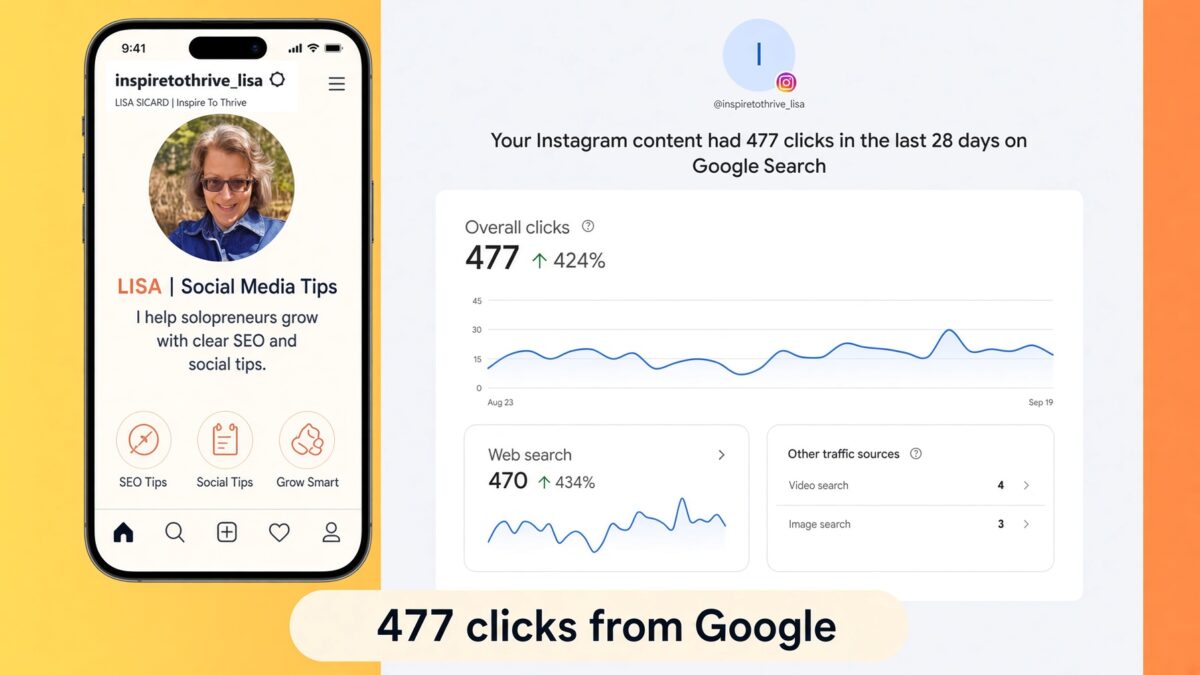
Table of Contents
Key Takeaways
- Public posts and Reels from a professional Instagram account can appear in Google Search.
- You can add Instagram to Google Search Console as a platform property and see clicks, impressions, and queries.
- Most of my 477 clicks came from web search, not video or image search.
- Captions now work like titles and descriptions. The first line matters.
- Connecting Search Console does not make posts rank. Clear topics do.
- Start with one question people already type into Google, then publish a post that answers it.
What Changed: Instagram Is Now a Google Search Surface
Two separate updates matter here.
First, public content from eligible professional accounts can be indexed by Google. That includes posts, Reels, carousels, captions, bios, and alt text. Stories, Highlights, private accounts, and personal accounts are not in that mix.
Second, in July 2026, Google added platform properties to Search Console. You can connect Instagram, TikTok, X, or YouTube and see how that content performs in Search, Discover, and (when relevant) News.
You do not need a website to do this. Verification happens by signing into the account, not by adding a DNS record.
That is why the Insights screen now says things like:
Your Instagram content had 477 clicks in the last 28 days on Google Search
That line is the whole story. People searched Google. Google showed my Instagram content. They clicked.
This does not replace your website. It is extra discovery. For a solopreneur, extra discovery is worth measuring.
How to Add an Instagram Google Search Console Property
You only do this once per account.
- Open Google Search Console.
- Click the property selector in the top left.
- Choose Add property.
- Under the new platform options, select Instagram.
- Sign in to the Instagram account you want to track and approve the connection.
- Click Go to property.
- Wait. Data often shows up within a couple of days.
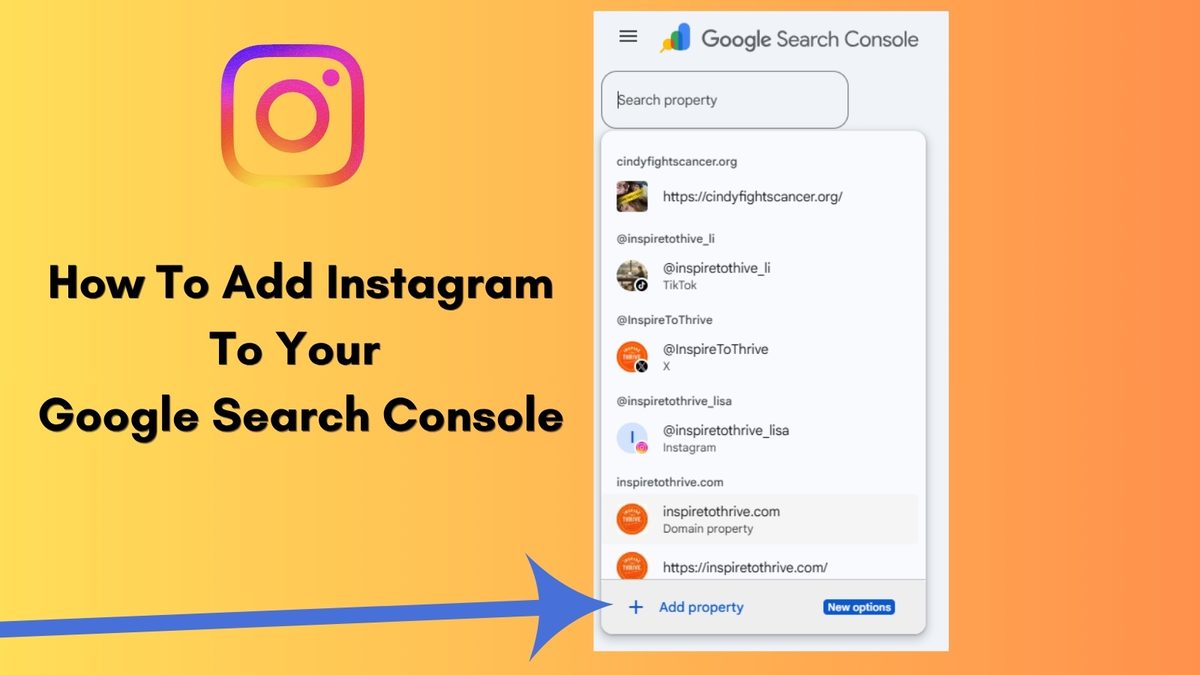
Use the account that actually owns the profile. A scheduling tool login is not enough.
After it connects, you will see Insights, Performance, Achievements, and Settings in the left menu, as shown in the screenshot I shared. The Insights view is the simple one. Performance is where you later filter by query and post.
Quick check on Instagram itself:
Settings → Privacy → allow public photos and videos to appear in search engine results. If that toggle is off, Google cannot use the posts even if Search Console is connected.
Your account also needs to be:
- Public.
- A Business, Professional, or Creator account.
- Held by someone 18 or older.
- Posting public posts or Reels (content from 2020 onward can be eligible).
Connecting Search Console does not change those rules. It only reports what already happened.
How to Read Instagram Google Search Console Insights
The top number is Overall clicks. Mine showed 477, with a 424% lift versus the previous 28 days.
Under that, you get two useful splits.
Web search: 470 clicks (+434%)
This is the one to watch. Someone typed a query into Google, saw a result tied to your Instagram content, and clicked it.
Other traffic sources
- Video search: 4 clicks
- Image search: 3 clicks
Those smaller numbers are not a failure. They tell you Google is mostly treating the content as a web result right now, not as a video pack or image pack.
The line graph in my report ran from August 23 to September 19. It stayed in a band of roughly 10–30 clicks a day, with one spike near 30. That is steady demand, not a one-day fluke.
When you open Performance, look for:
- Queries (what people typed).
- Posts or Reels getting the clicks.
- Countries and devices.
- Trending up vs trending down query groups.
On my account, the earlier batch of Google clicks clustered around real questions rather than brand vanity terms. Examples from the older report:
“Can you see if someone screenshots your Instagram Story?”
“How do I find my Instagram URL / web address?
That pattern still holds. Google sends clicks when a post answers a search, not when a caption is cute.
👉 A pretty Reel with no searchable sentence in the first line is invisible in this report.
How to Write Instagram Content Google Can Rank
You already know Instagram SEO inside the app. This layer is simpler than people make it.
1. Put the search phrase in the first line of the caption.
When Google shows the post, that caption becomes the title and description. Lead with the topic, then add personality.
Weak: “Okay this one surprised me 😅”
Better: “How to find your Instagram URL on desktop and in the app.”
2. Answer one question per post.
Question posts match search intent. Tutorials, definitions, settings walk-throughs, and “does Instagram actually do X?” posts travel well.
3. Add real alt text.
Describe the image or the first frame of the Reel. Use the topic in plain language. Skip keyword stuffing.
4. Put on-screen text on Reels.
Google and Instagram can both use visible text. A title on the video helps humans and search.
5. Keep the profile consistent.
Your name field and bio should say who you help. Mine needs to sound like a social media and SEO site for small businesses, not a mystery brand.
6. Use a few relevant hashtags, not 30.
Hashtags help Instagram. They are a weak Google lever. Three to five on-topic tags are enough.
7. Refresh winners.
If Search Console shows a post earning clicks, update the caption, add a clearer first line, and pin or reshare it. Old posts can keep working because Google is not the 24-hour Reels window.
I wrote a fuller checklist in my Instagram SEO tips post. Use that for profile and hashtag work. Use this post for the Google measurement layer.
What I’m Doing With the 477 Clicks
The number is useful. The next queries are more useful.
This week I am:
- Opening Performance and exporting the query list.
- Marking every question I already answered on the blog.
- Turning unanswered queries into one Reel or carousel each.
- Rewriting the first line on any post that already gets impressions but few clicks.
- Linking the best Google-winning Instagram topics back to a matching blog post in the bio or a comment, so the click has somewhere to go.
That last step matters for Inspire To Thrive. Instagram can introduce you. The blog still holds the full answer, the email list, and the affiliate context.
If your site traffic dipped this summer, this is a second door. It will not replace Search Console for your website. Check both. I keep a short weekly GSC habit for the blog, and now the Instagram property sits in the same login.
Common Mistakes That Waste This Report
- Waiting for Search Console to “make Instagram rank.” It only measures.
- Optimizing Stories. They are not the main indexed format.
- Stuffing the caption with keywords until it sounds like a press release.
- Tracking reach inside Instagram and ignoring Google queries.
- Connecting the wrong account, then wondering why the graph is empty.
- Treating 477 clicks as website sessions. Some people land on Instagram and stay there. That is still a win if they follow, save, or tap the bio.
Get the one social + SEO note I actually send
Short. No daily dump.
Frequently Asked Questions
Yes. Public posts and Reels from professional accounts can appear in Google Search when the account allows search engine indexing.
Yes. Reels that explain a topic, demonstrate a step, or answer a question are the ones most likely to appear.
Add Instagram as a platform property in Google Search Console, then open Performance and look at Queries.
Indexing rolled out more widely, Search Console started reporting the traffic, and question-style posts have a clearer match with search intent. A 424% jump can be measurement plus ranking, not just “I posted more.”
No. Platform properties work with the social account alone.
Turn off “Allow public photos and videos to appear in search engine results” in Instagram privacy settings, or switch the account to private.
Sometimes. People who click through to Instagram may tap your bio link next. The safer plan is to answer the same questions on both platforms and connect them.
Put One Thing to Work This Week
- Do not rebuild your whole content calendar.
- Pick one audience question.
- Write the answer in the first line of a caption.
- Publish the post or Reel.
- Add Instagram to Search Console if it is not there yet.
- Check Insights again in 28 days.
That is how I went from “about 60 Google clicks” to 477 on the same account. The report made the work visible. The captions made the work rank.
Have you added Instagram to Search Console yet? What number are you seeing? Tell me in the comments. 👇
Enjoy this content? Help me show up more often in Google by adding Inspire To Thrive as a Preferred Source.
Disclosure: This Inspire To Thrive blog post contains affiliate links. I may earn a commission from qualifying purchases at no extra cost to you. Some sections were drafted with AI tools and carefully reviewed/edited by me.
Enjoy this content? Help me show up more often in Google by adding Inspire To Thrive as a Preferred Source: