
You’ve probably been told never to delete old blog posts, that your archives are valuable assets.
I used to think the same thing.
Last month, I finally took the plunge: I deleted 20 underperforming posts. Within 21 days, my organic traffic jumped 27%.
Yes, you read that right. Cutting content actually increased my reach.
In this Inspire To Thrive updated guide, I’m sharing the real data behind the experiment, why old content can hurt your Google rankings, and the exact steps I used so you can do the same safely.

Estimated reading time: 5 minutes
Table of Contents
Key Takeaways: Content Pruning for Better SEO
- Deleting low-performing content can boost organic traffic. I saw a 27% increase in just 21 days with more key events (sales).
- Old, thin, or outdated posts waste crawl budget and dilute your site’s authority.
- Focus on quality over quantity; fewer, stronger pages often rank better.
- Always use 301 redirects when deleting to preserve link equity.
- Improve internal linking afterward (I use Link Whisper to make this fast and effective).
- Monitor results in Google Analytics and Search Console for 2–4 weeks after pruning.
- Combine pruning with creating fresh, high-value content for the best long-term gains.
👉 Content pruning isn’t about losing content; it’s about making your best work shine.
Watch me walk through the full experiment below:
Understanding the Importance of SEO for Your Blog or Website
Search Engine Optimization (SEO) plays a crucial role in the success of your blog or website. It determines how visible your content is to search engines like Google. Therefore, making it easier for potential readers or customers to find you.
With effective SEO strategies, you can increase your organic traffic, enhance your online visibility, and ultimately grow your online presence and business.
My Before & After Results
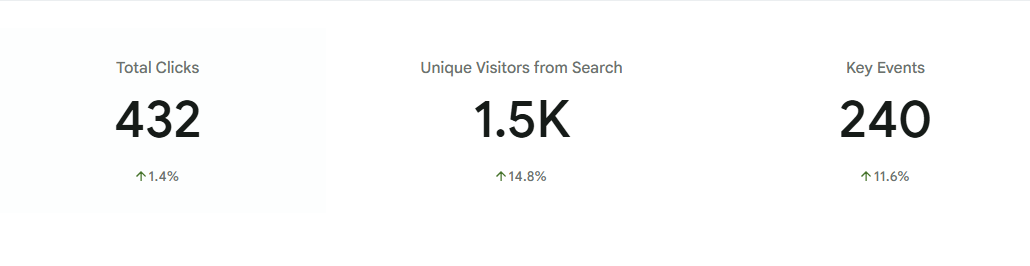
- Before pruning: Steady but plateaued traffic.
- After deleting 20 posts (21 days later): +27% organic sessions.
- Top pages got stronger signals and better rankings.
This wasn’t luck. Removing thin, outdated, and low-engagement content helped Google focus on my best material.
Why Old Content Can Hurt Your SEO
Search engines like Google want to deliver the freshest, most relevant results. Outdated or low-quality posts send the wrong signal:
- They waste crawl budget.
- They create a poor user experience (high bounce rates).
- They dilute your site’s topical authority.
- They compete with your stronger pages for rankings.
👉 Pruning is like weeding a garden; it gives your best content room to grow.
3 Big Benefits I Saw from Content Pruning
- Better Rankings — Google rewarded my stronger pages.
- Higher Engagement — Visitors spent more time on quality content.
- Faster Indexing — Crawlers could focus on what matters.
How I Decided Which Posts to Delete
I used a simple audit process:
- Low traffic + low engagement (Google Analytics).
- Posts with little or no backlinks.
- Outdated information (especially post-2023 AI/SEO changes).
- Thin content (<800 words with little value).
- Posts with a high bounce rate.
- Duplicate or near-duplicate topics.
Pro Tip: Use Rank Math, Yoast or your SEO plugin’s content audit features to spot weak posts quickly.
3 Steps to Safely Prune Your Content
- Audit Your Site: Review analytics for the past 12–24 months. Sort by sessions, bounce rate, and average time on page.
- Decide the Fate of Each Post
- Update & republish (best for evergreen topics).
- 301 redirect to a better post.
- Delete completely (use for truly low-value pages).
- Implement Redirects & Update Internal Links. Always use 301 redirects when deleting. Then update your sitemap and resubmit to Google Search Console.
What to Do After Pruning
After deleting the posts, I focused on strengthening what remained. One of the most effective things I did was improve internal linking across my site.
I use Link Whisper to quickly find and suggest smart internal links; it saves me hours and helps distribute link equity to my best pages.
I also recommend:
- Monitor Search Console for crawl errors.
- Create 2–3 new high-quality posts on the same topics.
- Update internal links across your site.
- Promote your strongest content again.
Ready to Try Content Pruning?
Deleting old content isn’t about losing work; it’s about making room for growth.
Have you ever deleted old blog posts? Drop your results (or questions) in the comments; I read every one!

Use CODE INSPIRE at Link Whisper to save $15 off your order today!
Read my newest post after cutting even more content from the blog!
Disclosure: This Inspire To Thrive blog post contains affiliate links. I may earn a commission from qualifying purchases at no extra cost to you. Some sections were drafted with AI tools and carefully reviewed/edited by me.
Enjoy this content? Help me show up more often in Google by adding Inspire To Thrive as a Preferred Source:





I’ve been doing a lot of that lately. On one of my blogs, I’ve deleted around 250 articles, and on another I’ve deleted about 100 or so. Some of the older articles I’ve decided to repurpose, make them longer and more SEO worthy to enhance the blog’s presence. When one’s been blogging for more than 15 years or so, repurposing is fairly easy. I will say, though, that I’ve left some of my old favorites alone, even if they don’t help with SEO, because I love the memories; sometimes we can’t help ourselves. lol
Hi Mitch, Have you noticed more traffic? Mine has doubled over the past 8 months. I had trouble deleting a few posts but realized it was personal and had to put them in the trash. One was about my doing my mom’s eulogy but I didn’t see how it would help anyone but me, so I trashed it. I have the original one saved for myself. Some of the other articles are like our babies, we did them so long ago. Thanks for coming by Mitch, have a great weekend. Hope you are not getting all the rain we will be getting here.
Truthfully, I haven’t been able to check it properly. I’m having problems getting Google Analytics to track my traffic on a few of my sites; it’s getting irksome…
Did you convert your GA to GA4 Mitch? I have a video that may help you with that: https://www.youtube.com/watch?v=dzNo6Hjei2M&t=176s Let me know if you need help Mitch.
I watched your video, but it didn’t address my issue. My main blog (at least the one you know lol) hasn’t set itself up with my overall account, which means it’s not tracking any data. I’m doing what I can to rectify it, but nothing’s working so far… which figures…
So are they different blogs Mitch? You would need different GA’s for each if so. They can be tied to your GA account but you would have different ones for different blogs and be able to switch between them.
Get out! When I set them all up over a decade ago, they were all under one account. I guess that means I need to delete all those accounts I don’t want to be a part of the original and create new ones; ugh! lol Well, at least I know how, because Google didn’t quite mention that anywhere as far as I know. Thanks!
Do you mean Google account? That is correct. Send me an email with screenshot so I can see for sure what you mean Mitch.
Hello Lisa,
I recently deleted all posts on my blog and started things from scratch. It improves my blog and it’s performance on search engine result pages. Sometimes, we need to delete some posts that are not relevant or do not perform well. Thanks for the insights.
Regards,
Vishwajeet Kumar
Hi Vishwajeet, how did that work out for you? I’m glad to hear you have started to see results from that. I need to do more of it as well. Thanks for the point on that and have a fabulous day.
Hello Lisa mam,
Yes, I agree with you, updating old content with fresh information can increase our website SEO, recently I updated more than 15 outdated blog post with a new relevant content, i was not sure whether it will work or not.
After updating my old content, my keyword is ranking in top 10 result page and my domain authority also increased.
Hi Niraj, sometimes it takes months to climb up the rankings, so give it time. I’ve had some that did well around the 6 month mark and others in 2 weeks, must depend on the competition of the keywwords as well.
All are excellent points because when blog posts are not usable, or, relevant, it wastes server space, lessens credibility and turns off the Google algorithm too. Blogs are a full body of work not individual, one-off posts littering the web. I frame my blog as a single entity, or, a single web presence whose collective impact is as strong as its seeming parts. Trash the low quality, dated stuff, update what you can salvage and you will boost SEO and overall blogging success.
Hi Ryan, I didn’t think much about the server space, excellent point. I try to delete as I find the old content or search for the lowest reach on the GOogle search console. That is unless I can update it with good relevant content. Thanks for coming by Ryan and enjoy your weekend!