
Did you know that Pinterest pins last longer than any other social media posts? Have you ever checked out a referral in your Google Analytics and found it was a pin from months or even years ago?
Would that happen from a month-old X post, Instagram post, TikTok video, or even a Facebook post? Learn why you may want to consider using pins on Pinterest to have your social shares last longer online and drive continuous traffic to your blog or website.
Estimated reading time: 11 minutes
Table of Contents
Key Takeaways: Pinterest Pins
- Pinterest pins last longer than posts on other platforms, driving continuous traffic to your site.
- Higher-quality pins can gain engagement for over a year; lower-quality pins last about four months.
- Create eye-catching pins using relevant keywords and strong visuals to enhance discoverability.
- Use Rich Pins to provide extra information about your content, improving engagement and visibility on Pinterest.
- Consistently pin 5-10 times a day to maintain a presence and optimize your traffic from pins on Pinterest.
Pins Last Longer
Now, higher-quality pins on Pinterest can continue to gain repins and engagement for a year or more, making this social media platform a wise choice for long-term social engagement.
A Pinterest pin can lead to a sale right to your online store.
Now, the average-quality pin has a lifetime of approximately four months. However, I’ve seen Pinterest pins last for years, linking back to my Inspire To Thrive blog.
Recently, my Google Analytics report shows Pinterest as my 2nd-largest source of referral traffic to the blog, after X. It remains in the top 5 sources of referrals to the blog here on Inspire To Thrive.
Facebook Posts vs. Pinterest Pins
The average Facebook post lasts up to 3-4 hours. That’s it! Of course, it depends on the algorithm and how many followers or fans you may have at that time. A good rule of thumb is not to post more than a few times a week.
The number one reason people stop following a Facebook page is that they see too many posts from the same page.
However, you can now use auto-scheduling directly on Facebook with Creator Studio, Buffer, or Agorapulse. There are many tools out there for scheduling your social media posts today.
A Posts on X LifeCycle
Posts on X last an average of 18 minutes, according to data from Moz. No wonder we can post a lot more on X than we can on Facebook. Just be careful not to post too much in the first 18 minutes. 1x is enough.
Let’s do the math: 1440 minutes per day / 18 minutes = 80 times per day or 3.3 tweets per hour. (That would not count your conversations via X or re-posts.)
Now, the better way is to save the code from Pinterest and put it in a blog post so it lasts longer.
Instagram Posts
If you prefer Instagram, posts on that platform can last up to 2 days.
Of course, you can always pin right from Instagram too. Be sure to include the link back to your Instagram post.
It is another great way to extend your Instagram reach.
YouTube Videos vs. Pins On Pinterest
YouTube is another platform where your video content can last longer than most posts on other social networks. You may get up to 3 weeks’ worth of views.
However, if it goes viral and people engage with you in the video, the video will run longer. Make your video last even longer by pinning your YouTube videos on your boards.
You can see how Ileane Smith uses Pinterest for her successful YouTube channel below.
Snapchat and TikTok
Both Snapchat and TikTok posts start to decay immediately unless they go viral. They attract a younger audience demographic.
It’s best to pick and choose the social media platforms where your audience is and where you can do well for your business or niche.
How To Create A Pin On Pinterest
Creating a pin on Pinterest is straightforward.
- First, log in to your account and click on the plus sign at the bottom right. Select “Create Pin.”
- Upload your image or video, then add a title, description, and the destination link.
- Make sure your description uses relevant keywords to help your pin get discovered.
- Next, choose the board you want it to live on, or create a new one.
- Finally, click “Publish or Schedule.”
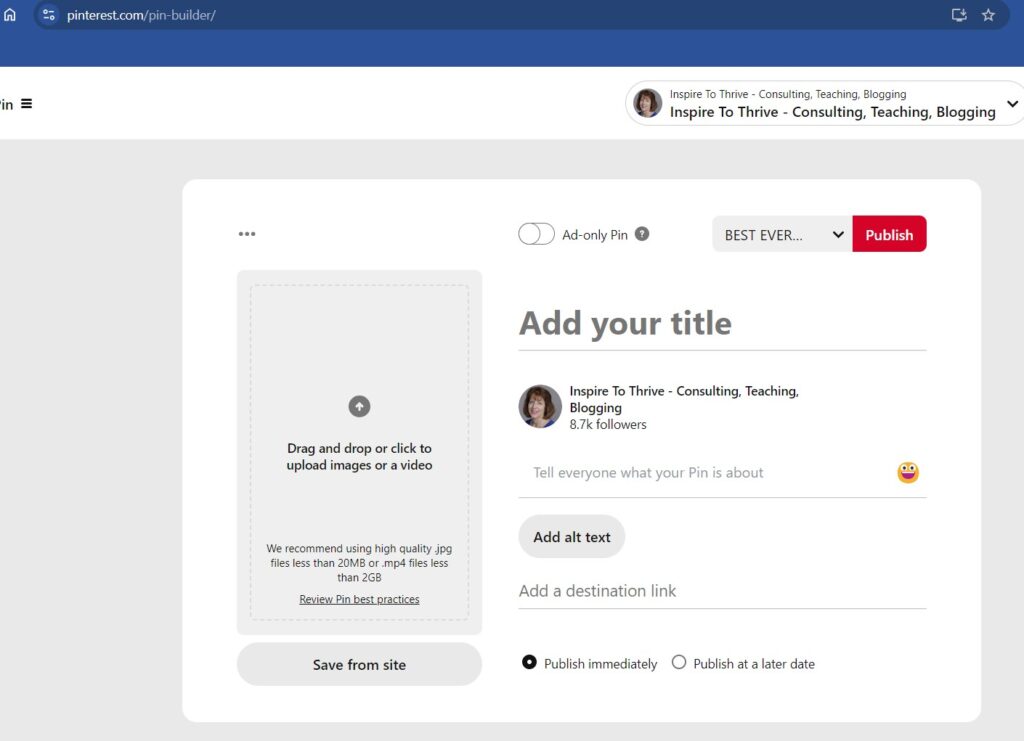
That’s it! Your pin is now live and ready for others to discover.
The Staying Power of Pins On Pinterest: How Pinterest Pins Last
Pinterest Pins can last for months and even years. You can arrange your pinboards to show off an old pin as your cover to get more repins.
Now, when you create new pins and new visitors come to your pinboard, they can find old pins quickly and easily.

Not so with any other social network! The only thing that lasts longer than a Pinterest pin is a blog post.
You have more control over Pinterest than any other social network site. But you get to choose where to place your pins.
You cannot do that via Twitter or Facebook. They go into an automated feed based on an ever-changing algorithm.
Search Engine Journal recommends being active on Pinterest to pin anywhere from 5 to 30 pins per day. When I pin about 5 per day, I get more repins, and some are from months or even a year or older.
Again, be careful not to pin them all at once. (You can use Tailwind or another tool like Pin Generator to schedule them or directly schedule pins on Pinterest as you watched in the above video.)
If I see a lot from one user that I don’t like, I may unfollow them. And remember, the Pinterest app for mobile makes it easy; it’s one of the best social media mobile apps out there!
Which Pins Work Best to Last Longer?
Videos are all the rage on most social networks, and Pinterest is no exception. Also, be sure to have your pins in the vertical format – they will generate more views and reach. You may also want to pin them on Saturdays.
You can often change your pins for your blog posts, too, to give them new life as a video or a rich vertical pin.
Rich Pins
What are Rich Pins? Rich Pins contain extra information attached to a pin
Rich Pins work by displaying metadata from marked-up pages on your website. Once you’ve applied for Rich Pins, any content on your site with metadata will turn into a Rich Pin when a user saves it.
These may include product, recipe, article, or app pins. You can see an article pinned below from Inspire To Thrive.
Video Pins On Pinterest
Video is hot on all social networks today. Pinterest is no different. The videos on this social media platform are anywhere from 3 to 15 seconds in length.
Not only do these pins help with creative storytelling and providing social engagement, but they also capture the attention of viewers who may otherwise scroll past static images and text-based posts.
Pinners have adopted this video pin technique as a powerful tool that helps them stand out in the social media jungle and reach more followers.
Video pins are designed to maximize viewer engagement, enabling social media users to build relationships with their audience by delivering the right message through visuals.
As such, bloggers and small businesses can tap into Pinterest’s huge user base and expose themselves to new opportunities for growth and success.
Product Pins
If you sell products online, you must use product pins. Product pins provide Pinners with important information about the products you sell, such as pricing, availability, and location.
Product pins are different from buyable pins. While product pins make product information easily accessible on Pinterest, they do not allow users to purchase the product directly on Pinterest.
Product pins must be linked to the product landing page, where users can actually make the purchase. However, if your website only showcases products that can be purchased on another site, it is recommended that you not use product pins.
Article Pins
Article Pins let users know that they’re clicking on a page with original content that tells a story.
These Article Pins include a headline, author, and story description. These types of pins are great for bloggers.
Recipe Pins
Today, Recipe Pins show exactly what a recipe entails without leaving Pinterest. These Recipe Pins can include titles, ingredients, cooking times, serving information, and ratings.
What Are Rich Pins?
Rich Pins display more information about your product on Pinterest. This makes your pin stand out and makes your content more appealing to pinners.
For example, A recipe Rich Pin will display the ingredients, cook time, and serving size listed right below the pin itself.
Rich Pins contain extra information attached to a pin. Below is how Pinterest describes a Rich Pin:
“Rich Pins show metadata right on the Pin itself, giving Pinners a richer experience and increasing engagement. Information in a Rich Pin is independent of the Pin description, ensuring that important information is always tied to the Pin. There are 4 types of Rich Pins: app, article, product, and recipe Pins.
Rich Pins work by displaying metadata from marked-up pages on your website. Once you’ve applied for Rich Pins, any content on your site with metadata will turn into a Rich Pin when a user saves it.”
Therefore, Rich Pins provide the user with a more actionable and useful pinning experience.
Different Types of Rich Pins
- Article Pins
Article Pins tell users that they’re clicking on a webpage with original content that tells a story. Article Pins include a headline, author, and a story description.
- Product Pins
Product Pins make it easier for users to see more info about the things you sell.
This includes pricing, availability, and location. Product Pins differ from Buyable Pins in that they do not allow users to buy the product directly from Pinterest.
Product Pins must link to the product landing page on your website.
- Recipe Pins
Recipe Pins show exactly what a recipe entails without leaving Pinterest. Recipe Pins can include titles, ingredients, cooking times, serving information, and ratings.

- App Pins
App Pins display an install button, allowing people to download your app without leaving Pinterest. Currently, App Pins are only compatible with iOS.
Why Pins On Pinterest Descriptions Are Important
Using Pin descriptions will help your Pin be keyword-rich and easier to find for those searching on Pinterest.
Be sure to fill out the description fully and use the alt text feature as well. You have up to 500 characters for each pin description.
Boost Your Pinterest Pin with Ads
Did you know Neil Patel recommended Pinterest ads over Facebook ads? He explains that you have to spend more on Facebook ads to get a return compared to Pinterest ads.
90% of Pinterest users plan to make a purchase. The average purchase is $50, which is higher than on any other social media platform.
Did you know you can also target those who have previously visited your website? A great way to re-target them is with Pinterest ads.
Conclusion: Need More Reasons For Pins On Pinterest?
Pins on Pinterest do more than fill a profile; they help your content stay visible and keep working long after you publish it. When you want steady traffic and a broader reach, consistency with pins on Pinterest is often what keeps your content showing up.
Be sure to read how not to get suspended on Pinterest.
How to Boost Your Traffic by Pinning Strategically on Pinterest: FAQs
Use keywords in your pin titles, descriptions, and image file names. Include relevant hashtags and categorize your pins accurately.
The best times are typically in the evening and on weekends. However, monitor your analytics to see when your audience is most active and adjust your schedule accordingly.
Pin consistently, aiming for at least 5-10 pins a day. Spread your pins throughout the day to maintain a constant presence without overwhelming your followers.
Use high-quality images, bold text, and strong calls to action. Vertical pins perform better because they occupy more space on the screen.
Group boards can expand your reach by allowing you to pin to boards with other contributors.
Rich Pins provide more context about an idea by showing extra information directly on the pin.
Include a clear call to action in your pin description, like “Click to read more” or “Visit our site.”
Yes, tools like Tailwind, Pin Generator, and Hootsuite can help you schedule pins and analyze performance.
Promoted pins are paid ads on Pinterest. Use them strategically for important content or products to maximize ROI.
Disclosure: This Inspire To Thrive blog post contains affiliate links. I may earn a commission from qualifying purchases at no extra cost to you. Some sections were drafted with AI tools and carefully reviewed/edited by me.
Enjoy this content? Help me show up more often in Google by adding Inspire To Thrive as a Preferred Source:


Hi Lisa, I have a very small engraving business and pinterest charges more than I can afford for marketing, is it a good idea I tied my pinterest to my etsy page?
Hi Mary, welcome to Inspire To Thrive. Yes, I believe it’s a good idea for you if most of your clientele is female. Thanks for coming by and have a great day.
So you find primarily female audience on pinterest? We sell some knives -cutlery and also pocket knives- engraved and feel like we do have a lot of male engagement too ☺
Yes Mary. About 75% female according to most stats. That’s great you have the male engagement too.
Hi Lisa, surely, Pinterest pins last longer than posts on other social media sites. In fact, Twitter used to be my top referral traffic source. But Pinterest now drives the most traffic even though I’ve not been posting on the platform recently. So, marketers need to make Pinterest a part of their digital marketing toolbox.
Hi Moss, thanks for the information, Great to know it is still working for you as well. I’ve noticed a little tick-down in Twitter with their algorithm changes and many ads all over the feed. It was amazing when I did the research how many showed how much longer Pinterest pins last. So you can try to combine them with other things to extend the reach of others. Enjoy the rest of your day Moss and thanks for coming by!
By far I have now come to know that why it is recommended to keep on resharing and retweeting your stuffs rather than leaving it once posted. I never knew pinterest statistics related the life time of our postings.
Thanks for making me aware.
You are welcome Charmie. Yes, isn’t it amazing? and I now use tweet old post plugin on my InspiretoThrive handle. It’s a great plugin! Thanks for coming by and have a great weeekend!
The fact that Pinterest allows this to be possible is amazing. Pinterest is a top social media site for many reasons, this being one of them.
Hi Michelle, yes that is one feature of Pinterest that other social media sites do not have. It really separates it from the rest. Thanks for your comment and have a great day.
Hey Lisa, great info here. I had no idea Pinterest pins had such a long life cycle, although I guess Pinterest still has a stigma for being marketed towards women more than men. I recently came across GentleMint, which is basically a Pinterest for men. HA! Have a great day!
Tom, yes, isn’t it amazing? I noticed it with the pin I used for the retail store and was surprised to see it still being pinned. Then I did some research and was fascinated by the stats. I did a post way back on Gentlemint too. I had signed up to do the post. I also am on Recipleaser for food. Thanks for coming by and have a great day.
I agree. They seem to last longer and when you hit the top pins, you really gain a lot of followers.