Have you noticed how easy it is for Stories to get skipped? A short Instagram story caption gives people a reason to stop: context with the sound off, a reply prompt, or a tap.
This guide covers how to add captions in 2026 (manual text and the Captions sticker), how long they should be, link sticker vs bio, and which Story insights to watch.
Estimated reading time: 9 minutes
Table of Contents
How to Add Captions to Your Instagram Stories
You don’t need special skills to include captions in your stories. Instagram makes it simple whether you want to type your own text or let the app work for you. Try these methods to find what best fits your style and message.
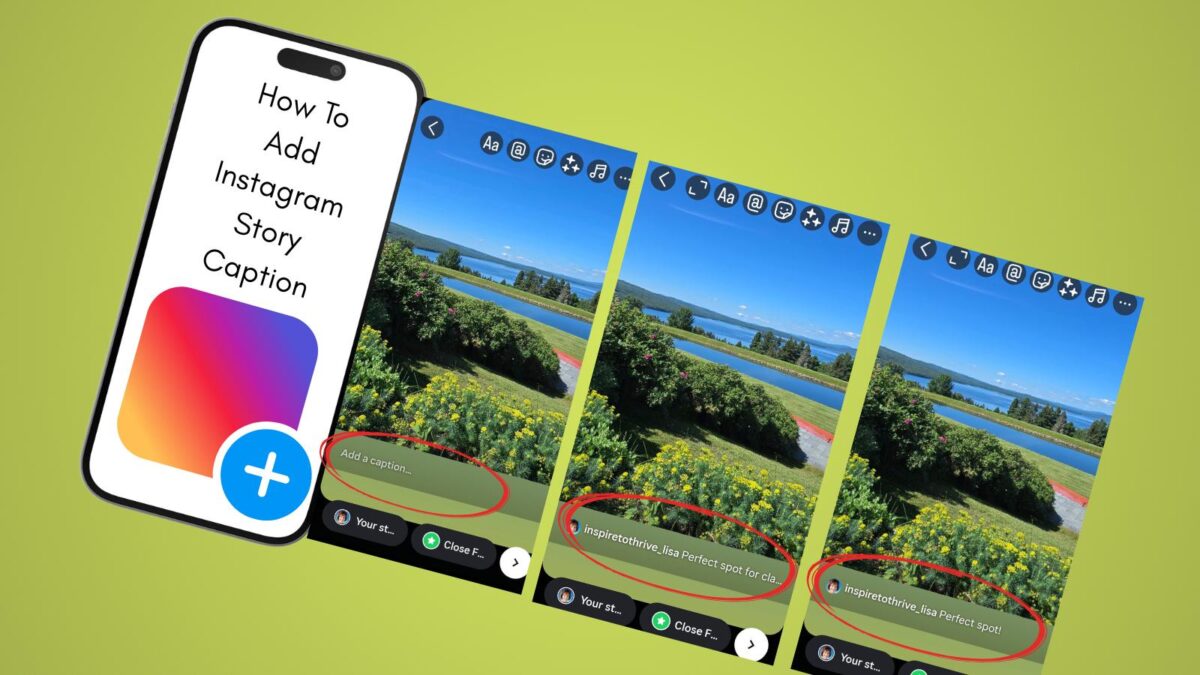
Step-by-Step Guide to Adding Instagram Story Captions Manually
- Open the Instagram app.
- Tap your profile picture or the plus icon at the top left to start a new story.
- Capture or upload your photo or video.
- Pick your moment, snap a shot, or upload from your camera roll.
- Tap the ‘Aa’ text icon.
- It’s in the top-right corner, looking like two letters.
- Type your caption.
- Say what’s on your mind, add a fun quote, a reminder, or a punchline.
- Choose your font.
- Swipe through the font bar to try classic, bold, typewriter, neon, or playful styles. Each brings a different energy.
- Change colors and background.
- Tap the color palette for text colors, or the ‘A’ icon with stars for backgrounds. Make sure your caption stands out without covering important parts of your image.
- Place and resize your caption.
- Pinch and drag to move or enlarge your text. Keep it above or below the faces to keep your story clean and readable.
- Add stickers or GIFs if you like.
- Mix in fun extras for more personality.
- Preview and share your story.
- When you’re happy, tap ‘Your Story’ or send it to friends.
Tip: Use short sentences or line breaks to make your captions easier to read at a glance. If you have a call to action, make it bold or place it near the center.
Instagram Story Captions in 2026: Captions Sticker, Links, and What to Watch
Captions sticker availability in 2026
Instagram’s Captions sticker turns spoken words in a Story video into on-screen text.
How to add it:
- Record or upload a video Story (it needs speech).
- Tap the sticker icon.
- Search Captions and add it.
- Tap any word to fix mistakes, then pick a style and color.
If you don’t see it:
- Update the app and switch to a Creator or Business profile if you’re still on a basic personal account.
- Speak clearly with less background noise.
- It still rolls out unevenly across languages and regions. English is the most reliable. If the sticker is missing, add a short manual line with the Aa tool instead of waiting.
Auto-captions are for what you said. They are not a hook. Add one extra short line (“Reply LINK,” “Save this,” “Which one, 1 or 2?”) so silent viewers know what to do.
That’s the fastest way to add Instagram story captions on video.
Link sticker vs link in bio
You no longer need 10,000 followers for Story links. Swipe-up is gone. Most accounts can add a Link sticker: sticker tray → Link → paste the URL → customize the button text.
Use them differently:
- Link sticker: one tap from that Story. Best for “this post, this checklist, this offer, today.” One link per slide. Put a second URL on the next slide if you need it.
- Link in bio: always on. Best for your main destination (blog, resource page, booking link).
Practical combo for small businesses: caption says the payoff, Link sticker goes to that exact page, bio stays your home base. If the Link sticker is missing (due to a new account, an app version, or an account status), use “link in bio” plus a mention of your handle as the fallback.
Don’t hide the destination. “Read the caption templates” converts better than a raw URL.
Insights to watch (so you know if the caption worked)
Open the Story (or Insights → Stories) within 14 days. Ignore vanity views. Watch how people move.
| Metric | What it usually means | What to change |
|---|---|---|
| Forward taps | They skipped this frame | Shorten the caption or lead with the payoff |
| Back taps | They re-read something | That frame had value; keep the idea, reuse the pattern |
| Exits / Next story | They left your sequence | Cut extra slides or move the CTA earlier |
| Replies | Strongest signal | Keep the easy prompt (“yes/no,” a number, one word) |
| Link taps | The caption + sticker did their job | Repeat that CTA wording on similar topics |
| Sticker taps (poll, question) | Low-effort interaction | Use these when you don’t need a click |
Test one change at a time for a week: caption length, placement, or CTA. Same topic and similar posting time. Save the lines that earn replies or link taps and reuse the structure, not the exact joke.
Third-Party Tools and Apps for Unique Captions
Maybe you want captions that pop even more or need fresh ideas when you’re short on words. Caption generator tools can save the day. Some handy options include:
- Inspire To Thrive’s Free Instagram Caption Generator: Get short, catchy captions in seconds by entering a keyword. Great for quick wins or breaking a creative rut.
- Canva: Design custom text overlays with stylish backgrounds and fonts before uploading to your story.
- Typorama or Over: Apps that let you create eye-catching text graphics and import them as images or video overlays.

Why use these tools?
- Stand out with unique fonts or graphic text.
- Brainstorm ideas when you’re stuck.
- Produce consistent branding, especially for business accounts.
How Instagram Story Captions Boost Your Story’s Impact
Instagram story captions do a lot more than fill space. They shape how followers see your message, push your reach, and help you grow your business or brand on social media.
If you’re wondering if captions are worth the effort, consider what they bring to the table.
Increasing Story Engagement and Interaction
Captions make stories interactive. They prompt your followers to:
- Reply with a quick message.
- React with emojis.
- Vote in a poll or answer a question.
- Tap a Link sticker, or use the link in bio if the sticker isn’t there.
Instagram’s algorithm notices when people engage with your story. More replies, reactions, and shares mean the platform will push your stories to the front of your followers’ feeds.
Words like “What do you think?” or “Tap if you agree!” spark fast responses.
Even short captions like “Morning mood?” or “How would you caption this?” work as instant conversation starters. When you make it easy for people to interact, they stick around longer and keep coming back.
Making Your Stories Accessible to All Viewers
Not everyone watches stories with the sound on. In fact, a large share of users scroll through Instagram at work, on the train, or late at night, often with their phones on mute. Here’s where captions pack a punch:
- Deaf viewers can follow along.
- Anyone watching without sound gets the full story.
- Non-native speakers get extra help understanding your message.
By adding clear captions, you make your content friendly for everyone. You also convey that you care about inclusivity. That breeds loyalty and trust, both of which are important for personal brands and businesses.
Boosting Brand Messaging and Driving Traffic
For entrepreneurs and small businesses, Instagram story captions can do some heavy lifting:
- Highlight special offers or events.
- Add a call-to-action (CTA), like “Learn more in bio” or “DM for details.”
- Share website links (with link stickers).
- Reinforce your brand’s personality or values.
A strong caption moves viewers from passive watching to active doing. Try lines like “Tap the link sticker to shop,” “Tap for a giveaway,” or “Read more about this on our blog.” Keep the tone in line with your brand to build consistency.
Creative captions also build authority in your niche. Before long, followers recognize your signature style and trust your calls to action.
Conclusion: The Why and How of Instagram Story Captions
Instagram story captions make a big difference in how your stories perform. They drive more reactions, keep your audience listening, and help you stand out among the noise.
Whether you craft your message by hand, use Instagram’s automatic stickers, or try third-party tools like Inspire To Thrive’s free Instagram Caption Generator, the right words can transform your stories.
Start experimenting with different caption styles and see what sparks the biggest response. If you need fresh ideas or want to level up your game, check out the free tools and resources at Inspire To Thrive.
Strong captions help you build loyalty, boost engagement, and grow your presence, story by story. Now go put your words to work for you.
Which caption style are you trying first: bold, funny, or helpful? Vote below in the comments!

Instagram Story Captions FAQ
Keep it to 1–2 short lines. If someone can’t read it in a second or two, split the idea across another Story frame instead of stacking more text.
Keep text off the top and bottom. Profile info and the reply bar sit there. Place the line near the middle or just above the lower third, then preview before you post.
Yes. Auto-captions follow what you said. A short on-screen line does a different job: hook, context, or next step (“Reply LINK,” “Save this,” “Which one, 1 or 2?”). Use both when the clip has speech.
Ask for something easy: a number, a yes/no, or a one-word answer tied to what they just saw.
Examples: “Reply LINK and I’ll send it.” / “Want the checklist, yes or no?” / “Which one are you, 1 or 2?”
Change one thing at a time for a week (same topic and posting window). In Story insights, watch forwards (often means they skipped), exits, replies, and link taps. Save the lines that earn replies or taps and reuse the pattern on new topics.
Disclosure: This Inspire To Thrive blog post contains affiliate links. I may earn a commission from qualifying purchases at no extra cost to you. Some sections were drafted with AI tools and carefully reviewed/edited by me.

- How to Use Social Media for the Best Black Friday Deals of 2026 - October 19, 2026
- How to Identify and Prioritize Your Money Pages (And Why I Just Updated Mine in Link Whisper) - October 19, 2026
- How to Build a Strong Online Presence for Solopreneurs in 2026 (Without Spreading Yourself Thin) - October 17, 2026
Enjoy this content? Help me show up more often in Google by adding Inspire To Thrive as a Preferred Source: