Can you tell if someone screenshots your Instagram Story? No. Instagram does not send a notification, add an icon next to a name in your viewer list, or log a screenshot anywhere you can see it.
What you can see is limited to who viewed the Story. What you can’t see is who saved it, and that rule has been consistent since Instagram tested (and quickly dropped) screenshot alerts back in 2018. The only real exceptions are disappearing photos and videos sent in DMs.
This guide breaks down exactly what notifies vs. what doesn’t, plus practical steps creators and businesses can take to protect more sensitive content without relying on tools that don’t work.
Estimated reading time: 5 minutes
Table of Contents
Can You Tell if Someone Screenshots Your Instagram Story?
As of September 2026, Instagram does not send screenshot notifications for regular Stories.
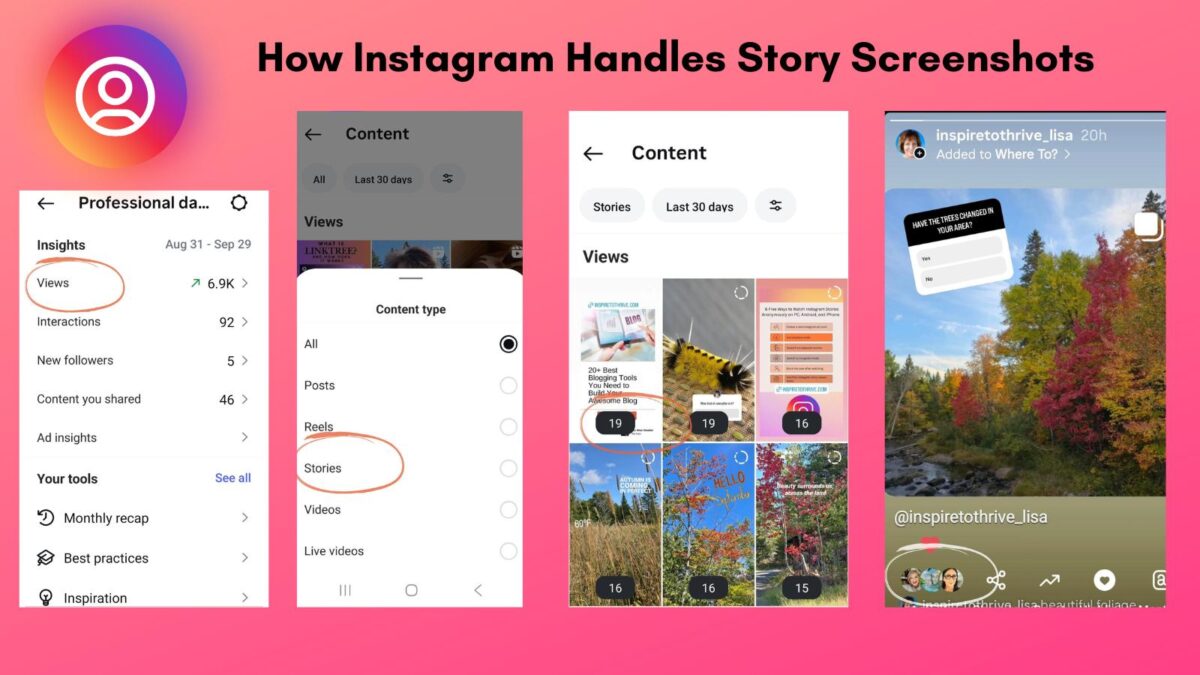
You can open your viewer list and see who watched. You will not get an alert if someone captured the frame. There is no extra icon in that list for an Instagram Story screenshot.
Instagram has borrowed many ideas from early Story platforms, then adjusted how privacy works. Snapchat still notifies you of screenshots. Instagram does not — at least not for public and regular Stories.
You still decide who can view the content by keeping your account public, switching to private, or switching to a creator account.
Think of it this way. You post a quick clip of a birthday surprise. A friend loves it and screenshots the cake. Instagram records that they viewed the Story, not that they saved it. You will not see a banner or a special mark next to their name.
Exceptions and Special Cases
A few features handle privacy differently. They do not change the rule for a standard Story screenshot.
- Vanish Mode in direct messages does alert the chat when content is screenshotted.
- Regular DMs do not notify for screenshots of text or a static photo kept in the chat. Disappearing DMs, View Once or Allow Replay photos and videos, can show an alert if someone takes a screenshot of that media.
- Close Friends Stories limit who can see the Story, but they still do not notify when screenshots are taken.
- Highlights follow the same rule as Stories. No screenshot notification.
Avoid third-party apps that claim to reveal who screenshotted your Story. Those tools often violate Instagram’s policies, risk your account, and can expose your login.
What notifies vs. what does not
| What they captured | Do you get notified? |
|---|---|
| Regular Story | No |
| Close Friends Story | No |
| Highlight | No |
| Feed post/carousel / Reel | No |
| Profile, bio, or grid | No |
| Regular DM (text or kept-in-chat photo) | No |
| View Once / Allow Replay photo or video in DMs | Yes |
| Vanish Mode content | Yes |
The 2026 rumor cycle is loud. Instagram tested Story screenshot alerts in 2018 and pulled them. That test has not come back as a public feature. Some people have reported a “screenshot detected” note on their own phone. That is not the same as notifying the person who posted the Story.
Protecting Your Content on Stories
You cannot detect a screenshot. You can share more carefully. These tips tackle the core concern without adding tools you do not need.
- Use a Close Friends Story for anything personal.
- Switch the account to private if you want approval over who follows you.
- Review your follower list. Remove accounts you do not recognize.
- Keep addresses, schedules, legal documents, and “we’re away” posts off a public Story.
- Use Stories for short, timely content. Save the grid for posts you are comfortable leaving up.
Turn on two-factor authentication:
- Go to Settings and privacy, then Accounts Center.
- Select Password and security, then Two-factor authentication.
- Choose an authentication app or text code and follow the prompts.
If you are posting as a creator, set a clear content plan for Stories. Mix behind-the-scenes clips with updates you would also put on the grid.
Use stickers to gather feedback without oversharing.
Best Practices for Safer Sharing
- Limit the audience.
- Hide your Story from specific accounts, or share sensitive frames only with Close Friends.
- Use interactive stickers. Polls and questions drive engagement without a full reveal.
- Post with purpose. Share clips that support the brand, not your front door.
- Archive a Story when the moment has passed.
- On a business profile, set roles, review permissions, and keep contact info clean.
What To Do If You Think Someone Screenshots Your Instagram Story
Look at the bigger picture. Most screenshots are a recipe, a tip, or a promo code.
Treat the account like a storefront. Review followers monthly, trim spam, and keep DMs polite but firm.
For business profiles, use Insights for reach, exits, and replies. If a topic draws the wrong attention, move that content to a smaller audience.
This question still sends search traffic — the same kind of intent I covered when Google sent 477 clicks to my Instagram in 28 days. People want a clear yes or no, then a next step.
This is the same question on Instagram. The short answer matches the post below: you cannot tell who screenshotted a Story.
Quick Answers
Bottom Line
Can you tell if someone screenshots your Instagram story? No, Instagram does not provide a screenshot notification for a standard Story.
You can still protect your privacy with tighter settings, a smaller audience, and a cleaner follower list. Keep the focus on useful content you are comfortable seeing saved.
Have a strategy, use the tools that already exist, and grow with confidence. More Instagram tips from Inspire To Thrive.
What do you keep off your public Story? Share what has worked for you.
Disclosure: This Inspire To Thrive blog post contains affiliate links. I may earn a commission from qualifying purchases at no extra cost to you. Some sections were drafted with AI tools and carefully reviewed/edited by me.
Enjoy this content? Help me show up more often in Google by adding Inspire To Thrive as a Preferred Source: