
Are you wondering how to tell if someone blocked you on Instagram? Instagram doesn’t send a notification when it happens, so many people are left guessing. The good news is there are clear signs you can check. In this guide, you’ll learn the most reliable ways to tell if you’ve been blocked, how to confirm it, and what to do next.
I even had a friend block me while writing this so I could test every method in real time. Seeing “User not found” but the profile picture is still there? Jump to the confirmation test below.
Remember, Instagram never sends a notification when you’re blocked.
Estimated reading time: 16 minutes
Table of Contents
Understanding Instagram Blocking
Instagram, one of the most popular social media platforms, allows users to engage with friends, family, and even celebrities through photo and video sharing. However, sometimes interactions on Instagram may not go as planned.
You might find yourself wondering if someone has blocked you on Instagram. In this section, I will share what it means to be blocked on Instagram.
Not only that, but how blocking works and the effects of a block on the IG platform.

Key Takeaways: How to Tell if Someone Blocked You on Instagram: Ways To Tell)
- Instagram never tells you when someone blocks you.
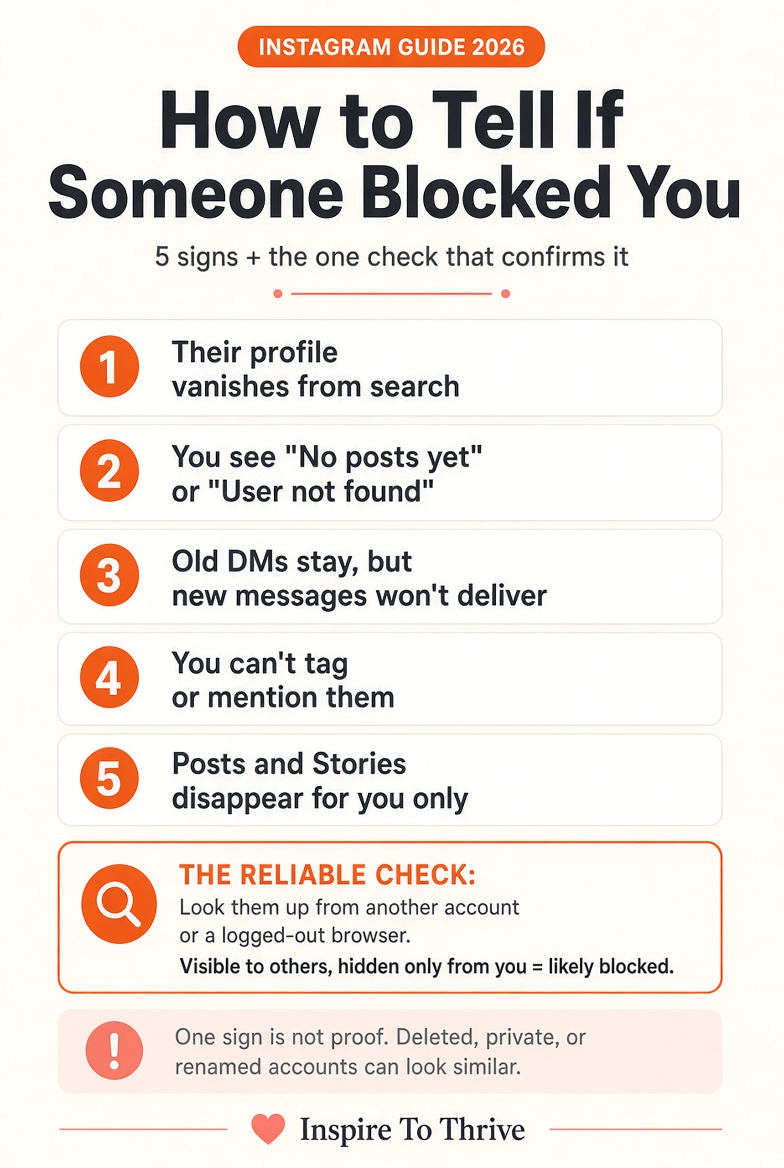
- The strongest signs are: their profile disappears from search, you can’t see their posts or Stories, and you can’t tag or message them.
- The most reliable confirmation is checking their profile from a different account.
- “User not found” or “No posts yet” can also mean they deleted their account or went private — always double-check.
- Respect the block and move on. Trying to get around it usually makes things worse.
Instagram “User Not Found” But You Can Still See the Profile Picture: What It Means
Seeing “User not found” while the profile picture is still visible is one of the most common (and confusing) situations people run into.
This usually happens because of how Instagram handles old data:
- In direct messages or in old links, Instagram often keeps the name and profile picture visible even after blocking, deactivation, or deletion.
- Cached images and partial previews can linger on your device or in the app.
- The profile picture alone does not tell you whether they blocked you, deactivated their account, or deleted it.
The key point: A visible profile picture with “User not found” is a clue, not proof. It can mean several different things.
The most reliable way to figure it out is still the cross-check method:
- Open a private/incognito browser window (or log out of Instagram).
- Go directly to
instagram.com/theirusername. - Compare what you see:
- Profile loads normally for others but not for you → They most likely blocked you.
- Profile is missing for everyone → The account is deactivated, deleted, or suspended.
- You can still see them from another account → Confirmed block on your main account.
This single test clears up the majority of “user not found but I can still see the picture” cases.
What Does it Mean to be Blocked on Instagram?
Being blocked on Instagram means that another user has taken the action to prevent you from interacting with them on the platform. When someone blocks you, it can affect various aspects of your interaction with them.
For example, you won’t be able to view their posts, stories, or comments on other users’ posts. Additionally, you won’t be able to follow them or send them direct messages.
How Does Blocking Work on Instagram?
When someone blocks you on Instagram, they essentially add your account to their block list. This action restricts your access to their profile and limits your ability to engage with their content.
When you visit their profile, you won’t be able to see any of their posts or view their Stories. Furthermore, if you come across a post or comment they made on someone else’s post, it will appear to be missing.
👉 Essentially, a block ensures that their presence is virtually missing from your Instagram experience.
Effects of Being Blocked on Instagram
Having a block on Instagram can profoundly impact your social media experience.
- Firstly, it may lead to feelings of confusion or disappointment, especially if the person is someone you interact with regularly.
- It can also hinder your ability to stay updated on their life through posts and Stories.
- You might miss out on important updates or announcements they share with their followers.
- It may disrupt the overall social dynamics between you and the person who blocked you on Instagram. It can strain relationships, cause misunderstandings, or even lead to the deterioration of friendships.
However, it’s important to remember that the choice to block someone is subjective and personal. It doesn’t necessarily reflect on your worth or value as an individual.
Signs To Know: How Do You Know If Someone On Instagram Blocked You?
If you’ve ever wondered whether someone has blocked you on Instagram, there are a few telltale signs that can help you confirm your suspicions.
In this section, I will share indicators that someone may have blocked you on Instagram.
Use the table below to help you tell if someone blocked you on Instagram and if an account is deleted or deactivated.
Blocked vs Deactivated vs Deleted vs Other Reasons
| What You See | Most Likely Cause | How to Confirm | Can It Come Back? |
|---|---|---|---|
| “User not found” + profile picture still visible (especially in DMs) | Block, recent deactivation, or cache | Logged-out browser or friend check | Yes (if blocked or deactivated) |
| Profile missing from search for you only | Blocked | Visible to others but not you | Yes, if they unblock |
| Profile gone for everyone | Deactivated, deleted, or suspended | Nobody can find it | Deactivated: yes; Deleted: usually no after 30 days |
| Profile shows “No posts yet” but you know they post | Often a block | Cross-check from another account | Yes, if unblocked |
| Profile picture disappears/turns gray in DMs | Block or deactivation | Name changes to “Instagram User” | Depends on the cause |
| Old username stops working, but you still follow them | Username change | Search their display name or check mutual friends | Already back under new name |
Quick rule of thumb:
If other people (or a logged-out browser) can see the profile and you can’t → it’s almost always a block.
If nobody can see it → it’s about the account itself (deactivated, deleted, or suspended), not about you.
Unable to Find the User’s Profile
One of the first signs that you may have been blocked on Instagram is the inability to find the user’s profile. When you search for their username or full name in the search bar, their profile may not appear in the search results.
This can be a strong indication that the user has blocked you. That’s because their profile is intentionally hidden from your view.

No Longer Able to See the User’s Posts or Stories
Another clear sign that someone blocked you on Instagram is the absence of their posts and stories in your feed.
If you used to see their content regularly but suddenly notice their posts or stories no longer appearing, it could be a sign that they have blocked you.
Blocked users are typically restricted from accessing the content shared by the account that blocked them.
How Do You Know If Someone On Instagram Blocked You? Check Inability to Tag or Mention the User
If you’ve been blocked by someone on Instagram, you will likely encounter difficulties when trying to tag or mention them in your posts or comments.
When you type their username in the caption or comment section, it won’t appear as a clickable link. Not only that, but they won’t receive any notifications about your tags or mentions.
This lack of interaction can be a strong indication that the user has blocked you.
No Response to Messages or Comments
Finally, if you’ve been blocked by someone on Instagram, you might notice that they no longer respond to your direct messages. Or respond to your comments. When you send them a direct message, it may remain unread or undelivered.
Similarly, your comments on their posts may go unanswered. This lack of engagement can be a strong sign that the user has blocked you and is intentionally avoiding any communication.
👉 These signs should help you determine if someone has intentionally cut off communication with you on the platform.
Methods to Identify if Someone Has Blocked You On Instagram
If you suspect someone has blocked you on Instagram, there are several ways to confirm. By following these techniques, you can get a clearer picture and determine if someone has indeed blocked you. Here’s the most reliable way how to tell if someone blocked you on Instagram; check from a second account or a logged-out browser.
Let’s explore these other methods in more detail:
Search for the User Directly
One way to find out if someone has blocked you on Instagram is by searching for their profile directly. Start by typing their username into the search bar and see if their profile appears in the search results.
If you’re unable to find their profile, it might indicate that they have blocked you. However, keep in mind that it’s also possible they have deactivated or deleted their account.
Or they may have turned their public account into a private one.
Check Mutual Connections
Another way to identify whether someone has a block on your account is to check your mutual connections. If you both have mutual friends or followers on Instagram, visit their profiles and see if you can find the suspected user in their following or follower lists.
If their profile is missing, it could be another sign that they have blocked you.
Verify Through A Different Instagram Account
If you have access to another Instagram account, you can use it to verify if someone has blocked you. Log in to the alternate account and search for the suspected user’s profile.
Or you could make another IG account in under 2 minutes to check.
Now, if their profile is visible to you on the second account but not on the first, it suggests that they have blocked your primary account.
How Do You Know if Someone Blocked You on Instagram: Observe Changes in Interactions
One way to detect whether someone has blocked you on Instagram is to observe changes in your interactions with them. If you were previously able to see their posts, comments, or likes on your content but their activity suddenly disappears, it could indicate they have blocked you.
Similarly, if you used to be able to send them direct messages but now your messages go undelivered, it may be a sign that they are blocked.
By using the methods below, you can gain insights into whether or not someone has blocked you on Instagram:
- Searching for the user directly.
- Checking mutual connections.
- Verifying through a different account.
- Observing changes in interactions.
Keep in mind that blocking is a personal choice, and if someone has blocked you, it’s best to respect their decision and move on.
Remember, it’s essential to handle such situations with empathy and understanding. Social media platforms are for connecting people, but sometimes differences arise, and it’s important to respect each other’s boundaries.
Alternative Indicators of a Block
When it comes to Instagram, being blocked by someone can be a perplexing and frustrating experience. While Instagram itself doesn’t offer a direct way to see who has blocked you, there are alternative indicators.
You can use these to help you determine if someone has indeed blocked you on the platform.
In this next section, I will explore three alternative indicators of a block on the Insta platform.
1. User’s Profile Picture Disappears
One of the first signs that someone may have blocked you on Instagram is when their profile picture mysteriously disappears. It disappears from your followers’ list or your direct messages.
If you notice that a particular user’s profile picture is no longer visible to you, it could indicate that they have blocked your account.
Keep in mind, however, that there could be other explanations for the disappearing profile picture, such as the user changing their privacy settings or deactivating their account.
2. User’s Posts or Comments Disappear from Your Feed
Another way to infer if someone has blocked you on Instagram is when their posts or comments no longer appear in your feed. If you used to see regular updates from a certain user, but they suddenly vanish from your feed, it could be a sign that they’ve blocked you.
Additionally, any existing comments they may have left on your posts could also disappear.
👉 This sudden absence of content from a specific user can be a strong indication that they have blocked you on Instagram.
3. Unable to Find User in Search Results on Instagram
A third indicator that someone on Instagram has blocked you is being unable to find a specific user in the search results. Normally, when you search for a user by their username, their profile should show up in the search results.
However, if you search for a user and their profile is not found, it may suggest they have blocked your account.
It’s important to note that this method is not foolproof, as the user may have changed their username, deleted their account, or had their account suspended by Instagram.
What to Do if You Receive a Block
Being blocked on Instagram can be frustrating, but it’s important to handle the situation with maturity and respect.
In the next section, I will show you more steps to tell whether someone has blocked you on Instagram.
These signs help you how to tell if someone blocked you on Instagram without guessing.
Once you know how to tell if someone blocked you on Instagram, the next step is deciding how to handle it. Respect the block and avoid trying to work around it.
Respect the Other Person’s Decision
When you discover that someone has blocked you on Instagram, it’s crucial to respect their decision. It’s their right to control who has access to their content and interact with them on the platform.
👉 Instead of taking it personally or getting upset, try to understand that everyone has different reasons for blocking others.
Consider Reaching Out Through a Different Platform
If you have a genuine reason to reach out to the person who has blocked you, consider using a different platform, such as X, to do so.
Instagram might not be the ideal channel at the moment, but they might be open to communication through email, messaging apps, or even face-to-face conversations.
👉 By showing your willingness to communicate and resolve any misunderstandings, you demonstrate maturity and respect for their boundaries.
Reflect on Your Actions and Behavior on Instagram
Take time to reflect on your actions and behavior that may have led to the block. Consider if there were any insensitive, offensive, or inappropriate comments or actions on your part that may have triggered this response.
Self-awareness is key to personal growth. This experience can be an opportunity to learn from your mistakes and become more mindful of your interactions with others on social media.
Remember, being blocked on Instagram doesn’t define you as a person. It’s essential to move forward and continue growing positive connections in the digital world.
Keep in mind that these suggestions are not guaranteed to resolve the issue or reverse the block. But it will help you answer the question: “How do you know if someone blocked you on Instagram?”
Conclusion: How to Tell if Someone Blocked You on Instagram
Determining whether someone blocked you on Instagram can be frustrating. There is no direct feature on the platform that allows you to see who has blocked you; there are a few indirect methods you can try.
One option is to search for the user’s profile in the Instagram search bar. If their profile doesn’t appear in the search results, it could indicate that they have blocked you.
Another option is to try accessing their profile through a mutual friend’s account. If you are not able to view their profile through the mutual friend’s account, it suggests you are blocked.
Remember, these methods are not foolproof and may not always yield accurate results. But it’s worth trying to find out whether you were blocked.
Now you have a clear process for how to tell if someone blocked you on Instagram and how to confirm it quickly.
Have you been blocked on Instagram recently? I’d love to hear about it in the comments below. 👇
Instagram Blocking: Quick FAQ
This is common. Instagram often leaves the profile picture and name visible in old direct messages, notifications, or cached links even after a block, deactivation, or deletion. The picture staying visible does not prove one specific cause. The reliable way to tell is to check the profile from a logged-out browser or a different account. If it loads for others but not for you, they blocked you. If it’s gone for everyone, the account is likely deactivated or deleted.
Not always. A disappearing profile picture (especially in DMs or your followers list) is a common sign of a block, but it can also happen when someone deactivates their account or Instagram suspends it. If the picture disappears and you can no longer find them in search while others still can, a block is the most likely explanation.
No. When someone blocks you, their profile disappears from your search results, and you cannot view their posts, Stories, or bio. You may still see their profile picture or name in old DM threads due to caching, but you won’t be able to open a full profile. Checking from another account or a logged-out browser is the best way to confirm.
When you block someone:
They can no longer see your profile, posts, or Stories.
They can’t message, tag, or mention you.
You disappear from their search results.
Old DM threads may remain on their side, but your profile picture often turns gray or shows as “Instagram User.”
They are not notified that you blocked them.
The fastest way in 2026 is the cross-account test:
Try to open their profile from your account.
Open the same profile in a private browser window (logged out) or from a friend’s account.
If the profile loads for others but not for you → they blocked you.
If the profile is gone for everyone → they deactivated, deleted, or had the account suspended.
“User not found” or a missing profile picture alone is not enough to confirm a block.
It often does. When you’re blocked, Instagram sometimes shows a profile that looks empty (“No posts yet”) even if the account is active. It can also appear on private accounts you don’t follow. Always confirm by checking from another account.
Look for multiple signs together: their profile is missing from search, you can’t see their posts or Stories, and you can’t tag them. The fastest confirmation is checking from another account.
Disclosure: This Inspire To Thrive blog post contains affiliate links. I may earn a commission from qualifying purchases at no extra cost to you. Some sections were drafted with AI tools and carefully reviewed/edited by me.
Enjoy this content? Help me show up more often in Google by adding Inspire To Thrive as a Preferred Source:


Hello Lisa,
Fantastic post on finding who blocked us on Instagram. I usually check the profile. When I logged in to my Instagram account If someone blocked me, I wouldn’t be able to see his profile. It says “Page not available” Similarly When Someone blocked you and you had conversations with them in DM then after blocking, you will not see her name in Insta DM, rather it shows “Instagram User”
Regards,
Vishwajeet Kumar
Thank you Vishwajeet. I had to test it all out along the way. Yes, those are 2 great ways for sure to check if you are blocked on Instagram. Thanks for coming by and have a great day!