Looking for a way to create eye-catching carousels, slides, and social posts without spending hours designing? The Gamma AI App is quickly becoming a must-have tool for bloggers, marketers, and anyone managing social media content.
With its AI-powered workspace, Gamma saves you time by turning your existing content into ready-to-share posts in minutes.
Instead of manually designing each carousel in Canva or PowerPoint, Gamma automates the heavy lifting. Whether you’re publishing on LinkedIn or Instagram, or testing carousel formats on Facebook, this app makes content repurposing fast and effortless.
Gamma can take blog posts, PDFs, and slide decks and turn them into polished carousels and more; all while keeping your branding consistent.
If you want to explore Gamma risk-free, you can sign up for a free trial of the Gamma AI app here. I’ve been using it for several months here at Inspire To Thrive and love the time-saving features!
Watch the quick walkthrough below (or keep reading for the full step-by-step + pricing). 👇
This video was recorded in 2025: The core workflow is the same, but Gamma has added some new features. Pricing and latest details are updated below.
Table of Contents
What’s New in Gamma (2026 Update)
Gamma has added several powerful upgrades since this post was first published. The new Gamma Agent lets you edit entire decks with simple natural-language commands (e.g., “make this more concise” or “add a stronger CTA”).
Gamma Imagine generates custom images right inside your project, so you no longer need to hunt for stock photos. Social tools are also stronger; you can now create platform-optimized carousels faster, export more cleanly for LinkedIn and Instagram, and apply your brand kit with less friction.
These updates make the core workflow (import → generate → export) even quicker for content creators.
Want to try these new features yourself? Start with Gamma free →
Getting Started with the Gamma Content Creator Tool
Pricing starts free, see a full breakdown later in this post. The setup process feels intuitive; even for first-time users. When you’re ready to create a new project, Gamma offers simple ways to bring in your content:
Creating a New Project
Here’s how to start:
- Import Options: Gamma lets you pull content from a URL, your Drive, PowerPoint files, PDFs, Google Docs, or Slide presentations.
- Why Use the URL Import? If your content lives online, just paste the URL of a blog post or web page. This instantly pulls text and images into Gamma for transformation into slides or carousels. No extra copying and pasting.
- Example: Say you’ve just updated a blog about ChatGPT. Drop the URL into Gamma, and the app instantly loads your article for conversion.
Selecting and Editing Content
Once your content is imported, Gamma displays it section by section. You get control over what stays and what goes:
- Toggle off extra or irrelevant sections (footers, “latest posts,” navigation bits).
- Leave only the strongest parts of your blog intact for social sharing.
- Quickly edit imported text—cut, rephrase, or copyedit before hitting generate.
This gives you a clean slate to build professional slides, without clutter or leftover website blocks.
Customizing Carousel Slide Designs in Gamma
No two brands are the same, so Gamma’s design tools provide flexible options to reflect your look and feel.
Applying Your Brand Theme
Here’s what makes Gamma stand out:
- Custom Brand Presets: Set up a brand theme that captures your colors, logo, and font styles. Gamma remembers your presets for one-click use every time.
- If your logo is orange, like Inspired to Thrive’s, you’ll notice every slide takes on that signature accent—keeping your posts on-brand from the start.
- Prefer to test a fresh look? Easily swap out the brand theme or remove it for a neutral vibe.
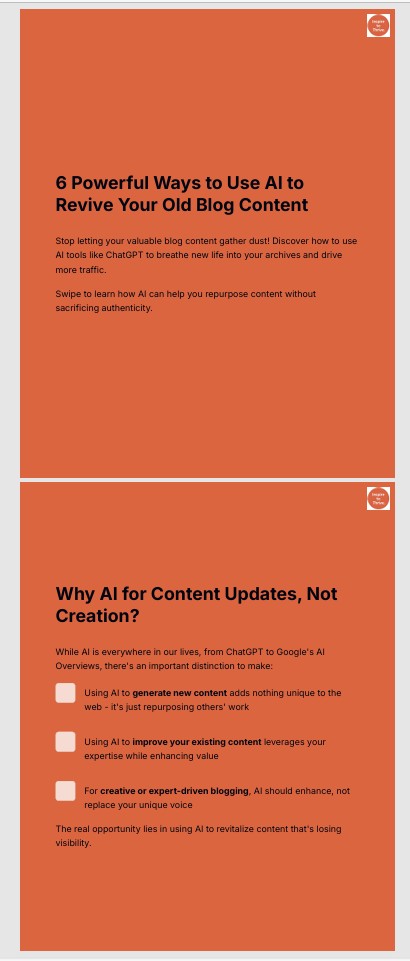
Exploring Design Variations and Styles with Gamma AI App
Don’t get stuck with the same old templates. Gamma encourages variation:
- Social vs. Presentation Mode: You get different output formats to suit each platform. Social sizes are ideal for LinkedIn and Instagram, while Presentation mode is optimized for screen sharing and slideshows.
- Style Presets: Check out presets like “Professional Light” that subtly switch up the color schemes and slide arrangements.
- Automatic Graphics: Gamma often adds relevant graphics based on your content, ranging from icons to stylized illustrations. If you want a specific image (such as a ChatGPT logo), you can prompt the AI to add it.
Tip: Play with style settings in your first few projects to see which best fits your brand and audience. (You can make your own brand kit as well.)
Previewing and Picking the Best Slides
Gamma generates complete carousels with the click of a button:
- Within seconds, you’ll see a preview of your slides—sometimes eight or more at a time.
- Want only three of them? Pick your favorite slides and export just those.
- Export for Instagram? Download your slides, then resize in Canva for the perfect fit.
This flexibility lets you deliver polished, on-message carousels without the manual tweaks.

Exporting and Sharing Your Creations
Once your carousel or slide deck is ready, Gamma offers plenty of sharing options built for social media managers.
Export Formats
Choose the output that fits your content plan:
- PDF: Great for lead magnets, newsletters, or attaching to blog posts. Gamma includes your logo on each page for consistent branding.
- PowerPoint: Ideal for workshops, team meetings, or live webinars.
- Embed or Direct Share: Place Gamma-generated slides on your website (though this may impact SEO, so use with care).
- Image Exports: Download as PNGs for direct upload to Instagram or LinkedIn.
PDF exports are popular for content marketing tools, giving you a professional look and easy sharing.
Sharing to Social Media
Social sharing is where Gamma shines:
- LinkedIn Carousels: You can post slides directly to your LinkedIn feed. Sometimes, LinkedIn’s preview only grabs the first sentence, but the carousel remains clickable. Add a link to your full blog in the comments for extra context.
- Instagram and Facebook: Export and upload slides as images. Instagram carousels look especially sharp; Gamma’s sizing keeps visuals crisp.
- Curious about using Facebook carousels for your business? Gamma makes this quick to test.
Ready to turn one of your blog posts into a carousel? Try Gamma free here →
Managing Projects with Gamma AI Content Creator Tool
Staying organized is simple:
- Gamma auto-saves every project you create. No need to save every version on your computer—access your carousel history, favorites, or recently viewed items from the dashboard.
- Return to an old project and tweak it for a new post in seconds.
Saving time here lets you focus on content quality, not file management. Need even more inspiration? Take a look at these examples of social media posts for creative ideas.
Gamma AI App Pricing: What Does It Cost?
Here’s the current Gamma pricing (August 2026):
| Plan | Price | Best for | Key Limits & Features |
|---|---|---|---|
| Free | $0 | Trying it out |
• 400 credits (one-time) • Up to 10 slides per prompt • Basic social, presentations, docs & images • Import PDF/PPTX • Export PDF/PPTX/PNG/Google Slides |
| Plus | $9/mo ($108/year) | Regular creators |
• 1,000 credits/month • Up to 100 slides per prompt • Removes Gamma branding • Advanced AI image models |
| Pro (Most popular) | $18/mo ($216/year) | Serious content creators & small teams |
• 4,000 credits/month • Premium AI image models • Custom branding & fonts • Analytics + advanced sharing • API access |
| Ultra | $90/mo ($1,080/year) | Heavy users / agencies |
• 20,000 credits/month • Most advanced AI models • Up to 100 custom domains • Early access to new features |
- Free plan needs no credit card.
- Annual billing saves money (shown above).
- Credits are used for AI generation (text, images, etc.).
- Most content creators doing LinkedIn/Instagram carousels land on Plus or Pro.
- Try The Gamma App For Free ➡️
Practical Tips and Use Cases for Gamma
The real magic of the Gamma AI app is its ability to transform busywork into simple, creative output.
How Much Time Can You Really Save?
Before Gamma, making Instagram or LinkedIn carousels was a slog—copying text, formatting each slide, picking graphics, exporting, and posting. One set could take an hour or more.
Now? Gamma does almost all the heavy lifting. You can:
- Import a blog post
- Edit your selections
- Generate, export, and post in under five minutes
Even advanced users will appreciate how easy it is to generate visually consistent slides.
Looking for even more ways to maximize your time? Check out these efficient social media marketing tips for extra strategies.
Best Content Types to Use in Gamma AI App
Gamma isn’t just for one platform. Use it to create:
- Blog post summaries for LinkedIn and Instagram carousels.
- Slide presentations for trainings or webinars.
- Marketing PDFs as lead magnets or digital downloads.
- Slideshows for Facebook and other networks.
The flexibility makes it ideal for creators, coaches, and marketers who want every piece of content to reach more people.
Tips for Maximum Results
Here are some simple tricks:
- Import from URL: This is the fastest way to get your existing content into Gamma.
- Edit Before Generating: Trim sections you don’t want. Fewer, stronger slides always outperform clutter.
- Experiment with Branding: Change up your looks for different campaigns or audiences.
- Cross-Platform Use: Resize slides for Instagram, post full sets to LinkedIn, and try snippets on Facebook.
Gamma opens the door to repurposing content with minimal effort, giving you more time to focus on engagement and growth.
Visual Walkthrough: How the Gamma AI Tool Works
Picture this:
- You log in to Gamma, click “Create New,” and paste the URL of your latest blog.
- Gamma instantly displays each section of your content. You check boxes to keep what works, skip what doesn’t.
- Choose your brand theme (or test a fresh style). Hit “Generate.” Watch as Gamma produces a dozen crisp, engaging slides.
- Need a graphic for a ChatGPT tip? Ask Gamma’s AI to add it—no searching for images.
- Preview your slide deck, pick your favorites, and export as a PDF or PNGs. Share on LinkedIn, then adapt for Instagram using Canva’s resize tool if needed.
- The final PDF includes your logo atop every page, ready for use as a free resource or email attachment.
Screenshots make this even easier—showing the dashboard, slide editing, and export options. It’s a visual process from start to finish.
Key Features of Gamma AI App at a Glance
Make your next piece of content stand out and reach more eyes without adding hours to your workload. Here’s what Gamma offers you:
- Import from multiple sources: URL, Drive, PDF, PowerPoint, Google Docs, and Slides.
- AI-powered slide creation: Text and visuals in a few clicks.
- Brand customization: Instantly apply colors, logos, and styles.
- Export flexibility: Create PDFs, PowerPoints, images, or direct web embeds.
- Project management: Save, favorite, and revisit past work in the dashboard.
- Direct sharing: Quick posting to LinkedIn or prepping for Instagram and Facebook.
- Visual editing: Prompt the AI to generate graphics or photos that fit your content.
Frequently Asked Questions About Gamma AI
Yes. Gamma has a free plan that gives you 400 credits when you sign up (no credit card required). It’s enough to test the tool and create several carousels or presentations. Paid plans start at $9/month if you need more credits or want to remove the Gamma branding.
Absolutely — this is one of its strongest uses. You can import a blog post or paste your content, choose the social/carousel format, generate the slides, and export them as a PDF or images ready to upload to LinkedIn.
Canva is excellent for design control, but it still requires you to build each slide manually. Gamma uses AI to generate the full carousel structure, text layout, and visuals for you in seconds. Most people use Gamma to create the first version quickly, then fine-tune if needed.
Yes. You can create portrait or square carousels and export them as individual PNG images, which you then upload as an Instagram carousel. Many creators use Gamma for the content structure and Canva only for final resizing if needed.
Once you have your content ready, most people can go from import to finished carousel in under 5–10 minutes. The AI does the heavy lifting on layout and design.
Yes. The free plan includes Gamma branding on exports. The Plus plan ($9/month) and higher remove it completely and also give you more monthly credits.
Yes. The interface is straightforward, and you don’t need design skills. If you can paste a URL or type a few sentences, you can create professional-looking carousels.
Conclusion: Gamma AI Tool Saves You Lots of Time
Whether you run a blog, coach entrepreneurs, or need a smarter way to keep your social feed active, Gamma lets you work smarter and faster.
The Gamma AI app is a fast, flexible solution for anyone tired of slow, manual slide creation. Import your content, tweak your selections, and let Gamma do the rest: saving you hours every week. The ability to create carousels, PDFs, and slides doesn’t just make social posting simple; it frees you up to focus on strategy, growth, and connection with your audience.
If you want professional-quality carousels and marketing materials without breaking your workflow, Gamma AI is worth a look. Try it, test export formats, and see how your content comes to life in a new way.
For even more ideas on standing out with your Instagram or LinkedIn carousels, don’t miss these in-depth top AI content creation tools for optimizing your social strategy.
If you want to create carousels faster, give Gamma a try — the free plan is enough to test it out.
Disclosure: This Inspire To Thrive blog post contains affiliate links. I may earn a commission from qualifying purchases at no extra cost to you. Some sections were drafted with AI tools and carefully reviewed/edited by me.

- Which Instagram Monitoring App Wins? EyeZy vs Peekviewer - October 20, 2026
- How to Use Social Media for the Best Black Friday Deals of 2026 - October 19, 2026
- How to Identify and Prioritize Your Money Pages (And Why I Just Updated Mine in Link Whisper) - October 19, 2026
Enjoy this content? Help me show up more often in Google by adding Inspire To Thrive as a Preferred Source: