
Are you looking to find inactive Twitter followers? No matter the season, the X Twitter X cleaning continues.
Why follow peeps who have not posted in weeks or months? Learn how you can check and remove inactive X followers here on Inspire To Thrive.
See how to find inactive Twitter followers to quickly clean up your account.
There are several reasons to remove inactive Twitter followers from your X account. If peeps are not active on the social networking service, it is time to say Goodbye to your lifeless X followers.
Estimated reading time: 9 minutes

Table of Contents
Key Takeaways: Cleaning Up Inactive X (Twitter) Followers in 2026
- Why it matters: Removing inactive followers improves your engagement rate, boosts X’s algorithm reach, and keeps your feed clean and relevant.
- Top tools:
- Circleboom — Best for easy filtering + bulk unfollows (inactive, fake, low-engagement). Use their Chrome extension for smoother actions.
- Fedica — Best for precise last-activity date filters and deeper audience insights.
- Safe approach: Never mass-unfollow hundreds at once. Stick to 50–100 per day/week to stay within X’s limits and avoid flags.
- Pro tips: Always whitelist important accounts. Combine tools (Circleboom for detection + manual/X-native for final removals). Re-audit monthly.
- Expected results: Users typically see increased engagement and higher-quality followers within 1–2 weeks of consistent pruning.
- Free starting point: Try Circleboom’s free tier or Fedica’s basic filters first.
Idle Peeps On Twitter X
For one reason or another, some X users decide to stop posting. Or maybe they were suspended by X and decided not to log back in.
Other X users may log in only to read posts, not to send any. For whatever reason, these people remain inactive on X.
How do you find these inactive Twitter followers? Or those that you followed who have turned inactive on Twitter?
3 Great Ways To Find Inactive Twitter Followers
There are some great tools you can use to find out who your inactive Twitter followers are. These are the ones that are no longer following you and show how long it has been since they last tweeted.
They may have been fake or old bot accounts. Why waste your X stream with folks that are lifeless and/or irrelevant to your tweets?
Most of the X tools below offer both free and paid versions to check for inactive X followers. The paid versions of these X tools offer a lot of bells and whistles to help you grow your X account.
With the recent changes to the API, most of these services had to raise their prices.
How To Delete Inactive Twitter Followers With 2 Tools
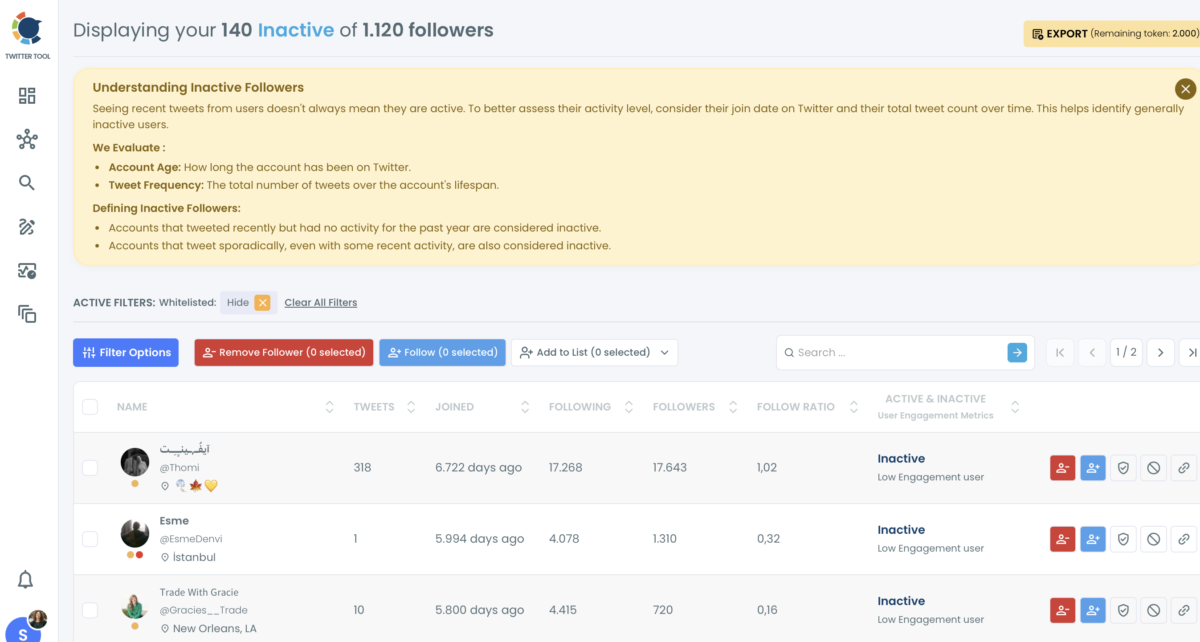
1. Circleboom (Strong All-Around Choice for Inactive Filtering + Bulk Actions)
Key 2026 Features:
- Default inactive filter: Accounts with no posts in the last 30 days (customizable to months/years).
- Newer enhancements: Better engagement scoring, “Engaging & Loyal Followers” detection (NEW label in dashboards), combined filters for verification status (Blue/Gold/Gray), and safer bulk unfollow via their dedicated Chrome extension.
- Post-API: Reliable data pulls with export options (up to token limits on higher plans).
Pricing (2026): Free tier for basic preview (1 profile). Paid plans start at $12–$28/month (Limited/Pro plans); annual discounts bring Pro to ~$24/month. Higher tiers (Plus/Premium) support more profiles and larger follower counts.
How to Use It (Step-by-Step):
- Log in to Circleboom and connect your X account.
- Go to Followers/Following Management → Inactive Followers (or “Inactive Following”).
- Apply filters (e.g., inactive + low engagement).
- Select accounts and unfollow in bulk (use their extension for smoother processing).
2. Fedica (Best for Precise Last-Activity Filters & Audience Insights)
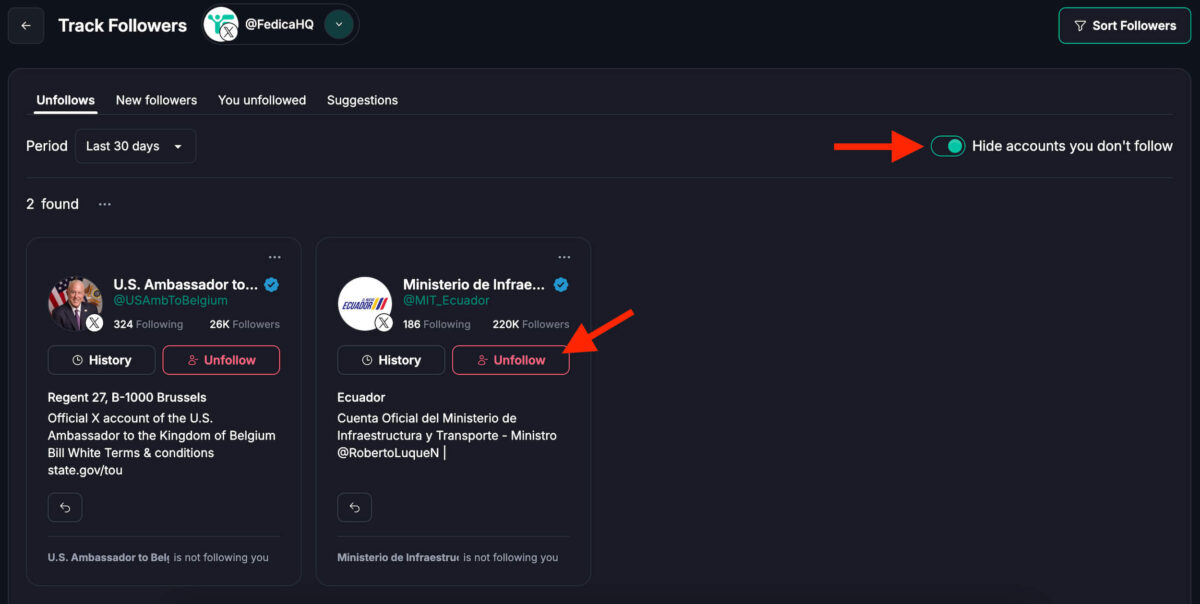
Fedica (formerly Tweepsmap) shines with granular “Last Active” filtering — perfect for spotting true ghosts. It’s excellent for deeper audience analysis beyond just inactivity.
Key 2026 Features:
- Sort Followers tool: Filter by “Last Activity Before” a specific date (e.g., 6 months ago).
- Toggle Inactive Accounts (2 months / 6 months presets).
- Additional layers: Combine with follower count, keywords, lists, or whitelists to protect key connections.
- No risky one-click mass unfollow (safer for X rules) — but fast individual unfollows from filtered lists.
- Bonus: Follower quality audits, maps, demographics, and unfollower tracking.
Pricing: Subscription-based (details on their site; strong value for analytics-focused users).
How to Use It:
- Unfollow selectively from the results
- For people you follow: Go to Accounts You Follow → Toggle Inactive.
- For your followers: Use Sort Followers → Last Active filter → Set date range.
3. Audiense (Best for Deep Audience Intelligence)
Audiense focuses on high-level segmentation, including inactive users you follow or who follow you. Great for larger accounts needing psychographic insights alongside cleanup.
Key Features: Inactive panels with date filters, influence/engagement overlays, and community management widgets. Pricing starts at ~$39–$49/month, depending on the Connect/Insights plan.
4. Browser Extensions (Quick, Lightweight Alternatives)
For lighter needs or manual control:
- X Unfollow Pro or similar (e.g., X Unfollower): Filter directly on X by bio/keywords, activity (30/60/90+ days inactive), and follower count. Bulk options in Pro versions. Low cost or freemium.
- Circleboom’s own Remove Followers Chrome extension for faster bulk actions after filtering in their dashboard.
Pro Tip: Always respect X’s daily limits (~400 actions) to avoid flags. Combine tools (e.g., Circleboom for detection + extension for execution) and whitelist important accounts.
| Tool | Best For | Inactive Filter Precision | Bulk Unfollow | Pricing (approx. 2026) | Safety Notes |
|---|---|---|---|---|---|
| Circleboom | Easy filtering + bulk | High (30+ days) | Yes (with ext.) | $12–$30/mo | Official partner |
| Fedica | Last-activity depth | Excellent (date range) | Selective | Subscription | Conservative limits |
| Audiense | Audience insights | Good | Yes | $39+/mo | Research-focused |
| Extensions | On-platform speed | Good | Varies | Free–Low | Use cautiously |
In 2026, prioritize tools that comply with X’s rules; mass actions still carry risks, but gradual cleanups (e.g., 50–100/week) boost engagement without issues.
Try Circleboom’s free tier or Fedica signup to audit your account today.
The New X Layout Shows Who Follows You or Not Now
When Twitter changed its layout a few years ago, it introduced a new feature directly in the X stream.
As you can see in the example below, Neil Patel is not following me back. Do note that you can also see who else is following you on your X (Twitter) account.

But as you can see below, Bad Red Head Media is following me back, and notice how you can see who else is following back:

This is a much better way to see who follows you or unfollows you. In addition, it will keep you from being locked out of X (Twitter), as it doesn’t like those 3rd-party apps! (However, it does take longer to find these unfollowers than the X Twitter tools above.)
And then there is a newer service for X Twitter that Ileane Smith tweeted about a few years back (she always has the latest on cool new and older tools).
X Followers – How Many Can You Unfollow On Twitter?
Twitter has rules on how many people you can follow and unfollow per day. You must be careful not to be seen as churning spam, particularly by automated means.
If you are someone who follows and unfollows daily, you may get noticed by X Twitter, which could be a cause for concern.
Today, you can follow up to 400 people per day. But, if your account is verified, that number climbs to 1,000 people that you may follow.
In addition, every X Twitter account can follow up to 5,000 accounts. Once you reach that number, you may need to wait until your account has more followers before you can follow additional accounts.
This number is different for each account and is automatically calculated based on your unique ratio of followers to following accounts, according to X. It sounds like a secret recipe.
Maybe Elon will share the secret and change this outdated Twitter rule.
So be careful not to keep following and unfollowing. So you don’t end up in Twitter jail – it really exists!
6 Reasons To Find and Remove Idle X Twitter Followers
- They haven’t posted or replied in weeks or months.
- People don’t post in your areas of interest. Why continue to follow them?
- They do not interact with you when you post or repost them.
- Other accounts don’t have a face or icon associated with their account – why did you follow in the first place?
- No profile pictures. What are these X Twitter peeps about? What is their purpose for being on X Twitter? Be sure to fill out your bio completely if you want to be followed.
- Lastly, they post constantly. They fill up your stream with not-so-great content. Maybe they should use Aograpulse to schedule their tweets.
Conclusion: How to Remove Inactive X Twitter Followers on X
To remove inactive Twitter followers on X, audit first, then act. Use Circleboom (circleboom.com) to flag inactive, spam, and egg accounts, filter by last tweet date, then queue removals.
Pair it with Fedica (fedica.com), which maps inactivity by time and engagement so that you can spot dead weight fast.
On X, remove followers on the web with Remove this follower, or use block, then unblock if needed.
Prune in batches, keep notes, and repeat monthly for cleaner data and better reach. Protect real connections, keep bots out, and watch engagement climb. Ready to clean your list and grow with intent?
If you still want to keep tabs on some of these removed folks on X, you can easily add them to a Twitter list.

Enjoy this content? Help me show up more often in Google by adding Inspire To Thrive as a Preferred Source:



Thanks Lisa for letting us know about this useful information. I have tried Tweetsmap today and find that It’s quick and easy to use. So this seems perfect for me. Great work you really do here…
Hi Romio, welcome to Inspire To Thrive. You are most welcome. I love the tool and may upgrade someday as well. Have a great day.
Hello Lisa,
I am also figuring out to find inactive followers on my Twitter profile. A few months back I removed some manually but it is definitely a time-consuming job when you have thousands of followers. Thanks for sharing these helpful tools.
Regards,
Vishwajeet Kumar
Hi Vishwajeet, I love that tool as it saves me a lot of time. If you go with the premium version I believe you can unfollow more as well. Thanks for coming by and have a great day there Vishwajeet.
This is the second article I read today on your blog, I must say you do really amazing work here…
I am gonna give “Tweetsmap” a try, thanks for sharing such an amazing article.
Thanks Ravi, welcome to Inspire To Thrive. I love that tool, just got it in my email this morning. They also have a browser extension you can use too. Thanks for coming by and have a great day.
This site (https://appunfollowers.com/) gives 200 free unfollows each day.
Pretty useful if you need to clean up your Twitter base without investing in a premium tool.
Thanks for the post, Lisa!
Thanks, Erik, good to know! I see lots of fluctuations lately with people coming and going on the network since Elon took over.
Hey Lisa,
Thanks a lot for sharing this wonderful post.
Being very honest I don’t check my lists to remove people who are not tweeting but yes, I too believe we have to keep an eye on our followers and why we follow them who are not tweeting much any longer.
I didn’t know about these follow and unfollow rules and terms and conditions in so depth but there are many strange followers who don’t have even full profiles and are inactive too. Hope this helps me lot. Thanks for sharing your awesome idea.
Thanks & Regards,
-Rijhu
You are most welcome Rijhu. Welcome to Inspire to Thrive. I rarely follow anyone who doesn’t have a photo unless I know them personally and anyone that does not have a profile. Having a full profile is so important today on Twitter. Thanks for coming by and have a great day!
Hi Lisa,
I’m glad you updated this post. A lot of tools that I gave access to my Twitter account no longer exist.
Btw – in that tweet when I mentioned an app called Tweet Drip – I was not implying that I used it. I was asking to see if anyone else was. Turned out you guys said no so I completed forgot about it and haven’t seen anyone talking about it since back in November 2019 ? They were not on my list of tools that I need to revoke access to from Twitter.
Thanks Lisa!
Hi Ileane, Oh yes, every once in a while we have to look at this Twitter apps we gave access to. It is an easy thing to forget there with so many other things to do. I see Tweet Drip is still around. Would be interesting to see if anyone does use it. Thanks for coming by and explaning this one to us here. Have a great day and be safe with the impending tropical storm!
Thanks! You too Lisa.
Thanks, Lisa for sharing this wonderful post.
Yes, we need to do a follow up on our followers.
Yes, why do we need to follow the dead woods!
The 6 Reasons To Stop Following Old Twitter Followers are worth notable and need to do an exercise here, why to keep or follow such followers.
Thanks for the insight and the tools links shared in this regard, I need to do a clean-up service in this regard on my twitter page.
Keep sharing
Season’s Greetings you and all your readers.
Best
~ Phil
PS; You have been mentioned in one of my recently updated posts.
Thanks
Phil
Hi Philip, You are most welcome. I try to check mine at least monthly on Twitter and I also follow new people as well. Good to keep the flow going there. I’ll have to check your article out Philip, thanks for letting me know. I hope you have a great season there as well and enjoy your weekend ahead.
Truthfully, I don’t go through my list all that often to remove people who aren’t tweeting much any longer. I used to have an app that told me about those folks but it died out. I use Tweetmap, but it only tells us who we’re no longer connected to as far as I can tell.
I tend to believe it’s more important not to go for the counts grab and only follow people you’re interested in. It’ll make Twitter a better experience for everyone.
Hi Mitch, You can also tell right on Twitter itself now. If someone is following you it will show right next to their bio. I agree on following those you are interested in for sure. I keep unfollowing those I followed years ago that I am no longer interested in. But if someone hasn’t tweeted in months or a year why still follow, right? Thanks for coming by Mitch and I hope you are staying warm in this winter storm.
Hi Lisa, there is excellent value in sweeping tweeps who are not active on the platform. If not for anything, it allows a person to create more space for new users and grow your followers. I use Untweeps to sweep them away.
Hi Moss, Thanks, I agree. I have not heard of untweeps yet. Is is a 3rd party tool? I’m so leary of those now with Twitter suspensions but I like how I can see right on Twitter and or on my Agorapulse dashboard of who follows or not anymore. Thanks for your input and have a great day Moss.
Hi Lisa,
Inactive twitter followers do not add any value to your business. It is always wise to bury them for the sake of better analytic reports. Focus more on building connection with like minded professionals on Twitter.
Thanks!
Hi Gaurav, I would agree with you on that one! I don’t follow back if they are inactive or I’ll unfollow if they never engage along the way. Thanks for your input and have a great week ahead.
Super guide Lisa.
I see great value in having as many Twitter followers as possible, and following many in return to promote a sense of community. But why follow someone who spams you, or send irrelevant tweets too often; or doesn’t have their profile set-up. There’s no value in that, but there is in removing those peeps. Less clutter.
Hi Nikola, I’d agree as long as you are communicating with them and not just following for the sake of following. Though I understand it’s hard to communicate with that many people. That’s why I love using Twitter Lists. It really helps me to keep organized and in touch with more peeps. Thanks for coming by on this one Nikola and have a wonderful weekend!
Hello Lisa,
Twitter is removing millions of inactive accounts in a step to clean the Twitter platform and make it more engaging.
Twitter rules clearly state that if a Twitter account has shown prolonged inactivity, it can be removed from Twitter.
As a Twitter user, you would want to follow those Twitter accounts that are active and contribute well to your Twitter feed.
Circleboom is a complete Twitter management tool that helps you with cleaning your Twitter account by unfollowing inactive, fake and spam twitter accounts – currently I’m using it.
Eventually, thanks for exploring your ideas with us.
With best wishes,
Amar Kumar
Thanks Amar. They are removing them yes, but I still have many followers that haven’t tweeted in months or even years. I use Agorapulse and a few others I mentioned in the post but I only unfollow and follow in the stream as Twitter is playing too friendly with many 3rd party tools today. You are welcome and have a great weekend Amar.
I really impressed from this post. Twitter is really a great social networking website. Having more followers can helps to make a new engaged community. And there is a twitter tool named Tweepdash which helps to remove followers who are not following you back. I think you know about this lisa. right??? I appreciate with you. Actually I have also written a post related to twitter followers recently so I think why not to check others post and came across to your post. Thanks once again for sharing.
Thanks Chetan, I do spend most of my social time on Twitter. It’s truly the BEST. I do like your tool that you introduced too, nice one! Thanks for coming by and sharing here too. Catch you back on Twitter!
Nobody likes inactive Twitter users, which is why I try to be as active on it as possible. If you can’t be active on it, I always recommend using something like Buffer which will help space out your tweets. It’s also helpful if you’re article surfing or something and you want to share with your followers, but you don’t want to annoy them by tweeting them all out at once.
James, I LOVE the Buffer app. I may go pro with it in the future. I agree and sometimes I can be guilty of it as I get a little zealous over on Twitter. Thanks for your comment and input on this one.
Hi,
Thank you for taking the time to write about Twitter. I’m a big fan of Twitter. Everything related to Twitter is important to me. I clean my account from time to time. Not regularly. During my first month on Twitter I had no idea that I need to make some cleaning.
I liked very much the idea of connecting people, being polite, making relationships etc. I used DM a lot. It was so nice to say thank you to people for following me. One day I said thank you to a person then I checked him and realized he is not a real person. It was a fake follower. I said “thank you” to a ghost.
I was so embarrassed and pissed off that I immediately decided to check my account for any other ghosts. I found a lot of eggs, people who buy followers etc. From that day I gave up sending DM’s to thank people. I do this only for those people who are real and I respect, admire etc..
Then I realized it is not so easy to clean my account so I searched for a software to help me do that more efficiently. Now I’m using MangeFlitter and it works fine.
Thank you for your time and have a nice day
Hi Silviu, welcome to Inspire to Thrive. I love Twitter myself. My favorite online place to be. I don’t use the DM’s anymore for thanking followers. I find them a little silly now. I’d rather interact via the stream with new followers, etc. Only if it’s a personal message with I use DM or to help someone out if I found a mistake and I didn’t want the world to know. I’ve used ManageFlitter too and had forgotten about it as I signed in a few weeks ago after others mentioned here in the comments too. There are so many ways or apps for Twitter it boogles my mind! Thanks for coming by and for your input on this subject Silviu, have a great weekend!
I really find it annoying when I have so many followers who are not beneficial to me. I’d rather have few who gives relevant information to me than have tons which are useless anyway.
Jeremy, I agree with you on that one. I’ve been weeding through mine. Thanks for coming by and for your input.
Speaking of twitter jail, I follow Rosanne Cash and she has been in twitter jail a few times. A couple of weeks ago I did a good twitter clean up, then the next day noticed I lost about 25 followers. Now, I try to un-follow only those who are truly annoying or are not following me.
Hi Savvy, yes I don’t unfollow a lot but recently some were banned and I lost some followers. Just read about it this a.m. from a few bloggers who recently got banned. Not sure of the reasoning yet. I’m sure we will hear more on it soon.
Hi Lisa,
Spring is in the air, I’ve been getting back into work by having a spring clean on my blog and removing old dead links etc.
When i first started on Twitter I was following a course that told us to auto follow to gain followers fast. Little did I know at the time what a mistake that was, I had all sorts of clowns following me that I automatically followed back.
I saw an unsavoury tweet on my stream and thought “What….. People will think i’m into that crap” and quickly put it right.
I followed a post by Mayura last year about Tweepi so ran my account through it…. Boy oh boy was I surprised by the amount of fake and flat followers.
I did do a mass unfollow and luckily got away with it, but now I know about Twitter Jail I’ll be more careful in future.
Thanks Lisa, great tips on twitter.
Barry
Hi Barry, so far I like Tweepi the best of all the tools I’ve tried. Yes, I do remember that one from Mayura – fake followers.I like how it shows the last time someone was active and if they are fake too. It still amazes me as to how many tools they are out there for this function with Twitter. It’s nice to see you back online Barry, I hope you have a wonderful Wednesday.
I have not thought to unfollow inactive twitter fans because I sometimes am not as active as I should be. I’m trying to improve but life happens outside social media. I am looking forward to being more active on twitter. Takes a while but I get there eventually.
Thanks for sharing this.
Its always good to know.
Hi Yetunde, Yes, it sure does! How often do you get to Twitter generally? Welcome to Inspire to Thrive.
Hi Lisa,
Out of the 3 tools you have mentioned, I’ve been using Tweepi. I like the options it has and easy to use tool too. I’ve seen folks tweeting “I’ve unfollowed with JustUnfollow” too. It’s preference, right?
However it’s not essential if you ask me as I don’t have much to unfollow lol… I follow as I get to know and very rare I unfollow someone too.
As I think if someone don’t tweet for 6 months or long, we can safely remove them, no? AND it’s really important mentioning about following and unfollowing too much, as Twitter doesn’t like it. Well, that’s how tools work.
I really like the reasons you have mentioned there Lisa. Especially the 6th one. Ha ha… Of course they need Buffer, HootSuite or something similar to schedule. My vote goes for Buffer though.
One more thing though. When someone intrudes a conversation with links and/or shows off spammy behavior, I tend to unfollow ’em too. Twitter is not all about promotion. no?
Hope I haven’t been unfollowed for not tweeting much lately, lol…
You have a wonderful weekend with lovely Spring flowers Lisa.
Cheers…
Hi Mayura, it sounds like you are on the same page with me on this on about Twitter and unfollowing. I like Tweepi the best too now over just unfollow and you know how much I love the Buffer, it’s not a good day unless my buffers are filled up. I agree on the spammy behavior too, great point. You seem to be on Twitter almost daily do I would not worry about being unfollowed. I hope your projects are going well there. Enjoy the rest of your day.
Hello Lisa, I use a number of site to help my social media, Managerflitter is one another one is Just Unfollow.
Thanks so much for a great share Lisa.
Hi Rob, you are another with Manageflitter. I must check it out as well. Just Unfollow is good for a quick check too. Thanks and enjoy the rest of your weeekend Rob.
I son’t use Twitter that much, but I have few tweets in my account but they are not mine. Is someone else tweeting on my behalf? How can I resolve it?
Rahul, it sounds like your account might have been hacked. Check out their help center and I’d tweet them too. @Support is their handle. Good luck and love to know how you make out Rahul. To prevent it in the future I guess you may want to change your password more often.
Hi Lisa
I was unfollowing people every once in a while but what Ted mentions above has got me thinking.
I’m not sure now whether to unfollow them or not. My Twitter feed is far too active for me to keep up with and maybe it’s the more active Tweeters that I need to unfollow?!
LOL Tim, wow you are going the other way on this one. Interesting – looks like we need a follow up post on that one or one with the different point of view, Thanks for your input and let me know what you end up deciding on Tim. Enjoy the weekend.