
Are you looking to find inactive Twitter followers? No matter the season, the X Twitter X cleaning continues.
Why follow peeps who have not posted in weeks or months? Learn how you can check and remove inactive X followers here on Inspire To Thrive.
See how to find inactive Twitter followers to quickly clean up your account.
There are several reasons to remove inactive Twitter followers from your X account. If peeps are not active on the social networking service, it is time to say Goodbye to your lifeless X followers.
Estimated reading time: 9 minutes

Table of Contents
Key Takeaways: Cleaning Up Inactive X (Twitter) Followers in 2026
- Why it matters: Removing inactive followers improves your engagement rate, boosts X’s algorithm reach, and keeps your feed clean and relevant.
- Top tools:
- Circleboom — Best for easy filtering + bulk unfollows (inactive, fake, low-engagement). Use their Chrome extension for smoother actions.
- Fedica — Best for precise last-activity date filters and deeper audience insights.
- Safe approach: Never mass-unfollow hundreds at once. Stick to 50–100 per day/week to stay within X’s limits and avoid flags.
- Pro tips: Always whitelist important accounts. Combine tools (Circleboom for detection + manual/X-native for final removals). Re-audit monthly.
- Expected results: Users typically see increased engagement and higher-quality followers within 1–2 weeks of consistent pruning.
- Free starting point: Try Circleboom’s free tier or Fedica’s basic filters first.
Idle Peeps On Twitter X
For one reason or another, some X users decide to stop posting. Or maybe they were suspended by X and decided not to log back in.
Other X users may log in only to read posts, not to send any. For whatever reason, these people remain inactive on X.
How do you find these inactive Twitter followers? Or those that you followed who have turned inactive on Twitter?
3 Great Ways To Find Inactive Twitter Followers
There are some great tools you can use to find out who your inactive Twitter followers are. These are the ones that are no longer following you and show how long it has been since they last tweeted.
They may have been fake or old bot accounts. Why waste your X stream with folks that are lifeless and/or irrelevant to your tweets?
Most of the X tools below offer both free and paid versions to check for inactive X followers. The paid versions of these X tools offer a lot of bells and whistles to help you grow your X account.
With the recent changes to the API, most of these services had to raise their prices.
How To Delete Inactive Twitter Followers With 2 Tools
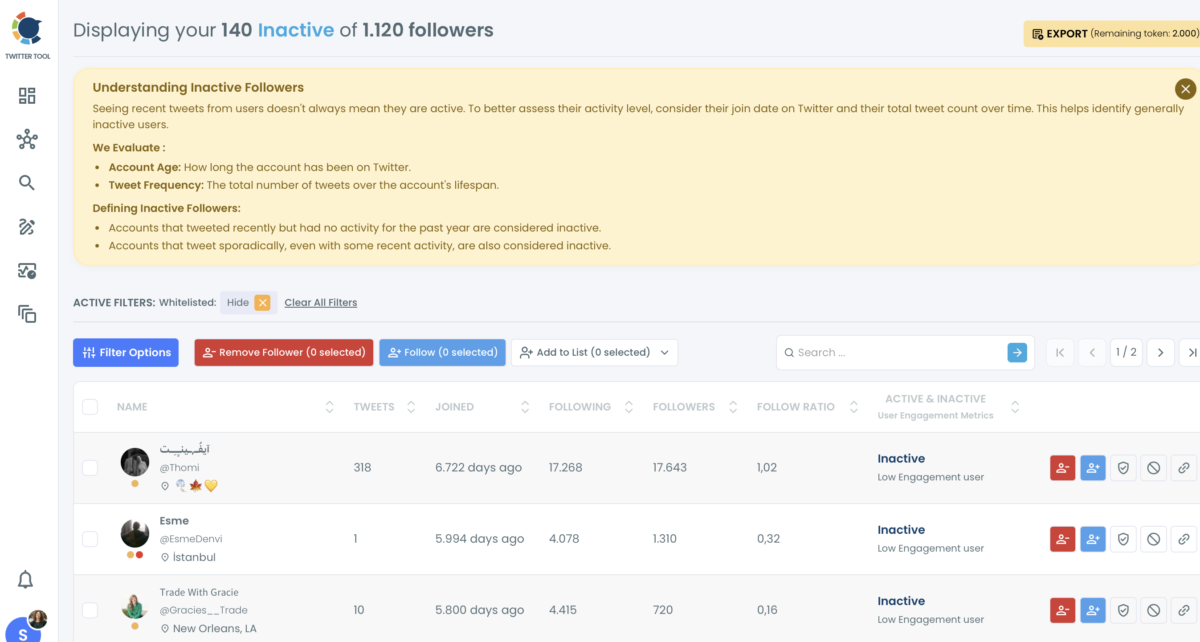
1. Circleboom (Strong All-Around Choice for Inactive Filtering + Bulk Actions)
Key 2026 Features:
- Default inactive filter: Accounts with no posts in the last 30 days (customizable to months/years).
- Newer enhancements: Better engagement scoring, “Engaging & Loyal Followers” detection (NEW label in dashboards), combined filters for verification status (Blue/Gold/Gray), and safer bulk unfollow via their dedicated Chrome extension.
- Post-API: Reliable data pulls with export options (up to token limits on higher plans).
Pricing (2026): Free tier for basic preview (1 profile). Paid plans start at $12–$28/month (Limited/Pro plans); annual discounts bring Pro to ~$24/month. Higher tiers (Plus/Premium) support more profiles and larger follower counts.
How to Use It (Step-by-Step):
- Log in to Circleboom and connect your X account.
- Go to Followers/Following Management → Inactive Followers (or “Inactive Following”).
- Apply filters (e.g., inactive + low engagement).
- Select accounts and unfollow in bulk (use their extension for smoother processing).
2. Fedica (Best for Precise Last-Activity Filters & Audience Insights)
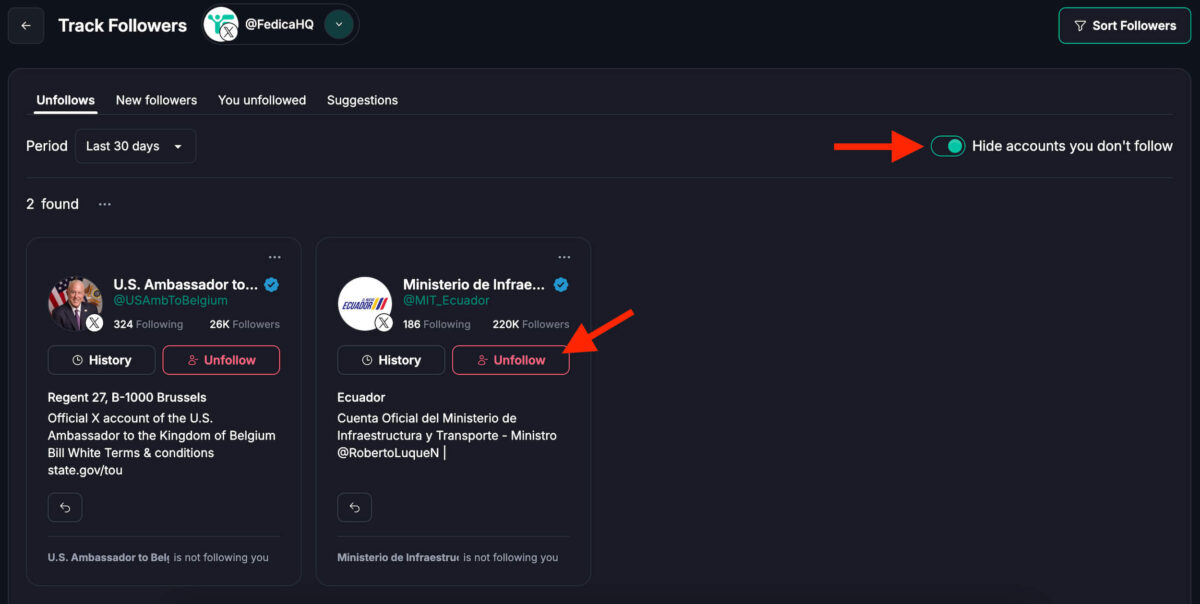
Fedica (formerly Tweepsmap) shines with granular “Last Active” filtering — perfect for spotting true ghosts. It’s excellent for deeper audience analysis beyond just inactivity.
Key 2026 Features:
- Sort Followers tool: Filter by “Last Activity Before” a specific date (e.g., 6 months ago).
- Toggle Inactive Accounts (2 months / 6 months presets).
- Additional layers: Combine with follower count, keywords, lists, or whitelists to protect key connections.
- No risky one-click mass unfollow (safer for X rules) — but fast individual unfollows from filtered lists.
- Bonus: Follower quality audits, maps, demographics, and unfollower tracking.
Pricing: Subscription-based (details on their site; strong value for analytics-focused users).
How to Use It:
- Unfollow selectively from the results
- For people you follow: Go to Accounts You Follow → Toggle Inactive.
- For your followers: Use Sort Followers → Last Active filter → Set date range.
3. Audiense (Best for Deep Audience Intelligence)
Audiense focuses on high-level segmentation, including inactive users you follow or who follow you. Great for larger accounts needing psychographic insights alongside cleanup.
Key Features: Inactive panels with date filters, influence/engagement overlays, and community management widgets. Pricing starts at ~$39–$49/month, depending on the Connect/Insights plan.
4. Browser Extensions (Quick, Lightweight Alternatives)
For lighter needs or manual control:
- X Unfollow Pro or similar (e.g., X Unfollower): Filter directly on X by bio/keywords, activity (30/60/90+ days inactive), and follower count. Bulk options in Pro versions. Low cost or freemium.
- Circleboom’s own Remove Followers Chrome extension for faster bulk actions after filtering in their dashboard.
Pro Tip: Always respect X’s daily limits (~400 actions) to avoid flags. Combine tools (e.g., Circleboom for detection + extension for execution) and whitelist important accounts.
| Tool | Best For | Inactive Filter Precision | Bulk Unfollow | Pricing (approx. 2026) | Safety Notes |
|---|---|---|---|---|---|
| Circleboom | Easy filtering + bulk | High (30+ days) | Yes (with ext.) | $12–$30/mo | Official partner |
| Fedica | Last-activity depth | Excellent (date range) | Selective | Subscription | Conservative limits |
| Audiense | Audience insights | Good | Yes | $39+/mo | Research-focused |
| Extensions | On-platform speed | Good | Varies | Free–Low | Use cautiously |
In 2026, prioritize tools that comply with X’s rules; mass actions still carry risks, but gradual cleanups (e.g., 50–100/week) boost engagement without issues.
Try Circleboom’s free tier or Fedica signup to audit your account today.
The New X Layout Shows Who Follows You or Not Now
When Twitter changed its layout a few years ago, it introduced a new feature directly in the X stream.
As you can see in the example below, Neil Patel is not following me back. Do note that you can also see who else is following you on your X (Twitter) account.

But as you can see below, Bad Red Head Media is following me back, and notice how you can see who else is following back:

This is a much better way to see who follows you or unfollows you. In addition, it will keep you from being locked out of X (Twitter), as it doesn’t like those 3rd-party apps! (However, it does take longer to find these unfollowers than the X Twitter tools above.)
And then there is a newer service for X Twitter that Ileane Smith tweeted about a few years back (she always has the latest on cool new and older tools).
X Followers – How Many Can You Unfollow On Twitter?
Twitter has rules on how many people you can follow and unfollow per day. You must be careful not to be seen as churning spam, particularly by automated means.
If you are someone who follows and unfollows daily, you may get noticed by X Twitter, which could be a cause for concern.
Today, you can follow up to 400 people per day. But, if your account is verified, that number climbs to 1,000 people that you may follow.
In addition, every X Twitter account can follow up to 5,000 accounts. Once you reach that number, you may need to wait until your account has more followers before you can follow additional accounts.
This number is different for each account and is automatically calculated based on your unique ratio of followers to following accounts, according to X. It sounds like a secret recipe.
Maybe Elon will share the secret and change this outdated Twitter rule.
So be careful not to keep following and unfollowing. So you don’t end up in Twitter jail – it really exists!
6 Reasons To Find and Remove Idle X Twitter Followers
- They haven’t posted or replied in weeks or months.
- People don’t post in your areas of interest. Why continue to follow them?
- They do not interact with you when you post or repost them.
- Other accounts don’t have a face or icon associated with their account – why did you follow in the first place?
- No profile pictures. What are these X Twitter peeps about? What is their purpose for being on X Twitter? Be sure to fill out your bio completely if you want to be followed.
- Lastly, they post constantly. They fill up your stream with not-so-great content. Maybe they should use Aograpulse to schedule their tweets.
Conclusion: How to Remove Inactive X Twitter Followers on X
To remove inactive Twitter followers on X, audit first, then act. Use Circleboom (circleboom.com) to flag inactive, spam, and egg accounts, filter by last tweet date, then queue removals.
Pair it with Fedica (fedica.com), which maps inactivity by time and engagement so that you can spot dead weight fast.
On X, remove followers on the web with Remove this follower, or use block, then unblock if needed.
Prune in batches, keep notes, and repeat monthly for cleaner data and better reach. Protect real connections, keep bots out, and watch engagement climb. Ready to clean your list and grow with intent?
If you still want to keep tabs on some of these removed folks on X, you can easily add them to a Twitter list.

Enjoy this content? Help me show up more often in Google by adding Inspire To Thrive as a Preferred Source:



Hi Lisa, thanks for the post. To be honest, the people I like to unfollow the most are those that tweet too much. Ironically, they are people heralded as mavens of social media.
Hi Andrew, interesting, I have at times too. It depends what they tweet too. It all depends on how many you have in your feed. The more people following etc the less you mind the ones that tweet a lot. I notice if new people follow me they unfollow me in a week probably due to that. Thanks for your input on it Andrew. Have a great weekend.
I see no one mentioned the one I use (that seems to happen often lol) which is Unfollowers.me. It’s pretty simple and works okay. I miss my old one though.
Hi Mitch, another one I haven’t used. There must be 100’s of them out there that do this. Amazing, wonder how they all make money. Thanks for coming by Mitch and adding another one to the list. Enjoy your weekend there.
Hi Lisa,
I unfollow users about once a month. I can’t remember which tool sends me a monthly list of people who have unfollowed me. (It may be Twellow.) That always motivates me to want to unfollow them back (if I am following them). My favorite tool to do this is manageflitter.com. After it checks your Twitter account, it returns all sorts of interesting views that you can use to determine who you want to unfollow.
In addition to identifying those who aren’t following you, it also identifies fake followers, followers without profile pics, inactive, quiet etc. The free version fits my needs.
Hi Sherryl, another one that uses managerflitter. I must check it out as well. There are so many Twitter tools it really is amazing. Oh yes, I’ve used Twellow too but not to check the followers – so many to chosse from. Thanks for coming by Sherryl and for your input on this. Enjoy the weekend.
Always a good tip Lisa and I keep mine pretty clean. I’ll check every once in a while to see who hasn’t tweeted in awhile but I’m never following anyone really who just doesn’t tweet. I also don’t have any faceless connections or totally inactive friends. That’s why I’m not following as many people that are following me. A lot of them are probably going after the numbers where I’m going after awesome people.
I use ManagerFlitter to clean up my account, been using that one for years now and they keep improving their service. It works beautifully.
Great reminder, thanks!
~Adrienne
Hi Adrienne, I have not heard of ManageFilter, there are so many Twitter tools out there, it really is amazing. I don’t like to follow any faceless people either unless it’s a business I know. I agree – quality over quantity anytime. Thanks for coming by and commenting. Enjoy your weekend Adrienne!
I honestly don’t have a clue how many followers I have that are inactive or don’t tweet something very often. I used to do a pretty good job keeping up with that stuff, but I guess I have been putting off doing so. I have used Tweepi, but it has been months since I logged into it. I am almost afraid to look now because I know I will most likely have more than I thought to go through. I probably have a few egg heads too. Anyway thanks for the reminder.
Ray, yes, those egg heads really must go. Unless it’s their first day or week on Twitter then I’ll excuse them for the egghead. But not for months like that. I do like Teeepi since it shows their last activity. Thanks for coming by Ray and enjoy the weekend ahead.
Hi Lisa
Sorry I have not been around much but I am back now….
I use free JustUnfollow and Commun.it and find them useful, I have not heard of Tweepi so I will check it out and see if I like it.
I tend to have a clear our every week, what is the use of keeping these people if they do not Tweet or engage with others?
Thanks for sharing hope you enjoy your day Lisa
Pauline
Hi Pauline, I hope all is okay. Yes Tweepi lets you check more out for FREE. You are very good to check weekly. Glad to see you back Pauline and hope you have a nice upcoming weekend.
Hi Lisa; Thanks for the info. I use the free JustUnfollow as well and find it pretty good. Commun.it is something I just discovered, but, haven’t really explored in detail. Must take the time to do some spring cleaning at Twitter, for sure! Have been busy doing that with the blog. Didn’t know you could go to Twitter Jail. Yikes!
Hi Debbie, yes I use that pretty regularly and then with FREE you can only check so many so I used Tweepi which tells you last time they tweeted, etc which I found even more useful. Commun.it will tell you that as well. Thanks for coming by and for your input. I really loved your post today by the way! Enjoy the upcoming weekend.
I am using the tool TweetAdder for doing this and earlier I used a good site for doing the same but can’t remember the name exactly. I think removing such user is a good idea but make sure that you don’t unfollow too many twitter followers in a single day, otherwise your account might get the risk of being banned Lisa.
Yes Taswir that is what I referred in the post – you could end up in Twitter Jail. I’ve heard of TweetAdder but to be honest people I know that use it are not very “engaged” so I’m not so sure about it. And it is not FREE. Do you see a big benefit from it yourself? I’m always curious of course. Thanks for coming by Taswir on this one and enjoy your day.
Hi Lisa, frankly speaking I am getting benefit from TweetAdder for unfollow and auto tweet. You are thinking to bulk unfollow while using TweetAdder I normally unfollow 100 of people every day which has reduced my task. I have also scheduled some of my best posts in auto posting, which is also helpful. Actually tweetadder has all the tools which a twitter user generally do.
TweetAdder has recently released version 4 and I have heard from somewhere else that they are going to change the pricing plan to monthly instead of current lifetime license, though I am not 100% sure on this point.
Hi Taswir, thanks for the info on TweetAdder. Do you find engagement as well with it? Wow, that’s a lot to unfollow on a daily basis – what is the criteria for that? I use buffer for auto posting myself. Interesting that they are going to monthly plan as well. Enjoy the rest of your day Taswir.
Yap Lisa I am somehow enjoying it and using everyday. Though I have see many people are getting the most of out it, but I am not that much aggressive though the result is not bad too. Buffer is a great app but I am using dlvr.it. There is 3 options for unfollow in my Tweet Adder current version 3.0.
I can unfollow people who hasn’t followed back to me ever
I can unfollow only them whom I added trough TweetAdder but hasn’t followed back to me
I can unfollow all people in my list except the whitelist.
But I didn’t test version 4.0 yet. Have a great day mate!
Hey Lisa!
Well this post sure helped me out! I’m pretty new at using the Twitter platform. Have stayed away from it until I learned the power of it from our dear friend Adrienne Smith on a mastermind group.
I’m on Triberr and using it carefully. I don’t like to have too many followers that are inactive. I like quality rather than quantity. Each day I get new followers and scrutinize them before I accept them. I want to do some Spring Cleaning on my Twitter and I must thank you for introducing me to Tweepi.
Just went over to check it out and will sign in after I finish this comment.
As always, wonderful info my friend,
Donna
Hi Donna – yes it is extremely powerful when used right. I agree quality is better than quantity. I liked Tweepi the best and had not used it in some time. Glad you liked it as well. Enjoy the rest of your day Donna and really enjoyed your post yesterday. Made me think a lot!
Hello Lisa,
These are great reminders. Also, a nice list of tools! Thank you!
You are welcome Cendrine, what do you think of the lurkers that Ted brought up? It’s an interesting point and another point of view. Thanks for coming by and commenting Cendrine.
Very helpful in situation where one is just following all the followers. Following inactive followers just caps your limit to follow other people. As twitter rule says you cannot follow more then 10% of your total followers. Sometimes I do hit that limit and I have to clear out some trash.
Hi Keral, I think that stops after you reach a certain amount of followers. But in the beginning that is a pain. Thanks for coming by and for your input on this. You just added another dimension to the topic.
Hi Lisa -Thanks for the Twitter tool tips. I didn’t know about the Twitter follow and unfollow rules. But it makes sense that any above the radar activity would upset Twitter. I also never understood why someone would create a Twitter account and then be antisocial by not personalizing their profile. Twitter is one of the most social, social networks.
Everyone should read your Twitter eBook. It’s a great resource.
Thanks Lauren, oh yes Twitter has rules. And if you are not careful you could end up in Twitter jail. So far I’ve not ended up there:) I agree, why set up account and not do anything? Although you do see that with some even on Facebook. Interesting, isn’t it? Have a great day Lauren and enjoy the rest of the week. I hope your weather is just as great as mine this week here.
Hi Lisa,
I sincerely agree with you on this, i think its of no use following people that are inactive on twitter, its just a waste of time. The reasons you gave above are really same thing that will also make me to unfollow someone.
The truth is that i can’t even remember the last time i did that but, you’ve just reminded me of what i should do immediately.
I know and have used commun.it and i really love the features. But, I haven’t used the other ones before, will have to check them out.
Thanks for sharing.
You are welcome Valentine. Yes, Commun.it only allowed like 60 to see that unfollow so that’s why I went to use the other services too. Let me know how you like the other services as well. Thanks for coming by today and enjoy the rest of your week.
HI Lisa,
Great set of tool shared!
Tweepi is what I like the most and I do the cleaning on regular basis. But haven’t done that for quite sometime now, a great reminder though. I don’t have any rule of removing anyone but yes at time I accept anonymous users, I try to find the most inactive amongst them and remove them.
Thanks Lisa and have a great week ahead.
Thanks Sapna. I hadn’t use Tweepi in a while and I really liked it. I liked seeing the activity and profiles all in one place too. I hope to do it at least quarterly. You too, enjoy the rest of your week Sapna. I miss your creative posts there.
I just used the justunfollow one last week to get rid of those that don’t tweet. I also do it with my instagram account too. I hate to get rid of people but twitter is about connecting and talking .
Hi Kita, I haven’t done it with Instragram. I don’t follow a lot of folks there yet and use it more for fun like Facebook. Thanks for the tidbit though on it, interesting. Enjoy the rest of your day and week Kita!
I’ve been tempted to put my accounts on protected, especially MGP’s twitter. I get the strangest followers that are very inactive and don’t have full profiles. Constantly blocking them. Why follow me if you’re not going to interact or at least, tweet something? Very odd. I use the Unfollow but will also look at that Tweet Attack. I like it’s name.
I never understood why people protect their accounts Bren unless they have something to hide? Almost like why be on Twitter? No? Do tell! They are lurkers if you read Ted’s comment. Not sure if I agree with him but he made an interesting point. I will be researching more on it. Tweet Attack – you find the most interesting stuff GF! Thanks for coming by and providing more insight on this topic Bren.
I think some ppl do protect their accounts like I did in the beginning, because I didn’t want my employer or coworkers finding me
Thanks Bren, that makes sense then
Hi Lisa
Before reading this article I was un-following Twitter followers manually but thanks to the programs you tell I will now use these surly.
Hi Mohsin, please do look them over before you unfollow even with these tools. Don’t just unfollow because they unfollow you – but check profiles and activity too. Thanks for coming by today and commenting.
I totally disagree with this post. Twitter lurkers have so much value and there is no way to know which of those not tweeting are using Twitter for what most use twitter for… searching, learning, and reading content. just because someone does not interact does not mean they do not have value, and IMHO many of them are way more valuable than those who do tweet.
I suggest reconsidering this approach. This comment box will not allow me to include a link to my post in Mashable about Twitter Lurkers so I suggest checking it out if you have the time… Why You Should Embrace Twitter Lurkers.
Ted, that’s the spice of life – disagreement. Very interesting conversation we all had on Twitter- thanks. I will definately check it out Ted and get back to you on it. I don’t agree at first glance on the ones that don’t interact but you are making me think. There are many people on Facebook that don’t post or like anything but they are still my friends. But they are 2 diferent platforms. Very interesting Ted, thanks!
Indeed. If I make you think about it I did my job.
Another great post, Lisa! You’re two for two today.
I regularly clean out those I follow, usually based solely on inactivity (I look for several weeks to a month of inactivity; some people just don’t have the time/need to Tweet daily, or even weekly, and I totally appreciate that.)
I have called out several people who pull the same-day follow/unfollow thing. I had a minister (a minister!) do that to me three times in a row over the course of several days. I respectfully called her out on her game-playing, and blocked her.
I don’t ever automatically follow those who follow me. I check out their profiles, and read their feed back over at least a few days (unless they’re aggressive tweeters, in which case one day is plenty) to get a sense of what they tweet. If I’m not interested, I just don’t follow.
Have a great day!
Thanks Ellen. Glad to hear you do it regularly. I agree, I give them at least a month because you never know of life situations that come up. (Though if I wasn’t on Twitter for a day people would probably call the police). Glad you came by Ellen and gave your input on this one today. It sounds like you are on the right track with Twitter Ellen. Enjoy the rest of your day and week ahead.
This is a great reminder Lisa.
I have to go in and do some spring cleaning myself and thank goodness there are tools to help otherwise I’d sitting there all day doing it manually.I haven’t signed in to my CommunIt account in a while but it looks like I’ll be using it more often.
I’ve had the same thing happen to me as Babanature where I’d follow back and get unfollowed right afterward so I’m on to ’em now.
And you’re right we should all be taking time to read the person’s profile and get a sense of what they’re all about. I’ve read some doozies let me tell ya.
Have a great day Lisa!
Corina, Commun.it is a great tool for Twitter. I agree, read what they are about, take the time before deciding. Then once a month do a check or at least quarterly. Enjoy the rest of your day Corina and thanks for coming by with your input.
Thanks Lisa for the all the important information about Twitter cleanup and I agree that we do not need social associations that are not active. Twitter has some different value and not like personal Facebook profile where we have friends that do nothing but stay as friends.
You are welcome Kumar. Correct, they is a difference between the two like you describe. I hope you like some of the services I suggested. Thanks for coming by and commenting. Enjoy the rest of your week.
Hello Lisa,
I have not thought of unfollowing my inactive twitter friends. For them to be inactive, it might be for some reasons so unfollowing them while they are in that crises might be a cruel thing to do. At times i see people follow me and when i follow them back, they’ll unfollow me. Now i am wiser and i am taking action and unfollow those who are not following me, but i am doing this manually. I Hope one of these tools can show me people that are not following me anymore? If yes! i should try one. Thanks
Good set of tools, thanks. i was always wondering if its possible to check the followers or not.
You are welcome Evan. Yes you sure can check. It’s not so much if they are following but how long since they have been on Twitter or tweeted last. I found some that some followers were not on for a year! That’s a long time not be on Twitter.
Hi Lisa,
You are so right there – it IS spring time and everything, including our Twitter followers need cleaning.
I’ve been using Tweepi for a while and it’s pretty good, though you do need to take out time and check out who the real people are who have been sitting quiet for long. It’s still either to send them a message before unfollowing them, but that’s about it – after that I do unfollow them too.
Thanks for sharing. Have a nice week ahead.
Thanks Harleena, I really do like some of the features in Tweepi. Nice idea to send message too Harleena. Enjoy the rest of your day.q
Hey Lisa,
I’m using Just Unfollow free too. I do use TweetAttack to unfollow accounts that are inactive for over 5 days. Sometimes, I kick off accounts that are idea for 72hrs and above.
Hi Enstine, I don’t think I’ve used TweetAttack, I’ll have to check that one out too. Thanks! Just 5 days huh? I try to give them more time in case of illness, etc. But if it’s weeks they are usually swept away. Thanks for coming by and for the suggestion too. Have a great day!
I think five days is a on the low side, Enstine.
Be generous and allow people more time to deal with their offline life.
Thanks for the Tweet Attack mention. Looks good…
Hi Yeeremi, I agree, I try to go a few months on most. You never know if they may have health issues, etc. Have you checked yours recently? Have a great day and thanks for stopping by Yeremi.