You keep hearing that generative AI can help you save significant time and money. But are these modern productivity software tools worth the cost, the setup, and the learning curve?
Sometimes yes. Sometimes no. It depends on your goals, your budget, and how much manual work is currently eating away at your week.
Here is how to tell when an AI tool is actually helping your workflow, and when it is only adding another unnecessary monthly charge.
Estimated reading time: 10 minutes
Table of Contents
Key Takeaways: Software Tools with AI
- Prioritize utility over hype: Only invest in AI tools that directly solve a time-consuming pain point or improve the quality of your output, rather than choosing tools based on their feature lists.
- Test before committing: Always use free trials or plans to run real-world tests on your actual tasks and ensure the software delivers tangible efficiency gains before paying for a subscription.
- Small teams benefit most: Individual creators and small businesses often see an immediate ROI because they wear multiple hats and rely on automation to handle repetitive manual work.
- Avoid feature bloat: A focused, niche tool that does one specific job exceptionally well is often more valuable than an expensive, bloated platform packed with features you will never use.
What AI Software Tools Can Do for Your Blog or Business
Good AI tools are helpers. They take workflow automation off your plate so you can focus on judgment, customer relationships, and growth.
These capabilities are driven by sophisticated large language models and natural language processing, which allow computers to understand and generate human-like text with surprising accuracy.
How AI saves you time on repeated tasks
Think about your week. Emails, captions, note summaries, rough ideas, and small edits. None of those jobs are huge on their own, but together they steal hours of your time.
That is where AI starts to make sense. The U.S. Small Business Administration’s AI guidance highlights the same benefit: greater efficiency in day-to-day work. If you work solo, getting back even a few hours matters.
Where AI can improve your content creation
For bloggers, content creation is often the first clear win. AI can help you brainstorm topics, build an outline, rewrite a clunky paragraph, or turn one post into an email and a few social updates. Beyond text, many creators are also leveraging AI for image generation and video creation to add visual flair to their work.
That does not mean you can hit publish and walk away. You still need to check facts, sharpen the advice, and make sure the post sounds like you. AI can speed up the draft, but your brand voice still does the heavy lifting.
Why small teams see fast wins first
Small teams usually feel the payoff faster because you do everything yourself. You do not have time for slow systems or lengthy setups.
If you wear five hats before lunch, one tool that removes a boring task can make a real difference. That is why bloggers and small business owners often see value sooner than larger teams do.
When AI Tools Are Worth the Cost, and When They Are Not
The real question is not, “Is this tool cheap?” It is, “Does this tool save enough time or improve enough work to justify the bill?”
A simple scorecard can help you evaluate these productivity tools and keep you honest.
| Question | Good sign | Bad sign |
|---|---|---|
| Does it save time weekly? | You finish recurring work faster | You still do most of it by hand |
| Does it improve output? | Better drafts, replies, or follow-up | More cleanup than help |
| Will you use it often? | It fits a weekly routine | It sits unused |
| Could it replace other work? | It cuts outside help or another app | It adds one more bill |
If most of your answers land on the bad side, skip it.
Signs a tool is paying for itself
You publish faster. Your inbox feels lighter. Lead follow-up gets more consistent. The annoying tasks stop piling up.
If one of your software tools replaces hours of manual work every week, it may already be paying for itself. This is especially true if it streamlines complex multi-step workflows or handles tedious tasks like transcription and summarizing meeting notes.
➡️ When you use data analysis to track your actual output gains, you can clearly see if the software is helping you avoid outsourcing small jobs too early.

Red flags that mean you should skip it
Some AI tools sound impressive and still waste your time. Weak output, confusing setup, or features you never touch are all red flags.
A shiny AI feature you never use is still a monthly bill.
If a tool forces you to rebuild your whole process for a tiny gain, it is probably the wrong fit. Always look for transparency; if a provider does not offer a free plan to test the core functionality, be wary of committing.
How to compare AI plans without overbuying
Start with a free plan or a free trial to ensure the software actually fits your needs. Test one real task, use data analysis to measure the improvement, and track the result for a week or two. That tells you more than any feature page ever will.
Before committing to a paid tier, check whether the free plan provides sufficient access to evaluate the long-term utility. If you are comparing labor costs to software costs, this look at how small businesses benefit from AI is a helpful reality check.
➡️ Clear pricing and easy cancellation matter too, because not every AI feature deserves its own subscription.
A Few Real-World Examples from Popular Software Tools
AI shows up in different parts of a business, not only in writing apps.
How HubSpot brings AI into everyday marketing
HubSpot is a good example of AI inside a broader system. Its powerful CRM integration helps streamline your workflow, offering capabilities that range from email ideas and meeting notes to complex data analysis. By using these features, you can significantly improve your lead-generation efforts while keeping your team organized.
When your marketing feels scattered, the platform helps by centralizing your CRM integration and lead generation tasks. Instead of jumping between notes, spreadsheets, and drafts, you can keep more of the work in one place and move faster.
What Wordfence shows about smarter website protection
AI is not only about content and marketing. Security software can also help you make faster decisions.
Wordfence shows why smarter detection matters on the website side. It offers enterprise-grade security by scanning files, flagging suspicious behavior, and helping you react faster when something looks wrong. You still need backups and updates, but good software can cut down your response time.
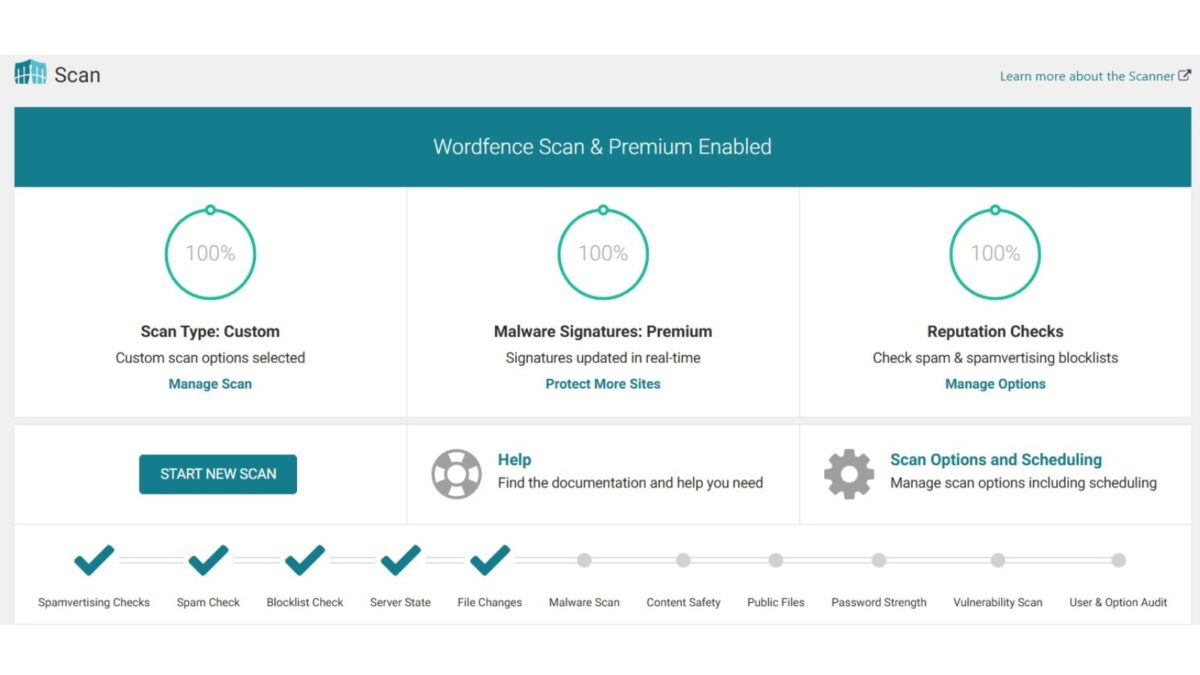
I used Wordfence for free on Inspire To Thrive for years until recently, when I went premium as I wanted to block more spam bots from foreign countries.
How Dolphin Radar Helps With Instagram
Dolphin Radar is an Instagram analytics and tracking tool that helps marketers, creators, and small businesses get a clearer view of public account activity without logging into Instagram.
It tracks recent follows, unfollows, likes, story interactions, interest patterns, and engagement trends for any public profile. It also provides automated weekly reports, visual relationship maps, and AI-based behavioral analysis.
For Instagram growth, that means you can monitor what competitors are doing, see which content elicits the strongest response from your audience, identify potential collaborators or influencers through mutual connections, and adjust your posting schedule based on real activity data, all while staying anonymous and within public data limits.
➡️ Whether you’re building a small business profile or growing real engagement on Inspire To Thrive, Dolphin Radar turns public Instagram data into useful insights that save time and help you make smarter choices.
How to Choose the Right AI Tool for Your Workflow
The best buying rule is simple. Match the tool to the job.
Start with one pain point, not every feature
Pick the biggest drain on your time first. Maybe it is content creation, email, or customer support. Alternatively, you might find that project management is a major bottleneck in your daily operations. If project management tasks are slowing you down, you can explore no-code platforms to build custom AI agents that automate specific steps.
These no-code solutions often simplify complex tasks without requiring extensive technical expertise. A focused tool usually works better than an all-in-one plan that tries to do a little of everything and leaves you overwhelmed.
Test software tools for quality, speed, and accuracy
Before you buy, give the tool a real task. Ask it to outline a post, conduct real-time research, or answer a common customer question.
You want to ensure the machine learning models driving the platform provide reliable, high-quality results. If your goal is to optimize development, you might look for a coding assistant to streamline your repository, or even experiment with vibe coding to see how intuitive the generation process feels.
If social posting is your bottleneck, it helps to compare social media scheduling software before paying for another AI add-on. Hype is cheap, but quality is what protects your brand. If you require advanced features, look for predictive analytics and robust API access to ensure the software can scale with your business.
Choose tools that fit your budget and skill level
The best software is the one you will still use on a busy Tuesday. If a platform feels confusing, heavy, or overpriced, that friction will show up fast. Always look for a free plan to test the interface before committing to a subscription. A simpler, lower-priced tool is often the smarter choice, and many services offer a generous free plan for individual users. You do not need the biggest platform or a complex coding assistant; you need the one that fits your workflow, stays within your budget, and gets out of your way.
I’d love to know whether you use any marketing software today. Please drop a comment below.
Frequently Asked Questions
You should evaluate whether the tool saves you significant manual work each week or improves the quality of your output. If you find that you are spending more time cleaning up the tool’s output than you would have spent doing the task yourself, it is likely not a good investment.
Specialized tools are often better at solving specific bottlenecks because they are designed to handle a single task with high precision. All-in-one platforms can be useful for centralizing workflows, but only if you actually use most of their features; otherwise, you are just paying for unnecessary clutter.
AI is an excellent assistant for brainstorming, outlining, and drafting, but you should never treat it as a replacement for your own brand voice. You must always review, fact-check, and refine AI-generated content to ensure it meets your standards and reflects your unique expertise.
Focus on the tool’s quality, speed, and accuracy in a real-world task rather than on its marketing claims. Ensure the interface is intuitive enough to use on a busy workday and check that the provider offers flexible billing or easy cancellation if your needs change.
Conclusion: Are AI Software Tools Worth It?
AI software tools are worth investing in when they save time, improve results, or help you stay consistent. Incorporating generative AI into your routine is a smart move if it actually streamlines your workflow, but these solutions are not worth it when they only add cost, clutter, and one more tab to ignore.
As you integrate new productivity tools into your business, remember that fit beats hype every single time. Whether you are looking for assistance with complex data analysis or aiming to scale your content creation, start small, test carefully, and keep your standards high.
Disclosure: This Inspire To Thrive blog post contains affiliate links. I may earn a commission from qualifying purchases at no extra cost to you. Some sections were drafted with AI tools and carefully reviewed/edited by me.

- Which Instagram Monitoring App Wins? EyeZy vs Peekviewer - October 20, 2026
- How to Use Social Media for the Best Black Friday Deals of 2026 - October 19, 2026
- How to Identify and Prioritize Your Money Pages (And Why I Just Updated Mine in Link Whisper) - October 19, 2026
Enjoy this content? Help me show up more often in Google by adding Inspire To Thrive as a Preferred Source: