
As a Facebook Page Manager, you know that managing comments is an important part of maintaining a presence on the platform. But should you hide comments on Facebook when someone leaves a nasty comment on your page?
In this Inspire To Thrive blog post, I will show you how to find and delete invisible comments on Facebook. You can also decide whether to hide comments on your page.
Estimated reading time: 10 minutes
Table of Contents
First, What Is Facebook Commenting?
Commenting is when someone leaves a few words, phrases, or sentences on a social media or blog post. They are engaging with the post or page on the social network or website.
When someone leaves that on Facebook, it is considered a comment.
Commenting is a form of engagement on social networks. It can help pull your content up higher in the algorithm when you receive comments on Facebook posts on your business pages.
That may be a serious consideration for you to not hide comments on your Facebook posts.
What Types of Comments Does Facebook Have?
Facebook offers two types of commenting for Pages: public and hidden.
Public
These public comments are visible to everyone, while hidden comments are only visible to the Page Manager, also called an admin. Public comments on Facebook include comments by friends and friends of friends.
However, there may be people you are not friends with or who don’t follow you. Public comments can be seen if someone searches Facebook for something your post came up as well.
Comments Hidden on Facebook
If someone hides comments on Facebook on your page, it’s up to you to decide whether or not to approve them. Beware, if you’re not sure how to find hidden comments, they can easily be missed.
Other times, Facebook comments may be hidden because they do not adhere to Facebook’s Community Standards. Either way, it is important to moderate the comments on your page so that only appropriate content is published.
If you state on your page that you will hide comments for certain types of behavior, be sure to follow through. If that behavior happens, it is time to hide fb comments from view.

When Should You Hide Comments On Facebook?
Not every negative comment needs to be deleted on Facebook. Sometimes a healthy discussion is a good thing.
Other times, you may be able to respond to a negative review, etc. If done right, this can help your business page. However, if someone is spamming your page, then it’s time to delete the comment from your Facebook page.
Another reason for you to hide comments is that they are written in poor or slang language. You want to keep your page as professional as possible.
Lastly, if someone is trying to promote their business vs. your own page, you may want to consider deleting their comments as well. There is a time and place for promotion, and people should not self-promote on another’s page.

Negative Ones Are Not All Bad
That’s correct. Sometimes, as mentioned above, you can turn negative comments into a good story or a lesson. It shows you or your company are real and not 100% flawless. You are only human, like everyone else.
Admitting to a mistake makes others respect you or your business more. As long as you can admit it and make an effort to correct the mistake. The same applies to Instagram comments.
Can someone hide comments on Instagram? Comments can be deleted or restricted on Instagram. Or some users would hide all comments on Instagram.
Start Private Conversations To A Comment On Facebook
Another way you can respond to negative comments is to send a direct message to the person who left the comment. This way, you can discuss their issue with your company privately rather than in front of everyone.
It is another way to hide Facebook comments after you respond to them in private.
These private conversations tend to resolve issues. You can offer a FREE product or service instead of what might have gone wrong, etc. This is a better method than trying to hide comments on Facebook pages.
Whatever you do, don’t delay in responding to Facebook comments. It can make your page less visible in the algorithm.
The quicker you respond, the better your Facebook page will do in the organic reach on the massive social network. Meta now scores pages based on the speed of replies on business pages.

To Find Hidden Comments on Facebook:
1. Click on the “Settings” tab at the top of your Page.
2. In the left-hand column, click on “Moderation Tools.”
3. Under the “Hidden Comments” section, click on “View.”
4. A list of all hidden comments will appear. To Approve or Delete a comment, click on the respective button next to the comment.
5. Repeat steps 1-5 for each Page you manage.
How To Delete Them:
If you find a hidden comment that violates your Page’s Community Standards, you can delete it by following these steps:
1. Click on the “Settings” tab at the top of your Page.
2. In the left-hand column, click on “Moderation Tools.”
3. Under the “Banned Words” section, click on “Edit.”
4. Enter the word or phrase you want to ban in the “Add Words” field, then click on “Add.” To remove a word or phrase from the banned list, click on the “x” next to it.
5. Once you’re finished editing your banned words list, click on “Save Changes.”
6. Repeat steps 1-6 for each Page you manage.
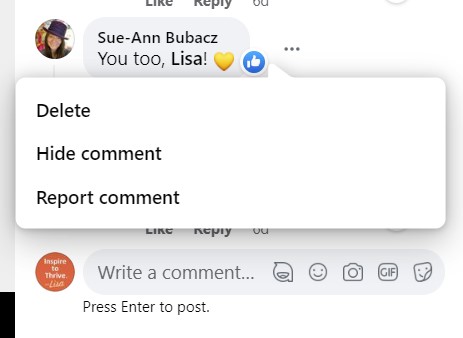
What Happens When You Make Comments Invisible On Facebook?
- Only the page managers can see the comment that was written.
- No one else visiting the page will be able to see it. It becomes invisible on the Facebook post.
- The author of the comment will not be able to edit the comment.
When Do You Report Offensive Comments?
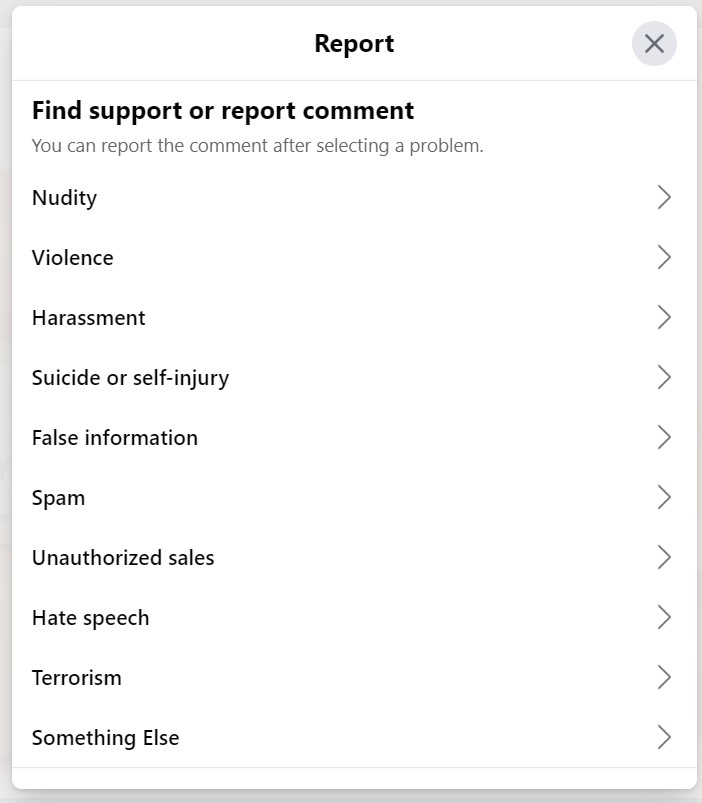
You have several options for reporting Facebook comments; see the choices in the menu below. If it’s not the first offense for spam, I would not report it, but I want to hide the comment from the page.
If a user continues to spam your page, I would report that comment, rather than hiding it. You could also hide keywords.
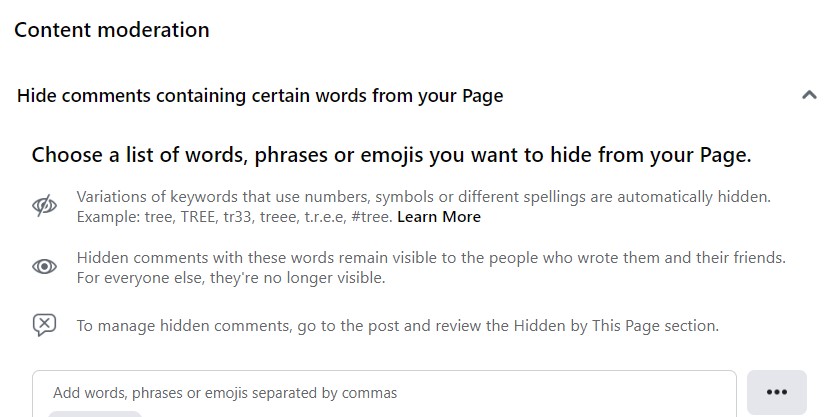
How to hide keywords on Facebook?
- Edit your page settings,
- Then tap General,
- then Content Moderation.
- You can put the keywords that you want hidden in that space.
Why spend time every day hiding comments on Facebook from the same person, over and over again?
Will The Person Who Wrote The Comment Know That You Hide Them On Facebook?
They may not realize at first that the comment on Facebook was hidden. When you hide a comment, the author of it is NOT notified by Facebook. They may check Facebook posts to see if anyone responded to their comment.
Then, they may notice that the comment will be hidden. Surely, this will not make them happy. It may lead to more spammy comments or messages on your page.
What If You Hide Them By Mistake?
Have no fear if you hide or delete comments on Facebook in error. You can always unhide a comment.
It’s easy to hover over the one that is invisible to the public and make it live once again as a comment on your Facebook page.
Hover over the three dots to change the hiding of a comment on Facebook, as you saw in the above screenshot with my friend Sue-Ann.
The comment will be visible to the person who posted it and anyone who sees the post.
Can You Automate Hiding Words?
In your Facebook settings, you can set certain words to be eliminated from your page, and thus, the comments that contain them will automatically hide them. It makes it easier for you to manage the page by hiding a potentially offensive comment.
Go to your public post page filter: You can add words to be hidden.
Choose Your Facebook Settings for Comments
You can choose where your comments come from on Facebook. You have 3 choices.
- Public
- Friends
- Friends of Friends
These can be found in your settings privacy section on Facebook. You can also choose who can follow you on Facebook.
However, any public Facebook posts can be commented on by anyone on the social media network.
Conclusion of When To Hide Comment, Keep, or Delete It
Keeping your Facebook page clean and free of spammy or inappropriate comments is important for maintaining a professional appearance. So hiding comments on Facebook may be part of your social media manager’s job.
Fortunately, there’s an easy way to find and hide a comment. Just log into your Facebook page, go to the “Posts” tab, and select “Hidden by Page Owner.” From there, you can view or delete any offensive comments.
Looking for more ways to control your Facebook presence or boost engagement? Reach out or check out more tips on Inspire To Thrive.

Finding Facebook Comments: FAQs
Hidden comments are replies to your posts or pages that aren’t visible to the public or followers. Facebook may hide them if they trigger filters like spam, offensive language, or page moderation settings.
Go to your post or page as an admin or moderator. Hidden comments often appear faint or grayed out with an option to “See comment” or “Unhide.” Facebook sometimes groups these under “Spam” or “Filtered” sections on the comments tab.
Facebook uses filters to screen out spam, offensive content, and self-promotion. The platform also hides comments based on page moderation rules or if other users report them.
Yes, you can. As a page admin or post author, you’ll see the option to delete or remove the comment after revealing it. Click the three dots next to the comment and choose “Delete.”
Yes. The person who wrote the comment and their friends still see it as normal. Only your followers or page fans will not see the hidden comment.
Go to your Facebook Page settings, then select “General,” then “Content Moderation” or “Profanity Filter.” Set your filters according to your needs, or add specific keywords to block.
Facebook usually doesn’t notify you about every hidden comment. Check your page’s comments regularly, especially the spam or filtered sections, to stay up to date.
Disclosure: This Inspire To Thrive blog post contains affiliate links. I may earn a commission from qualifying purchases at no extra cost to you. Some sections were drafted with AI tools and carefully reviewed/edited by me.

- Link Whisper Review: Best Plugin To Boost Your Internal Links - October 14, 2026
- FlexClip Video Editor Review: Easy-to-Use Tool for Consistent & Professional Videos - October 14, 2026
- Instagram SEO Tips to Help Bloggers Get Discovered - October 12, 2026
Enjoy this content? Help me show up more often in Google by adding Inspire To Thrive as a Preferred Source:




First, I thought you hated Facebook! lol
Second, it’s not a bad platform to be on, but it’s not as much fun as Twitter used to be. I’m connected to a lot of family members that I’m not particularly close to, and my best friends there don’t post all that often. So it’s left up to me to post articles on a page I created as a pulse to others on Facebook who might like something and even comment on it here and there.
As for dealing with people who get on your nerves; I do the same on Facebook that I did on Twitter and that I do on LinkedIn; block them and never think about them again. It takes a lot for me to become friends with someone, but if they have that recalcitrant friend or enemy that decides to try to ruin the party (mainly on LinkedIn), I go to that person’s page and block them, then anything they have to say or do is hidden in perpetuity. It makes for a more peaceful life; who doesn’t want to live like that?
Hi Mitchell, no I don’t hate it, well maybe sort of – LOL. I use it for business pages, no more personal, too many issues with family members. Actually, I’ve noticed fewer and fewer family and friends posting there on Facebook unless they have a business. (Or maybe they are just using groups.) I’ve always loved Twitter, quicker and less of a “fishbowl” effect. Oh yes, you can block people on most social networks today and I do. However, this is more about the Facebook business pages and the comments received there. I try to ignore them before doing anything else most of the time. It really depends on how bad or spammy the comments are. Thanks for coming by Mitch and have a great day.
Hello Lisa,
Very helpful post. Facebook has hidden comment features and we need to do private chat to resolve the issue with the user who has left a negative comment. This is definitely a great idea to deal with negative comments. Thanks for sharing this helpful guide.
Regards,
Vishwajeet Kumar
Hi Vishwajeet, thank you. Yes, I have found that is the best way to reach a resolution unless some spam folks are unreasonable which some tend to be from time to time. But as Ryan says, we move on! Thanks for coming by on this one and have a great weekend Vishwajeet.
What a helpful tutorial Lisa. Thanks for shouting out my blog post, too.
I usually see Hidden comments if Facebook determines that the comments do not adhere to their rules. But it’s good to know that other hidden comments types exist.
These days, I am engaging often and blocking profiles solely to hang up on folks, conversation-wise. Spam comments seem to be the chief culprit. Nothing personal. I do not feel upset when I do it. But I move on quickly from people who want to get business from me versus being interested in my blog and my blogging tips.
Thank you Ryan. Yes, I noticed more spam comments of late on several accounts I manage on Facebook and had to report a few or block others. Moving on is key! You are most welcome as I thought your post about comments was a good link to have within it. Make it a great weekend Ryan.