Deleting Old Content To Supercharge Your SEO

Is your blog or website not getting the traction you desire? Are you struggling to improve your SEO rankings? One effective strategy many bloggers overlook is deleting old content to improve SEO.

Not only that, but deleting old content also helps your readers. Yes, you heard it right. It’s like pruning your trees for future growth by deleting outdated content.

Removing outdated or irrelevant posts from your blog or website can significantly boost your SEO. In this blog post, we will explore the reasons why deleting old content can be a game-changer for your SEO efforts.

Discover how this simple yet powerful tactic can help you climb the search engine rankings and attract more organic traffic to your blog.

Understanding the Importance of SEO for Your Blog or Website

Search Engine Optimization (SEO) plays a crucial role in the success of your blog or website. It determines how visible your content is to search engines like Google. Therefore, making it easier for potential readers or customers to find you.

With effective SEO strategies, you can increase your organic traffic, enhance your online visibility, and ultimately grow your online presence and business.

The Power of Organic Traffic

Organic traffic refers to the visitors who discover your website through search engine results without paid advertisements. It is considered highly valuable because it indicates a genuine interest in the information or products you offer.

By optimizing your blog or website for SEO, you can improve your chances of attracting more organic traffic.

Boosting Online Visibility by Deleting Old Content

When you implement SEO techniques, your blog or website becomes more visible to search engines. This visibility is crucial because it determines where your content appears in search engine results pages (SERPs).

Higher rankings translate to greater visibility, which leads to increased exposure for your blog or business.

Building Credibility and Trust by Deleting Old Content

Search engine users tend to trust websites that rank higher in search results. By optimizing your blog or website for SEO, you can establish credibility and trustworthiness in the eyes of both search engines and your audience.

This can positively impact engagement, conversions, and overall user experience.

delete old content

Staying Ahead of Competitors With Updated Content

In today’s competitive online landscape, staying ahead of your competitors is essential. SEO helps you gain an edge by outranking competitors for relevant keywords.

By targeting specific keywords and optimizing your content to rank well for them, you can attract more traffic. Thus, gain potential customers and leave your competitors in the dust.

Long-Term Benefits of Deleting Old Content

One of the most significant advantages of SEO is its long-term benefits. While other digital marketing tactics may provide short-term boosts, SEO is a sustainable strategy that can deliver lasting results.

By consistently optimizing your content and website, you can maintain your visibility. Not only that, but attract consistent organic traffic and grow your online presence over time.

The Impact of Old and Outdated Content on SEO

In the ever-changing landscape of SEO, keeping your website or blog up to date is crucial to maintaining a strong online presence.

Unfortunately, old and outdated content can have a detrimental effect on both your search engine rankings and user experience. Let’s look at the reasons why this is often the case.

How Outdated Content Affects Your Search Engine Rankings

Search engines like Google constantly strive to provide users with the most relevant and up-to-date information. When your website features outdated content, it signals that your site may not be the best source of current, valuable information.

Consequently, search engines may lower your website’s rankings in search results, making it harder for potential visitors to find you.

Moreover, search engine algorithms prioritize websites that consistently produce fresh and valuable content. By neglecting to update your old content, you miss out on the opportunity to improve your website’s visibility and attract organic traffic.

seo benefit of deleting old content
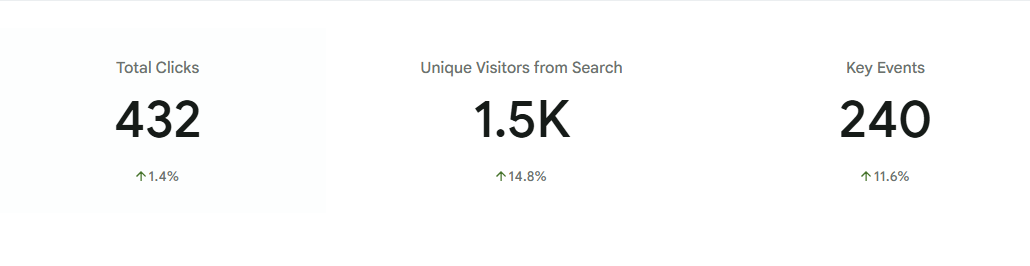
Results from my year-long process of deleting old content on Inspire To Thrive, helping SEO and the reader experience.

The Negative Impact of Outdated Content on User Experience

User experience plays a vital role in SEO, as search engines aim to deliver the most relevant and user-friendly results. Outdated content can have a negative impact on user experience in several ways:

  1. Inaccurate information: Outdated content may contain information that is no longer accurate or relevant. This can lead to user frustration and a lack of trust in your website.
  2. Poor user engagement: Users are more likely to engage with content that feels fresh and up to date. Outdated content is less likely to captivate your audience. Thus resulting in lower engagement metrics such as time spent on page, bounce rate, and social shares.
  3. Decreased usability: As technology and user expectations evolve, old content may not be optimized for mobile devices. Or they may lack necessary interactivity. This can make it difficult for users to navigate and consume your content, leading to a negative experience.

By regularly reviewing and updating your old content, you can enhance the overall user experience on your website. Therefore, you will improve engagement metrics that search engines use to rank webpages.

3 Benefits of Deleting Old Content

Deleting old content from your blog or website may seem counterintuitive. However, it can actually provide several significant benefits for your SEO strategy.

By removing outdated or irrelevant content, you can improve search engine visibility and rankings (as shown in the image above), enhance user experience and engagement, and increase crawl efficiency and indexation.

1. Improved Search Engine Visibility and Rankings

A cluttered website with outdated or low-quality content can negatively impact your search engine rankings. When search engines crawl your website, they consider the relevance, freshness, and quality of your content. It is used to determine its ranking in search results.

By deleting old content, you can focus on publishing high-quality, up-to-date content. Content that aligns with your target keywords and provides value to your audience.

When search engines encounter fewer pages with valuable content, they can better understand the purpose and relevance of each page.

This, in turn, can improve your website’s overall visibility in search results and increase the likelihood of ranking higher for relevant keywords.

2. Enhanced User Experience and Engagement

Deleting old content can also improve the user experience on your website. Outdated or irrelevant content can confuse or frustrate users seeking fresh, accurate information.

By removing such content, you create a more streamlined, efficient user experience, enabling visitors to find the most relevant and valuable information more easily.

Engagement is a crucial factor that search engines consider when ranking websites. When users find your content useful, engaging, and free from outdated information, they are more likely to spend time on your site.

They may explore other pages, and even share your content with others.

Lisa, Inspire To Thrive

This increased engagement signals search engines that your website is valuable and trustworthy, leading to improved rankings.

3. Increased Crawl Efficiency and Indexation

When search engines crawl your website, they have limited time and resources. The more pages they need to crawl, the less time they can spend on each page.

By deleting old or low-quality content, you can help search engines allocate their crawl budget more efficiently to the most important and valuable pages on your site.

Moreover, removing irrelevant or duplicate content can prevent search engines from indexing multiple versions of the same content, thereby diluting your visibility in search results.

By focusing on maintaining a lean, high-quality content inventory, you can ensure search engines can easily crawl, index, and understand your website’s most valuable pages.

3 Steps to Effectively Delete Old Content

When optimizing your website’s SEO, one important strategy is to regularly delete outdated content. By doing so, you can ensure your website remains relevant, performs better, and improves search engine rankings.

In this section, we will discuss the steps to effectively delete old content, from identifying and evaluating outdated content to properly redirecting or updating relevant content and utilizing 301 redirects for deleted pages.

1. Identifying and Evaluating Outdated Content

The first step in deleting old content is to identify and evaluate which pages or blog posts are outdated. Start by reviewing your website’s analytics and identifying pages with low traffic, high bounce rates, or outdated information.

Additionally, consider content that is no longer relevant or doesn’t align with your current business goals or target audience. By conducting a thorough content audit, you can determine which content pieces need to be removed or refreshed.

However, if you use an SEO plugin, you can find it quickly on your site.

2. Properly Redirecting or Updating Relevant Content

Once you have identified outdated content, decide whether to redirect or update it. In some cases, you may find that the content is still valuable. However, it may simply need to be refreshed with new information or optimized for SEO.

In such instances, make the necessary updates to enhance its relevance and ensure it aligns with your current SEO strategy.

On the other hand, if the content is no longer relevant or serves no purpose, it’s best to redirect the URL to a more appropriate page on your website.

Using 301 redirects ensures that any incoming links to the old URL are redirected to the new URL, preserving link equity and minimizing the impact on your website’s SEO.

This approach not only maintains a seamless user experience but also helps search engines understand your website’s updated structure.

web developer making 301 redirects and deleting old content on a blog

3. Utilizing 301 Redirects for Deleting Old Content

There may be instances where you decide to delete pages entirely because they are irrelevant or redundant. In such cases, it’s crucial to properly redirect these deleted pages.

By implementing 301 redirects, you can inform search engines and users that the content has been permanently moved or removed. This helps retain the SEO value of the old page by redirecting traffic and passing link equity to relevant pages on your website.

When implementing 301 redirects, ensure the redirected pages are closely related to the original page’s content. This creates a smooth user experience and helps search engines understand the relevance and context of the new page.

Additionally, update your website’s sitemap and internal linking structure to reflect the changes and ensure search engine crawlers can easily discover and index the redirected pages.

Best Practices for Optimizing SEO After Deleting Old Content

When it comes to boosting your SEO, deleting old content from your blog or website can be a strategic move. However, it’s crucial to follow best practices to maintain or even improve your search rankings.

In this section, we’ll explore three key strategies to optimize your SEO after deleting old content: conducting keyword research and updating metadata, updating internal links and improving site structure, and promoting fresh content and generating backlinks.

1. Conducting Keyword Research and Updating Metadata

One essential step after deleting old content is to conduct thorough keyword research to identify relevant and high-volume keywords that align with your website’s objectives. By understanding what your target audience is searching for, you can optimize your remaining content accordingly.

To begin, use reputable keyword research tools like Google Keyword Planner, SEMrush, or Moz Keyword Explorer. Look for keywords with high search volume and relevance to your niche or industry.

Incorporate these keywords naturally and strategically into your content.

Additionally, it’s crucial to update the metadata for the remaining pages on your website, including title tags, meta descriptions, and header tags.

Ensure that your metadata accurately reflects the updated content, includes relevant keywords, and entices users to click through to your website from the search engine results pages (SERPs).

Deleting old content can disrupt your website’s internal linking structure. Therefore, it’s essential to review and update your internal links to maintain a solid site structure and ensure a positive user experience.

Start by identifying any internal links that point to the deleted content. Replace or redirect these links to relevant and related pages within your website.

This process helps search engines understand the relationships between your pages and ensures that visitors can navigate your site easily.

Additionally, take the opportunity to improve your overall site structure. Consider organizing your content into logical categories and subcategories to create a clear hierarchy.

This approach not only aids search engine crawlers in discovering and indexing your pages more effectively but also helps users find the information they need quickly and easily.

Deleting old content opens the door to creating fresh, valuable content that aligns with your current business objectives and your target audience’s needs. By consistently publishing new and engaging content, you signal to search engines that your website is active, relevant, and deserving of higher rankings.

To promote fresh content effectively, consider implementing a content marketing strategy that includes regular blog posts, articles, videos, and other media. Ensure that your content offers unique insights, solves problems, or provides valuable information to your audience.

Don’t forget to interlink your new content with relevant pages on your site to improve navigation and encourage user engagement.

In addition to creating fresh content, building backlinks from authoritative, relevant websites can significantly improve your SEO. Reach out to industry influencers, bloggers, or other website owners to request backlinks to your new content.

This not only helps drive referral traffic but also signals to search engines that your website is trusted and authoritative.

By following these best practices for optimizing SEO after deleting old content, you can ensure that your website’s rankings continue to improve or remain steady.

Remember to conduct thorough keyword research, update metadata and internal links, and actively promote fresh content while generating backlinks from reputable sources.

link whisper plugin
Use CODE INSPIRE to save $15 off your order today.

These strategies will help you maintain a strong online presence and attract valuable organic traffic.

2 Ways To Monitor and Measure the Impact of Deleting Old Content

When optimizing your website for better SEO, deleting old content can significantly improve your search rankings and organic traffic.

However, it is crucial to monitor and measure these changes to understand the effectiveness of your content cleanup efforts.

This section will explore two essential aspects for tracking the impact of deleting old content: tracking changes in search rankings and organic traffic, and analyzing user engagement and bounce rates.

1. Tracking Changes in Search Rankings and Organic Traffic

When you delete old content from your website, it is essential to monitor any changes in search rankings and organic traffic. There are several tools and metrics that can help you monitor these changes effectively:

  1. Keyword rankings: Use a reliable SEO tool to track the rankings of your target keywords before and after deleting old content. Look for any fluctuations or improvements in rankings and identify the keywords that show significant changes.
  2. Organic traffic: Analyze your website’s overall organic traffic using tools like Google Analytics. Compare the traffic data before and after deleting old content to identify any noticeable changes. Pay attention to changes in the number of organic sessions, new visitors, and returning visitors.
  3. Inbound links: Removing old content may affect the number and quality of inbound links pointing to your website. Monitor your website’s backlink profile using tools like Ahrefs or Moz to ensure that removing old content did not result in a significant loss of valuable backlinks.

By consistently monitoring these metrics, you can gain valuable insights into the impact of deleting old content on your search rankings and organic traffic.

link whisper plugin to fix broken links
Use CODE INSPIRE to save $15 off your order today.

2. Analyzing User Engagement and Bounce Rates

While search rankings and organic traffic are important, it is equally crucial to assess the user engagement and bounce rates on your website. This will help you understand how deleting old content has affected your website visitors’ behavior.

Here are some key areas to focus on during your analyses:

  1. Bounce rate: Analyze your website’s bounce rate before and after deleting old content. A high bounce rate indicates that visitors are leaving your site without engaging further. If the bounce rate decreases after content deletion, it could be a positive sign that the remaining content is more relevant and engaging for users.
  2. Time on page: Examine the average time users spend on your website’s pages. If the time on the page increases after deleting old content, it suggests that visitors find the remaining content more valuable and spend more time consuming it.
  3. User behavior flow: Use Google Analytics to analyze user behavior, focusing on the pages visited after deleting old content. Identify any changes in the visitor flow and determine if users are navigating the website differently or accessing more relevant content.

By analyzing user engagement metrics, you will have a better understanding of how deleting old content has influenced the overall user experience on your website.

Common Mistakes to Avoid When Deleting Old Content

When it comes to boosting your SEO by deleting old blog or website content, it’s essential to proceed with caution.

While removing outdated or irrelevant content can have its benefits, it’s important to avoid some common mistakes that can harm your website’s ranking and user experience.

In this section, we’ll discuss two critical mistakes to avoid when deleting old content:

1. Deleting Content Without Proper Redirects or Replacements

One of the most significant mistakes you can make when deleting old content is failing to implement proper redirects or replacements. When you remove a page or post from your website, you need to ensure that any traffic or link equity it had is redirected appropriately.

Failing to do so can result in broken links, 404 errors, and unfulfilled user expectations.

To mitigate this issue, consider implementing 301 redirects. 301 redirects inform search engines that a page has been permanently moved to a new location.

By setting up redirects to relevant and equivalent content, you can preserve the link equity and maintain a smooth user experience. Additionally, be sure to update your internal links to reflect the changes, ensuring seamless website navigation for your visitors.

2. Removing Valuable Content Unintentionally

Another mistake to avoid is accidentally removing valuable content during the deletion process. Sometimes, it can be challenging to determine the true value of certain pages or posts, especially if they are not driving significant traffic or engagement.

However, what may seem insignificant to you could be valuable to your audience or hold hidden SEO potential.

Before deleting any content, analyze its performance, conversion rates, and user engagement metrics. Consider repurposing the content, updating it to make it relevant, or optimizing it for SEO.

By carefully evaluating each piece of content, you can avoid unintentionally removing potentially valuable assets from your website.

Remember, maintaining a balance between deleting outdated content and preserving valuable resources is key. Conduct a comprehensive content audit and identify pages that are truly obsolete or detrimental to your website’s performance.

Then you can ensure proper redirects or replacements are in place. By avoiding these common mistakes, you can effectively boost your SEO without sacrificing user experience or losing valuable content.

Conclusion: Updating Old Content For Your Blog

Updating old content on your blog isn’t just about fixing typos or refreshing outdated info. It’s about making what you’ve already created more valuable for readers and search engines. Find posts that still get traffic but could be improved—like adding fresh stats, better visuals, or clearer writing.

Check keywords too. Are they what people currently search for? If not, adjust. Don’t forget to update internal links so readers can easily explore related content.

A small tweak can bring big results. Why let good content fade when it can keep working for you?

link whisper plugin
Use CODE INSPIRE to save $15 off your order today.
Lisa Sicard

14 thoughts on “Deleting Old Content To Supercharge Your SEO”

  1. I’ve been doing a lot of that lately. On one of my blogs, I’ve deleted around 250 articles, and on another I’ve deleted about 100 or so. Some of the older articles I’ve decided to repurpose, make them longer and more SEO worthy to enhance the blog’s presence. When one’s been blogging for more than 15 years or so, repurposing is fairly easy. I will say, though, that I’ve left some of my old favorites alone, even if they don’t help with SEO, because I love the memories; sometimes we can’t help ourselves. lol

    1. Hi Mitch, Have you noticed more traffic? Mine has doubled over the past 8 months. I had trouble deleting a few posts but realized it was personal and had to put them in the trash. One was about my doing my mom’s eulogy but I didn’t see how it would help anyone but me, so I trashed it. I have the original one saved for myself. Some of the other articles are like our babies, we did them so long ago. Thanks for coming by Mitch, have a great weekend. Hope you are not getting all the rain we will be getting here.

      1. Truthfully, I haven’t been able to check it properly. I’m having problems getting Google Analytics to track my traffic on a few of my sites; it’s getting irksome…

      2. I watched your video, but it didn’t address my issue. My main blog (at least the one you know lol) hasn’t set itself up with my overall account, which means it’s not tracking any data. I’m doing what I can to rectify it, but nothing’s working so far… which figures…

      3. So are they different blogs Mitch? You would need different GA’s for each if so. They can be tied to your GA account but you would have different ones for different blogs and be able to switch between them.

      4. Get out! When I set them all up over a decade ago, they were all under one account. I guess that means I need to delete all those accounts I don’t want to be a part of the original and create new ones; ugh! lol Well, at least I know how, because Google didn’t quite mention that anywhere as far as I know. Thanks!

      5. Do you mean Google account? That is correct. Send me an email with screenshot so I can see for sure what you mean Mitch.

  2. Hello Lisa,

    I recently deleted all posts on my blog and started things from scratch. It improves my blog and it’s performance on search engine result pages. Sometimes, we need to delete some posts that are not relevant or do not perform well. Thanks for the insights.

    Regards,
    Vishwajeet Kumar

    1. Hi Vishwajeet, how did that work out for you? I’m glad to hear you have started to see results from that. I need to do more of it as well. Thanks for the point on that and have a fabulous day.

  3. Hello Lisa mam,
    Yes, I agree with you, updating old content with fresh information can increase our website SEO, recently I updated more than 15 outdated blog post with a new relevant content, i was not sure whether it will work or not.
    After updating my old content, my keyword is ranking in top 10 result page and my domain authority also increased.

    1. Hi Niraj, sometimes it takes months to climb up the rankings, so give it time. I’ve had some that did well around the 6 month mark and others in 2 weeks, must depend on the competition of the keywwords as well.

  4. All are excellent points because when blog posts are not usable, or, relevant, it wastes server space, lessens credibility and turns off the Google algorithm too. Blogs are a full body of work not individual, one-off posts littering the web. I frame my blog as a single entity, or, a single web presence whose collective impact is as strong as its seeming parts. Trash the low quality, dated stuff, update what you can salvage and you will boost SEO and overall blogging success.

    1. Hi Ryan, I didn’t think much about the server space, excellent point. I try to delete as I find the old content or search for the lowest reach on the GOogle search console. That is unless I can update it with good relevant content. Thanks for coming by Ryan and enjoy your weekend!

Comments are closed.

Scroll to Top