
Traffic rarely disappears in one dramatic crash. It slips a little, then a little more, and by the time you notice, one of your best posts has cooled off. A quick weekly check of your Google Search Console reports helps you catch these trends early.
You can use Search Console Insights to get a high-level view of your recent wins and see how your content is performing. Monitoring these metrics allows you to spot traffic shifts, identify posts that are gaining momentum, resolve indexing issues, and make small adjustments before they become bigger problems.
Protecting your organic traffic matters more now than ever because search results change fast, and your blog can lose ground without much warning.
The good news is that this routine does not need an hour of your time. If you know which reports matter, you can protect and grow your site in a few focused minutes each week.
Table of Contents
Key Area Takeaways
- Prioritize the Performance Report: Regularly monitor your total clicks, impressions, and click-through rates by comparing week-over-week data to identify traffic trends and detect performance dips early.
- Optimize for Search Intent: Use Query data to find pages with high impressions but low clicks; improving your titles and meta descriptions can often boost these rankings without requiring a full content rewrite.
- Ensure Technical Health: Review the Indexing report weekly to confirm that Google can crawl your pages, and use the URL inspection tool to troubleshoot why specific posts may be missing from search results.
- Leverage Low-Hanging Fruit: Focus your optimization efforts on posts ranking on the second page (positions 11-20) by refreshing outdated information, improving skimmability, and strengthening internal linking to drive them higher.
- Monitor User Experience: Keep an eye on mobile usability and Core Web Vitals to ensure technical layout issues are not negatively affecting visitor engagement or search rankings.
Analyze the Performance Report: One of the Essential Google Search Console Reports
In the left-hand sidebar, click on Search results under the Performance section. If you only check one report each week, make it this Performance report. It acts as a central hub for your site data, allowing you to monitor how your content performs in search results.
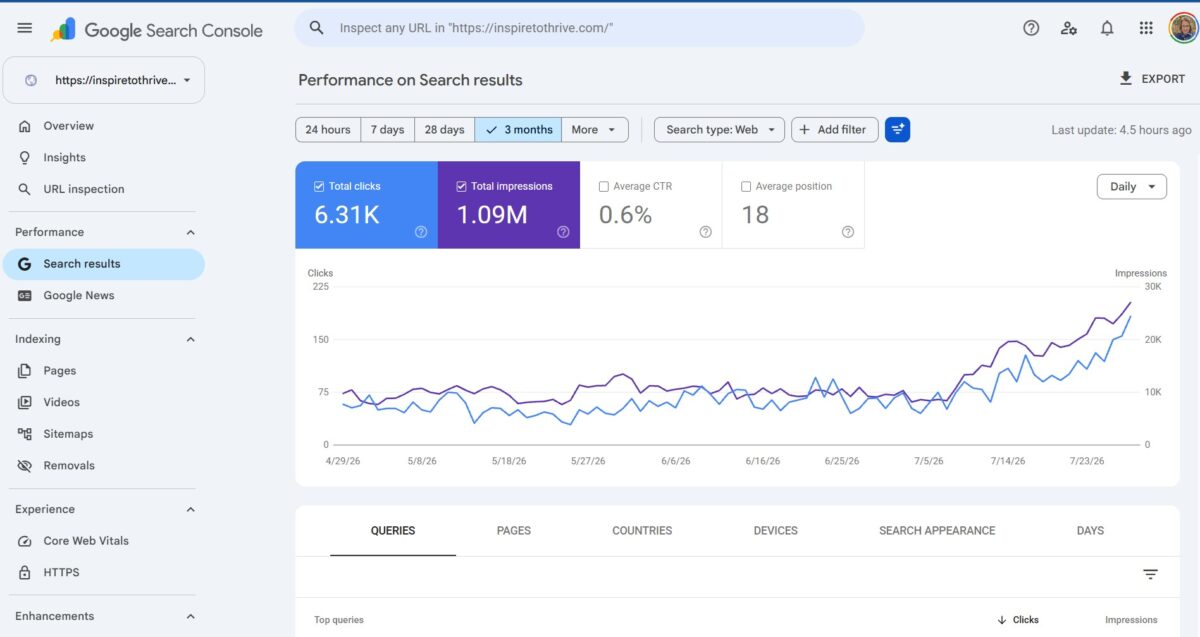
To make the most of this data, you should focus on these four core metrics:
- Total clicks: How many times a user clicked through to your site from search results.
- Total impressions: How many links to your site a user saw on Google search results.
- Click-through rate: The percentage of impressions that resulted in a click.
- Average position: Your average ranking for the queries shown in the report.
Google’s own Search Console tools overview sums it up well, but the weekly habit is what turns data into useful action.
Follow these steps to analyze your progress:
- Click the Date filter at the top of the report.
- Select the Custom option.
- Set the date range to the last 7 days.
- Select the Compare tab, then choose “Compare last 7 days to previous period.”
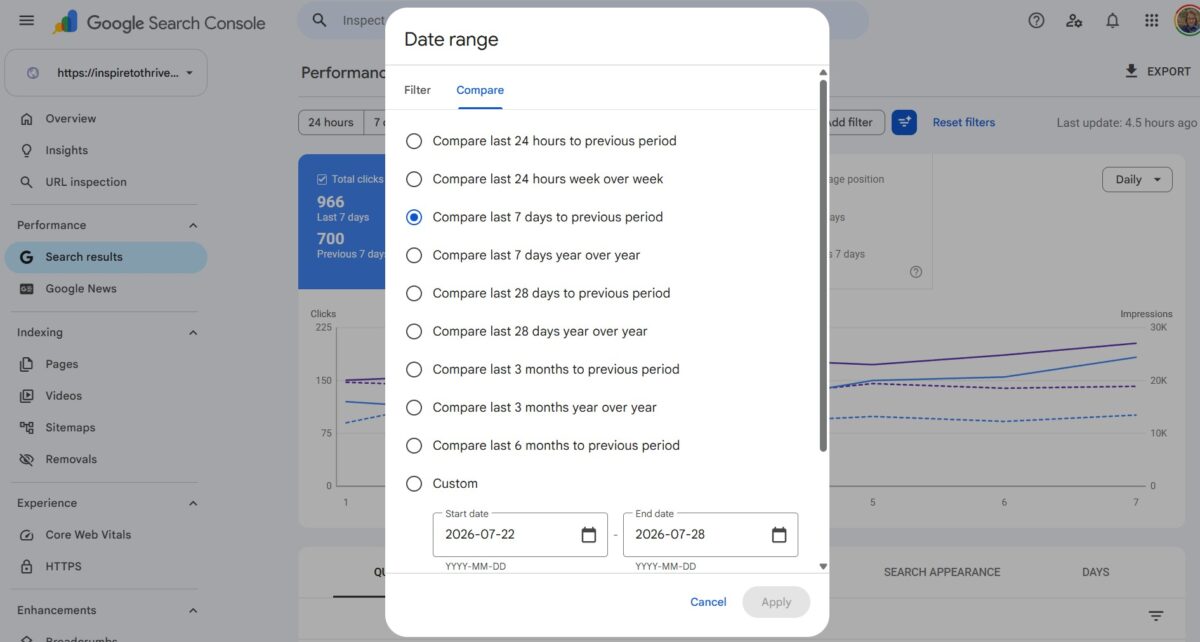
This comparison helps you spot changes in traffic trends fast. As you review your metrics, try filtering out your site name to remove branded traffic from the results. This allows you to see how your non-branded search queries are actually performing against your competitors.
Look for pages that gained or lost clicks
Don’t stare at every row. Start with the biggest movers. A sudden jump often means a post is being picked up for new topics, ranking higher, or better matching what people want than before.
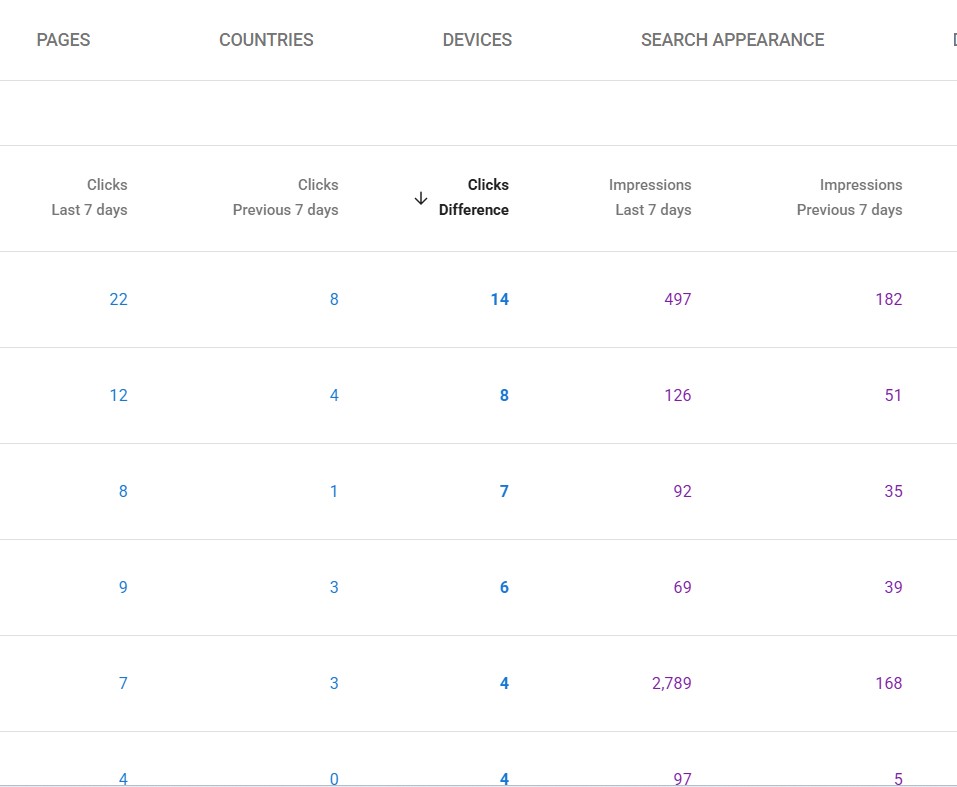
A sudden drop can mean the opposite. Maybe demand changed, a competitor wrote a tighter headline, or Google shifted where your page sits.
Your job isn’t to panic. Your job is to make a short action list. Which page rose? Why? Which page slipped? A simple note like “update intro” or “add fresh example” is enough to keep momentum.
Find search queries that deserve a stronger title or meta description
Now switch your view from Pages to Queries. This is where you find the specific search queries that put your post in front of readers.
Watch for terms with solid impressions but a weak click-through rate. That is often a sign your post is visible, but your snippet is not compelling enough.
You may not need a full rewrite; sometimes a better title, a clearer promise, or a tighter meta description is enough to boost your results. If a post ranks for a query you didn’t expect, pay attention.
That can show you the real intent behind the search. When your wording doesn’t match that intent, readers scroll past. Small edits often fix that faster than writing a brand-new post.
Check Indexing and Coverage so Your Posts can Actually Appear in Search
Great content cannot pull traffic if it is not properly indexed. That is why the Page indexing report and the broader Coverage report should be part of your weekly routine. To get started, navigate to Indexing in the sidebar and select Pages to view your coverage.
Look for patterns rather than random noise in this report. Pay attention to pages marked as excluded, especially those labeled Discovered or Crawled, currently not indexed.
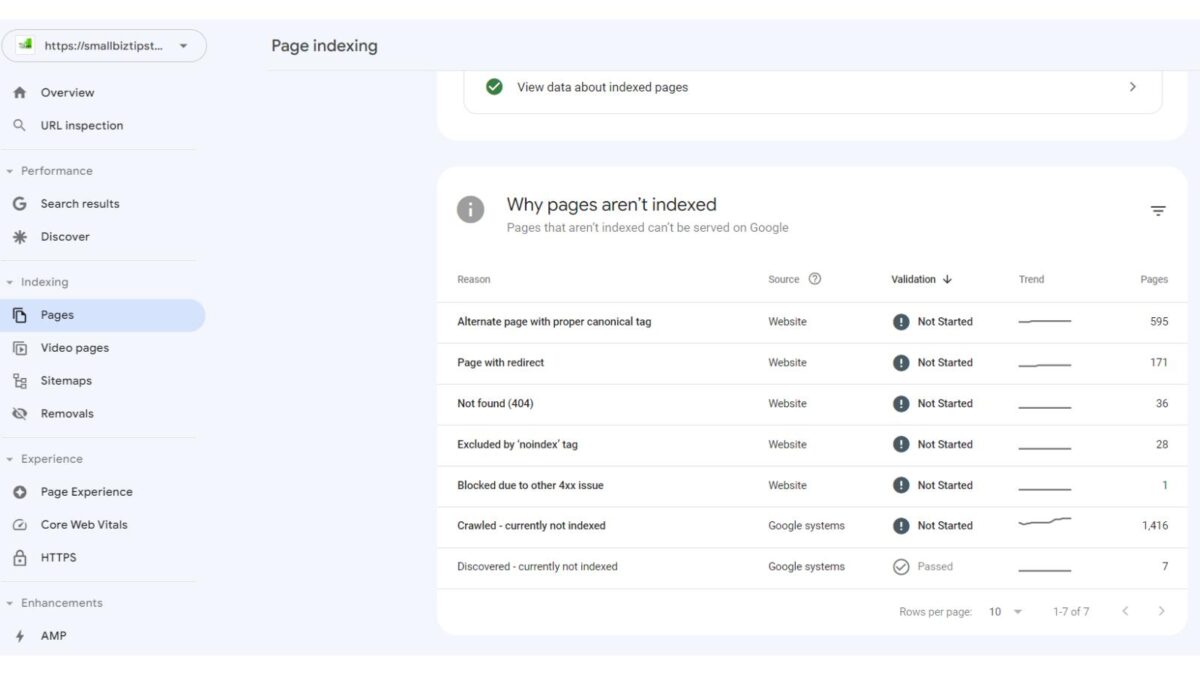
These labels indicate that Google knows your content exists, but for one reason or another, it has not included the page in Google search results. This is also a good time to check your Sitemaps report to ensure your primary URLs are being submitted correctly.
If you notice a drop in traffic, check Search Console to see if you have any crawl errors that might be preventing your content from being surfaced. Pairing this data with tools like Google Analytics helps you distinguish between a technical visibility problem and a shift in user behavior.
Spot pages that are not indexed or are being skipped
When a new post does not appear in search results, investigate the common causes for indexing issues:
- Lack of internal links: If a page is buried deep in your site structure, Google may take longer to find it.
- Duplicate content: Having multiple versions of the same page can confuse search engines.
- Noindex tags: Ensure you did not accidentally add a noindex tag that blocks your page from appearing in results.
- Thin content: If a post provides little value compared to competitors, Google may decide not to include it in its index.
👉 When you identify these issues, improve the page, use internal linking, and provide Google with a clearer reason to value the content.
Use the URL inspection tool when a post is not showing up
When something feels off, use the URL inspection tool. Paste your specific page URL into the search bar at the top of the console to see exactly how Google views that page.
When checking a missing post, look for the following:
- Indexing status: Does Google know the page exists, and is it currently eligible for indexing?
- Canonical issues: Ensure the page is not pointing to a different URL as the canonical version.
- Crawl errors: Confirm there are no server or connectivity issues preventing Google from accessing the page.
Using this tool saves you from having to guess about technical problems. If the page is technically sound but still not indexed, focus on strengthening the content structure or depth.
👉 Once you have made improvements, you can request indexing directly through the tool to prompt a re-evaluation.
Use page and query data to update posts that are already ranking
The best Google Search Console reports for bloggers do more than just report data. They point you toward specific content optimization opportunities that can lift traffic without starting from scratch.
Look at pages that already generate impressions and clicks. Those are your warmest opportunities. You are not trying to bring a dead page back to life; you are improving something Google already considers relevant. Additionally, keep an eye on your Search appearance data within the performance report.
This helps you determine if your rich snippets or FAQ schema are effectively grabbing attention and improving your click-through rates.
Refresh posts sitting on page two
Posts ranking on page two are often your easiest wins. They do not need a total rebuild, but they do require sharper help, as I’ve recently learned. Check queries where your average position sits between 11 and 20.
Before making changes, check for keyword cannibalization to ensure you do not have two different pages competing for the same query, which often confuses search engines and hurts your rankings.
When refreshing these posts, focus on these small actions:
- Tighten the opening to better address your audience’s search intent.
- Add internal links from your high-authority pages to provide more context and support.
- Improve your headings to make the content easier to skim.
- Update outdated facts, screenshots, or weak examples.
- Fill content gaps by adding sections that your top competitors currently cover.
Find pages that need better internal links
A high-quality post can stall because it lacks sufficient support. That is where a weekly review pays off. If a page receives impressions but underperforms in clicks and rankings, audit your site structure to see how often you use internal links to point toward that specific page.
Think of internal links as signposts in a busy town. If no links point to your post, fewer people and fewer crawlers will find it. 👉 Regularly update your archives by adding links from relevant articles, using natural anchor text, and ensuring your most valuable pages have multiple paths leading to them from the rest of your blog.
Watch for mobile and experience issues that can hurt clicks and rankings
A large portion of your readers visit your blog on a phone rather than a desktop. If your page layout is awkward on mobile, your traffic can slip even when your rankings hold steady in Google search results.
Check Search Console regularly for mobile usability problems and Core Web Vitals issues. You do not need to obsess over every warning, but you should look for sudden spikes. If multiple pages show errors in the same week, that is your cue to review your theme, a plugin change, or a recent layout update.
While you are there, take a moment to check the Security & Manual Actions section in the sidebar. It is vital to scan for manual actions and security issues to ensure your site has not been penalized or compromised by malicious activity.
Check for mobile usability problems before they cost you traffic
Some mobile usability factors are easy to miss until they accumulate and start impacting your performance. Be on the lookout for the following:
- Text that is too small to read comfortably.
- Buttons or interactive elements that sit too close together.
- Layouts that break or shift on smaller screens.
- Pop-ups or overlays that obscure the main content.
Any of these issues can frustrate readers and cause them to bounce. A weekly scan helps you catch these problems before they spread across your site. When you notice a dip in clicks, compare your search data with user behavior metrics.
Google’s guide on using Search Console and Google Analytics data together can help you identify these patterns without guesswork.
Frequently Asked Questions
You can effectively maintain your site in just 15 to 30 minutes per week. The goal is not to study every metric, but to perform a targeted scan of your performance data and indexing status to catch issues early.
If your content is missing, check the Indexing report for common issues like “discovered, currently not indexed” statuses or technical blocks. You should also ensure you have not accidentally applied a noindex tag and that your site structure allows Google to find your pages through internal links.
You should do both, but fixing existing posts that are already ranking is often the fastest way to grow traffic. Improving a post that is already indexed and ranking on page two often requires less effort than building authority for a brand-new article from scratch.
Compare your Search Console data with Google Analytics to see if the decline is site-wide or specific to certain pages. If it is site-wide and accompanied by crawl errors in Search Console, it is likely technical; if specific pages are dropping, it may suggest a shift in search intent or increased competition.
Conclusion: Staying On Top of Your Results
Weekly checks beat monthly surprises. When you review the right Google Search Console reports on a consistent schedule, you catch traffic drops sooner, protect pages that are working, and fix indexing or mobile issues before they do real damage. As part of your routine, try exporting report data into a spreadsheet to track your growth trends over time.
👉 Additionally, take a moment to glance at your Links report to ensure your profile of external links remains healthy and free of spammy spikes.
That is enough to keep your blog from drifting and give your best content a better shot at growing.
What are you doing to stay on top of your blog’s or website’s results? I’d love to hear about it in the comments below. ⬇️
Disclosure: This Inspire To Thrive blog post contains affiliate links. I may earn a commission from qualifying purchases at no extra cost to you. Some sections were drafted with AI tools and carefully reviewed/edited by me.


- Porn on X (Twitter): What’s Allowed and How to Block It - September 29, 2026
- Dolphin Radar Review 2026: Instagram Follower Tracker (What I Saw After 2 Weeks) - September 29, 2026
- 5 Reasons to Review Your Deleted Tweet History Before Your Next X Cleanup - September 29, 2026
Enjoy this content? Help me show up more often in Google by adding Inspire To Thrive as a Preferred Source:


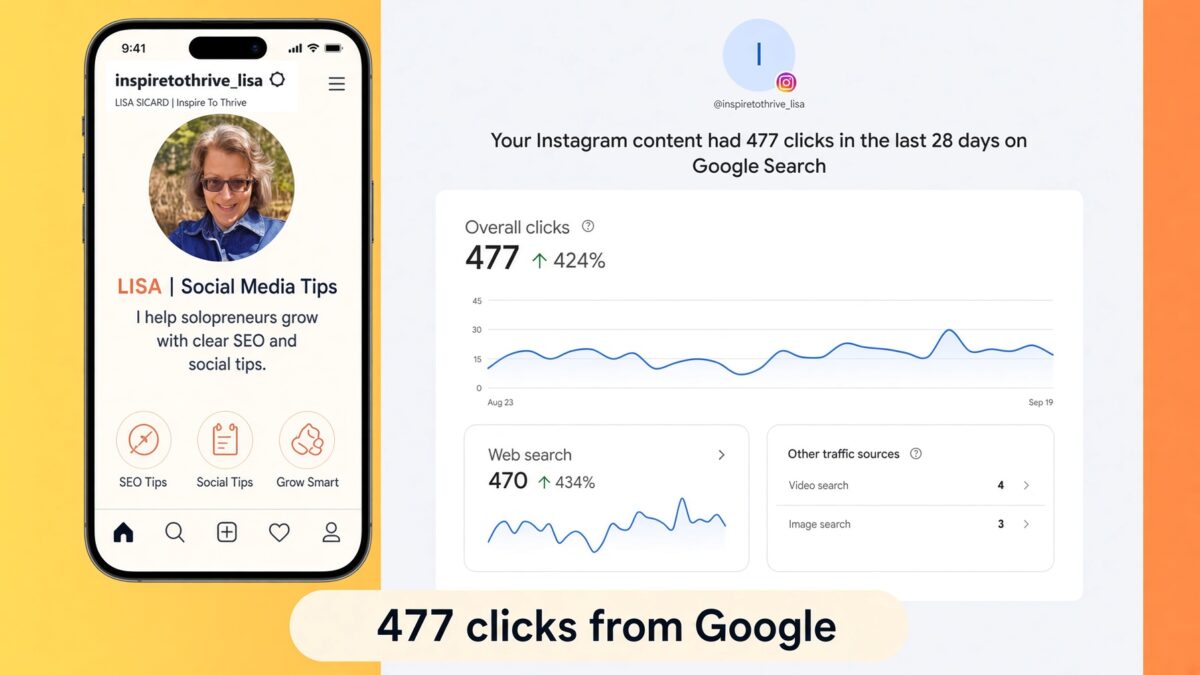

Creating better titles made a marked difference with me.
Some low traffic posts received a traffic boost after I edited titles to be clear. Getting to the point increases traffic quickly.
My updated posts tend to rank on Google in part because I changed titles. Out went the longer titles lacking clarity. In came short and sweet promises based on queries…..or at least, close to the query copy.
Excellent insights here Lisa.
Hi Ryan, Yes, I’ve been noticing more clicks since I focused more on the meta titles and descriptions. It’s something to keep on eye on for sure. Thanks for your input and have a great day.