
Struggling to keep your Instagram inspiration organized in 2026? Instagram Collections are your secret weapon. This powerful (yet private) feature lets you save and categorize posts and Reels to fuel smarter content planning and establish yourself as an authority.
Estimated reading time: 4 minutes
Table of Contents
What Are IG Collections?
Instagram is constantly evolving, and features like Guides (which became Collections) remain useful for staying organized. While public Guides are gone, Collections help you save, categorize, and draw inspiration from posts; perfect for content planning, research, and building your expertise behind the scenes.
In this updated Inspire To Thrive guide, I’ll show you how to use Instagram Collections effectively in 2026 and share strategies to leverage curation to build authority and drive growth.
What Are Instagram Collections?
Instagram Collections are private folders where you can organize posts, Reels, and other content you’ve saved. Unlike the old public Guides, Collections are for your eyes only (unless you choose to reference them in your own original content).

Key Benefits in 2026:
- Organize content inspiration by topic.
- Create mood boards for Reels and carousel-style posts.
- Track competitor content and trends.
- Save your own posts for easy repurposing.
- Build a personal swipe file of ideas.
Collections help you move from chaotic saving to strategic content planning.
How to Create and Manage Instagram Collections (Step-by-Step)
- Open the Instagram app and go to your Instagram profile.
- Tap the three-line menu (top right).
- Select Saved.
- Tap the + icon (top right) to create a new collection.
- Give it a clear, actionable name (e.g., “Reel Ideas 2026”, “Client Testimonials”, “Carousel Templates”, “Quote Inspiration”).
- Tap Next and start adding saved posts.
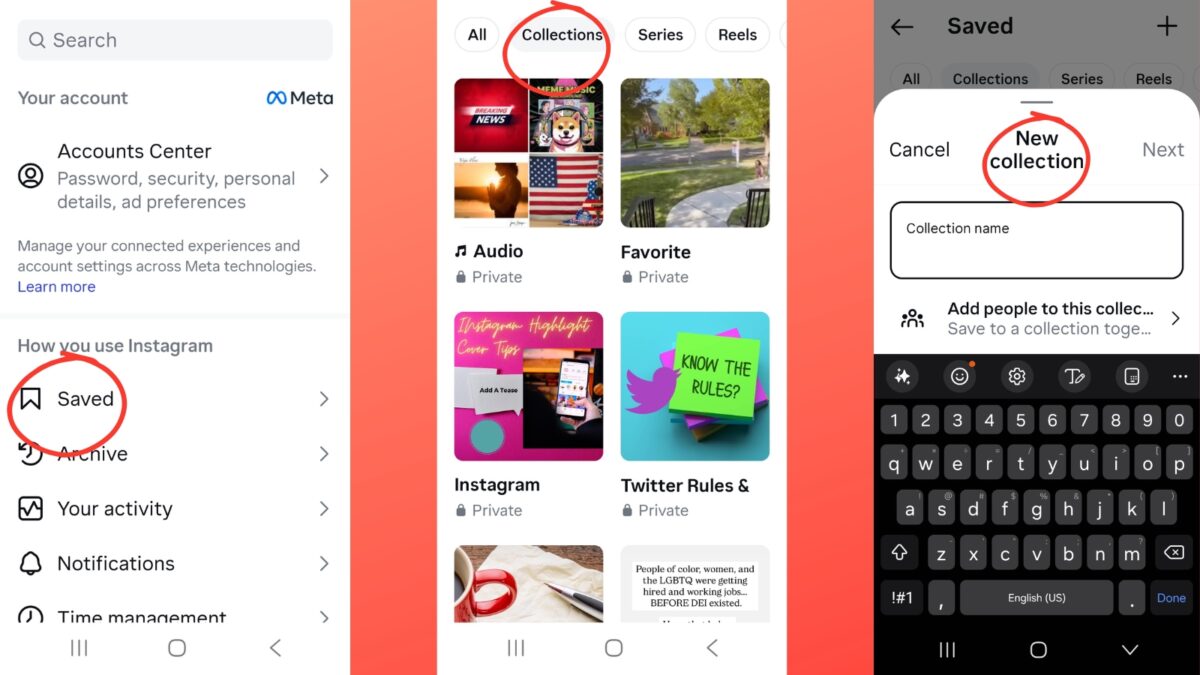
Pro Tip: You can quickly add a post to a collection right after saving it by tapping “Save to Collection” in the pop-up banner.
Smart Ways to Use Collections to Build Authority in 2026
While you can no longer publish public Guides, you can use Collections strategically to create better original content:
- Content Planning — Save trending Reels and posts in your niche, then create your own original version with your unique insights.
- Competitor Research — Create a private collection for top accounts in your industry to analyze what performs well.
- Idea Bank — Build collections like “Hook Ideas,” “Story Angles,” and “Visual Styles.”
- Repurposing — Save your own best-performing posts for future repurposing into new formats.
- Mood Boards — Collect visuals that align with your brand aesthetic to ensure consistent design.
Important 2026 Note: Instagram now heavily favors original content. Accounts that mostly repost or aggregate other people’s content without significant transformation see reduced reach. Use Collections for inspiration and research, then create something new.
Types of Collections Worth Creating
- Content Ideas & Hooks
- Trending Audio & Sounds
- Visual Inspiration
- Competitor Analysis
- Client Success Stories / Testimonials
- Educational Resources
- Seasonal Campaign Ideas
How to Promote Your Expertise Using Collections
Even though Collections are private, they fuel your public content:
- Turn research from Collections into educational carousels.
- Create “What I Saved This Week” style Reels sharing your insights.
- Build original roundup posts (“5 Lessons from Top Fitness Accounts”).
- Use saved content to inform your Stories and daily posting.
This approach positions you as a knowledgeable curator without violating Instagram’s repost rules.
Final Thoughts
Instagram Collections may not be as flashy as the old Guides feature, but they’re a practical, powerful tool for staying organized and consistently creating content that builds authority.
The key in 2026 is to use them as a content-creation engine rather than a publishing tool.
Ready to get organized? Start by creating 3–5 targeted Collections today and watch how much easier your content planning becomes.
FAQs About Instagram Collections
Instagram retired the public Guides feature in December 2023. Existing Guides were converted into private Collections.
No. They are completely private and only visible to you.
Yes, by creating original posts, carousels, and Reels inspired by what you’ve saved in Collections.
Instagram allows a generous number; you can create dozens without issue.
Absolutely. They’re one of the best tools for staying organized and consistent with your content strategy.
Disclosure: This Inspire To Thrive blog post contains affiliate links. I may earn a commission from qualifying purchases at no extra cost to you. Some sections were drafted with AI tools and carefully reviewed/edited by me.

- Best Instagram Story Viewers in 2026: Free Tools + Honest Limits - October 22, 2026
- Which Instagram Monitoring App Wins? EyeZy vs Peekviewer - October 20, 2026
- How to Use Social Media for the Best Black Friday Deals of 2026 - October 19, 2026
Enjoy this content? Help me show up more often in Google by adding Inspire To Thrive as a Preferred Source:



Hello, Lisa,
I recently became active on Instagram and exploring its potential. I have got some good responses there. however, I haven’t heard about their guide feature. Sounds interesting. After reading your article, I will definitely give it a try. Thanks for sharing this helpful post with us.
Have a great Day
Vishwajeet
Hi Vishwajeet, I’ll have to check out your Instagram account. Glad to hear you are seeing some results too. You are most welcome and I appreciate your coming by on this updated post today.
Lisa: I did not know about this feature. My main Instagram account is all over the place, with everything under the sun, from tea to podcasting! I have to take some time time, tinkering about the opportunities with. this guide feature.
Hi Martin, I don’t think many do know about the Instagram Guides as I didn’t find many examples. I love the feature. You should focus more on a niche and maybe have a few different Instagram accounts. Too many topics can make it harder for folks to follow you. Thanks for coming by and have a great day.
Hi Lisa,
This guide provides a detailed look at Instagram Guides and features—an increasingly popular way of curating content for users to enjoy. You did a good job of outlining the steps from start to finish in an easy-to-understand way, providing useful insight on subjects like selecting topics, creating content, sharing them, and promoting them. Moreover, the helpful sample images and video further explain the process. Overall, this is a great resource for readers who want to learn more about Instagram Guides.
Thank you for sharing!
Thank you Moss. I’m glad you found it a great resource. They are really a cool Instagram feature. I’ll be doing more with them going forward. Thanks for coming by Mos and have a great weekend ahead.