
This morning, I went to hit the snooze for 30 days on a friend’s Facebook account. It felt good, no more drama for 30 days. Now, you can learn how to snooze someone on Facebook to avoid drama or seeing posts that may upset you as you log in to your Facebook account today.
People have strong opinions and they’re not afraid to share them. If your news feed’s stressing you out, remember you can control what you see. It might be worth taking a break from certain voices until things cool down. Facebook Snooze hides posts from your feed for 30 days without unfriending.
Check out your options and decide what’s best for your peace of mind. You will also learn how to know if someone snoozed you on Facebook.
Estimated reading time: 7 minutes
Table of Contents
Key Takeaways
- You can snooze a person, page, or group on Facebook to hide their posts from your feed for 30 days.
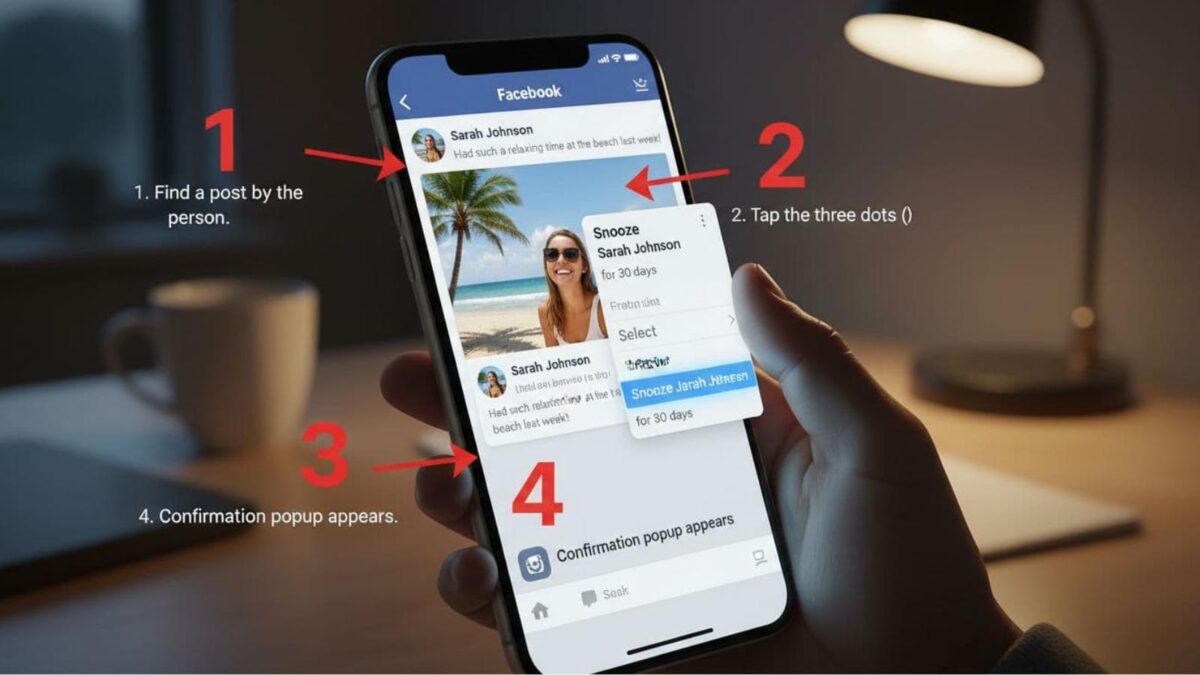
- To snooze someone, open one of their posts, tap the three dots, then select “Snooze for 30 days”.
- Snoozing does not unfriend or block someone; you can still message them and interact in comments.
- You can end a snooze early by going to Settings, then Feed, then Snooze, and removing the snooze.
- Facebook does not tell you if someone snoozed you; there is no notification or alert.
How To Snooze Someone On Facebook (30 Days)
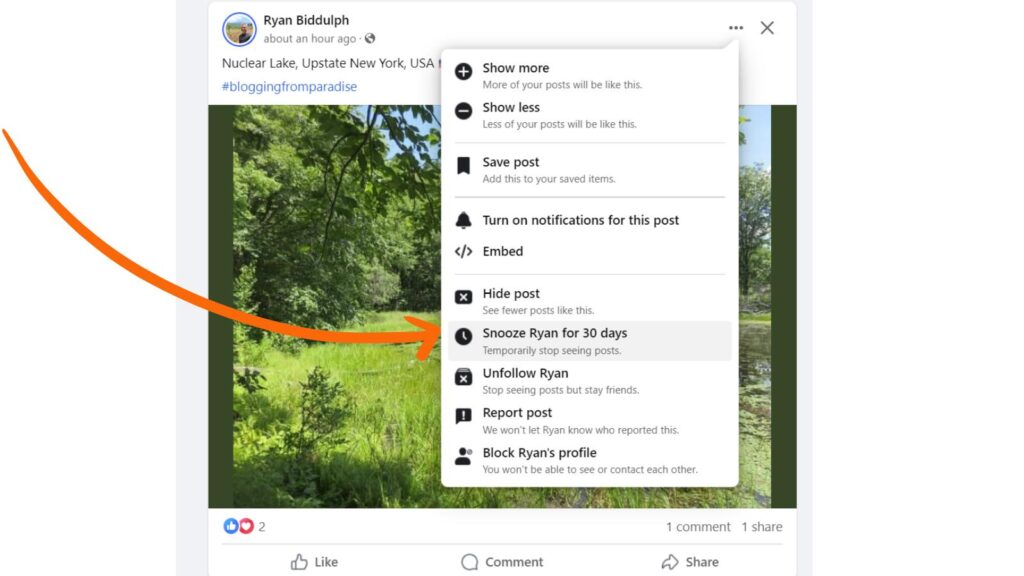
Here is an example from my blogger friend Ryan Biddulph from Blogging From Paradise, who I know wouldn’t mind being used as an example here:
Click the three dots next to their name in the upper-right corner of their latest post. There you will have several choices to pick from, as you can see below.
Choose: Snooze for 30 days, that’s it. Now you know how to snooze someone or a page on Facebook for 30 days.
What You Will Still See
After you snooze someone on Facebook you will still see:
- Messenger chats
- Notifications when they comment on your post
- Group activity you share
Can You Snooze Pages or Groups on Facebook?
Yes, you can also snooze a Facebook page or a Facebook group. You would do it the same way as shown above to snooze a person on the social platform.
When you snooze a profile, page, or group on Facebook, you’re simply pausing their posts from your feed for 30 days. This doesn’t mean you’re cutting off contact.
You can still chat with them on Messenger and get notifications when they interact with your posts or comment on shared content in your mutual groups or friends’ posts.
It’s a handy way to declutter your feed without losing touch with essential interactions.
What Are Some Reasons To Hit The Snooze Button?
As we saw back in the 2024 presidential election, it remained one of the top reasons people snooze you on the Meta platform. If you keep posting things that someone disagrees with, they may become angry and no longer wish to see your political posts.
Other reasons may include constantly posting about your drama on the feed. People get tired of hearing negative things from the same person all the time. Most users respond to positive sentiments today.
Another reason to hit the snooze button is when a friend posts the same things over and over. It gets to be too much to see the same thing every time you log in to your FB account from that same friend.
Differences Between Snooze, Unfollow or Block on Facebook
Here are the differences between these options for you to know before you decide to hit the snooze button on a friend, page, or group:
| Method | What It does | Results |
| Snooze | Hides their posts for 30 days | A user, page or group doesn’t know they have been snoozed |
| Unfollow | Stop seeing them in feed but still friends | You can visit them and message them and vice versa |
| Block | Completely severs ties with user | They cannot see you in feed or message you |
How To Unsnooze Someone
Now, there may come a time when you want to see that person’s posts or page again.
To take someone off snooze on your Facebook account, you have to go to your private settings and then feed. You will find it in the upper-right corner of your desktop.
Someone has to use the desktop to change settings, and not all settings will work with your mobile device.
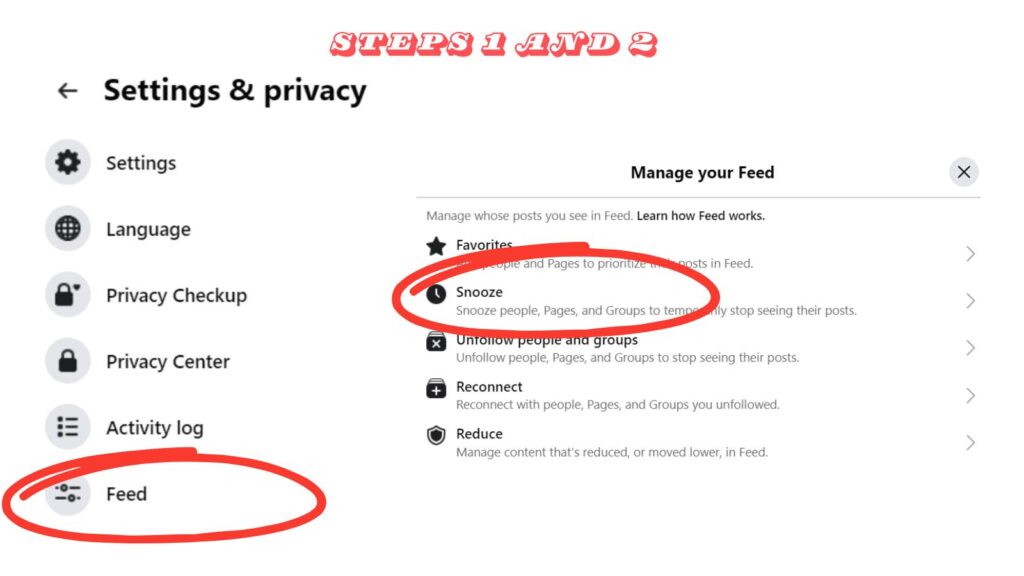
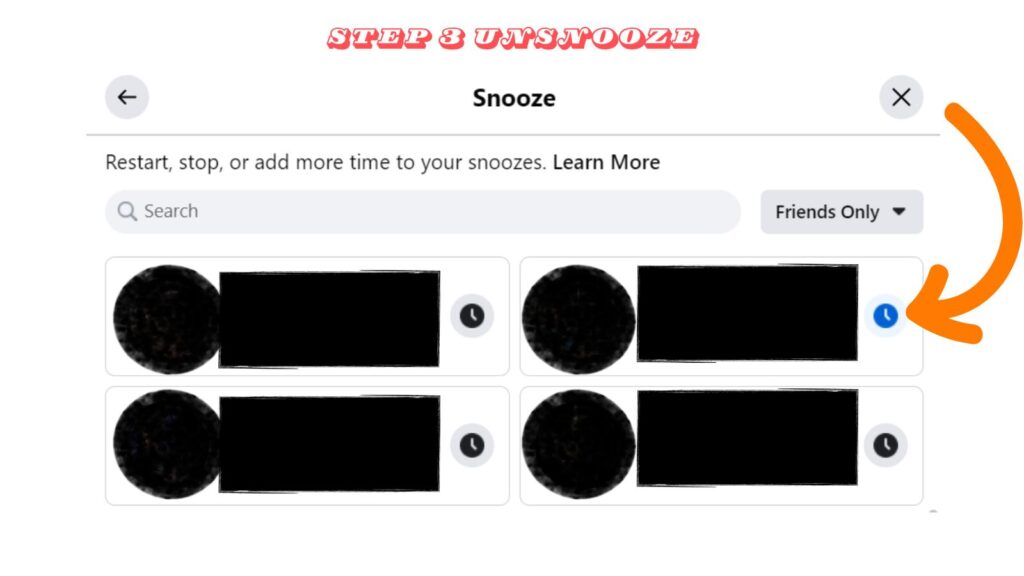
Then go to the snooze arrow to get to the next screen. You will see everyone you ever snoozed, and if it has ended or is still in progress, by seeing a clock there, as pictured below.
That is how you know how long the snooze has left for that person or page to hide from your main feed.
Can You Tell If You Were Snoozed?
No, it is not possible to know if someone has snoozed you for 30 days on the social platform. They can still engage with you on the platform, so you have no way of knowing for sure.
How Can You or Your Page Avoid It?
The short answer: Don’t be annoying. The longer answer is:
Keep your content engaging and relevant. Personal share posts, offer value, like interesting insights, helpful tips, or fun stories.
- Post less often
- Avoid repeat posts
- Mix photos and tex
- Don’t post constant drama
Conclusion: How To Avoid Drama With the Snooze Button
To steer clear of drama or anger on Facebook today, the snooze button is your best friend. If someone’s posts are getting under your skin or you’re tired of endless political debates, just hit snooze.
It lets you mute someone for 30 days without unfriending them, giving you a well-deserved break from negativity. This feature helps keep your feed peaceful while maintaining your relationships.
With one click, you take control of your social media experience, ensuring you stay calm and collected without getting into unnecessary conflicts. Use the snooze button to protect your peace and focus on what truly matters.
Frequently Asked Questions About Snoozing Someone on Facebook
Find a recent post from the person (or page or group) in your feed. Click or tap the three dots in the top-right of the post, then choose “Snooze for 30 days”. Their posts will stop showing in your feed for the next 30 days.
Yes. You can snooze a page or a group the same way you snooze a person. Use the three-dot menu on a post from that page or group, then select “Snooze for 30 days”.
Facebook hides that person’s posts from your feed for 30 days. You are not unfriending or blocking them, and you can still chat on Messenger and see interactions like comments or notifications.
Go to your Facebook Settings, then open Feed, then Snooze. You will see a list of accounts you snoozed, along with whether the snooze is still active. Remove the snooze to start seeing their posts again.
No. Facebook does not show a notice when someone snoozes you. Since they can still interact with you, there is no clear way to confirm it.


- Why Making A Personal Connection Is Marketing Gold Dust - September 19, 2026
- What Is My Instagram URL? How to Find and Copy Your Profile Link - September 19, 2026
- 5 Types of Instagram Posts Users Want to View Anonymously - September 18, 2026
Enjoy this content? Help me show up more often in Google by adding Inspire To Thrive as a Preferred Source:


Hello Lisa,
Sometimes people spam too much on Facebook. I also receive this kind of spam and I occasionally snooze people for a few days who posted too much spam. Facebook is a large social media site and We need to be aware of its preventive features like snoozing someone for a few days. Thanks for letting people know about this.
Regards
Vishwajeet Kumar
Hello Vishwajeet, nice to see you back here. Yes, some people do spam a lot on Facebook. We are seeing a lot of political posts, memes, etc here in the United States and it can be overwhelming. Thanks for coming by and have a great day.
Thumbs up for the mention, Lisa. Appreciate it. As for snoozing, we have many potential reasons to snooze someone for this stretch. Politics is a biggie. Especially as we hit crunch time with the election in the USA. But sometimes it may be helpful to allow someone to cool off temporarily versus cutting them off with a block. People go through rough spots. Even though we want to help by listening it is a bit too much at times. Snoozing provides space for both parties until the one airing grievances a bit too often comes back to being their normal self. Setting boundaries is important to maintain peace of mind.
Ryan
Hi Ryan, you are most welcome. I agree with you about setting boundaries being important. I think by snoozing someone it can save the relationship as people tend to cool off afterwards. Thanks for your input on this one Ryan and have a great day!