
Social media evolves quickly. As a longtime user (since 2009!), I’ve adapted from the 140-character days to X’s current “everything app” focus. This Inspire To Thrive guide shares practical tips for longtime Twitter X users to thrive with today’s features, algorithm, and best practices
Estimated reading time: 13 minutes
Table of Contents
Key Twitter X Takeaways
- Prioritize quality replies and conversations over volume posting.
- Use native long-form (Articles), video, and carousels.
- Limit early links; focus on engagement velocity in the first 30 minutes.
- Consider Premium for boosts, editing, and monetization.
- Refresh pinned posts and Highlights regularly.

Character Limits & Long-Form Content
The old 140 (then 280) limit forced brevity, great for quick updates. Now, Premium subscribers can post up to 25,000 characters, plus Articles (long-form with formatting, images, etc., favored by Premium+).
👉 Tip: Mix short, punchy posts with occasional deeper ones. Brevity still wins for reach, but long-form builds authority.
Links Strategy
Link-dumping no longer works like before. The algorithm favors engagement: limit to 1-2 thoughtful links daily, ideally in replies or pinned posts. Test native content first.
Twitter X Guide for Longtime Users: Engagement Tips for Today
- Post less, engage more: 1-2 quality posts + 15-20 thoughtful replies daily often outperform high volume.
- Diversify: Videos (up to hours for Premium), carousels (rolling out more in 2026), polls, and Spaces.
- Timing & Analytics: Use X Analytics (Premium) or tools like Creator Buddy. Experiment!
- Ditch excessive hashtags: Semantic understanding rules; they can flag spam. Use naturally or sparingly.
- Refresh your pinned post and Highlights tab (Premium feature—curate top content on your profile for an instant portfolio effect).
Making the Most of Replies
Replies are gold. Thoughtful ones get a massive boost (replies weighted far higher than likes). Be the “reply gal”; add value, ask questions. My example reply below left a strong impression by sparking a conversation.
Wow, never seen that before – spider must be pretty smart creatures.
— Lisa Sicard 👩💻 (@Lisapatb) March 11, 2025
X Premium / Verified Changes
Verification is now subscription-based:
- Basic (~$3/mo): Edit posts, longer content/videos, bookmark folders, reply prioritization.
- Premium (~$8/mo): Blue check, ~50% fewer ads, creator revenue sharing, Media Studio, Grok access.
- Premium+ (~$40/mo): Ad-free (mostly), largest reply boost, Articles, X Pro, enhanced Grok/Radar.
- Pricing varies by region/platform; annual discounts available. Review eligibility for checkmark.
The Pricing
X Premium Pricing & Tiers (July 2026)
Today, there are Basic, Premium, and Premium+ plans with pricing starting at $3 per month on the web (annual discounts available; prices vary by country and platform).
| Tier | Key Features | Pricing (Web) |
|---|---|---|
| Basic |
| $3 per month |
| Premium |
| $8 per month or $84 per year |
| Premium+ |
| $40 per month or $395 per year |
Note: X pricing may change from time to time. Rates vary by country. Always check the official X Premium page for the latest details.
Must-Use Features in 2026
- Grok AI: Useful for ideas/summaries (stronger on Premium+).
- Highlights Tab: Spotlight best posts on your profile (Premium).
Must-Use Features in 2026
Grok AI: Useful for ideas/summaries (stronger on Premium+).
Highlights Tab: Spotlight best posts on your profile (Premium).
Spaces & Communities: Great for live audio and niche connections (your blogger community link).
Video Power: Short clips or longer (Premium). X pushes video heavily.
Bookmarks: Encourage them; bookmarkable content (tips, lists) boosts algo.
Notifications: Customize for quick replies.
The Highlights Tab Boost
The X Highlights Tab is a nifty feature exclusive to paid subscribers on X (formerly Twitter), designed to let users showcase their favorite or most impactful posts in a dedicated section on their profile.
It’s super easy to use: just tap the three-dot menu on any of your posts and select “Add/remove from Highlights” to curate your collection. This is a game-changer for creators, artists, and writers who want to spotlight their top content.
It is like a portfolio or a storytelling tool, making it instantly accessible to anyone visiting their profile.
Not only does it boost visibility for your best work, but it can also spark more engagement from your audience. For the best results, try picking high-performing posts. Then keep your highlights fresh with regular updates and align them with your personal brand.
Keep in mind, though, that since it’s tied to a paid subscription, not everyone will have access to this perk.
Spaces and Live Audio
Spaces are audio chatrooms where you can listen, talk, or even host discussions. Think of them as podcasts that turn into live conversations.
You can join while out on a walk or even listen in while you’re cooking dinner. Spaces give you an easy way to interact without worrying about how you look or being tied to a screen.
Hosting your own Space can also be a great way to boost engagement and position yourself as an expert in your field. Even if conversation isn’t your thing, joining popular Spaces hosted by others can still benefit you.
The Power of Video
Video content is growing fast on X. Whether it’s a quick two-minute clip (allowed on free accounts) or a longer-form video if you’re subscribed, video lets you connect with your audience on a deeper level.
Elon Musk, the platform’s current owner, has ambitions for X to compete with YouTube, so you can expect more video-focused tools and features to emerge soon.
If you’re comfortable in front of the camera or editing clips, this can be an excellent opportunity to stand out. Not into video? That’s okay; there are plenty of other ways to thrive on the platform.
Good Saturday morning 🌞
— Lisa Sicard 👩💻 (@Lisapatb) June 27, 2026
Watching a tree frog yesterday.
Do you like frogs? 🐸 pic.twitter.com/ojAzACYELl
Notifications
X notifications are a game-changer for staying connected and responding swiftly to the latest posts.
These handy alerts ping you whenever there’s activity: Think mentions, replies, or fresh posts from accounts you follow—keeping you in the loop instantly.
You can tweak your settings to focus on key interactions, ensuring you’re not swamped with updates. Quick responses are vital on social media; they spark conversations, show you’re engaged, and keep your audience hooked.
With the X app, you can get these notifications anywhere, anytime, or lean on third-party tools to streamline the flow. Use X notifications to jump into discussions fast and make your presence felt.
I like to mix up my notifications. When I find a user is no longer posting useful content, I may turn off the notifications, and when I find a new interesting user, I turn them on.
X Bookmarks: Valuable Part of the Algorithm
What makes X bookmarks so valuable? The more people bookmark your posts, the higher your visibility goes on the social media platform.
So before you post again, think: is this post bookmarkable? Make it something people want to return to with directions, interesting content, printable content, etc.
Why save content to your bookmarks? So you can always go back to them, and they are private.
I saved this post from Alex Finn about Grok prompts in my bookmarks. It’s a great way to go back and see it.
6 Grok prompts that EVERY creator on X should be using.
— Alex Finn (@AlexFinnX) March 13, 2025
Will INSTANTLY improve your content and drive you way more engagement
(Yeah, bookmark this) pic.twitter.com/PsTvW80hAu
There are 3 tiers of bookmarks on X today:
- Basic: Simple bookmarking with a potential limit, ideal for light users.
- Premium: Unlimited bookmarks with organizational tools and syncing, suited for regular users. You can set up folders to organize, and these are private.
- Premium+: Advanced bookmark management with exclusive features, perfect for heavy users.
Each tier builds on the last, offering progressively more powerful bookmark capabilities to match different user needs and subscription costs.
Algorithm Notes (2026)
Focus on conversation quality, early momentum, and relevance. Original, valuable content from engaged accounts wins. External links early can reduce reach. Test what resonates with your niche audience.
👉 Pro Tip for Creators: Authentic content (like my Stella videos) often outperforms polished AI. Use hybrid approaches.
The Expanded Bio on X Twitter
The expanded bio feature on X is a game-changer for users who want to make a lasting impression. Exclusive to Premium and Premium+ subscribers, this feature allows you to craft a longer, more detailed bio.
It is perfect for sharing your story, showcasing your personality, or even promoting your brand.
Whether you’re a creator, entrepreneur, or just someone with a lot to say, the expanded bio gives you the space. Space to add context, links, or even a mini-story that resonates with your audience. It’s a powerful tool for personal branding.
The expanded bio can help you stand out and give followers a deeper look at who you are.
👉 Pro tip: Use this space to highlight what makes you unique and include a call to action. Or drop a link to your latest project and make your bio prime real estate for engagement.
Article Feature for Premium+ Users
With this feature, you can craft detailed articles using formatting tools like headings and bullet points, and even embed multimedia such as images and videos—all displayed in a dedicated tab on your profile for easy access.
It’s perfect for diving deep into topics, whether you’re a creator sharing a step-by-step guide or a business highlighting a case study to boost engagement.
Note that it’s currently exclusive to Premium+ subscribers and verified organizations, making it a premium perk worth considering. Want to stand out on X?
Try the article feature and share your expertise in a big way—your readers will thank you!
You can check my older article features out here on X: https://x.com/Lisapatb/articles
Grok AI – Your X Assistant
Grok AI, developed by xAI, is your personal assistant on X (formerly Twitter), designed to make your experience on the platform smoother and more engaging. Grok3 (the recent update) is really amazing to try if you haven’t already.
Integrated directly into X, Grok taps into real-time data to deliver up-to-date insights, answer your questions, and even sprinkle some humor into its responses.
Whether you’re decoding a trending topic, analyzing a tricky post, or crafting a clever reply, Grok’s got your back. Its conversational tone and ability to handle both text and images make it a versatile tool for casual scrollers and content creators alike.
I love using Grok for images on my posts. You can see the animated image below, created from a cartoon meme featuring me and my Victorian bulldog, Stella.
You do have to give Grok AI time to know your inputs and change up your prompts to get more of what you want. I used “create me a funny cartoon meme of me with my bulldog Stella doing _______” to create the image below.

Plus, with features like the Highlights Tab, where you can showcase your top posts, and the expanded bio option for Premium subscribers, Grok helps you connect with your audience and boost your presence on X.
As X continues to evolve, Grok remains your trusty sidekick, effortlessly keeping you informed and engaged.
Radar For X Premium+ Subscribers
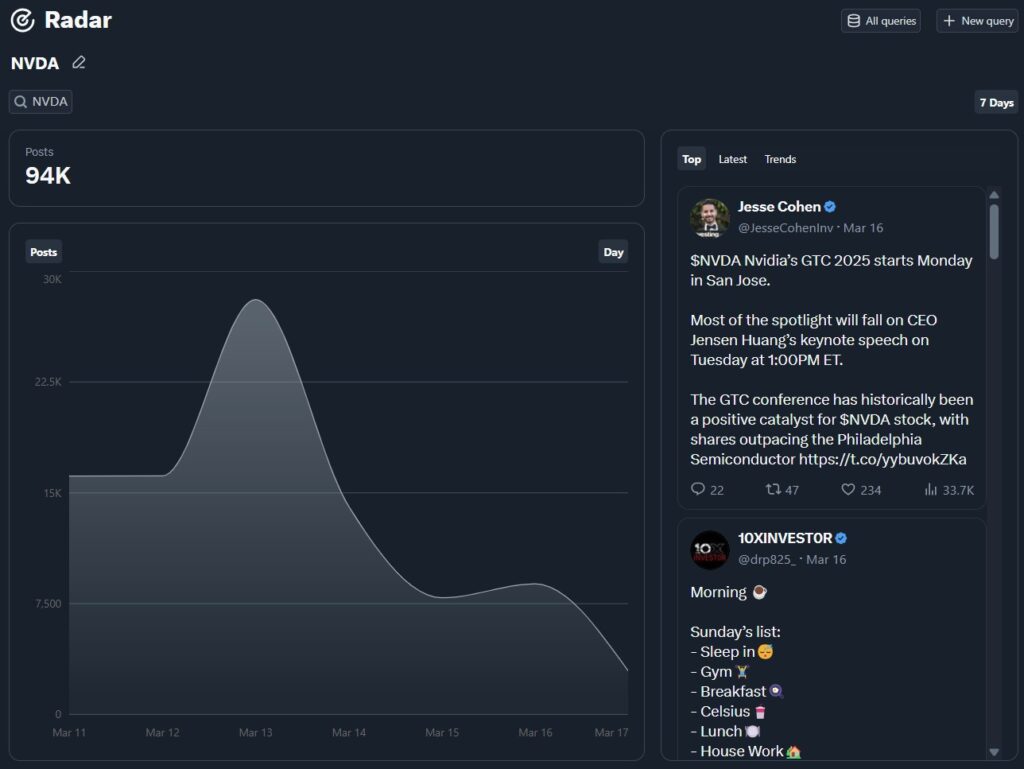
Radar on X is a powerful real-time search and trend analysis tool that helps users stay informed and engaged. It allows you to monitor trends, track conversations, and get instant updates on breaking news and live events, such as sports matches or elections.
With Radar, you gain access to the latest tweets, images, and videos related to your queries, refreshed continuously for up-to-the-second accuracy.
Exclusive to Premium+ subscribers, this feature offers a premium experience that keeps you ahead of the curve.
Monetization: Can You Make Money on X?
One of the biggest changes to X is its focus on monetization. The Creator Program allows you to earn money on the platform, but reaching that level isn’t a walk in the park. You’ll need:
- A verified premium account.
- 500 premium followers.
- 5 million impressions over three months.
The Third Requirement Is Tougher
However, I do use my own voice with the AI tool and don’t use it for all my posts. I love going rogue on X, thanks to its fast-paced networking. (You can tell with my infamous typos in the replies.)
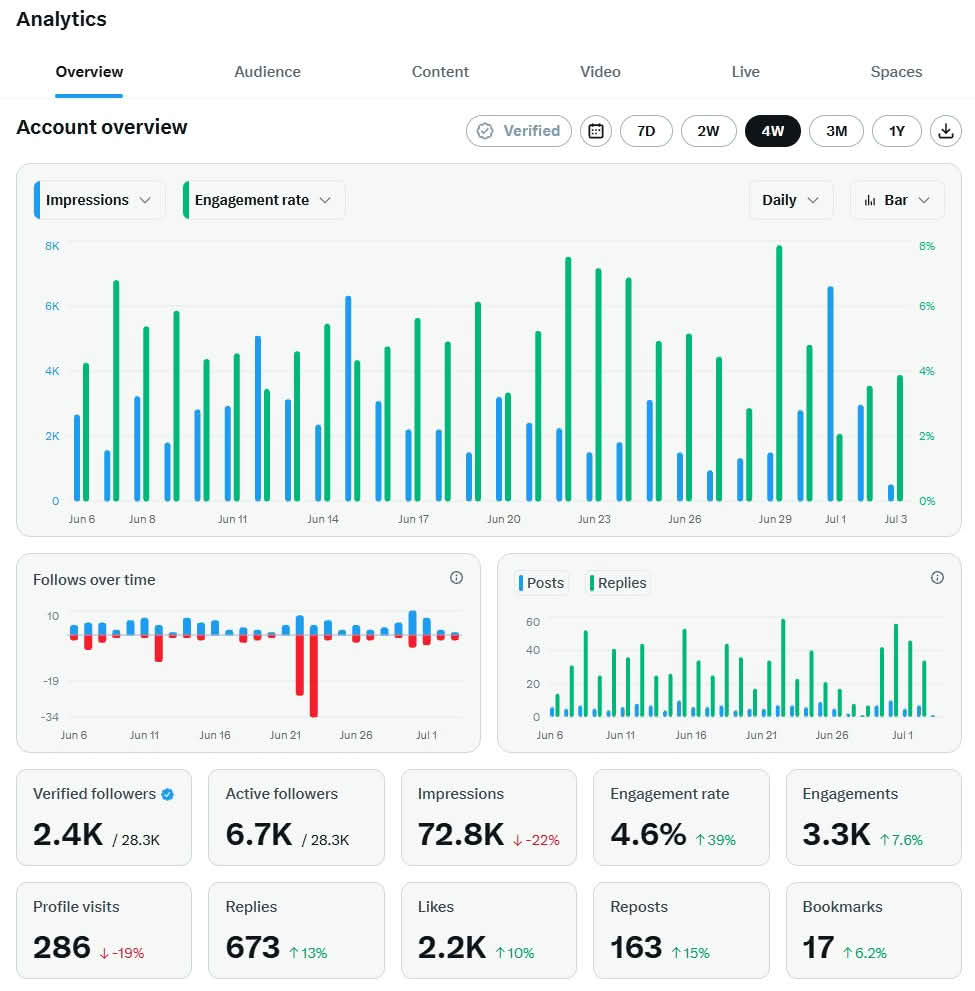
Here’s a look at my more recent X analytics (as of mid-2026):
[Insert your newest screenshot here – preferably a 30-day or 90-day view that shows realistic current performance]
This is a snapshot of my ongoing journey toward consistent growth on X. Results fluctuate (as they do for most creators), but focusing on high-quality replies and authentic content remains my best strategy.
There’s also the Subscriptions feature, allowing followers to pay for exclusive content from you. This works great for those who already have an engaged audience.
Ready to Update Your X Game in 2026?
Longtime users like us have seen massive shifts, but the core of building real connections remains. The biggest wins come from experimenting with replies, native video/carousels, refreshing your Highlights, and focusing on quality over quantity.
What’s one change you’ll try first? Reply below 👇 I read and reply to as many as I can (and love seeing longtime users adapt successfully). Your insights help the whole community!
If you’re looking for more practical social media, SEO, and small business tips tailored for solopreneurs and rural creators, join my free newsletter. Get actionable ideas, tool roundups, and early access to new resources delivered to your inbox.
👉 Subscribe to the Inspire To Thrive Newsletter Here 👈
Thanks for reading! Follow me @Lisapatb for more real-talk on X strategy, rural life with Stella, and creator growth. Let’s make 2026 our most engaging year yet.
FAQs: Navigating Twitter X Changes for Longtime Users
Twitter officially rebranded to X in 2023 as part of Elon Musk’s vision to build an “everything app.” The core functions remain familiar, but the platform has expanded significantly with longer posts, video focus, monetization, and AI features.
Yes. Posting, replying, liking, reposting, and scrolling work similarly. The biggest shifts are in visibility: engagement (especially replies) matters far more than before, and heavy link-sharing early in posts often reduces reach.
In 2026, the algorithm prioritizes conversation quality, reply depth, and early engagement velocity (within the first 30 minutes). It favors original, relevant content and uses semantic understanding rather than hashtags. Toggle between For You and Following tabs, and use Lists for better control.
Creators can offer paid Subscriptions for exclusive content. Premium users also qualify for ad revenue sharing based on engagement from other Premium users. X takes a cut, but it’s a solid option for consistent creators.
Yes—DMs support longer threads, better organization, and encrypted options. You can filter messages from followers vs. non-followers to reduce spam.
Keep your profile complete with keywords in your bio, use a clear profile photo/header, and engage consistently. Verified (Premium) accounts often get a reply boost, and fresh Highlights content helps visitors stay longer.
Links (especially in the main post) significantly reduce initial reach for non-Premium accounts. Best practice: Share a strong hook or teaser, then add the link in a reply or your pinned post. Build interest first.
The algorithm heavily rewards meaningful interactions (replies, especially) over passive likes or volume posting. Thoughtful conversations boost visibility and help build real relationships, key for longtime users transitioning old habits.
It depends on your goals. Basic ($3/mo) unlocks editing and longer content. Premium ($8/mo) adds the blue check, monetization, and analytics. Premium+ ($40/mo) is best for heavy users who want an ad-free experience and access to Articles. Test what fits your workflow.
Available to Premium subscribers, it lets you curate your best posts in a dedicated profile tab. Add high-performing content via the three-dot menu—it’s excellent “portfolio” real estate for creators. Keep it updated!
Disclosure: This Inspire To Thrive blog post contains affiliate links. I may earn a commission from qualifying purchases at no extra cost to you. Some sections were drafted with AI tools and carefully reviewed/edited by me.
Comments are from previous years; the post was fully updated in July 2026 👇

- How to Build a Strong Online Presence for Solopreneurs in 2026 (Without Spreading Yourself Thin) - October 17, 2026
- TikTok Viewer: How to Watch Public Videos Anonymously (2026 Guide) - October 16, 2026
- Find Broken Links on Site Fast: Scan, Fix, and Protect Your SEO - October 15, 2026
Enjoy this content? Help me show up more often in Google by adding Inspire To Thrive as a Preferred Source:




Hi Lisa,
I typically check X-Twitter once every few days.
But when I do stop by and reply to only a few folks, I do so thoroughly. I respond with at least 3-4 sentences most times if not longer. I find that adding depth builds bonds organically but also appeases the algorithm because these chats gain exposure in the main stream.
Basically, I employ my blog commenting strategy. Share in-depth thoughts to make a strong impact. Every thoughtful comment adds value to the initial post-content. We do people a solid by being thorough in more ways than one.
I like that, reply like you would with blog commenting. The X algorithm loves that, it’s all about the engagement as with most social media networks today. It’s a great way to get to know people better too. Happy 4th of July Ryan!