
Are you experiencing issues with Instagram today? Wondering: Is Instagram down in your area, for just you, or for everyone? In this Inspire To Thrive guide, I will show you how to quickly check whether IG is experiencing an outage.
Whether you rely on Instagram for personal use or as a marketing tool for your business, downtime can be frustrating. Knowing how to determine if Insta is down can save you from potential headaches and help you stay informed.
Estimated reading time: 8 minutes
Table of Contents
Why Is It Important To Check if Instagram Is Down
In today’s connections, whether Instagram is down in your area can significantly impact your social media activities. However, it may be only in your area of the world or country.
Let’s look into why it’s crucial to stay up to date on the app’s availability and how it can affect both your personal and business interactions.
Impact On Social Media Activities
When Instagram experiences downtime in your region, your ability to connect with friends, share moments, and engage with your followers is disrupted. Imagine trying to post a captivating photo or a witty caption only to find that the platform is inaccessible – it can be quite frustrating.
Checking whether Instagram is working in your area helps you identify potential disruptions to your online interactions, allowing you to adjust your social media strategy accordingly.
Business Implications: Is Instagram Down In My Region?
For businesses, the impact of Instagram downtime goes beyond personal inconvenience. If your business relies on this app as a marketing tool, service interruptions can directly impact:
- Your reach.
- Engagement.
- Your bottom line.
Whether you run a small online shop, offer services to clients, or promote products through the platform, being aware of Instagram’s status in your region is crucial for maintaining a seamless social media presence.
By staying informed about Instagram outages, you can proactively address any disruptions to your digital marketing efforts and explore alternative ways to engage with your audience.
Methods To Check: Is Instagram Down In My Area?
Wondering if Instagram is offline or if the issue is on your end? Here are some methods to help you check the status of Insta:
Official IG Status: Is Instagram Down In My Area?
Instagram has an official status page where users can check for any ongoing issues with the platform. Visiting this page can provide real-time updates on any outages or disruptions.
Third-Party Websites
There are several third-party websites dedicated to monitoring the status of popular online services like Instagram.
These websites can give you a quick overview of Instagram’s current status and whether other users are experiencing similar issues.
Use Other Social Media Platforms To Check “Is Instagram Down In My Area?”
Another way to check if Instagram is down is to visit other social media platforms like X (Twitter). Often, users will take to X to report issues with the competitor app, and searching for keywords like “Instagram down” with hashtags can give you insights into the situation.
By utilizing these methods, you can stay informed about its status and determine whether any disruptions are widespread or specific to your account.
Remember to check official sources for the most reliable information on service outages.
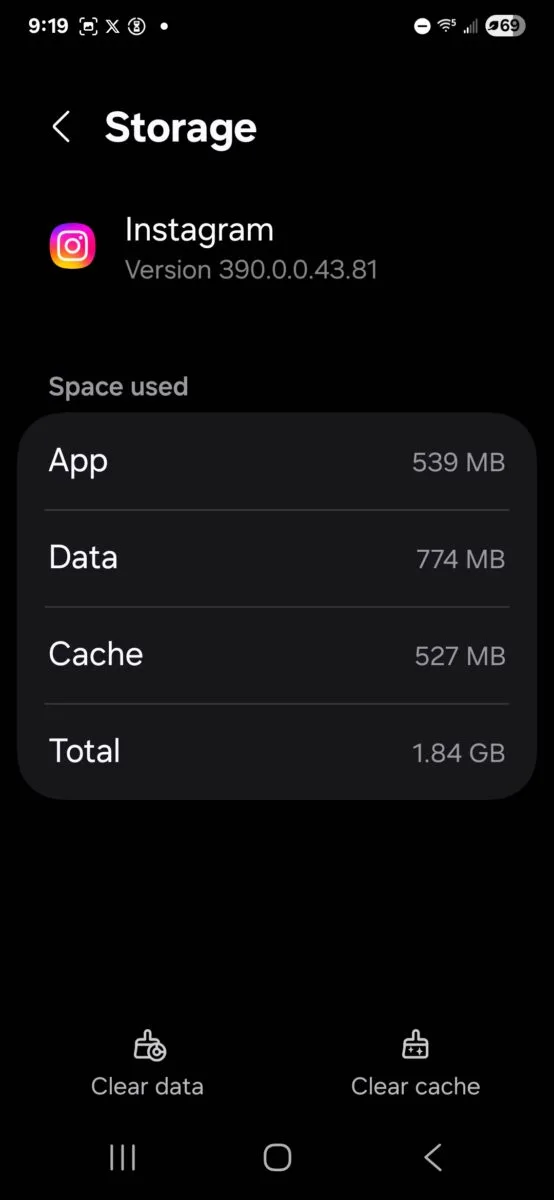
Check Your Cache
Clearing your Instagram cache can significantly improve your app’s performance. When you browse IG, the app stores data to speed up future interactions.
However, this cache can accumulate over time and slow down your app. By clearing your cache, you can free up storage space, reduce loading times, and potentially fix glitches or bugs.
It’s a simple yet effective way to ensure a smooth and seamless Instagram experience. It may make the difference between the app working and being offline for you.
Tips to Confirm an Outage When Asking “Is Instagram Down in My Area?”
Wondering if Insta is offline and not sure how to verify it? Here are some practical tips to help you confirm if the popular social media platform is experiencing technical difficulties.
Check Other Apps
One way to determine if Instagram is not running is to check other apps on your device. If multiple apps are failing to load or are slow to respond, it could be an issue with your internet connection rather than Insta itself.
Testing the functionality of various apps can give you a better idea of the problem’s scope.
Internet Connection
Ensure your internet connection is stable by opening a web browser or trying to load another website. If other online services are working fine except for Instagram, the issue likely lies with the platform.
However, if you encounter connectivity problems across multiple websites, the culprit might be your internet connection.
Real-Time Reports
To stay updated on Instagram’s status, you can turn to a real-time outage-monitoring app or social media platforms like X (Twitter). These sources aggregate user reports to provide insights into Instagram’s current status.
Checking these platforms can help you determine if others are experiencing similar issues with the app.
By following these tips, you can quickly determine whether Insta isn’t working and take appropriate steps to address the issue. Remember to consider external factors such as app performance, internet connectivity, and real-time reports when verifying Instagram’s status.
What to Do When Wondering if Instagram Goes Down In My Area?
In the rare event that Instagram experiences downtime, it can be frustrating for you when you rely on the platform for various reasons.
Here are some practical steps to take when you encounter Instagram being unavailable:
Wait Patiently
During Instagram outages, the best course of action is usually to wait patiently for the platform to resolve the issue.
In many cases, the technical team at Meta is already working on fixing the problem, and constantly refreshing the app or website may not speed up the process.
Engage On Other Platforms
While Insta is down, take the opportunity to engage with your audience or followers on other social media platforms.
You can use this time to create content for platforms like Facebook, Twitter, or LinkedIn, ensuring that your online presence remains active even during Instagram downtime.
However, do note that Facebook may sometimes go down with Instagram, since Meta also owns both.
Report The Outage
If you suspect Instagram is experiencing an issue that needs attention, you can report it directly to Instagram.
By providing feedback through the appropriate channels, you contribute to the platform’s awareness of the situation and help them prioritize fixing the downtime.
Remember, downtime on social media platforms is not uncommon, and staying calm and proactive during such situations can help minimize the impact on your online activities.
Conclusion: Is Instagram Down In My Area Now?
Instagram is a widely used social media platform, and experiencing downtime can be frustrating for its users. Checking whether Instagram is offline can be done in various ways, ensuring you stay informed about the platform’s status.
By following the steps outlined in this Inspire To Thrive guide, you can quickly determine whether Instagram isn’t working for everyone or just for you, allowing you to troubleshoot accordingly.
Frequently Asked Questions About Instagram Being Down in My Area
Start by checking whether the problem shows up on both Wi-Fi and mobile data. If Instagram won’t load on either connection, and other apps work fine, there’s a good chance the issue isn’t just on your phone. You can also check real-time outage reports on sites like Downdetector and search X for recent user reports in your city or region.
It depends on the pattern. If many users report login issues, feed errors, or stories not loading at the same time, it’s likely a broader outage. On the other hand, if only your account or device is affected, the cause is often local, such as a weak connection, an app bug, a VPN conflict, or an account-related issue.
First, refresh the app and test your internet connection with another website or app. Then switch between Wi-Fi and mobile data, restart Instagram, and check for app updates. If the issue sticks around, restarting your phone and clearing the app cache (on Android) can help rule out device-level glitches.
Partial problems are common during outages or app-side bugs. For example, your feed might load while DMs fail, or stories may post while reels won’t play. That usually points to a service issue on Instagram’s side, though a slow connection can also affect video-heavy features first.
Most Instagram outages are short and clear up within minutes to a few hours. Larger disruptions can take longer, especially if login systems, uploads, or messaging are affected. If reports keep climbing and your troubleshooting steps don’t resolve the issue, waiting for Instagram to resolve it is often the only real option.
Yes, and it happens a lot. A weak router signal, a carrier issue, a DNS problem, or a network restriction can make Instagram seem down even when the platform is working normally. That’s why testing another device or another connection is one of the fastest ways to narrow it down.
Disclosure: This Inspire To Thrive blog post contains affiliate links. I may earn a commission from qualifying purchases at no extra cost to you. Some sections were drafted with AI tools and carefully reviewed/edited by me.

- Instagram Reel Length 2026: Is 90 Seconds Too Long? Best Lengths, Limits & Testing Tips - October 2, 2026
- How to Build a Traffic Pipeline from Instagram to Your Blog or Store - October 1, 2026
- Instagram Tools Aren’t One-Size-Fits-All: Match the Tool to the Job - September 30, 2026
Enjoy this content? Help me show up more often in Google by adding Inspire To Thrive as a Preferred Source:




Clearing your cache is a smart tip Lisa. Few consider this to be an issue. I had no idea that caching can actually crash apps, outright….especially on Instagram with all of its images cached. Clearing it speeds up the app, improves performance and usually shows that IG being down was simply me forgetting to clear my cache.
Thanks Ryan. Yes, it is one many do not do often and forget about it. Even on desktop browsers, I can’t tell you how many times I’ve had to tell clients to clear their browsers cache. I appreciate your coming by and have a great day Ryan.