An Instagram business card is a great way to expand your local presence in person to an online presence on IG. These business cards are easy to make online. You can have them printed online and shipped right to your home or office.
When you’re out meeting people, and they ask about your job or business, you can simply give them your IG business card, that is, unless you have a private account on Instagram.
Table of Contents
What Types of Businesses Should Use An IG Business Card?
These Instagram business cards are great for small businesses who may not have a website. Yes, there are many small and part-time businesses that do not have a website in 2026. I just met one, and the owner inspired me to write about this for you.
We were out for an afternoon walk, and she got to talking about a side business she had and showed me her Instagram profile. Of course, it didn’t have the bio completed, so I advised her to do so immediately
Having a great bio on any social media platform today is very important. It showcases who you are and what you do, etc. Other IG users will decide whether to follow you or not by viewing your profile on Instagram.
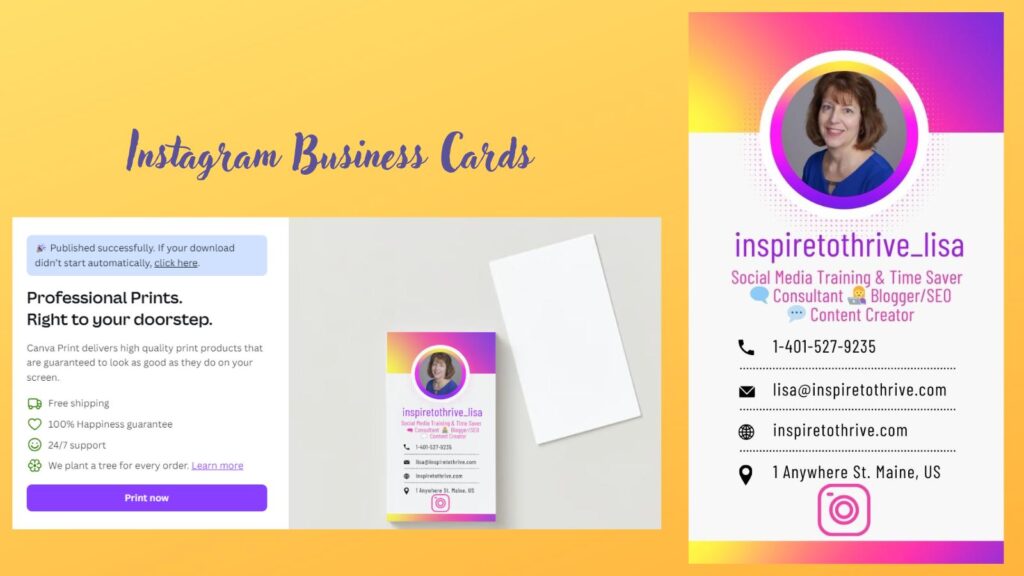
Creating Your Own Instagram Business Card
Creating your own Instagram business card is a breeze with tools like Canva, Neoprinty, Vista Print, Moo, and Etsy. Canva offers easy-to-use templates where you can drag and drop your brand elements, making design simple even if you’re not a pro.
Neoprinty stands out for its user-friendly interface, which lets you customize your Instagram business card in a few clicks. Vista Print provides a wide range of templates and printing options, ensuring your cards look professional and polished.
Moo adds a touch of creativity with premium finishes and unique designs, ideal for making your card memorable. Etsy is a treasure trove of handmade and customizable designs that let you support small creators while getting a personalized touch.
Each of these platforms offers unique features that cater to various needs, whether you’re looking for simplicity or something more creative.
So, which tool will you choose to bring your Instagram business card to life?
Keeping Them Sharp
Your Instagram business cards need to be sharp and to the point. Start with your handle right at the top. Make sure it’s bold and easy to read. Add a catchy tagline or short description that sums up your brand in a few words.
Be sure to include your logo or a memorable image that reflects your vibe. Don’t forget your contact info—keep it simple with an email or phone number. If you have a website, put that on there too.
A QR code that links directly to your Instagram can be a slick addition. Keep the design clean, making sure each element has space to breathe.
Use colors and fonts that match your brand’s style. Your business card should be a quick snapshot that makes people want to check out your feed.
What to Include on an Instagram Business Card
Keep your Instagram business card clean and focused. Here’s exactly what works best:
- Instagram handle — Place it prominently near the top in a bold, easy-to-read font (e.g., @YourHandle).
- Logo — Include your logo or a strong brand image so people recognize you instantly.
- QR code — Link it directly to your Instagram profile. This is one of the highest-converting elements.
- Website (if you have one) — Optional but helpful for people who want more information.
- Short tagline — One clear line that explains what you do (example: “Helping small businesses grow on Instagram”).
Pro tip: Avoid overcrowding the card. White space makes it look more professional and easier to read at a glance.
How To Make An Instagram Business Card on Canva Quickly
Most small business owners don’t have much time to make their business cards. However, with Canva’s template, it can be done in 5 minutes.
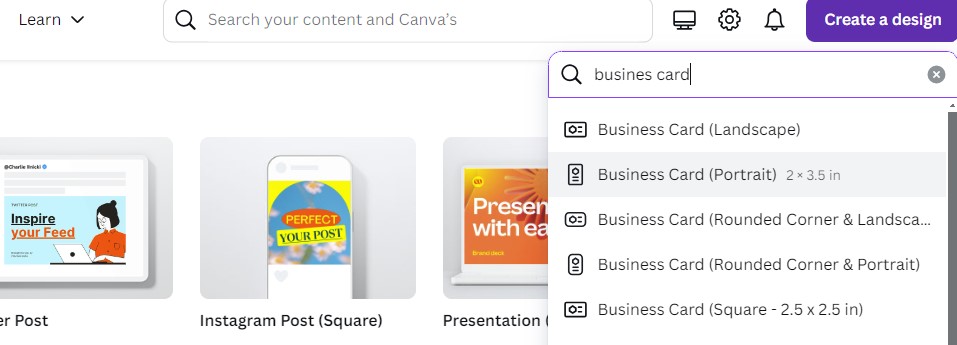
First, choose the business card template from your Pro Canva account. Be sure to pick the portrait size card.
Next, choose your Instagram template. You may have several to choose from. Pick one that best matches your branding.
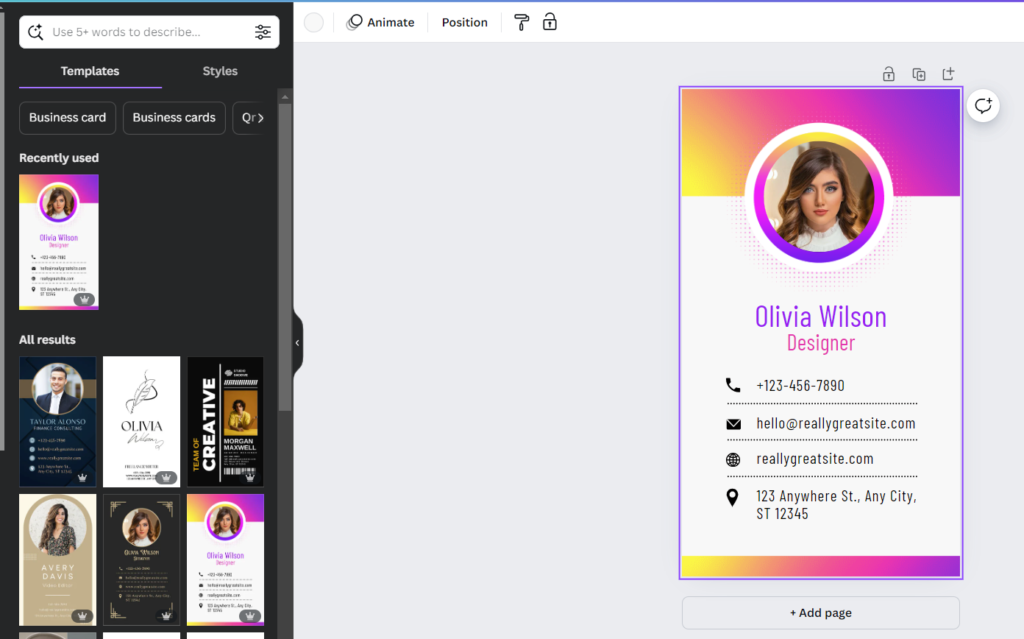
Change up the information to your own and voila you will have an Instagram business card within minutes.
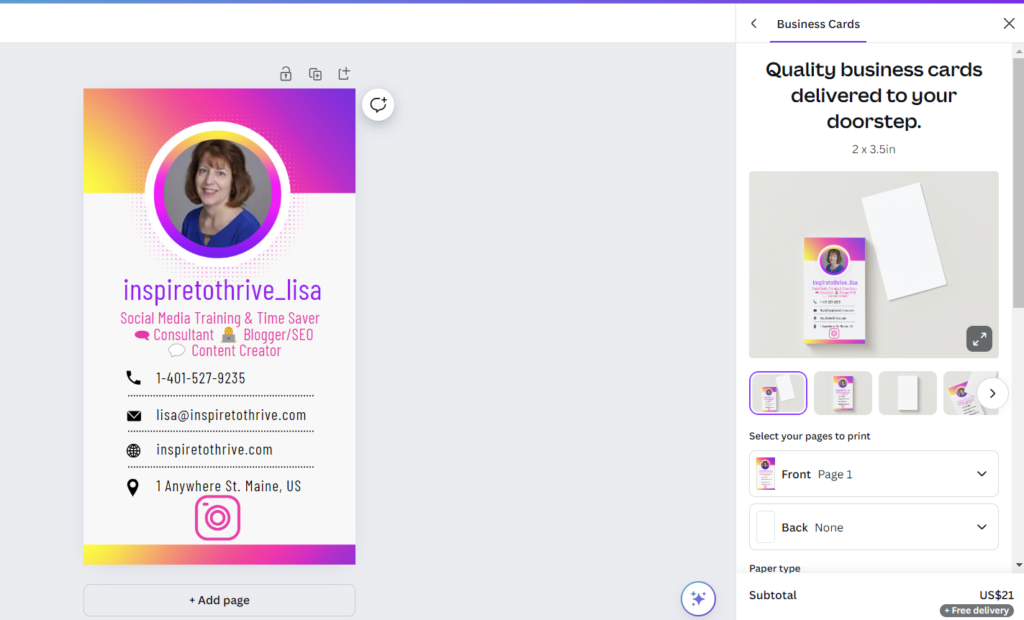
Next, you can choose to have it printed in Canva or save it and have it printed elsewhere. You can see the price here is $21 for 100 business cards with Free delivery from a Pro Canva account above.
You can pick other quality cards for additional costs.
Conclusion: Why Have Cards for Your IG Account?
Having an Instagram business card is a savvy branding tool. It connects the online and the physical, keeping you top of mind.
So, why wait to design yours and carry it everywhere? Get ready for more clicks and followers.
Isn’t it time for you to expand your reach on IG? I’d love to hear if you have created on in the comments below.
Disclosure: This Inspire To Thrive blog post contains affiliate links. I may earn a commission from qualifying purchases at no extra cost to you. Some sections were drafted with AI tools and carefully reviewed/edited by me.

- Best Instagram Story Viewers in 2026: Free Tools + Honest Limits - October 22, 2026
- Which Instagram Monitoring App Wins? EyeZy vs Peekviewer - October 20, 2026
- How to Use Social Media for the Best Black Friday Deals of 2026 - October 19, 2026
Enjoy this content? Help me show up more often in Google by adding Inspire To Thrive as a Preferred Source: