This Inspire To Thrive guide shows how to use Grok on X web to proofread, shorten, adjust tone, and preview edits before posting.
Here’s how to use Grok AI 4.20 Beta to make your X content more engaging, accurate, and impactful.
You will also gain insights and see examples of Grok Imagine, as it has come a long way since I first wrote this post on Inspire To Thrive.
Estimated reading time: 9 minutes
Table of Contents
Key Takeaways of Grok AI
- Grok AI helps improve X posts by fixing grammar, tightening wording, and suggesting tone and style changes before you publish.
- Grok 4.20 Beta adds faster output, stronger prompt adherence, and lower hallucination rates (per xAI’s positioning), which can make post edits more reliable.
- You can use Grok post enhancements on X web by clicking the xAI button near the compose box, then previewing changes in real time.
- X subscription tiers affect access, with Premium+ (and SuperGrok, per the article note) unlocking more Grok features and higher usage limits.
- Grok Imagine adds AI image and video creation features via prompts and editing tools, enabling richer post formats on X.
What is Grok AI?
Grok AI is an AI tool developed by xAI, designed to help users enhance their social media posts. It’s not just about correcting typos; This tool can proofread, shorten, improve grammar, and even inject personality into your posts.
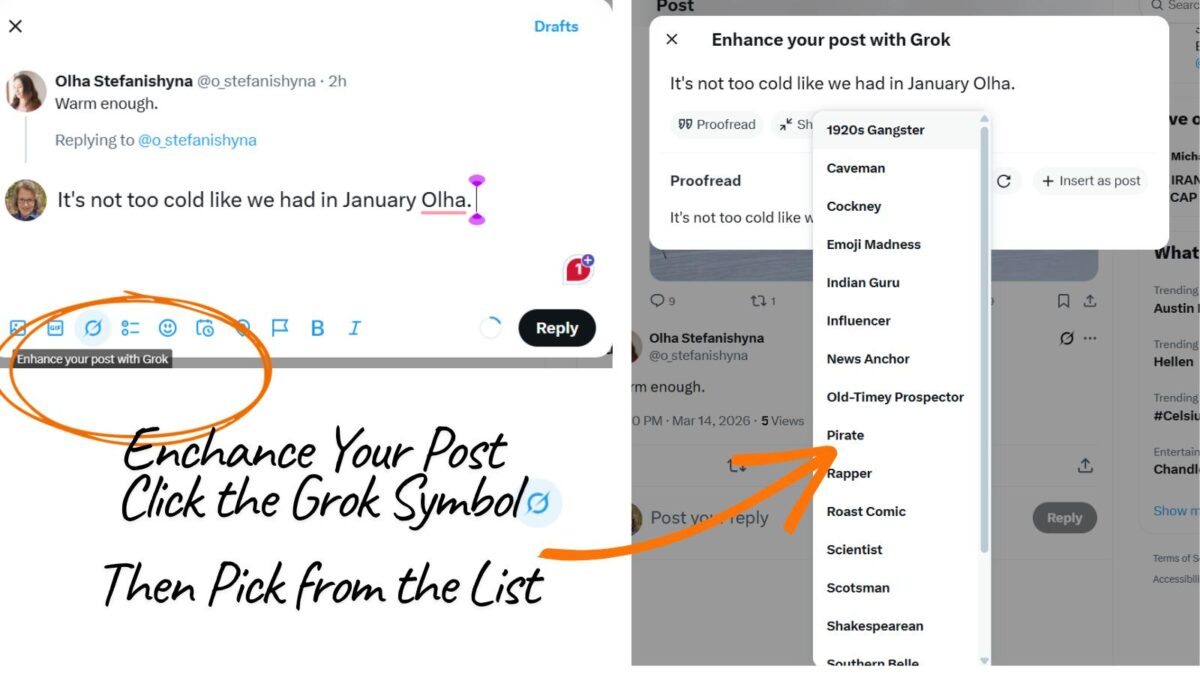
This AI tool is particularly useful for those looking to make their posts more professional, engaging, or tailored to specific audiences. It is also useful for X Creators who make money posting on the platform. You can see my example below when I choose “influencer” as the response.
OMG guys, it’s literally NOT even freezing anymore, like January was giving us STRAIGHT ice vibes, Olha 😭
— Lisa Sicard 👩💻 (@Lisapatb) March 14, 2026
We’re finally thriving!!! Who else is loving this glow-up weather?! 🔥✨
New Grok 4.20 Beta
Grok4 is the newest release from xAI and is available to SuperGrok and Premium+ subscribers, as well as users of the xAI API. xAI describes Grok 4.20 multi-agent beta (March 2026) as “the smartest AI model in the world,” and it comes packed with some standout features.
Here’s what you get with Grok4.20
- Leads in speed
- Agentic tool calling
- Low hallucination rates
- Strict prompt adherence
- Precise/truthful responses
If you’re looking to stay ahead with the latest AI, Grok 4.20 Beta is now at the top of the list for many businesses and content creators.
Paid vs. Free Accounts
X offers three subscription levels, each with different features and pricing.
- Free users get basic access to both with strict limits (e.g., ~10 messages/2 hours; minimal image/video generation).
- X Premium+ ($40/month) unlocks higher quotas, priority processing, early features (like Grok 4.20 Beta), seamless post-enhancement tools on X (xAI button for tones/personality), plus X perks (ad-free, reply boosts).
- Standalone SuperGrok (~$30/month via grok.com or the Grok app) focuses on pure AI power: unlimited-ish queries, full access to advanced models, enhanced Grok Imagine (more/higher-quality images/videos and audio), voice mode, and peak-time priority—without X social features. X Premium+ often delivers the best all-in-one value for active X users, while SuperGrok suits heavy AI creators needing max creative tools.
- On X (x.com/X app): The Free tier has basic limits; X Premium+ ($40/mo) offers the highest quotas on X, early access to features, integrated post tools, and bundled SuperGrok-level AI.
- Standalone (grok.com web + Grok iOS/Android apps): Free tier for limited testing; SuperGrok (~$30/mo) for unlimited-ish queries, full advanced models, enhanced Grok Imagine (higher quotas for images/videos/audio), voice mode, priority, and pure AI focus without X perks. Free basic access is more widely available now (e.g., grok.com), though capped.
In contrast, the free version of X does not include these exclusive features, limiting users to standard functionalities without the additional perks or customization options. However, look at all you get for $395/year.
Note: Grok 4.20 Beta is available to free users on Grok.com and apps for many features; Premium+ or SuperGrok for unlimited access and advanced modes.
➡️ Download the latest Grok app (iOS/Android) for new Imagine UI, voice mode, and instant enhancements.
Watch for Grok 5 coming out later in 2026!
How to Use Grok AI 4.20 Beta for Post Enhancements
1. Accessing the Tool:
- Grok AI’s enhancement features are currently available on X’s web platform. To use it, you’ll need to be logged into X on your laptop or desktop.
- Look for the xAI button beside the compose box when you’re about to create or edit a post.
2. Enhancing Your Posts With Grok
Grammar and Proofreading: Click on the xAI button and select “Enhance your post”. Grok AI will check for grammatical errors, typos, and suggest improvements for clarity and readability.
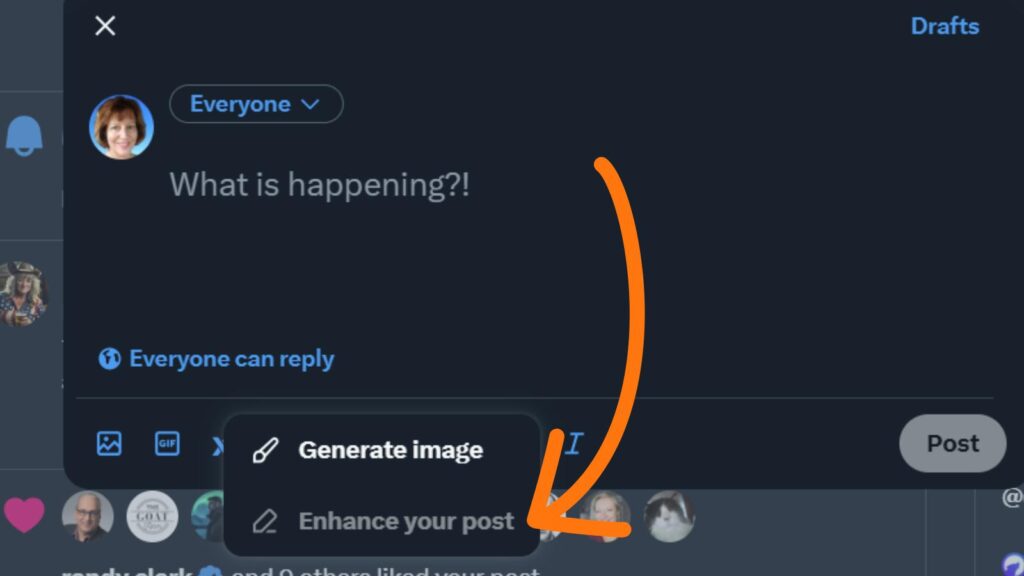
- Shortening: If your post feels too long, Grok AI can help condense it while retaining the core message, making it concise and impactful.
- Personality Injection: Choose from various tones or personalities like a comic, scientist, influencer, or even a rapper to give your post a unique voice that aligns with your intended audience or the context of your message.
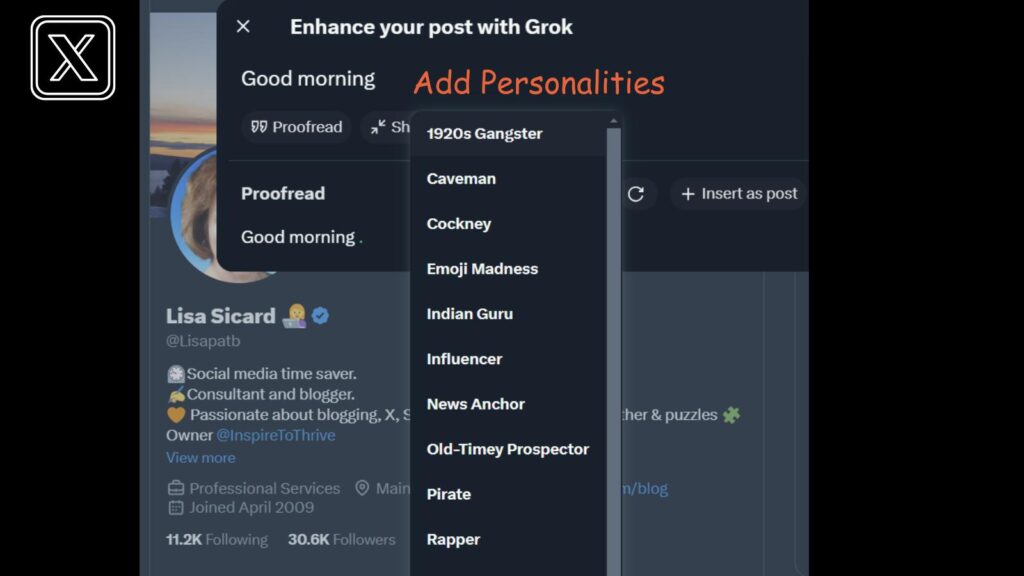
3. Real-Time Feedback
Once you’ve selected your enhancement options, Grok AI will provide a real-time preview of how your post will look after the modifications. This allows you to review and adjust further if necessary before posting.
Grok 4.20 Beta Imagine
Now you can get really fancy with creating images, videos, and more with Grok Imagine. It’s state-of-the-art image and video generation/editing via:
- Text prompts
- Image-to-video
- Element/style editing
- Audio integration
- And more
Tops benchmarks such as the Artificial Analysis Video Arena and Pareto frontiers for price/performance. Available in the Grok app (iOS/Android/web), with a dedicated Grok Imagine API for advanced use.
Here are some examples of what can be done with Grok Imagine today in 2026:
The rebirth of Earth through the ancient goddess Gaia, created with Grok Imagine’s Extend Video. pic.twitter.com/fTBDX7D1tu
— Karata (@karatademada) March 12, 2026
Good Saturday! 🔆 Move over Friday the 13th, it's Caturday March 14th. Happy Pi Day! 🤓
— Eliza Tino (@elizatino) March 14, 2026
The mice have gone full circle arguing over pie. Coffee is staying out of it. ☕
Hope everyone has a fabulous day. 💜 https://t.co/Z24cGR5i8w pic.twitter.com/PBMuVA6QJd
Benefits of Grok 4.20 Beta for Your Posts
- Enhanced Readability: By correcting grammar and syntax, your posts become more accessible to a broader audience.
- Engagement Boost: A well-crafted post with the right tone can significantly increase likes, reposts, and comments.
- Time-Saving: Manual proofreading and rewriting can be time-consuming. Grok AI speeds up this process, allowing you to post or respond more frequently with high-quality content.
Tips for Maximizing It’s Potential
- Experiment with Tones: Don’t stick to one style. Experiment with different tones to see what resonates best with your followers.
- Fact-Checking: While Grok AI can enhance text, always ensure the facts within your posts are accurate. Use Grok AI’s fact-checking capabilities if available to maintain credibility.
- Stay Updated: Grok AI is part of a dynamic AI ecosystem; keep an eye on updates from xAI for new features or improvements that could further refine your posting strategy.
- Gain New Followers: You may notice that you gain new followers when you post enhanced content on X.
The more you use the tool, the better it will get to know you and the better results it will deliver. It may be a little frustrating at first, but once you get over the hump, it will become your best friend.
Use X Analytics
To track your Grok AI 4.20 Beta results, check your X Analytics for detailed stats. You’ll see impressions, replies, engagement, new followers, and more—all laid out in straightforward sections. (You do need to be a subscriber to view them.)
Impressions show how many people saw your content, while replies help gauge how effective your conversation starters are. Engagement metrics break down likes, shares, and clicks to show how much your audience interacts.
The “new followers” metric indicates whether your content is attracting more followers. Everything’s easy to review, so you can understand what’s working and what isn’t.
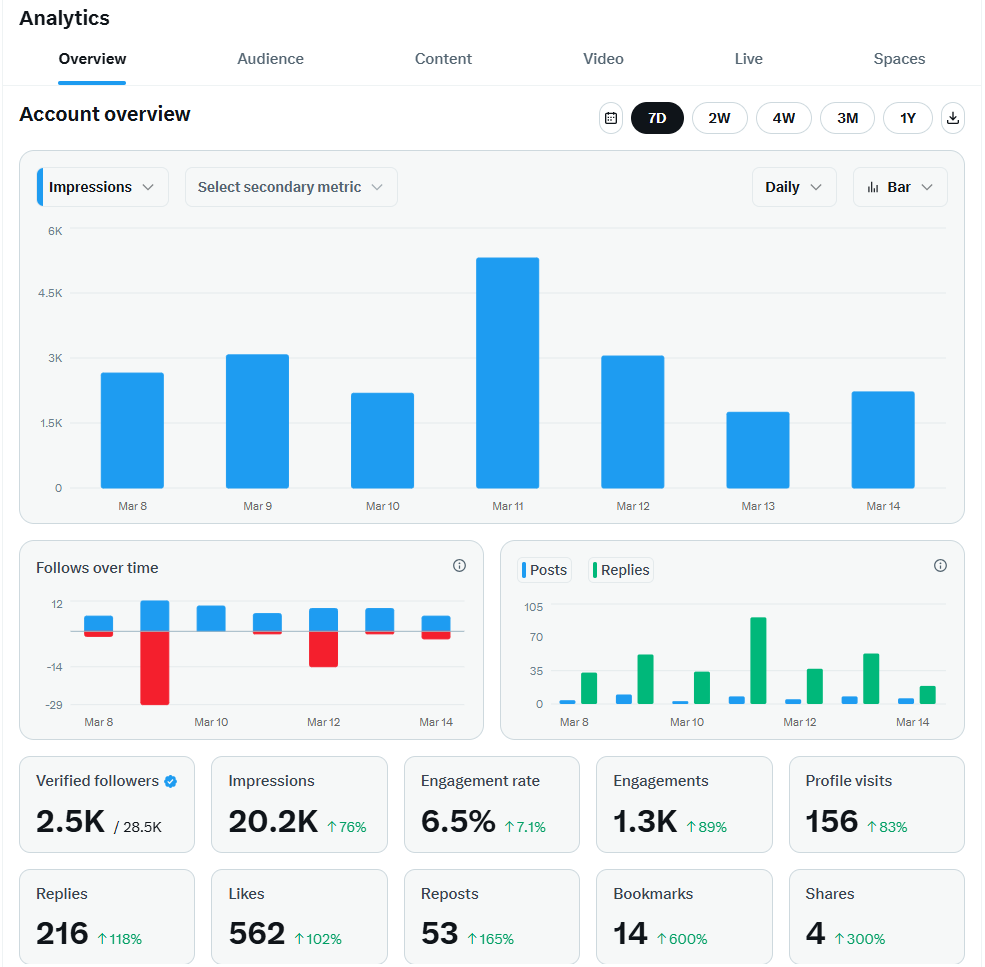
Use this data to adjust your approach and improve your results over time.
X Mobile Apps
Mobile apps now fully support voice, Imagine UI, and real-time features; xAI iterates rapidly (e.g., recent video gen updates, SpaceX acquisition news).
Conclusion: Grok AI 4.20 Beta Helping You Grow On X
Grok AI 4.20 Beta is not just a tool for correcting mistakes; it’s your companion in crafting posts that stand out on the busy X platform. Posts fly by the second, and videos, graphics, etc., are all passing by at a quick speed.
Whether you’re a business looking to engage customers or an individual aiming to share your thoughts more effectively, Grok AI 4.20 Beta offers a pathway to communicate with clarity, personality, and impact.
Start enhancing your X posts today and watch your engagement levels soar.
For more insights on using AI in social media, keep an eye on future updates here as we continue to integrate AI into our daily digital interactions on X.
Frequently Asked Questions About Using Grok AI 4.20 Beta for X Posts
Grok AI helps you edit and improve posts before publishing. This article includes grammar fixes, clarity improvements, shortening long posts, and adding a chosen tone or personality (such as an influencer, scientist, or comic).
Log in to X on the desktop, then open the post composer. Next, click the xAI button beside the compose box and choose “Enhance your post.” After that, review the real-time preview and make any edits before you publish.
The article notes that some Grok features may be available to free users on grok.com and in apps, but Premium+ or SuperGrok is required for unlimited access and advanced modes. On X, access to Grok is tied to higher subscription tiers (Premium+ in the article’s pricing section).
Grok post enhancements focus on improving text, like proofreading, shortening, and tone changes. Grok Imagine focuses on creating and editing media, including image generation, image-to-video, style edits, and audio integration, with access through the Grok app and an API option for advanced use.
Use X Analytics to compare impressions, replies, and engagement (likes, shares, clicks) over time. The article also highlights “new followers” as a helpful metric for gauging whether improved posts attract more people to your account.

- 5 Hashtags Per Post on Instagram: What Changes Now - March 31, 2026
- Why Hiring a Business Consultant for Bloggers Can Grow Your Blog Business - March 30, 2026
- X Influencers: How to Find and Connect with Key Players in Your Niche (Formerly Twitter) - March 29, 2026