
Facebook Marketplace is a convenient and safe way to sell your products. But before you start selling on the platform, make sure that you follow its rules. To maximize your sales potential, use a few advanced strategies for items you sell on Facebook Marketplace.
These include product research and listing optimization. Also, ensure you communicate effectively with your buyers when selling on Facebook Marketplace.
Estimated reading time: 10 minutes

2026 Update: While the core strategies remain strong, Marketplace is now more strictly focused on consumer-to-consumer (C2C) sales. Business/commercial use faces restrictions in many regions.
Local sales are free, shipped items have a 10% fee, and powerful new Meta AI tools have been added. Always check Meta’s current Commerce Policies.
Table of Contents
Product Research
Facebook Marketplace is a great place to sell new or used products. However, knowing that you cannot sell items intended to hurt people or content that doesn’t respect intellectual property rights is essential.
This is why it’s essential to do some research before making a listing. Learning how to sell on Facebook Marketplace is essential for individuals and businesses looking to reach a wider audience and sell their products or services more efficiently online.
- You can use various tools to estimate product profitability and demand on Facebook Marketplace.
- When you’re ready to list, optimizing your product details and adding photos is essential. You should also include your price and a pick-up or delivery location for items for sale on the Facebook Marketplace.
- However, you can also boost your listings to increase visibility and speed up the sale process. Boosted listings will appear as ads in people’s news feeds.
- Lastly, you can also choose your target audience by employing age, location, and interest filters.
New Features in 2026
- Meta AI integrations now help with listing creation, suggested pricing, and buyer insights.
- Collaborative buying options and save/share boards are available.
- Virtual try-on for select categories (furniture, clothing, etc.).
Creating a Listing on the Facebook Marketplace
First, how do I get to Facebook Marketplace? All you need to do is click the marketplace icon on your desktop or in your app. It’s available in most countries, and you must be at least 18 years old.
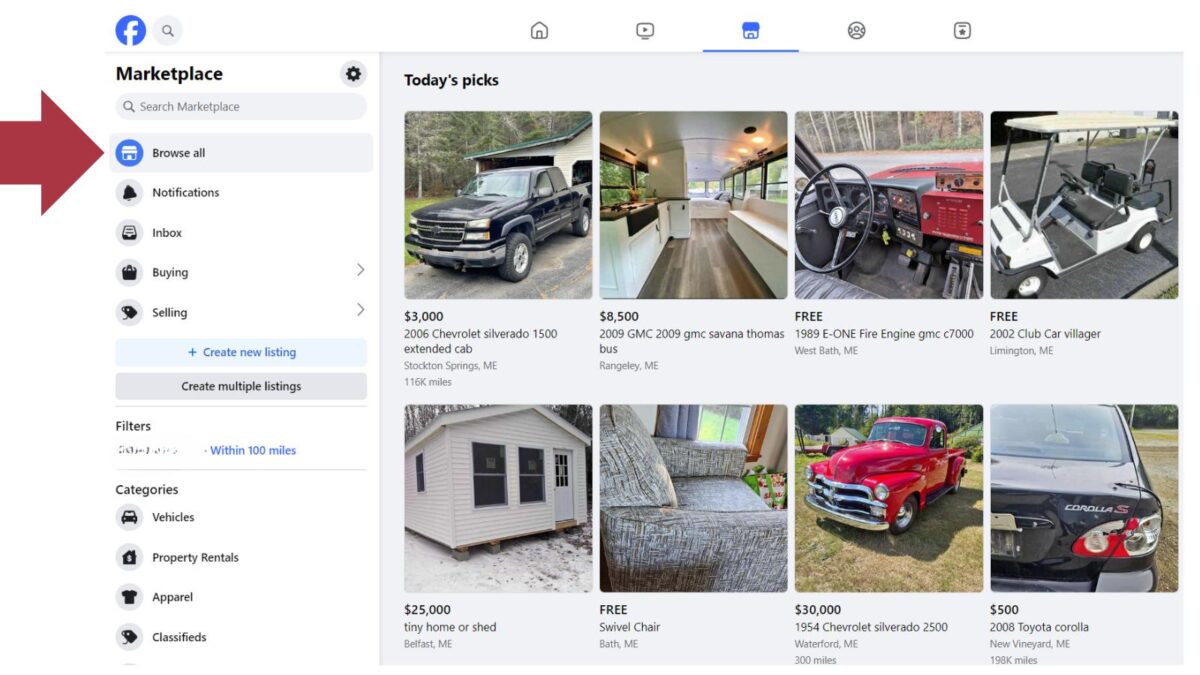
Facebook Marketplace is a great local product sales channel for small businesses. It offers a sizable pool of possible customers and tools that streamline the procedure.
Facebook Marketplace Categories in 2026
Facebook Marketplace offers many categories to help your listing reach the right buyers. Choosing the most specific category possible improves visibility. Here are the main categories currently available:
| Main Category | Examples / Notes |
|---|---|
| Vehicles | Cars, Trucks, Motorcycles, Boats, ATVs, RVs |
| Property Rentals | Apartments, Houses, Rooms, Vacation Rentals |
| Home Sales | Houses, Land, Commercial Properties |
| Apparel & Accessories | Clothing, Shoes, Jewelry, Bags, Watches |
| Electronics | Phones, Computers, TVs, Cameras, Gaming |
| Home Goods & Furniture | Furniture, Kitchenware, Decor, Appliances |
| Home Improvement | Tools, Paint, Hardware, Building Materials |
| Garden & Outdoor | Lawn Equipment, Patio Furniture, Plants |
| Family & Baby | Baby Gear, Kids Clothing, Toys, Strollers |
| Sporting Goods | Bikes, Fitness Equipment, Sports Gear |
| Free Stuff | Giveaways and free items |
| Others | Pet Supplies, Toys & Games, Hobbies, Entertainment, Office Supplies |
Tip: Always select the most specific sub-category available for better reach.
Product Research & Listing Best Practices
Effective product research remains key to success on Facebook Marketplace. Analyze what’s selling well in your local area and price your items competitively.
When creating a listing:
- Use clear, high-quality photos (multiple angles recommended).
- Write detailed descriptions with relevant keywords.
- Choose the most specific category and sub-category available.
Pro Tip: Share your listings in relevant local buy/sell groups for extra visibility.
Tip: Always select the most specific sub-category available for better reach.
Using New Meta AI Tools on Facebook Marketplace (2026)
Meta has added helpful AI features to make selling easier:
- AI Suggested Descriptions – Helps write better titles and descriptions.
- Smart Pricing Suggestions – Recommends competitive prices based on similar listings.
- AI Message Assistant – Generates quick, professional replies to buyer questions.
- Photo Enhancement & Background Removal – Improves your listing photos automatically.
These tools can save you time and help your listings perform better.
Facebook Marketplace Fees in 2026
Understanding the current fee structure is essential for profitable selling:
- Local Pickup Sales: 0% fee — Completely free. No listing fees or selling fees.
- Shipped Items (using Facebook/Meta checkout): 10% selling fee (minimum $0.80 per order).
The 10% fee applies to the total amount (item price + shipping + taxes) and covers payment processing and buyer protection.
Pro Tip: Always preview the exact fee and payout in the app before publishing a shipped listing.
Important 2026 Note on Business Use:
- Marketplace is primarily designed for individual sellers. Small businesses and commercial sellers should be cautious; heavy commercial activity can lead to listing removals or account restrictions, especially in regions like Europe, India, and the Philippines.
- It works best for occasional or low-volume sales from personal accounts. For higher-volume business selling, consider using Facebook Shops with website checkout (the on-platform checkout was phased out for Shops in late 2025).
Managing Your Listings
Facebook Marketplace remains a popular platform for selling locally and beyond. Here’s how to manage your listings effectively in 2026:
Marketplace has no listing fees for local pickup sales. However, shipped items incur platform fees (see details below).
Facebook Marketplace Fees in 2026
- Local Pickup Sales: 0% fee — Completely free.
- Shipped Items (using Facebook/Meta checkout): 10% selling fee (minimum $0.80 per order).
The 10% fee applies to the total amount (item + shipping + taxes) and covers processing and buyer protection.
➡️ Pro Tip: Always preview the exact fee and your payout before publishing a shipped listing.
2026 Tips for Managing Listings
- Use the improved shipping tools that now show total costs (shipping + tax) upfront to buyers.
- Monitor your listings regularly; organic reach can vary, and boosting is often needed for better visibility.
- Take advantage of new AI-powered suggested messages to respond to buyers faster.
- Update photos, descriptions, or pricing if a listing isn’t performing well.
Provide excellent customer service by responding promptly and being transparent. This builds trust and improves your seller rating.
2026 Tips for Managing Listings:
- Use the improved shipping tools that now show total costs (shipping + tax) upfront to buyers.
- Monitor your listings more frequently as organic reach can vary — boosting is often necessary for good visibility.
- Take advantage of new AI-powered suggested messages to speed up buyer communication.
Communicating with Buyers
Facebook Marketplace is an excellent option for both e-commerce businesses and individuals looking to make some extra cash. It is easy to navigate and offers many customizable features, including the ability to create a return policy.
However, returns are available only for shipped orders, not for peer-to-peer transactions. To get started, visit the Facebook Marketplace on your account and select the “Create a Listing” option.
You must describe your item and upload high-quality photos. Then, select a location and set the price. Researching competitors can help you optimize your listings. It can also give you ideas for what products your audience is looking for.
Reading the community standards and following local safety guidelines is also good. Finally, provide clear, accurate descriptions and answer buyers’ questions.
➡️ In 2026, you can use Meta AI to help draft responses or get insights on buyer questions. Always prioritize safety: meet in public for local sales, and use platform payments for shipped items.
Conclusion: Facebook Marketplace
As you navigate the Facebook Marketplace, it’s important to continually evaluate and adjust your selling strategies. Pay attention to analytics, such as views, clicks, and conversions, to identify what works best for your listings.
Experiment with different pricing, posting times, and product descriptions to optimize your results.
By staying proactive and adaptable, you can continuously improve your selling performance and make the most of the opportunities presented by the Facebook Marketplace.
Final 2026 Advice: The fundamentals you’ve read here on Inspire To Thrive still work very well, especially for local sales. Stay updated by regularly reviewing Facebook’s Commerce Policies, as rules around commercial activity, fees, and prohibited items can evolve. Combine Marketplace with your other sales channels for best results.
FAQs: Selling on Facebook
Local pickup: 0% (completely free).
Shipped items (using Facebook checkout): 10% selling fee (minimum $0.80 per order).
The fee applies to the total amount (item, shipping, and taxes) and is deducted from your payout. Always preview the exact fee before confirming a shipped sale.
To create a listing on the Facebook Marketplace, follow these steps:
Open the Facebook app on your mobile device or go to the Facebook website on your computer.
Tap on the “Marketplace” icon located on the menu bar at the bottom of the screen (mobile) or on the left-hand side of the homepage (computer).
Click on the “Sell Something” button and choose the type of item you want to sell.
Provide the necessary details about your item, such as title, description, price, category, and photos.
Once you’ve filled in all the required fields, click on the “Post” button to publish your listing.
To manage your listings on the Facebook Marketplace, here are some useful tips:
Regularly check for messages and inquiries from potential buyers. Respond promptly and provide accurate information about your item.
Update your listings if there are any changes, such as price adjustments or availability.
Mark items as sold once they are no longer available to avoid further inquiries.
Delete or archive old listings that are no longer active to keep your inventory up to date.
Boost your listings by promoting them with paid advertisements on Facebook to increase their visibility to potential buyers.
When communicating with buyers on the Facebook Marketplace, keep these guidelines in mind:
Respond to messages promptly to maintain good customer service.
Be polite, professional, and provide accurate information about your item.
Use the Facebook Messenger platform to communicate with buyers, as it offers a secure and convenient way to exchange messages.
Avoid sharing personal or sensitive information outside the Facebook platform to protect your safety and privacy.
If necessary, negotiate prices or specific details regarding the transaction through Messenger before finalizing the sale.
While Facebook Marketplace allows you to sell a wide range of items, there are certain restrictions. Here are a few disallowed items:
Weapons, firearms, and ammunition.
Illegal, prescription, or recreational drugs.
Adult or explicit content.
Counterfeit or replica items.
Animals or pets.
Make sure to review Facebook’s commerce policies to ensure your items comply with their guidelines before listing them for sale.
When it comes to payment transactions on the Facebook Marketplace, it’s recommended to follow these best practices:
Use secure payment methods like PayPal or Facebook Pay to protect yourself and the buyer.
Avoid accepting payment through wire transfers or other less secure methods.
If meeting the buyer in person, consider accepting cash as a payment option, but always exercise caution and meet in a public place.
Be wary of potential scams or fraudulent activity, such as fake PayPal emails or suspicious payment requests. Trust your instincts and report any suspicious behavior to Facebook.
Remember, it’s crucial to prioritize your safety when engaging in online transactions.
Clearly state your return policy in your listing description to set expectations for buyers.
It’s important to establish clear terms and expectations upfront to minimize potential conflicts.
When it comes to returns or refunds on the Facebook Marketplace, follow these general guidelines:
Determine whether you offer returns, exchanges, or refunds on a case-by-case basis.
Resolve any issues or disputes with buyers through open and honest communication.
If a return or refund is agreed upon, arrange for the item to be returned in its original condition before issuing a refund.
Keep records of all communication and transactions for reference.
Disclosure: This Inspire To Thrive blog post contains affiliate links. I may earn a commission from qualifying purchases at no extra cost to you. Some sections were drafted with AI tools and carefully reviewed/edited by me.

- Find Broken Links on Site Fast: Scan, Fix, and Protect Your SEO - October 15, 2026
- 8 Best AI Ranking & Visibility Tracking Tools for Bloggers (2026) - October 15, 2026
- Link Whisper Review: Best Plugin To Boost Your Internal Links - October 14, 2026
Enjoy this content? Help me show up more often in Google by adding Inspire To Thrive as a Preferred Source:




Hello Lisa,
I have listed some products on Facebook Marketplace and the response is very good. Facebook has a large user base and it will definitely help people sell their items on their marketplace. Thanks for sharing this helpful Post.
Regards,
Vishwajeet Kumar
Hi Vishwajeet, yes, most of the time if you products are priced right they will go right away. It also depends on your local area too if there are many people there or not. Since I moved to a rural area it’s become a tad harder. Thanks for your input and have a great day!