
Many X users wonder: how does the X algorithm work? The X algorithm updates have even caused some long-time users to leave the social media platform.
However, many former X users have returned to share their thoughts, seeking answers on the new algorithm, as well as many new creators joining X daily.
Let me guide you on how to make your X experience better in 2026 by tweaking a few settings and using different methods to view posts on X.

Estimated reading time: 17 minutes
Table of Contents
Key Takeaways
- The X “For You” timeline works in 3 stages, candidate sourcing (fetch posts), ranking (machine learning), and filters (remove blocked, NSFW, or already seen content).
- Your X settings strongly affect what you see, including whether you view Latest vs Top posts, plus what you search for and what you mute or block.
- X uses your Interest data and Preferences (like location and muted accounts) to shape recommendations, and you can edit these in Settings, Privacy and safety, Content you see.
- Content quality signals matter, posts can lose reach for offensive text, all-caps, offensive usernames, misspellings, or replying to accounts that don’t follow you.
- Engagement signals that can boost distribution include watch time (over 10 seconds on video), dwell time (2-plus seconds), plus quotes and bookmarks.
How the X Algorithm Works (For You Feed)
The way in which you set your X settings can make a big difference in how you receive posts. By choosing the latest posts, you will see the LATEST vs. FOR YOU posts, which alter the X algorithm.
What you search for on X can also make a difference. Even Elon Musk posted about it a while back:
Very important to fix your X feed:
1. Tap the more button.
2. Go to your settings and look for privacy and safety
3. Select “content you see”; you can adjust it all from there.
You are being manipulated by the algorithm in ways you don’t realize.
Easy to switch back & forth to see the difference.
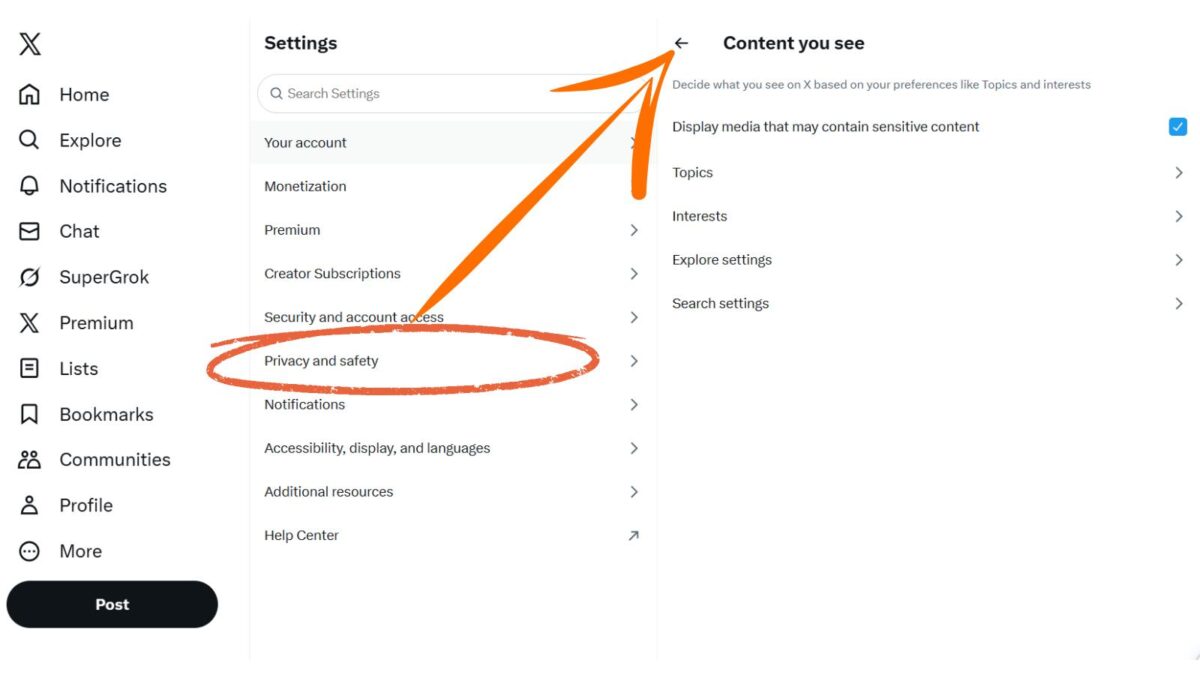
You can change them back and forth at any time to see the differences.
Latest Updates on the X Algorithm
Some new guidelines came out from the coding of the X algorithm changes last year. Elon posted about that, and so did Alex Finn with further explanations.
Here are some of the things to keep in mind as you post over on X:
- Tweepcred is still everywhere in the code. It gives a reputation score to every user.
- Post ‘offensive text’? 80% reach reduction.
- All-caps post? That’s seen as ‘shouting’. Major penalization.
- Offensive username? 80% reach reduction.
- Low text quality (misspellings)
- Replying to accounts that don’t follow you
These will make your posts disappear:
- Spammed about crypto
- Copy Paste
- Misinformation about health
- Misinformation about crises
- Multiple hashtags•
- More than 1 trending topic • Gore and violence •
- High toxicity
- NSFW text
- Low severity – hateful slurs
- Medium severity – hateful slurs
- High severity – hateful slurs
What Can You Do To Do Better with Tweepcred?
- Post a video? If people watch it for more than 10 seconds, you get a MASSIVE boost
- Dwelling on your text posts also helps.
- If people spend 2+ seconds looking at your post, it’ll be pushed to more people.
- Quotes and bookmarks are also massive.
X Recommendation Algorithm
According to their blog, this algorithm comprises many interconnected services and jobs. While there are many areas of the app where posts are recommended—Search, Explore, Ads—this algorithm focuses on the home timeline’s “For You” feed.
It works in 3 stages on X:
- Fetch the best posts from different recommendation sources in a process called candidate sourcing.
- Rank each post using a machine learning model.
- Apply heuristics and filters, such as filtering posts from users you’ve blocked, NSFW content, and posts you’ve already seen.
Their goal for this ranking is to serve you relevant tweets. It is based on whether you mute or block accounts, edit posts, mix up accounts so you don’t see all posts from one account in rapid succession, lower scores if you have negative feedback on a post, etc.
It’s like your grandmother’s secret sauce. If you want to really spice it up, use Creator Buddy.
Data for Interests from X
Your X Data is one area in which X assumes what you like to see on X. Go to Interests from X. There are 2 columns there.
One of the interests is known for, and the other interests are interested in it. The “interested in” column can go on and on if you spend time on X.
See below: How to change your X interests.
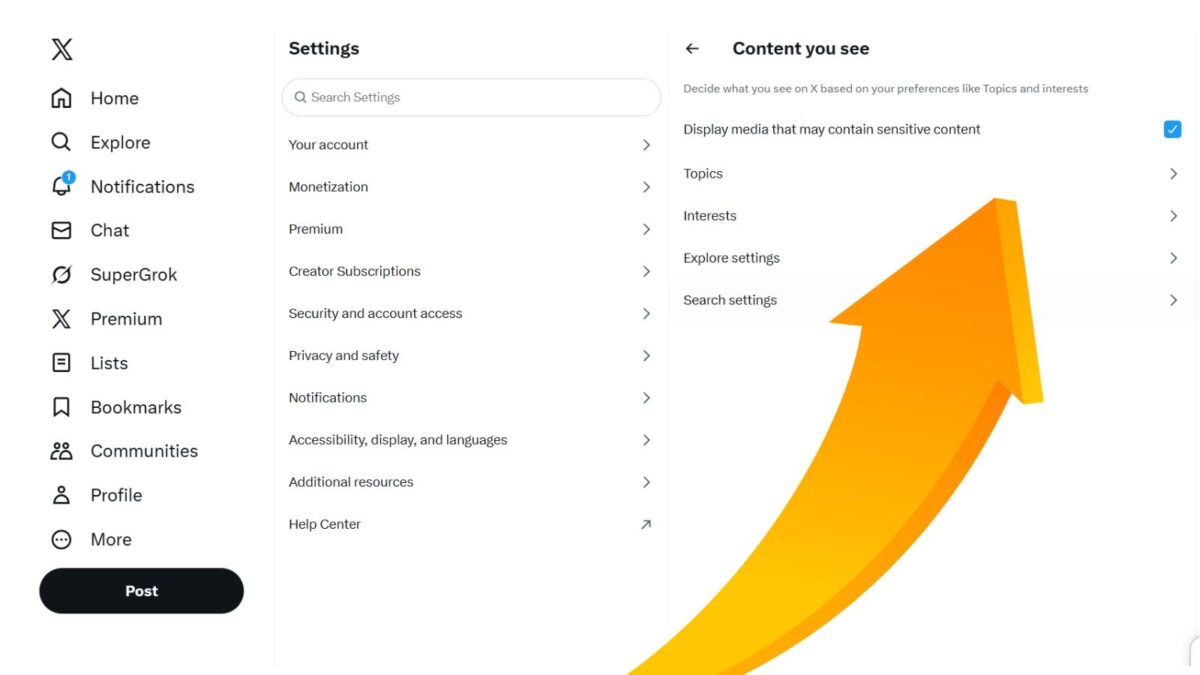
I quickly unchecked a bunch of topics that I am NOT really interested in, but X thinks I am. Hmm, wondering how they assume that?
One was the NFL draft, really? Ever since Tom Brady left the New England Patriots, I lost interest in the NFL until recently, as they climbed to the number 1 spot for the 2026 playoffs.
Another interest that came up was movies, and that is not why I’m on X; I don’t look at movie posts either.
Imagine the social network X now believes it knows what you like! You can uncheck some of the boxes if you know or feel they are wrong.
I just did this myself as I researched all the areas of my X settings.
How Does The X Algorithm Work With Your Preferences?
Settings Area – if you set your location, you will see posts around you. This does not mean you won’t see other posts, but these may come up first if events/news that are being posted are happening in your hometown, for example.
- Go to settings:
- Then go to privacy and safety. You can change yours if you like.
- In this same area, you can check accounts you have muted and unmute them if you choose to.
Oftentimes, you may have forgotten an account you muted years ago because they posted too often or annoyed you for another reason.
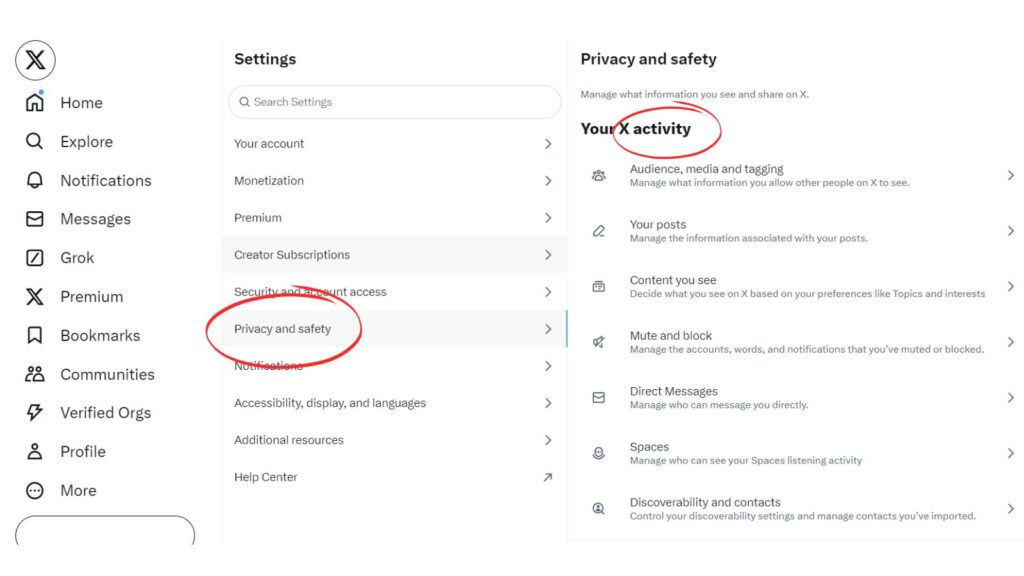
Notification Settings On Your X Feed
You can set these settings to see only certain things in your notifications. There, you will be able to see:
- Which of your posts have been liked?
- The latest reposts.
- Posts directed to you (replies and mentions).
- Your new followers.
You can view your notifications in two ways:
- All shows you notifications for account activity like new followers, Reposts, mentions, and likes.
- Mentions show you notifications only for posts that mention your username.
Elevated Content
In addition to your notifications, X will elevate content that it thinks you’ll be most interested in and that contributes to the conversation in a meaningful way, such as content that is relevant, credible, and safe.
This last one is interesting as X assumes what we are interested in. It must be the Grok AI at work.
But there is one thing you can do here: Turn on the quality filter on X. When enabled, it filters out lower-quality content from your notifications.
For example, duplicate posts or content that appears to be automated — it does not filter notifications from people you follow or accounts you’ve recently interacted with.
You can turn this on or off in your notification settings.
Advanced Quality Filters on X
You may sometimes receive notifications from certain types of accounts you’d like to avoid. In addition to enabling the quality filter, you can choose to disable notifications from the following types of accounts:
- Accounts that are new (that you don’t follow).
- X accounts that don’t follow you (that you don’t follow).
- Accounts you don’t follow.
- Other accounts with a default profile photo (that you don’t follow).
- X accounts without a confirmed email address (that you don’t follow).
- Accounts without a confirmed phone number (that you don’t follow).
If you want to know who unfollowed you, try out Fedica; it’s FREE to use. For years, I received the FREE weekly email to see who unfollowed you or who was inactive for 6 months or longer.
Last year I signed up for the premium plan for more options with X and other social networks to save time.
How to Use X Lists to Avoid the Main Feed
If you’re not happy with the X algorithm, make sure to utilize X lists. I use them most of the day instead of my main feed.
You now find lists under the chat/messages tab on X.
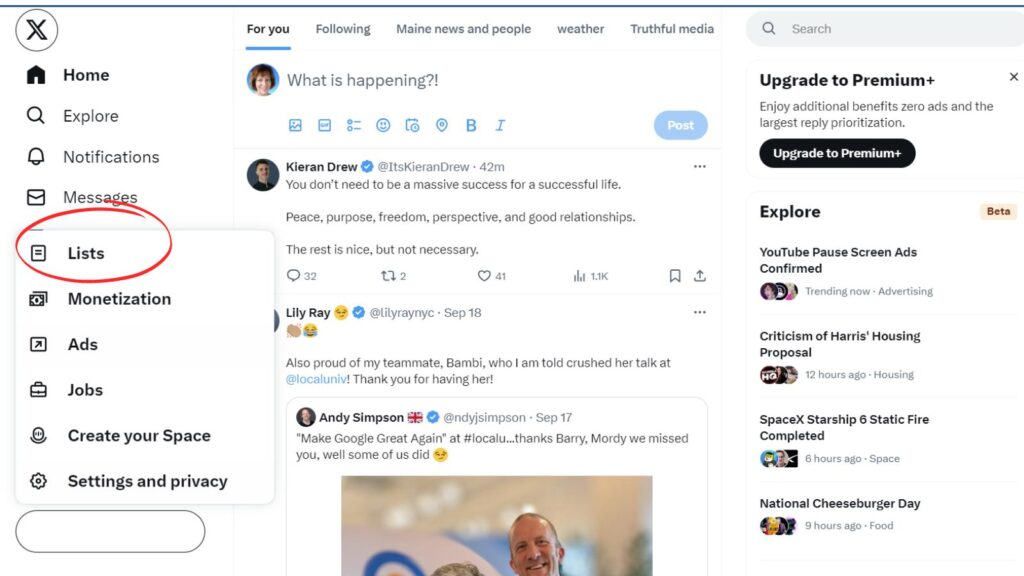
With lists, you can stay on topic and keep focused while posting with your clients, colleagues, and friends.
That is unless of course we are in a major political election season, then all bets are off.
I see many in my blogging, social media, or SEO feeds becoming activists for their political party. You can mute them until after the election or take them off the list altogether.
So if you haven’t used X Lists yet, be sure to start creating them. This post will help you to get started today.
Recently, I was invited to a new X list of women supporting women: It’s a list where other women share your content, and you share there if it is relevant to your niche and audience.
(However, I don’t recommend sharing others’ content just for the sake of sharing and reciprocation.)
X Communities Another Way To Ignore The Main X Feed
Have you tried X Communities yet? Most that I have joined were not active yet, except for one on the topic of SEO.
When you join a Community, you can post directly to that group instead of to all your followers. Only members of that community can reply and share your posts.
You can invite people to your community, and you can join other communities as long as you follow the community rules.
- Be kind and respectful
- Keep posts on the topic
- No self-promotion
- No spamming allowed
If you start your own community (as a moderator), you can change the description of the 5 rules and how they apply to your community. Sometimes an X post will go viral in a community, and other times it doesn’t.
If you are a blogger, feel free to join my bloggers’ social media community on X.
How Does The X Algorithm Work With Trending Topics?
X has been using trending topics for several years, but there is not always a clear answer to how and why they choose them.
The question “Why was this trending on X Twitter?” was asked over half a million times back in 2020 on Google.
They have now added pinned posts and descriptions on trends to help explain why something is trending. These trends do have an effect on the X algorithm and what you see on the X social network.
According to X
X went on to say: “In the coming weeks, you should see brief descriptions added to some trends as well to help add context to the trend. Descriptions will provide straightforward, clearly sourced context around why something is trending.”
No more having to scroll through posts to find out why something’s trending.
Furthermore, I hope they explain to all of us on the fast-paced social media network why these posts are trending. It makes many users wonder how the X algorithm works.
Breaking News on X and the Algorithm
When there is big breaking news, you will probably see posts everywhere about it, or you may see/hear an audio space taking place. That is what happened during the assassination attempt of former President Trump last year and recently with the assassination of Charlie Kirk.
You can talk with others who are feeling the same as you about something. You may learn you are not so alone.
Audio spaces allow you to listen to discussions on various topics throughout the day. Sometimes you can chat with the moderator, and other times it is reserved for just the speaker and a moderator of the space.
These are a great way to up your visibility on the X network and engage with other users. You may be able to give the speakers likes and then follow them.
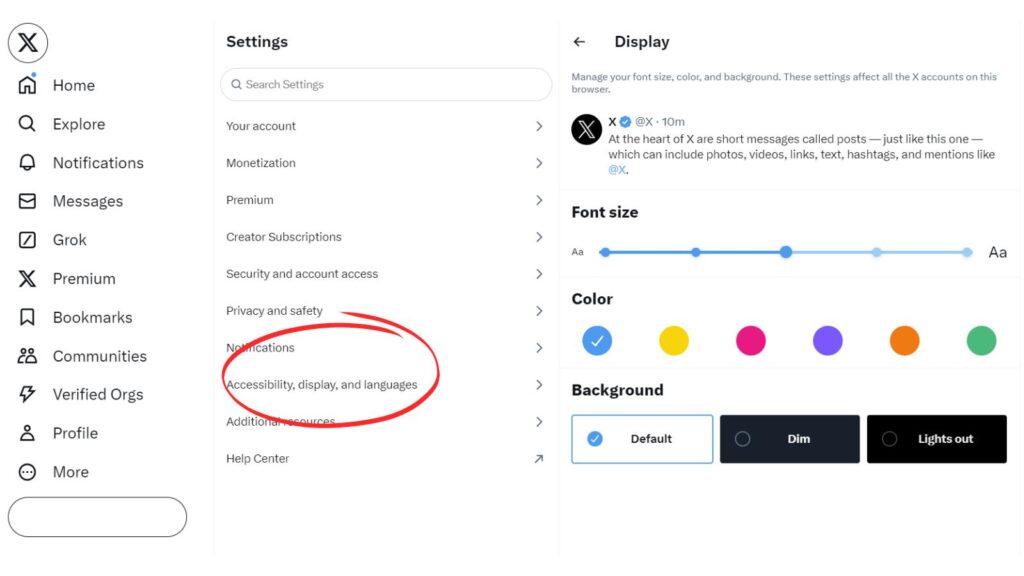
X Display Update
You can now change the colors and font size to view the posts better in your X feed or list. These are nice changes and work both on mobile and desktop.
Go to your display settings on X to see the choices available. X is more accessible now to those who have trouble seeing. You can make the font size much larger.
Also, there is an X nighttime setting that sets the background to black. Do you like these new visible changes with the X display?
X Censorship Stopped By Elon
Yes, X had been censoring posts before Elon Musk came along. He vows to change this as he believes in free speech. If you are on any social media network, you will notice that they are all following X with more censorship on their own networks.
(Facebook, YouTube, LinkedIn, and even Pinterest. You cannot post anything against climate change or question it on Pinterest, or you will be banned.)
My commitment to free speech extends even to not banning the account following my plane, even though that is a direct personal safety risk – Elon Musk.
One day, you are reading a post, and the next day it is no longer there, or the X account has been suspended.
The Babylon Bee has been around for a few years and started with a parody blog. They have grown a lot since that time. The Babylon Bee X account was suspended for a short time recently.
However, X lifted its suspension after a few days. Others have not been so lucky.
Big Tech absolutely targets Conservatives. Including the hilarious ones. https://t.co/JTJ0f9lcRG
— BDW (@BryanDeanWright) August 17, 2020
The Babylon Bee wrote about the incident after Twitter reinstated its account.
Twitter Apologizes After Intern Accidentally Sets Coffee On ‘Destroy All Conservatives’ Button https://t.co/8eB9odcaFx
— The Babylon Bee (@TheBabylonBee) August 18, 2020
Many accounts that were censored in 2020 are now back up and available on X in 2026.
X Rules, Suspensions & Spam Avoidance in 2026 (Under Elon Musk)
X (formerly Twitter) aims to be a “trusted digital town square” where a wide range of views are tolerated, as long as you don’t break the law or spam. Elon Musk has emphasized: “Any incitement to violence will result in account suspension.”
While censorship has decreased significantly since Elon took over, rules around spam, abuse, and platform manipulation remain strict. Violating them can still land you in X jail (temporary limits) or lead to permanent suspension.
Common Rule-Breaking Behaviors to Avoid
- Spam & Automation: Duplicative or substantially similar posts, aggressive follow/unfollow, automated likes/retweets, bulk DMs.
- Violence & Threats: Incitement, glorification, or promotion of violence/terrorism.
- Abuse: Targeted harassment, non-consensual private media, hateful conduct.
- Other: Username squatting, buying/selling usernames, misinformation on sensitive topics (health/crises), excessive crypto spam.
Pro Tip: X’s algorithm heavily penalizes low-quality or spammy signals (e.g., all-caps, misspellings, duplicate content). Keep it authentic and mixed up!
Follow & Posting Limits (2026)
- Daily follow limit: ~400 (up to 1,000 for some verified/Premium accounts).
- Overall, following cap: ~5,000, then ratio-based.
- Daily post limit: Around 2,400 (technical).
Stay well under these to avoid flags. Focus on quality engagement over volume.
Automation Tools – Use Sparingly
Bloggers and small businesses love tools for scheduling, but go slow:
- Mix up your posts (even slightly) when using schedulers.
- Recommended: Fedica (for unfollow insights), Circleboom, or built-in X scheduling.
- Avoid aggressive automation; it’s a fast track to limits.
I personally use tools minimally and focus on genuine conversations. That’s kept my account healthy for years.
What to Do If Limited or Suspended
- Check your email/notifications for details.
- Appeal via X’s form (especially if you believe it was a mistake).
- In the meantime, review your content against the official X Rules.
Bottom line for small business owners & creators: Be yourself, add value, engage authentically, and avoid anything that feels spammy. The algorithm rewards real conversations far more than gaming the system in 2026.
You May Be Shadowbanned By X
Yes, you may get shadowbanned on X, according to Elon’s tweet recently. So what is a shadowban?
A shadowban is when a post is de-boosted and cannot be found unless you search for it like a detective. This may also happen over on Instagram.
The new X is about freedom of speech, but not about freedom of reach.
Negative/hate posts will be max-deboosted & demonetized, so there will be no ads or other revenue for X.
You won’t find the post unless you specifically seek it out, which is no different from the rest of the Internet.
How Does The X Algorithm Work Better With Your Pinned Post?
Another way to gain traction with your X account and beat the algorithm a bit is to change up your pinned post.
You can change it every 48 hours, and it appears to more of your followers than your other posts on X. Not only that, but it shows to anyone who visits your X profile.
It’s like prime real estate on the X network. Another option is that if you have a subscription, you can add posts to your highlights, but save your best posts for this feature only.
Conclusion: The Ever-Changing Algorithm
In 2026, the X algorithm keeps shifting because X keeps tuning what it rewards, what it downranks, and how it spots low-effort behavior, so you can’t treat any single “hack” as permanent. Your safest conclusion is simple: build posts that earn real reactions, then measure what happens and adjust.
Keep your focus on the signals you can control, like clear topics, tight writing, and steady posting, and watch outcomes in your analytics. Use this quick checklist as your default: prioritize meaningful replies over empty likes, write for the people you want to reach (not everyone), test one change at a time (format, hook, timing), and avoid anything that looks spammy or repetitive.
-When rumors fly, anchor your decisions in primary sources like the X Help Center (https://help.x.com/) and X Developer docs.
If you stay consistent, review performance weekly, and keep your content useful, you won’t get whiplash every time the algorithm shifts.
Your Thoughts – How Does The X Algorithm Work
Now, I’d love to hear your thoughts on the algorithm changes happening on X.
Do you think the X algorithm will change more in 2026? Let’s discuss it over on X at @Lisapatb
Frequently Asked Questions About the X Algorithm in 2026
X describes the home timeline recommendation system as a 3-stage process. It first pulls candidate posts from multiple sources, then ranks them with a machine learning model, and then applies filters and rules (for example, removing content from blocked accounts, NSFW content, and posts you’ve already seen).
Your feed changes based on choices like Latest vs Top posts, what you search for, and what you mute or block. You can also adjust what shows up by going to Settings > Privacy and safety> Content you see (this includes interests and other feed controls).
The article notes several factors tied to reduced visibility, including offensive text, all-caps posts (seen as “shouting”), offensive usernames, and low-quality text, such as misspellings. It also lists content that can make posts “disappear,” including crypto spam, copy-paste content, health or crisis misinformation, too many hashtags, multiple trending topics, gore and violence, high-toxicity content, NSFW text, and hateful slurs.
The article states that Tweepcred appears in the code and assigns a reputation score to users. It also shares examples of what may help, including video watch time (over 10 seconds), post dwell time (2+ seconds), and strong engagement signals such as quotes and bookmarks.
Two practical options covered are X Lists and X Communities. Lists let you follow a focused set of accounts outside the main feed, and Communities let you post to a group where only members can reply and share, helping you stay on topic.
Disclosure: This Inspire To Thrive blog post contains affiliate links. I may earn a commission from qualifying purchases at no extra cost to you. Some sections were drafted with AI tools and carefully reviewed/edited by me.

- Why a Google Ads Agency Delivers Better Results Than Managing Campaigns In-House - September 4, 2026
- How to Write an Instagram Bio That Gets Clicks - September 4, 2026
- Spotify for Creators (Formerly Anchor): Is It Still Worth Using in 2026 - September 3, 2026
Enjoy this content? Help me show up more often in Google by adding Inspire To Thrive as a Preferred Source:



Hi Lisa! I love using “Dim mode” on the new Twitter layout. I like the tips you shared in this post. I’ll be sure to pass them along and hopefully more people will pay attention to their settings. Thanks!
Hi Ileane, That can come in handy when you are in the dark or want to not have light shining n your eyes. Thank you for coming by and for sharing this one Ileane. I hope you enjoy the weekend.
I honestly had no idea most of this was going on! Time to check all these boxes(or uncheck lol) Thanks for explaining!
Hi Marian, you are not alone! I went exploring on Twitter to find it. You are most welcome. Glad you found it helpful. Have a great day and weekend ahead Marian.
I think I need to uncheck a lot of interests that Twitter has been showing me lately.
Even my trends are occupied with things I don’t even like seeing.
Thanks for this helpful piece of information.
– Emenik
Hi Emenike, yes, that is what I did. It did help. And it’s not easy to know about unless you go exploring on Twitter. That’s why I wrote the post. Thanks for coming by and have a great weekend.
Good to know Lisa. Twitter and social media in general seems to censor more and more accounts these days. From flat out shutting down accounts to either removing updates or warning users about the validity of updates – this happened to me on Facebook, when one of my Shares was deemed as not being true – Twitter and all social seems to be changing their algorithms on the regular. You also proved why nothing beats good old fashioned relationship building on Twitter. Friends stay in touch, no matter the update or algo change, because they reach out to you via your blog, email or other social media site if they stop seeing your updates for algo-related updates.
Thank you Ryan. Yes, it certainly is crazy that they are censoring so much, what happened to our freedom of speech? Another reason our blogs are so important to have today. Our own place with our own ruled. I really don’t understand why they are going so far on all of this censorship but the truth will come out someday I’m sure. It usually does. Thanks for coming by on this one and I hope you found it useful for your Twitter feed! Have a great day Ryan!