
If you are staring at a blank WordPress page too often, I get it. After 15 years of blogging, I no longer rely on hustle alone. Instead, I rely on a mix of blogging tools and workflows that help me write faster, repurpose more content, and keep my sites on track. Improving your overall approach to content creation can help you publish more consistently without losing your unique voice, which is what matters most to me.
Some of these tools are AI-based, while others are basic site management utilities I would not want to run without. Together, they help me maintain a steady production pace on Inspire To Thrive and beyond.
Estimated reading time: 13 minutes
Table of Contents
Key Highlights
- Balance AI with Human Input: Use AI for initial drafts, keyword research, and structure, but always add your personal stories, opinions, and voice for authenticity.
- Prioritize Content Repurposing: Turn long-form videos into blog posts and Instagram and Pinterest carousels using tools like The Right Blogger and Gamma AI.
- Maintain Site Health: Regularly audit and update content while using internal linking tools to boost SEO and navigation.
- Focus on Essential Tech: Reliable hosting, security, and good lighting prevent technical issues so you can focus on creating.
Recording and Presentation are Part of My Blogging Workflow Now
Before I even start writing, I think about how I present my work. Lately, I have been recording on Zoom, and I was surprised by how many built-in effects and background options it offers for high-quality content creation. I started playing with colors, backgrounds, and lighting because I did not want my entire office visible, and the blur effect was not giving me the professional look I wanted.
That kind of testing matters more than people think. If I am recording a long-form video, I want it to look clean without eating up half my day. I am still tweaking my setup, but even small changes make a big difference.
Lighting is next on my list. I have followed Ileane Smith for years because video has always been her specialty, and she is excellent at it. I may end up picking up the light from Ileane Smith’s lighting recommendation because good lighting fixes a lot faster than endless editing does.
In the same way that proper image optimization saves you time in your post-production workflow, investing in the right light eliminates the need to spend hours fixing shadows or exposure issues later on.
The Blogging Tools and Workflow That Got Me Past the Blank Page
Two bloggers I’ve looked up to for a long time are Ryan Biddulph and Ryan Robinson. They come at blogging from completely different angles, and I think that’s why I respect both of them.
Ryan Biddulph keeps things simple. Ryan Robinson is more tool-driven and built The Right Blogger with Andy. Different styles, same long-term commitment.
Funny enough, the three of us also share a love of walking, hiking, and being out in nature. I don’t think that’s a small thing.
👉 Sometimes the best content ideas show up when I’m away from the screen. (That’s a hint for you!)

The Path of Less Resistance Using Blogging Tools and Workflows
The biggest shift in my own workflow came when I stopped resisting AI writing assistants. I used to think I would never use a tool to generate a full article inside WordPress. Then I tried it on a couple of my other blogs and saw how much time it saved.
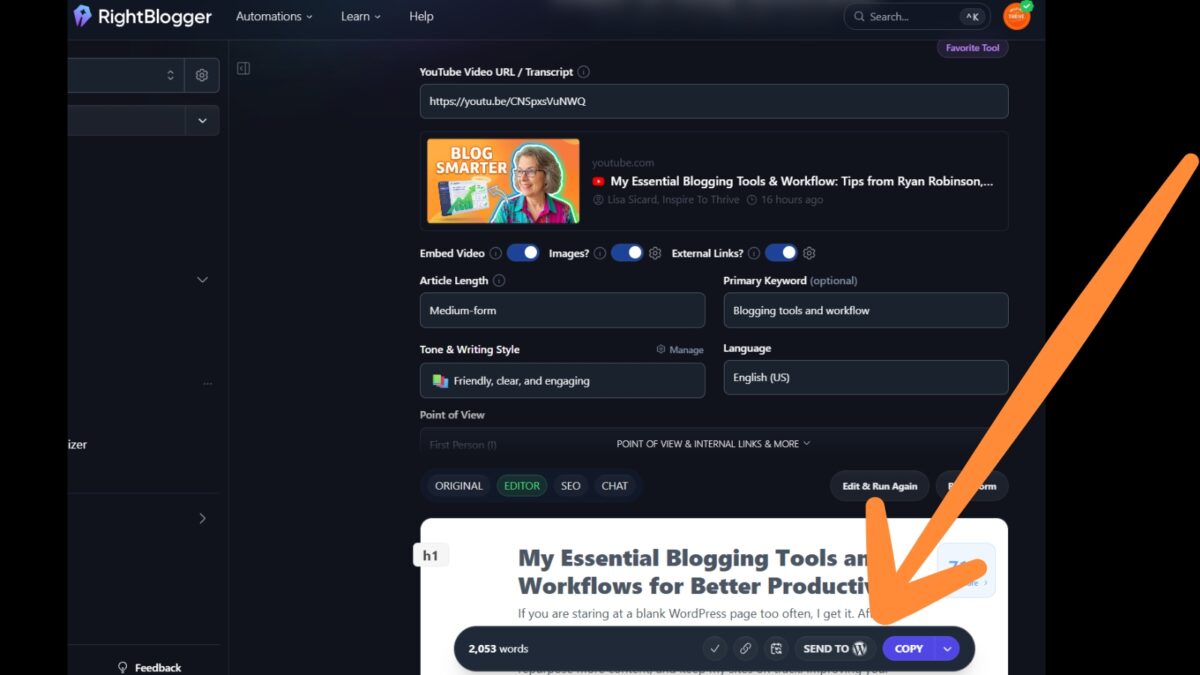
Now I perform my keyword research first, feed The Right Blogger the topic, my angle, and a detailed content brief, then I start shaping the draft from there.
That doesn’t mean I publish what it spits out. Not even close. I’ve spent over 3 hours editing before hitting the publish button.
AI can get me started, but it can’t tell my story for me.
Keep Your Story
That’s the part I won’t skip. I add my examples, my opinions, and the reason I care about the topic to ensure the post reflects my brand voice. Otherwise, it is just commodity content, and I don’t want that on my site.
I also test Grok AI against The Right Blogger for ideas and strategy questions. Sometimes I ask when a topic is worth posting, what season fits best, or how I should frame something.
For images, I bounce among Grok, The Right Blogger, Thumbs AI, and Canva depending on which looks better. I’ve even been working more personal touches into them, like images that include Stella and me. I’ve written before about AI image generators for bloggers, and that space keeps changing fast.

Blogging Tools I Use and Mentioned:
Tool | Description / Primary Use | Pricing | Affiliate Link |
|---|---|---|---|
| Canva | Graphics, thumbnails, social images, templates | $144/Pro, Business $250 | N/A |
| FlexClip | Video editing for Shorts, Reels & simple videos | Free Limited Plan, $11.99/mo for Pro, and $19.99/mo for Business | FlexClip Affiliate |
| Gamma AI | AI presentations & quick content outlines | Free trial with 400 credits, $9/mo Plus, $18/mo for Pro, $90/mo for Ultra | |
| Wordfence Premium | WordPress security & protection | Free, $149/yr Premium, $590/yr Care Plan, $1250/yr for Response plan | Wordfence affiliate link |
| ScalaHosting | Managed WordPress hosting | Many options starting at $2.95/mo. | Scalahosting affiliate link |
| RightBlogger | AI blog writing & automation | Free 14-day trial, 3 plans – from $59/mo, $69/mo, $199/mo. Save more if yearly. | The Rightblogger Affiliate Link |
| ThumbsAI | AI-generated YouTube thumbnails | Premium $19/mo. Ultimate $49/mo and Master at $119/mo. Save 40% more with yearly plan | ThumbsAI affiliate link |
| Google Search Console | SEO performance, indexing & search insights | Free | N/A |
| Google Analytics | Traffic & audience analytics | Free | N/A |
| Grok AI | Research, ideas, content help & image generation | $395/yr with Premium X subscription. | N/A |
| Google Trends | Keyword & topic research | Free | N/A |
How I Repurpose One Piece of Content Into More Than One Post
Repurposing is where my workflow saves me the most time. By using a solid content calendar, I can plan ahead and ensure that a long-form video translates into blog content, short videos, social posts, and even email marketing newsletter updates.
Below is a short video I created in FlexClip from an interview I did with Ryan Robinson about 2 years ago.
That is how I keep content moving without starting from zero every time, and these blogging tools and workflows are essential for the speed I need as a solopreneur.
FlexClip
FlexClip has become one of my favorite tools. I used Fliki heavily before, especially for turning blog posts into video with voice cloning. Then FlexClip reached out, and once I tried it, I was hooked.
It has been much easier to take long-form videos and turn them into shorts. That is a huge help when I am posting across multiple channels and collaborating with others on YouTube. I have shared more in my Inspire To Thrive FlexClip video editor review.
I care a lot about how fast a tool makes sense. If it takes me all day to learn, I probably won’t stick with it. FlexClip clicked fast, and that is why it has stayed in my stack.
Gamma AI
Gamma AI is another one I keep around for repurposing. I use it to turn blog posts into PDF-style content and carousel posts, then I resize those in Canva for different platforms. That gives me more mileage from one original piece of content.
The places I use those carousels most are:
- LinkedIn, where PDFs still work well
- Instagram, once I resize the slides in Canva
- Pinterest, after I adjust the format in Canva to fit their specific requirements
👉 Each platform has its own size rules and limits, so I always double-check those before posting to ensure my repurposed content looks its best. (I’ve made mistakes with that in the past!)
The Tools I Use To Clean Up and Protect My Sites
One of the least flashy parts of blogging is cleanup, but it is one of the most important. I use Link Whisper across my sites and on a client site because it helps me find related internal links fast. By using these internal links to connect relevant posts, I can spot broken links and tighten up weak anchor text.
When a site grows past hundreds of posts, that kind of help matters. I have more than 800 posts on Inspire To Thrive, so manual cleanup alone would take forever. I go into more detail in my Link Whisper review. (Right after my video recording, the Link Whisper plugin had an update, and it was much faster on Inspire To Thrive! I was so excited about it! )
Lately, I have also been trimming content hard. I am trying to keep Inspire To Thrive more focused on social media, SEO, and blogging. If something does not fit those core topics, I either update it, combine it, move the angle elsewhere, or remove it as part of my ongoing SEO optimization.
That is one reason I created Small Biz Tipster: to provide a better home for small business topics that did not belong on the main site.
A Real Life Example
A good example is Creator Buddy. I had three posts and a YouTube playlist around that tool because I used it for X for about a year and became an affiliate. Then the updates stopped; I was not hearing back, and the content was no longer helping readers.
I do not hold that against anyone, but I do hold my site to a standard. If content is outdated and no longer useful, I fix it. In that case, I am combining, removing, and unlisting where appropriate. I even asked Grok AI to help me think through the cleanest way to handle the merge. (After the video was published, Alex did get back to me and paid my affiliate dues, and I noticed his X account for Creator Buddy is no longer there.) I really appreciated that he got back to me.
Blog and Website Security Tool
Security matters too. I finally moved from the free version of Wordfence to Wordfence Premium on Inspire To Thrive because I was seeing too much junk traffic and obvious bot activity from other countries. I wanted better control, and it gave me that.
The Free Blogging Tools and Support That Still Keep Me Grounded
Not every useful tool costs money. Google Search Console, Google Analytics, and Google Trends are still some of the best tools I use.
Search Console shows me what content is getting seen, while Analytics shows me what people do after they land on my site. I also use Google Trends for keyword research, which helps me gauge interest before I spend time writing.
Hosting is another expense I do not cheap out on. I use Scalahosting, and yes, the bill gets my attention. But when a site has issues, 24/7 support is worth paying for. I have been able to solve problems faster because of that support, rather than waiting and wondering.
Then there is my tech guy, Mayura. When I hit something I cannot solve fast, or I do not have time to mess with it, I call him. We often use a shared project management tool to track these tasks, which helps me stay organized. 👉 That kind of backup keeps me from burning out.
Video First Workflow
I have also been leaning more into a video-first workflow. Sometimes it is easier for me to talk through an idea before I write it. I might outline these thoughts in Google Docs to refine them.
Then I can turn that into a blog post with my own edits and strengthen the written version. It also keeps more of my personality in the content.
It’s a lesson I learned from Ryan Robinson, who uses this technique on his blogs by starting with video production.
And yes, real life is always part of the plan. I cannot always film outside. Sometimes my husband is working on the house, sometimes it is too loud, and sometimes Stella, my Victorian Bulldog mascot, is downstairs snoring.
New for Me – Thumbs AI
After finishing the video for this post, I decided to test ThumbsAI for YouTube thumbnails. I’ve been experimenting with it on a few recent videos, and the results surprised me. What I like most is how quickly it generates multiple strong options based on the video title and key moments.
For example, I created the thumbnail for this very post using ThumbsAI; it produced bold colors and clear text that match my brand style far better than I could have done manually. I still tweak the final version in Canva, but ThumbsAI gives me a much stronger starting point in seconds.
👉 If you create a lot of video content or YouTube Shorts, it’s definitely worth trying.

I wish I had used the thumbnail above before publishing a short video about Stella being camera shy. Those shorts cannot be fully edited after being published.
Frequently Asked Questions
No, you should only adopt tools that help you create, repurpose, and manage your site without adding unnecessary complexity. The goal is to build a lean, efficient system that supports your specific workflow rather than overwhelming you with too many subscriptions.
AI should only be used to generate the skeleton or initial draft of your content based on your brief. The essential human elements, such as your personal anecdotes, specific examples, and individual perspective, must be manually added afterward to ensure the content reflects your unique brand.
Yes, repurposing is one of the most effective ways to save time because it lets you get more mileage from a single idea across multiple platforms. By using tools like Canva, FlexClip, and Gamma AI, you can quickly adapt a single core piece of content into various formats, such as videos, PDFs, and social posts.
You should consider upgrading to premium tools, such as Wordfence Premium or managed hosting services, as your site traffic grows or you face increased technical issues, such as bot activity. Investing in these resources saves time on administrative cleanup and security maintenance, allowing you to focus on content production.
Final Thoughts: Blogging Tools and Workflows To Keep You Moving
My workflow is not about using every tool available. It is about finding the few that help me create, repurpose, clean up, and protect my content without slowing me down. Ultimately, maintaining a lean, effective system is essential for long-term monetization, as it allows me to focus on growth rather than on administrative burnout.
The biggest change for me has been this: I let technology do the heavy lifting at the start, and then I handle the human elements. That is where the voice, the stories, and the trust come from.
The specific software will keep changing over time. However, my primary job is to keep my blogging tools and workflows simple enough that I can consistently keep showing up.
I hope you found this post helpful on your blogging journey or in your business. Please drop a comment below so we can discuss it.👇
Want more practical blogging tools, workflows, and video tips?
Subscribe to My YouTube Channel for More
(Turn on notifications so you never miss a new video!)
Disclosure: This Inspire To Thrive blog post contains affiliate links. I may earn a commission from qualifying purchases at no extra cost to you. Some sections were drafted with AI tools and carefully reviewed/edited by me.

- Porn on X (Twitter): What’s Allowed and How to Block It - September 29, 2026
- Dolphin Radar Review 2026: Instagram Follower Tracker (What I Saw After 2 Weeks) - September 29, 2026
- 5 Reasons to Review Your Deleted Tweet History Before Your Next X Cleanup - September 29, 2026
Enjoy this content? Help me show up more often in Google by adding Inspire To Thrive as a Preferred Source:



Hi Lisa,
Thanks as always for the shout out.
After doing this blogging bit for a while, the hustle culture thing is never a long term solution. You burn out.
Following a sound strategy based on publishing practical content, targeting everything for one reader then testing and tweaking through your tactics above, all go into being a persistent professional blogger who does this for a living.
Tools helped skilled bloggers as aids; developing skills takes immense practice. Most bloggers run away from the sometimes grunt work of writing, editing and distributing highly-detailed content.
You are most welcome Ryan. Yes, so many bloggers that started when we did are no longer at it. Even the tools you need to practice using them to get the most out of them. Thanks for your input and have a great day Ryan.