
TubeBuddy is a powerful browser extension and toolkit that helps YouTubers optimize videos, save time, and grow channels faster. As a small creator and digital marketer running Inspire To Thrive, I’ve used it to improve SEO, test thumbnails, and manage content more efficiently.
It integrates directly into YouTube Studio and offers tools for keyword research, A/B testing, bulk edits, analytics, and more. Over 14 million creators use the free version alone, and data shows active users see significantly higher growth in views and subscribers.
Is TubeBuddy worth it in 2026? For most creators publishing regularly, yes, especially if you want data-driven decisions over guesswork.
TubeBuddy is a powerful yet easy-to-use software that helps you grow your YouTube channel. It’s for people who are serious about their video content and want to take it to the next level with video SEO. That’s why I wanted to share this updated TubeBuddy review with YOU.
Estimated reading time: 8 minutes
Table of Contents
What Is TubeBuddy?
TubeBuddy is a YouTube-certified partner tool (a browser extension and web app) that adds powerful features to YouTube Studio. It helps with video SEO, workflow automation, audience engagement, and growth analytics, without needing passwords or taking over your account.
- Free version: Solid starting point for basics like top tags, upload checklists, and limited keyword insights.
- Paid plans (Pro/Legend): Unlock A/B testing, bulk processing, advanced analytics, and AI tools.
It works on desktop (Chrome/Safari) and has mobile apps. You can even cross-post to Facebook easily.
Safety & Trust: Yes, TubeBuddy is safe. It’s an official YouTube partner, doesn’t store your login credentials (you authorize via OAuth), and has strong reviews for reliability. No major risks with canned responses or bulk actions if used thoughtfully; always review changes. Start with free to test.
Who Is TubeBuddy For?
- Beginners/New Creators: Free/Pro for learning SEO, checklists, and keyword guidance to build good habits.
- Small Channels (under 10K subs, like mine): Pro plan shines for testing and optimization without overwhelm.
- Growing/Monetized Channels: Legend for bulk edits on large libraries, A/B testing, competitor analysis, and monetization protection.
- Bloggers/Solopreneurs Repurposing Content: Great for turning blog posts into videos with SEO tools and cross-promotion.
- Agencies/Multi-Channel: Enterprise options or Legend for management.
If you publish consistently and want to stop guessing on titles/thumbnails, it’s a strong fit. Less essential if you upload very rarely.
Core Features & How Creators Use Them
TubeBuddy turns optimization into a repeatable workflow that fits real schedules.
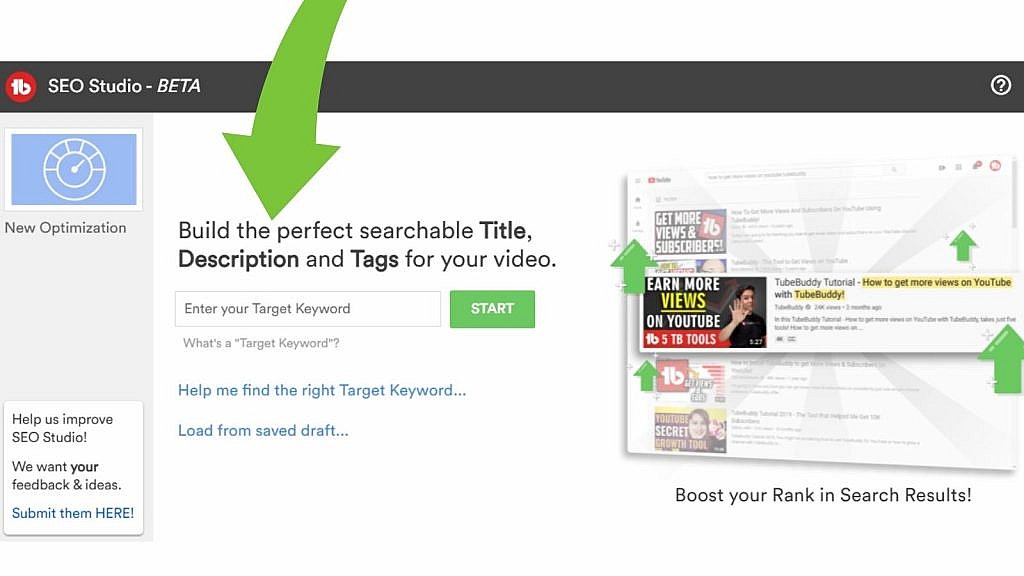
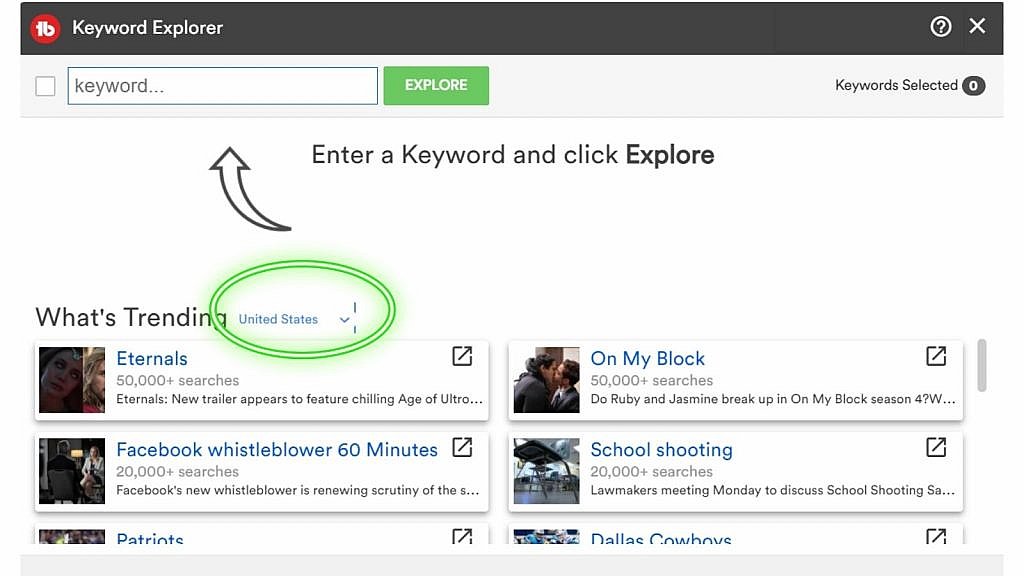
Keyword Explorer & Research (All plans, deeper in paid): Enter a topic and get search volume, competition, opportunity scores, and related terms. It shows YouTube + Google potential.
Use it to find low-competition keywords that drive views from both platforms. Example: Instead of guessing a broad topic, data shows easier variants with higher opportunity. Competitor tag analysis helps you borrow proven strategies.
Pros, Cons, and Limits
A/B Testing for Thumbnails, Titles & More (Legend+): Test variants and see real performance data on CTR, watch time, and engagement. This is a standout feature; many creators report 20-40% increases in CTR. Workflow: Upload, run test for days/weeks, apply winner. Perfect for improving click-through on existing or new videos.
Upload Checklist & Best Practices Audit: Reminds you of thumbnails, cards, end screens, chapters, tags, etc. Prevents missing basics that hurt rankings.
Bulk Processing (Pro+): Edit tags, descriptions, cards, and end screens across many videos at once. Huge time-saver for large libraries—update old content for fresh SEO wins without hours of manual work.
Suggested Shorts AI (Pro+): Analyzes long videos for engaging clips to turn into Shorts. Data-backed for better performance.
Comment Management: Filter, canned responses, word clouds. Scales engagement as comments grow.
Chapters & Other Tools: Easy chapter editor, thumbnail generator/analyzer, embed codes.
Advanced Tools for Growth:
- Health Reports & Demonetization Audit: Identify issues affecting performance or monetization (e.g., risky keywords).
- Competitor Scorecards & Analysis: compare channels, see what works for them.
- Best Time to Publish & Channelytics: Data on your audience’s active times + deeper insights.
- Social Monitoring & Brand Alerts: Track shares/mentions.
- Channel Valuation & Auto-Translation: Estimate worth; translate titles/descriptions for global reach.
- Retention Analyzer: Improve watch time.
Real Workflow Example: Research keywords → Create/test thumbnail/title → Upload with checklist/templates → Monitor health/competitors → Bulk update old videos → Analyze results and iterate. This has helped my channel gain traction in business and content creation.
When to Upgrade? Free → Pro when publishing regularly. Pro → Legend for heavy bulk or advanced testing. Annual billing saves money.
What’s better than that? My video quality is still not the best.
TubeBuddy vs vidIQ Comparison
| Feature | TubeBuddy | vidIQ | Winner / Notes |
|---|---|---|---|
| Bulk Editing | Excellent | Limited | TubeBuddy |
| A/B Thumbnail & Title Testing | Strong (Legend) | Basic | TubeBuddy |
| Keyword Research | Very Good | Excellent | vidIQ (slight edge) |
| Competitor Analysis | Strong Scorecards | Strong | Tie |
| Best Time to Publish | Yes | Yes | Tie |
| Pricing Value | Better | Higher | TubeBuddy |
| Best For | Optimization & Workflow | Discovery & Analytics | Depends on your needs |
My Take: I prefer TubeBuddy for day-to-day efficiency and cost. Many creators use both.
Pricing: Free vs Pro vs Legend (2026)
TubeBuddy offers flexible plans (billed monthly or annually—save ~20% yearly). Pricing starts low and scales with needs.
- Free: Keyword basics (top 3 tags), checklists, limited tools. Great for testing, enough for beginners to see value and improve basics.
- Pro (~$4–9/mo annual; check current): Most productivity/optimization tools, better keyword access, some bulk, A/B limited. Ideal for small/growing channels. Worth upgrading when free limits (e.g., no full bulk or advanced testing) slow you down.
- Legend (~$15–33/mo annual): Everything—unlimited A/B testing, full bulk, advanced analytics (health reports, competitor scorecards, valuation), AI features, multi-channel. Best for serious/monetized creators with bigger libraries.
- Enterprise: Custom for teams/multiple channels.
When to Upgrade? Free → Pro when publishing regularly (time savings pay for it quickly). Pro → Legend for heavy testing/bulk or when scaling. Non-profits and small channels often get discounts. Always start free!
Pricing Comparison
| Plan | Price (Monthly) | Best For | Key Highlights | Special Notes |
|---|---|---|---|---|
| Free | $0 | Beginners & testing | Basic tags, checklists, limited keywords | Great starting point |
| Pro | $7.50/mo | Small/growing channels | Search optimization, engagement tools, guides | Most Popular |
| Legend | $32.99/mo | Serious creators | All 50+ tools, unlimited A/B testing, AI features, competitor scorecard | Full access |
| Enterprise | Custom / Bundle | Brands & teams (3+ channels) | Everything in Legend + dedicated support, training | Contact sales |
👉 Tip: Creators with fewer than 1,000 subscribers can use the RisingStarBuddy coupon on the checkout page for up to 50% off Pro.
TubeBuddy vs vidIQ
Both are excellent; many creators use one or the other, or both primarily.
- TubeBuddy Strengths: Superior bulk editing, A/B thumbnail/title testing (unique power), workflow templates, pricing/value. Better for optimizing existing content and large libraries.
- vidIQ Strengths: Deeper real-time analytics, competitor video stats, AI topic ideas, sometimes stronger keyword depth for planning.
- Choose TubeBuddy if you focus on packaging/optimization, testing, and efficiency (my preference for solopreneurs).
- Choose vidIQ if: Heavy on discovery/analytics upfront.
- Both? Complementary—TubeBuddy for execution, vidIQ for insights. TubeBuddy often wins on cost and on specific tools like A/B testing.
Pros, Cons & Limits
Pros:
- Seamless YouTube integration.
- Proven growth lift (views/subs).
- Time-saving automation.
- Strong free tier + affiliate-friendly.
Cons/Limits:
- Some advanced features Legend-only.
- Learning curve for all tools (but checklists help).
- Interface can feel busy (though functional).
Honest: It’s not magic—great content + consistency still rule—but it removes guesswork and amplifies efforts.
Final Recommendation
TubeBuddy delivers real value for creators who want to grow their YouTube channel with better tools and data. Start free, upgrade as you scale. It’s transformed how I approach video SEO on my channels.
Affiliate Link: Get TubeBuddy (Free to Start)
Disclosure: Affiliate link; I earn a commission if you upgrade (at no extra cost to you). I only recommend tools I’ve used. What’s your experience with TubeBuddy or similar tools? Share in comments; I read them!
FAQ: Common Questions About TubeBuddy
TubeBuddy is a browser extension and app that helps YouTube creators with keyword research, video SEO, analytics, and productivity tools. It makes channel growth smoother and more efficient.
Yes. It’s YouTube-certified, uses secure authorization, and doesn’t access your passwords. Always install from the official site.
TubeBuddy is stronger for bulk editing, A/B testing of thumbnails and titles, and workflow efficiency. vidIQ shines more in some analytics and content ideas. Many creators choose based on their main needs (or use both).
Yes, TubeBuddy offers a free version with basic features. Paid plans unlock advanced tools like competitor analysis, bulk processing, and in-depth analytics.
Start with Free or Pro. Pro is usually enough for most small channels; upgrade to Legend when you need heavy bulk tools or unlimited A/B testing.
The A/B testing feature lets you test different thumbnails, titles, and descriptions against each other and see which performs best based on real data.
Pro and Legend plans allow you to update tags, descriptions, cards, end screens, and more across many videos at once—saving hours on old content.
The Best Time to Publish tool analyzes your audience data and suggests optimal times, while Channelytics gives deeper performance insights.
Yes. Legend plan includes A/B testing plus competitor scorecards, health reports, and best time to publish insights.
Disclosure: This Inspire To Thrive blog post contains affiliate links. I may earn a commission from qualifying purchases at no extra cost to you. Some sections were drafted with AI tools and carefully reviewed/edited by me.

- Best Social Media Automation Tools: Agorapulse vs Buffer (2026) - September 20, 2026
- Why Making A Personal Connection Is Marketing Gold Dust - September 19, 2026
- What Is My Instagram URL? How to Find and Copy Your Profile Link - September 19, 2026
Enjoy this content? Help me show up more often in Google by adding Inspire To Thrive as a Preferred Source:



Thanks so much for the shoutout Lisa. Interesting solution here. TubeBuddy looks like a helpful tool for YouTubers. My Shorts continue to gain traction on a daily basis. The one I uploaded today generated 1500 reviews in roughly 1 hour. I will keep ’em coming to see where this heads. Excellent review here.
You are welcome Ryan. It’s a great way to UP your YouTube videos. Interesting how the shorts are taking off. I think they are doing it to compete with TikTok and Instagram reels. Thanks for coming by and Happy 2023!
Hii Lisa,
Tubebuddy is very helpful for new youtubes and the way you have provided the information is very good.
Thank you so much…
Hi Bhawani, welcome to Inspire To Thrive. Yes it is very good for those that haven’t been on and even for those of us who have been on. Thanks and have a fabulous day!
Hello Lisa, I saw this thing tube budy on youtube and it was annoying tbh at first but after reading this I think I should use it.
thanks
Hi Rohail, LOL – yes, it can be until you find how useful it is. I’m loving it still. Thanks for coming by and let me know if you do end up using it.
First, thanks for the highlight Lisa. I think you’re also subscribed to my other channel, but I’ll take both of them.
Second, I’m using TubeBuddy via Ileane to test my titles. It’s been a big help, and I’m seeing slow growth, but it’s better than no growth. If I can keep up at the rate it’s going, maybe one day I’ll have more subscribers than videos. lol
Hi Mitch, glad to see you finally tried it! Yes, it will help and slow and steady wins the race, right? I did subscribe. I know how hard it is to get new subscribers on any channel these days! It’s all about engagement everywhere today and of course, having good content. Thanks for taking the time to comment here Mitch. Have a wonderful day and long weekend ahead. Stay well! (Maybe you could do a contributor post here in the future?)
Hey Lisa,
I am also using Tubebuddy for my Youtube channel.
It has got a lot of useful stats to display.
The best thing I have noticed in it is showing the tags that your competitor has used in his video and the rankings also.
Hi Nirmal, good to hear that. Yes, I’m loving the use of tags there with it. Do you use it for any other social accounts? Thanks for coming by and have a great rest of the weekend.
Hey Lisa,
Thanks for the mention. Much appreciated.
I enjoy TubeBuddy. I love the tag tools, stats info, best practices, the comment responses and so much more. The free version has a lot to offer and I really liked that. I went ahead and upgraded to pro this year and I love it even more.
Enjoy using this. I’m sure we’ll be able to teach each other some tips and tricks along the way.
Hi Dana, you are most welcome. I love your channel and how you do your videos. I’ll be mentioning you more once I get my shirts up and on. I’m loving the promotional products you offer. Thanks for coming by on this Dana and enjoy your day down there in the sunshine.
HI Lisa
This looks like a great tool to use.
I don’t really use my YouTube channel so effectively because I also upload videos mostly through Vimeo Pro.
But I do put them on YouTube also from time to time.
I’ll certainly look into TubeBuddy to help me grow my YouTube channel.
Nice review. Thanks.
-Donna
Hi Donna, It really is! Ah, that’s why they are not as wide. I thought it might have been a stream. You are most welcome Donna and have a great day. I hope the weather is sunny up there like it is here in Southern New England.
Hi Lisa, thank you so much for mentioning my YouTube channel here. You’ve had great results after your first month, congrats on that!
This is a really nice review of Tube Buddy. For example having these reminders (it seems to be like a check-list) is a big deal when you’re starting out. I can’t tell you how many times I would forget the cards or end screen on my first few videos. Another interesting feature seems to be your top 3 tags of your video that are attracting viewers. Very valuable information for YouTube SEO!
I haven’t been so active on YouTube anymore because I’m growing my Twitter account – there are only so many hours in a day. But once my account is bigger it will also help me share my videos with more people and then I definitely have to post new videos again. Tube Buddy will help me there!
Cheers, James
Hi James, you are most welcome! Yes, thank you – now to keep it up. That can be the bigger challenge, right? Oh yes, I still forget those things which is why I went with the paid verison of the tool. SO many things to remember after spending time producing a video to boot! I hear you about so many hours in a day, I do work way too many on most days. I try hard to stay more focused and organized though to help. I love using more tools like TubeBuddy and Agorapulse to help me. I may dip into YouTube ads next too. Thanks for coming by and taking the time to comment on this one James. Have a great day!