If you’re a blogger, you don’t have time to refresh Google all day, take screenshots of AI Overviews, and guess whether your posts still show up. You need the best AI ranking tools for SEO analysis.
These tools tell you when your blog content is mentioned, cited, or replaced, without turning tracking into a second job.
The biggest win is simple: you stop wasting money on content that never gets visibility in AI answers, and you focus on posts that already earn citations.
For a broader view of what’s out there, browse the best AI ranking tools for SEO analysis list by Inspire To Thrive, then narrow down to the tools that match your workflow and budget.
Estimated reading time: 9 minutes
Table of Contents
Key Takeaways of AI Ranking Tools
- Bloggers need the best AI ranking tools for SEO analysis that monitor content visibility efficiently.
- Key features include clear ranking data, smart alerts, and keyword grouping for better content planning.
- Nightwatch and SE Ranking are great for comprehensive tracking, while tools like Otterly AI and Keyword.com focus on AI citations.
- Use Google Search Console for a free check to validate AI tracking insights and observe changes in page performance.
- Choose the right tool based on your workflow to maximize visibility and minimize manual checks.
What Are The Best AI Ranking Tools for SEO Analysis?
The best AI ranking tools for SEO analysis are the ones that give you clear, trusted ranking data and then explain what to do next, without burying you in charts. You want accurate position tracking across desktop and mobile. You may also want local and national perspectives, as rankings vary by device and location.
Next, look for smart alerts that flag sudden drops, keyword volatility, and competitor jumps, so you don’t miss a real issue. In addition, strong tools connect rankings to clicks and pages. That way, you can see which posts need updates and which keywords you already “almost” own.
It also helps when the tool groups keywords by intent (informational, commercial, or local). They also suggest related terms, which can help you plan content faster and avoid cannibalizing your own pages.
Finally, pick options that make reporting easy (clean exports, shareable dashboards, and simple notes). It helps you can track progress over time and explain wins to a client or your own team.
Here is the list of 8 of the best you can try today from Inspire To Thrive.
1. Google Search Console (Free Reality Check)
Google Search Console won’t label “AI Overview share” directly, but it’s still one of the best free ways to confirm what your tracking tools suggest. If impressions jump while clicks drop, or if your average position holds steady but CTR slides, you have a strong signal that the SERP layout changed, often because answers appear higher up.
It’s also where you validate the impact of updates. After you refresh a post to match what AI Overviews cite (definitions, steps, comparisons, and clear headings), Search Console is where you see whether the page actually regained attention in search behavior.
Learn more about using Google Search Console for finding your AI overviews in the video below:
2. SE Ranking
SE Ranking makes sense if you want a broader SEO toolkit while still keeping an eye on AI Overviews. You’re not only tracking AI mentions, but you’re also managing the basics that keep your blog healthy. Such as:
- Audits
- Keyword tracking
- Ongoing optimization tasks
This matters because AI Overview visibility doesn’t exist in a vacuum. If a page slows down, loses links, or slips in traditional rankings, it may become less likely to appear as a cited source.
SE Ranking is a good fit for a blogger who wants fewer subscriptions, even if it costs more than a niche AI-only tracker.
3. Otterly AI
Otterly AI is built for people who want fast visibility into AI results. You won’t feel like you’re learning a new enterprise platform. If you’re running a smaller blog or a solo site, that simplicity saves you hours.
You track where your brand shows up across major AI assistants, including Google AI Overviews, and get alerts that help you notice changes before your traffic reports make them obvious.
It’s especially helpful when you’re trying to confirm, “Did my guide actually get cited, or did an AI answer switch to other sources?”

4. Rankscale AI
Rankscale AI focuses on AI search tracking across platforms and tends to appeal if you’re managing multiple sites, client projects, or several topic clusters. Credit-based models can work well when your tracking needs change month to month.
This type of tool is useful when you care less about one keyword rank and more about the bigger pattern:
- How often does your site appear in AI answers
- Whether you’re gaining or losing mentions
- Which pages get cited repeatedly
5. Keyword.com AI Tracker
Keyword.com AI Tracker works well when your main goal is tracking citations and visibility without paying for a massive SEO platform. For many bloggers, that’s the sweet spot because you’re trying to protect traffic and revenue while keeping overhead low.
It’s also practical if you’re monitoring a specific set of money posts. You can focus tracking on the keywords that drive affiliate clicks, course sales, or service leads, then watch for AI Overviews that directly answer the query.
That clarity helps you decide whether to update the post, expand it, or build a stronger supporting article that becomes the cited source.
6. Peec AI
Peec AI is a good fit when your blog is tied to a personal brand, product, or small business name that you need to protect. It’s less about obsessing over individual blue-link rankings and more about knowing where and how you’re being referenced across AI answers.
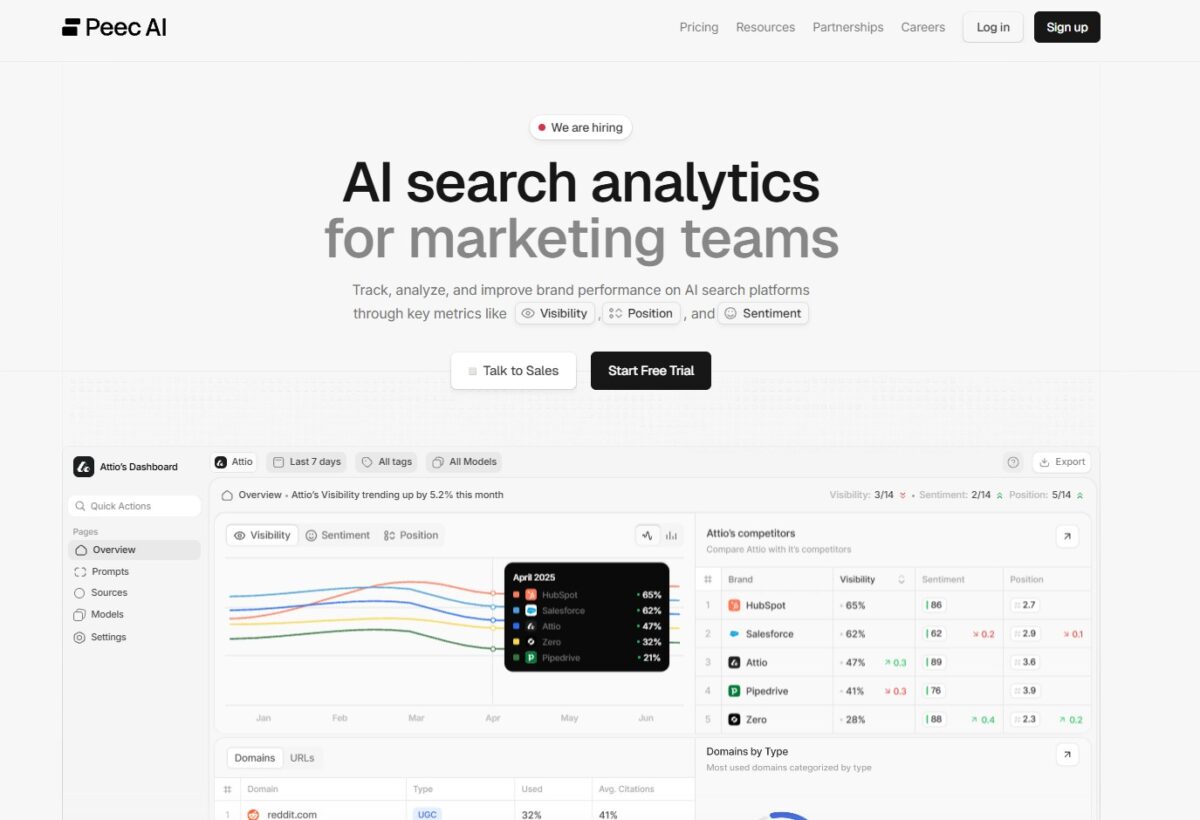
That matters because bloggers often win with recognizable expertise. When AI tools quote you, cite you, or summarize your process, your brand becomes the shortcut people remember.
Peec AI helps you watch that visibility trend and notice when competitors start taking your place for the same prompts and topics. (It’s one of the tools I used for a while.) The price starts at $89 per month.
7. Mangools SERPWatcher (lightweight option)
Mangools SERPWatcher is a simpler tracker, and it’s a reasonable pick if you’re starting or you only need light monitoring. You won’t get the same depth of AI Overview visibility features as AI-first tools, but you do get a clean way to keep your keyword performance in view.
This can still help with AI Overviews because when you see ranking changes for key terms, you know where to look more closely.
For bloggers on a tighter budget, lightweight tracking is often better than no tracking at all. It works especially when you’re trying to stay consistent without drowning in data.
8. Nightwatch
Nightwatch stands out when you want a single place to track classic Google rankings and AI answer visibility without juggling multiple dashboards. It covers multiple AI platforms. You’re not stuck watching only Google AI Overviews as your audience shifts.
You’ll like it because it reduces manual checks. Instead of searching your keywords one by one:
- You monitor whether AI Overviews appear
- Whether your site is being mentioned
- How often competitors get the nod.
- It’s also built for reporting so that you can stay consistent with weekly updates and spot drops early.
When you’re comparing options, the AI visibility tools overview helps you frame what “AI visibility” tracking includes across platforms.
Conclusion: Best AI Ranking Tools for SEO Analysis for Your Blog
The best AI Ranktracking tools for SEO analysis help you keep your blog visible, even when Google answers the question before readers see the first result. The best choice depends on how you work.
Nightwatch and SE Ranking are strong if you want broader tracking plus reporting, while Otterly AI, Rankscale AI, and Keyword.com AI Tracker keep things focused on AI mentions and citations.
Once you pick a tool, the value shows up fast, with less manual checking and less wasted time.
Frequently Asked Questions About AI Ranking Tools for SEO Analysis
An AI ranking tool tracks where your pages show up in search results for the keywords you care about, then turns that data into patterns you can act on. Instead of staring at a spreadsheet, you get faster clues about what changed, when it changed, and which pages or terms deserve attention first.
In practice, you use it to spot ranking drops early, identify keywords near page one, and compare performance across pages, devices, or locations (depending on the tool). It’s still your job to decide what to fix, but the tool helps you see the “what” and “where” without as much manual work.
They can be accurate, but results can still vary because Google’s search results change by location, device, language, search history, and constant testing. Many tools reduce that noise by using set locations, fixed devices, and scheduled checks, so your data stays consistent over time.
That said, don’t treat a single position change as a crisis. You’ll get better decisions by watching trends, not one-day swings. If you need proof, confirm key terms manually in an incognito window with the same location and device settings you track.
Start with what saves you time and supports content decisions:
·Keyword and page-level tracking so you know which post moved.
·Location and device options if your audience is local or mobile-heavy.
·SERP feature tracking (featured snippets, “People also ask”), because clicks can drop even when rankings hold.
·Simple reporting you’ll actually look at weekly.
If you publish often, also look for helpful alerts and notes to mark dates like content updates or site changes.
Yes, if the tool shows more than a rank number. The most useful ones connect rankings to the page and query behind them, so you can find posts that sit in positions 6 to 20 and improve them first. Those updates often pay off faster than starting from scratch.
You’ll still want to pair ranking data with Search Console, because it shows impressions and clicks. Rankings tell you position, Search Console tells you demand.
If you only track rankings, you might miss easy wins that already get impressions but need better titles, intros, or a better match to intent.
For most bloggers, weekly checks are enough. Daily tracking can help during a launch, a big site change, or after a core update, but it also creates noise.
A practical rhythm is weekly reviews, then a deeper monthly look at your biggest movers (up and down). Most importantly, keep your tracking list focused on pages that support your goals, not every keyword you’ve ever written about.

- How To Get Facebook Reviews: 10 Strategies For Your Page - March 26, 2026
- Top Blogging Categories To Have On Your Blog For Better SEO - March 24, 2026
- Writing Guest Posts for Blogging That Actually Grow Your Reach - March 24, 2026