Deleting old X posts can feel productive, but speed is not always helpful. A large cleanup of your deleted tweet history can remove years of comments, references, useful links, and personal records in a short session.
X itself does not provide native bulk deletion, so larger cleanups often involve outside services or previously downloaded account data. Reviewing what has already been removed gives the next cleanup a clearer starting point.
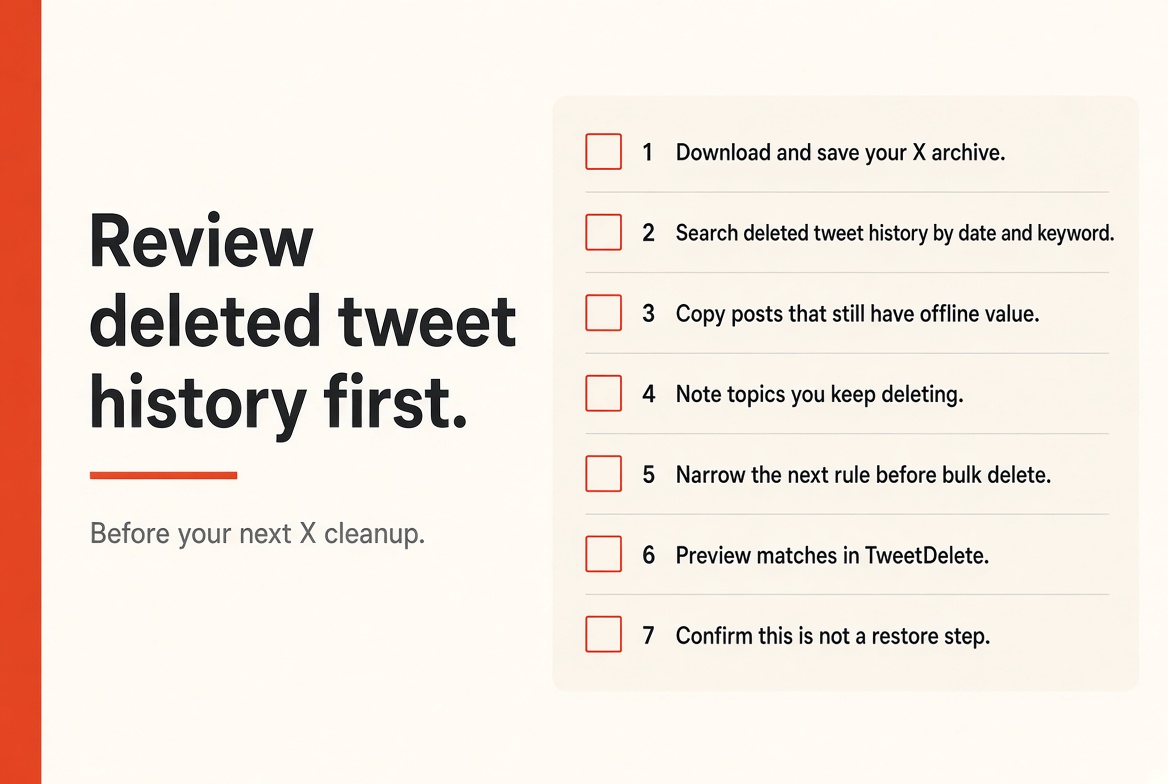
Deleted tweet history can also show what earlier cleanup decisions actually removed. If you keep an X archive, export, or another saved record, it is worth reading part of it before setting new deletion rules. TweetDelete has a dedicated guide where users can check deleted tweets and understand its archive-based workflow.
The point is not to recover everything. It is to avoid repeating an old cleanup without knowing what disappeared the first time.
Estimated reading time: 8 minutes

Table of Contents
1. Protect Useful Posts Still Sitting in Your Deleted Tweet History
Old Posts Can Still Be Useful Offline
Not every outdated post is useless. An old thread may contain research notes, a useful explanation, a project milestone, or wording you want to reuse elsewhere. Once a post is deleted, its content and related public information are no longer available through X in the normal way.
Saving the useful part before another cleanup prevents an unnecessary loss of reference material. A pass through deleted tweet history makes those repeats easier to see than scrolling the live timeline.
Decide What Deserves a Copy Before Deleting More
A review creates a small pause between finding content and removing it. That pause helps separate material that needs to disappear from material that should be stored privately first.
X allows users to request an archive containing posts, media, messages, and other account information in HTML and JSON files. Keeping a local copy can therefore be useful before a major account change.
2. Spot Patterns in Deleted Tweet History: You Miss One Post at a Time
Repeated Topics Tell You More Than One Awkward Post
A single old tweet rarely explains the shape of an account. Fifty posts about the same subject can. Reviewing previous deletions may reveal recurring topics, phrases, arguments, or posting periods that were repeatedly removed.
That is more useful than relying on vague memories of what the account used to contain.
Patterns Can Become Better Search Rules
Once a pattern appears, the next cleanup can be more targeted. A repeated project name may become a keyword search. A specific period may be handled with a date range instead of scrolling through years of posts. TweetDelete supports filtering by keyword, phrase, and date range when searching account content.
This approach also reduces random deletion. Instead of deciding on a post-by-post basis based on mood, you can define a reason for each search. One pass may cover an old employer.
Another may cover outdated promotions. A third can deal with replies that no longer make sense without their original conversation.
3. Separate Reputation Problems From Harmless Deleted Tweets
Age Alone Is a Weak Cleanup Rule in Deleted Tweet History
An old post is not automatically a reputation problem. Some content becomes inaccurate because facts changed, while other posts remain harmless years later. A review helps identify the difference before another broad deletion begins.
This matters because deleting by age alone can remove useful history without solving the issues that prompted the cleanup.
A better question is whether the content still represents something you want publicly connected to the account. Outdated contact details have one problem. An old opinion may have another. A dead promotional link presents a different issue again.
Treating them as separate categories produces more useful cleanup rules.
Public Removal Does Not Erase Every Outside Copy
Deleting a post removes it from the account, follower timelines, and X search results. X also states that copied text, quoted posts with added comments, and material cached elsewhere may remain outside X. That means a cleanup changes what is publicly available on the account, but it cannot guarantee that every previous copy disappears from the wider web.
This is another reason to review history before deleting more. If a sensitive post already exists in screenshots or another published source, deleting the X version solves a different problem than removing a forgotten low-value post.
The first case may require checking outside copies. The second may need no further action after deletion.
4. Use Deleted Tweet History to Turn the Last Cleanup Into a Better Plan
Compare What You Removed With What Still Remains
Deleted tweet history is the only complete record of what the last cleanup actually removed.
Old deletion records can work as a rough audit. Look at what was removed, then compare those themes with the current account. You may discover that one category was cleaned thoroughly while another was barely reviewed.
This gives the next session a defined scope instead of another full account sweep.
The comparison does not need to be complicated. A short list is often enough. Record the type of content, why it was removed, and whether similar posts remain.
The table below shows a practical way to organize that review.
| Previous cleanup finding | What it may tell you | Next cleanup action |
| Many old promotional posts | Campaign content was left online too long | Search older campaign terms |
| Repeated replies were removed | Conversations may need separate review | Filter replies separately |
| Posts from one period caused most concern | The issue may be time specific | Search that date range |
| Useful posts were removed by mistake | Rules were too broad | Preview matches before deletion |
| Old likes remain untouched | Cleanup focused on posts alone | Review likes as a separate task |
Avoid Repeating Rules That Were Too Broad
A previous cleanup can expose poor filtering decisions. Maybe a keyword appeared in both the unwanted and the useful posts. Maybe a date range included a project that should have remained visible. Those examples are valuable because they show where the next search needs narrower criteria.
Previewing results before deletion addresses part of this problem. It lets you check whether a filter is capturing the content you intended to remove. This is especially useful when a common word appears across unrelated topics.
👉 A few minutes of review can prevent a broad rule from accidentally wiping content.
5. Use TweetDelete as a Controlled Browser-Based Cleanup Option
Preview and Filters Help Before Bulk Removal
TweetDelete offers bulk deletion with filters for date, keywords, post type, and other criteria. Its browser extension also lets users preview matching posts before starting the cleanup. That combination supports a review-first workflow rather than immediate removal.
X itself requires posts to be deleted individually through its native interface.
Archive Workflows Add Another Layer of Reference
The TweetDelete extension supports bulk operations in the browser, and lists archive backup as one of its features. TweetDelete also allows uploaded X data to be used as a source when filtering older content.
A saved archive serves as a reference, not a way to restore deleted posts to the account.
Review Deleted Tweet History First, Then Decide What the Next Cleanup Is For
A Better Cleanup Starts With a Better Question
Reviewing deleted tweet history changes the question from “What else can be deleted?” to “What should this cleanup actually fix?” That difference can reveal content worth saving, repeated themes worth filtering, and earlier rules that were too broad.
It also makes archive and backup decisions easier before another bulk action begins. The strongest cleanup is not the one that removes the largest number of posts. It is the one where each group of deletions has a clear reason.
FAQ
Deleted tweet history is the record of posts you already removed from X. It usually lives in an older X archive, an export, or a tool that saved the data before the posts came down. It is a reference copy, not a way to put those posts back on your profile.
No. Reviewing deleted tweet history does not restore posts to X. The point is to see what the last cleanup removed so the next one is more precise.
A fast wipe can take down useful links, research notes, and personal records along with the junk. A short review shows what disappeared last time and which rules were too broad.
Start with an X archive you downloaded before the last cleanup. If you use TweetDelete, its archive workflow can help you search that file by date or keyword. A new archive requested after deletion will not bring those posts back.
No. X can remove it from your profile, follower timelines, and X search. Quote posts, screenshots, caches, and search snippets can still exist. That is another reason to review history before you delete more.
Usually no. Compare what you already removed with what is still live. Keep a copy of posts that still have offline value, then delete with a narrower date, topic, or keyword rule.
Have you deleted any of your tweet history? I’d love to hear about it in the comments below. 👇
Disclosure: This Inspire To Thrive blog post may contain affiliate links. I may earn a commission from qualifying purchases at no extra cost to you. Some sections were drafted with AI tools and carefully reviewed/edited by me.

- Instagram Tools Aren’t One-Size-Fits-All: Match the Tool to the Job - September 30, 2026
- Porn on X (Twitter): What’s Allowed and How to Block It - September 29, 2026
- Dolphin Radar Review 2026: Instagram Follower Tracker (What I Saw After 2 Weeks) - September 29, 2026
Enjoy this content? Help me show up more often in Google by adding Inspire To Thrive as a Preferred Source: