
If you have ever looked at your analytics and wondered why your website bounce rate is high, you are not alone. Bounce rate is one of the most talked-about metrics among bloggers, small business owners, and affiliate marketers, and one of the most misunderstood.
In this updated guide, I will explain what bounce rate actually means today (including the big change in Google Analytics 4), how it differs from exit rate, when a high number is completely normal, and the practical steps you can take to improve it.
The goal is not to chase the lowest possible percentage. The goal is to understand what your visitors are doing and fix the pages that are not delivering results.
Estimated reading time: 11 minutes
Table of Contents
What Is A Website Bounce Rate?
Bounce rate measures the percentage of sessions in which a visitor arrives at your site and then leaves without engaging in the way your analytics tool defines as meaningful.
There are two common definitions, depending on which version of Google Analytics you are looking at.
Classic Bounce Rate (Universal Analytics)
In the older Universal Analytics, a bounce was a single-page session. The visitor landed on one page and left without viewing a second page or triggering an interaction event. The formula was simple:
➡️ Classic bounce rate = (single-page sessions ÷ total sessions) × 100
Example: If 40 out of 100 sessions viewed only one page, the bounce rate was 40%.
Bounce Rate in Google Analytics 4 (GA4)
Google Analytics 4 changed the definition. In GA4, bounce rate is the percentage of sessions that were not engaged. The formula is:
Bounce rate = 100% − engagement rate
A session counts as engaged in GA4 if it meets any one of these three conditions:
- It lasts longer than 10 seconds (you can adjust this threshold in your data stream settings, up to 60 seconds).
- It includes a key event (what GA4 used to call a conversion).
- It includes at least two page or screen views.
Because of this change, the same site will often show a lower bounce rate in GA4 than it did in Universal Analytics. A visitor who spends 45 seconds reading one blog post now counts as engaged, even if they never click anything else.
👉 This is why you should not compare old Universal Analytics bounce rates directly to your current GA4 numbers.
Bounce Rate vs. Exit Rate
These two metrics are easy to mix up, but they measure different things.
- Bounce rate looks at sessions that start and end on the same page (or, in GA4, sessions that never become engaged). It is mainly useful for evaluating landing pages and entry points.
- Exit rate measures how often a specific page is the last page in a session, regardless of how many pages the visitor viewed before that.
Example: A visitor lands on your homepage, clicks through to a product page, and then leaves. That session is not a bounce (they viewed two pages), but the product page has an exit.
👉 Every bounce is an exit, but not every exit is a bounce.
Exit rate is more helpful when you are looking at the middle or end of a path, such as a pricing page, a checkout step, or a long form, where you want to see where people drop off after they have already engaged.
Is a High Website Bounce Rate Always Bad?
No. Bounce rate is a diagnostic metric, not a stand-alone measure of page quality, SEO success, or conversions.
A high bounce rate can mean:
- The page is slow, hard to use on mobile devices, or has a technical issue.
- The title or meta description promised something the page does not deliver.
- The content is weak, or the call to action is unclear. It can also mean the visitor found exactly what they needed and left satisfied. This is especially common on:
- Blog posts and how-to articles that fully answer a search query.
- Contact or location pages.
Affiliate or resource pages where the visitor clicks an outbound link and leaves (which can be a successful outcome for you).
Before you decide a page is “bad,” look at it alongside other data: average engagement time, conversions or key events, pages per session, and whether the traffic source matches the page’s purpose.
- A blog post with a 70% bounce rate but strong average engagement time and ranking for its target keywords may be performing well.
- A product landing page with the same bounce rate and almost no conversions is a problem.
What Is a Good Website Bounce Rate?
There is no universal “good” number for website bounce rates. Acceptable rates vary by page type, traffic source, audience, and whether you are looking at classic or GA4 numbers. Google does not publish official benchmarks.
Use these as rough context only, and always compare similar pages on your own site over time:
- Blog posts and informational content: Often higher (especially in older Universal Analytics data). A single-page visit can be normal if the article answers the question.
- Landing pages and sales pages: Usually lower is better because the goal is a click, form fill, or purchase.
- E-commerce product pages: Tend to sit in the middle; many visitors browse and leave.
- Affiliate or resource pages: Can look high if successful outbound clicks are not tracked as key events. Instead of aiming for one site-wide target (such as “under 50%”), look at:
- Bounce rate by landing page.
- Differences by source/medium (organic search vs. social vs. email).
- Device category (mobile vs. desktop).
- Trends over time for the same page. Prioritize pages that have both high traffic and weak business results (low conversions, low engagement time, or high bounce compared with similar pages).
How to Find Bounce Rate in Google Analytics 4
Your website bounce rate is not shown by default in most standard GA4 reports. You need to add it (and it is useful to add engagement rate at the same time so you can see they always add up to 100%).
Add Bounce Rate to a Standard Report
- Open a detail report such as Engagement > Pages and screens, Engagement > Landing page, or Acquisition > Traffic acquisition.
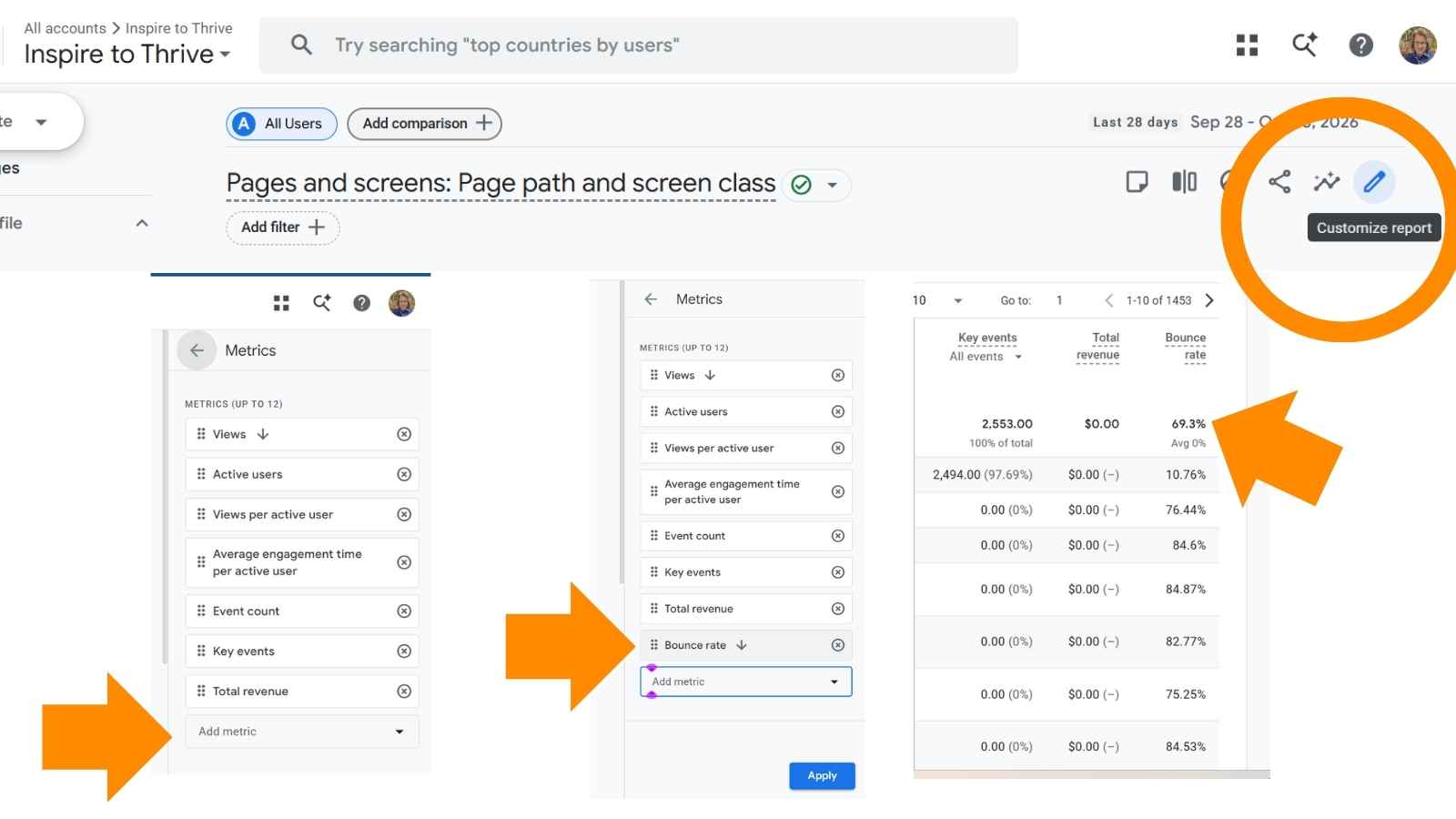
- Click the pencil icon (Customize report) in the top right. You need Editor or Administrator access.
- Under Report data, click Metrics.
- Click Add metric, search for “Bounce rate,” and select it. Add “Engagement rate” as well if it is not already there.
- Click Apply, then Save and choose Save changes to current report. The new columns appear at the right of the table. Scroll right if you do not see them immediately.
Prefer to watch? Here’s a quick walkthrough of finding key metrics in GA4.
Use an Exploration for more flexibility:
- Go to Explore.
- Start a free-form exploration.
- Add dimensions such as Landing page, Session source/medium, or Device category.
- Add metrics including Sessions, Bounce rate, Engagement rate, and Average engagement time.
- Drag the dimensions into Rows and the metrics into Values. This view makes it easy to compare bounce rate, engagement time, and conversions side by side.
Also check:
New vs. returning users
- Technology (browser and device).
- Key events or conversions for the pages you care about.
- Is your website down or has it gone down?
How to Diagnose a High Bounce Rate
A list of possible fixes is less useful than a clear process. Here is a practical way to investigate your website bounce rate:
- Identify high-traffic pages with higher bounce rates than similar pages on your site. Sort landing pages by sessions and look at bounce rate and engagement time together.
- Segment by source and device. A page may bounce heavily from social traffic but perform well from organic search, or it may have problems only on mobile.
- Check engagement time and key events. If people stay longer than 10–30 seconds and trigger conversions, the bounce rate may not indicate a problem.
- Review the page itself. Compare the title tag and meta description with the actual content.
- Look at mobile layout, load speed, and whether the next step is obvious.
- Prioritize. Focus first on pages with high traffic and poor business outcomes.
- Improving a low-traffic page that already converts well is usually lower priority.
Common Causes of High Bounce Rate
Here are frequent reasons visitors leave quickly:
- Slow page load times.
- Technical errors that affect only certain browsers or devices.
- Poor mobile layouts or text that is hard to read on small screens.
- Misleading title tags or meta descriptions that do not match the page content.
- Intrusive pop-ups that cannot be closed easily.
- Weak or thin content that does not satisfy the search intent.
- Unclear or missing calls to action.
- Forms that ask for too much information too soon.
- Cluttered design or hard-to-scan content (long walls of text, no headings).
- Browser-specific issues or broken elements that only appear for some visitors.
Practical Ways to Improve Your Website Bounce Rate
Group your improvements by the likely cause so you can test one change at a time. Page Speed and Technical Performance
- Run the page through Google PageSpeed Insights and fix the biggest opportunities (image size, unused code, server response time).
- Test the page in the browsers and devices your visitors actually use (check the Technology report).
- Customize your 404 page with links to popular posts or your homepage so accidental errors do not dead-end.
Mobile Usability
- View the page on a real phone. Check that text is large enough, buttons are easy to tap, and nothing requires horizontal scrolling. Also check for errors, as I often find them on my mobile device.
- Make sure forms and calls to action are usable on small screens.
Search Intent and Quality Content
Compare your page title and meta description with the search results that send traffic. Make
sure the page delivers what the snippet promises.
- Add clear headings and short paragraphs so the content is easy to scan.
- Provide useful, complete answers. For blog posts, a single-page visit that fully answers the query is often a success.
- For affiliate or product pages, make the recommended next step obvious and track outbound clicks as key events when they matter to your goals.
Page Layout and Calls to Action
- Place a clear next step above the fold or early in the content (related article, email signup, product link, or contact button).
- Simplify forms. Ask only for what you need on the first step.
- Remove or delay pop-ups that block content. Internal Linking and Next Steps
- Add relevant internal links to related posts, product pages, or resources. This helps visitors who want more and can lower bounce rate when it makes sense.
- Opening external links in a new tab is a user-experience preference, not a reliable way to reduce the bounce rate.
Prioritize clear internal next steps instead.
Successful outbound affiliate clicks can still be valuable even if the visitor leaves your site.
Bounce Rate and SEO
- Bounce rate is not a direct Google ranking signal. A consistently high rate does not automatically hurt your rankings.
- It can help you spot mismatches between search intent and page content.
If a page ranks for a keyword but has a high bounce rate, low time on page, and poor conversion rates, the content may not fully meet searchers’ expectations. Improving that match can help both user experience and long- term performance, but you should evaluate rankings and traffic separately in Google Search Console.

FAQs
It is the percentage of sessions that were not engaged. In GA4, that means the session lasted 10 seconds or less, had no key event, and had only one page view. In older Universal Analytics, it simply meant a single-page session.
Many readers land on an article, get the answer they need, and leave. That can be a successful visit even if they never click another link on your site.
Typical bounce rates vary by industry, but generally, a bounce rate between 26% and 40% is considered excellent, 41% to 55% is average, while anything over 70% may indicate a problem.
Add it as a metric in a detail report (Customize report → Metrics → Add metric) or include it in an Exploration. Also look at engagement rate, since the two always add up to 100%.
No. A low bounce rate can sometimes mean visitors are confused and clicking around trying to find what they need. Always pair it with engagement time and conversions.
Not directly. It can indicate that a page does not match searchers’ expectations, which is worth fixing for both users and long-term SEO performance. Check rankings and clicks in Search Console separately.
Average engagement time, key events or conversions, pages per session, and traffic source. Look at
them together by landing page and device.
Your Take
Have you been surprised by your bounce rates after switching to GA4? Have you found pages where a higher rate was actually fine because the content fully answered the question? Or have you used the diagnostic steps above to improve a specific landing page?
Drop a comment and let me know what you have tried. I read every one. 👇
This article was updated in October 2026 to reflect Google Analytics 4 definitions, current reporting steps, and more accurate guidance on when bounce rate matters.
Disclosure: This Inspire To Thrive blog post may contain affiliate links. I may earn a commission from qualifying purchases at no extra cost to you. Some sections were drafted with AI tools and carefully reviewed/edited by me.
Comments are from previous years; the post was fully updated in October 2026.
Enjoy this content? Help me show up more often in Google by adding Inspire To Thrive as a Preferred Source:





Hey Lisa… am excited I can leave comments again….
Give people a reason to stick around. Even allowing comments keeps them on the page longer.
Though sweet and to-the-point answers to the questions being asked will mean they got their answer quickly, giving them ample time to go and wash the dishes, water the plants or waste time doomscrolling..
Yes, I am excited too, Trevor, and am exploring your suggestion. Anytime I can save on plugins, I’m happier. Yes, people don’t want to waste time today. There is so much to do and explore that people won’t stick around more than 8 seconds for an answer. They can then decide whether to stay for more information. Thanks for coming by, Trevor. Have a great day.
The weak content point is never discussed Lisa.
Bloggers nail down technical aspects to lower the bounce rate. But some never tighten up their content. Confusion follows since the blogger appeared to do everything right. Yet detailed, highly practical, targeted content keeps readers onsite more than any other factor.
No doubt, my old theme hurt my bounce rate but my detailed content balanced things out. My new theme changed things pronto. Nothing like having a solid user experience in place.
Bounce rates can vary depending on the type of website, but I want to second that recommendation to internally link as much as possible and also the suggestion to open external links in a new tab. We do this as standard practice, and even sometimes set up the “about blank” for internal links from one blog post to another. That way, they don’t lose the first one when opening the second, since the links tend to be weaved into the content.
We tend to have a higher bounce rate on our domain. But that’s because people most often arrive on blog posts, read it, and exit once they find the answer to whatever problem we’re writing about. Still, we get leads on subsequent visits quite often, so we live with the elevated bounce rate even though it may very well be suppressing us on Google. Priorities, right?
Hi Tommy, welcome to Inspire To Thrive! Oh yes, I have been looking over my external links and making sure they do open in a new tab. You make an excellent point about finding what readers need and leaving can make a higher bounce rate. Thanks for that input. Hopefully they come back for more info the next time they need answers as well. Thanks for coming by and have a great day Tommy.
Lisa,
I list pricing on my website for some of my services. I used to have pricing on my SEO’d pages, but to reduce bounce rate I just updated the ranking page to link to another page with the prices. I like how you’ve created “resource pages” for some of your on-topic posts. Great internal linking strategy.
All the best -Russ
Hi Russell, thank you. I’m in the process of starting some services and pricing. It seems to be a catch-22 whether to have the pricing on or not. But I know from my own purchasing experience, I like to see prices. Otherwise you think it’s very expensive if you have to inquire, right? Thanks for coming by and for the compliments.
Lisa, I debated for a long time whether or not to add prices, but I’ve found that it does a few things for me. 1. It helps my prospects know what to expect 2. It makes it easier to talk to prospects, as the published prices feel more credible 3. It gives people what they really want. Because very few people actually publish their prices.
Thanks Russell for your input on that one.
Hi Lisa!
I found your totally excellent blog, because of my coach and mentor Adrienne Smith. But it was while studying on Kumars blog, I noticed your blog post headline and decided to check out things more closely.
It’s turned out to be a very good decision on my part!
This is an excellent post! You covered so much! And have certainly given everybody a ton to consider, in terms of creating a far more receptive online environment for our particular target audiences.
Each one of these excellent points can easily stand on their own and be both an individual blog post and or “how to” educational video or pod cast as well!
I definitely will be creating some very good content, as a direct result of reading your excellent post! Thank you!
Thank you! I’ve learned a lot!
And I’ll be studying here way more often going forward!
Thank you Mark and welcome to Inspire to Thrive. Glad to hear you have learned a lot. I try to share everything I’ve learned online over the years. It changes quickly too. Now I must work on a video soon for a future post. I had a goal to complete it by March 31st but several offline things needed my attention. I hope you have a great day and that I see you back here again.
Hey Lisa,
Nice post and Yes, bounce rate really plays an important factor in blogging. Lower the bounce rate, more happier we are. Interlinking really plays an important role in decreasing bounce rate. Site speed also plays an important factor because if site speed is very low it cause to switch reader from our blog. I will surely gonna all tips you share for reducing bounce rate. Thanks for sharing this post.
Thanks Sudipto. Many bloggers are unaware of the interlinking factor. Speed sure does too, who wants to wait for your slow site to load up, right? You are welcome and have a nice day Sudipto.
Hey Lisa,
Honestly this is the best and most descriptive post i ever found on Bounce rate. However, i just checked mine and it was bit scary to see the bounce rate in 60-70%. Can you give me some tips on how to reduce it too 30-40.
Thanks and Regards
Ashish (Webcipher)
Thank you Ashish. There are 13 tips here on the post on how you can lower yours Ashish. Let me know if you have a specific question on them. Best of luck with it and remember it will take some time too.
Site speed and poor design were reasons behind high bounce rate of my blog. I spent a good time in optimizing my blog for maximum speed and also lightened my pocket on a premium design. Yeah, the things worked, and now my blog’s bounce rate is mere 31 percent. Working to make it even lower.
Hi Rajan, welcome to Inspire to Thrive. Wow, it sounds like you got yours way down now. I will have to check out your theme and my bounce rate again since I’ve recently had some technical work on it to save on speed as well. Thanks for the input and have a great day Rajan.
This is a awesome post, bounce rate is the most important criteria for any blog and sometimes I feel that even google uses this in it’s algo updates to penalise the sites with very high bounce rate. Well the bounce rate also depends on specific niche while for blogs which teach blogging it might be low as readers want to learn new things but for a tech blog it could get higher cause readers are searching for specific piece of information.
Thank you Prateek. Interesting take you have on specific niche – that seems to make a lot of sense. I would not stay around a highly technical blog once I got the answer I was looking for unless it had some amazing images. Thanks for coming by and sharing your thoughts on bounce rate, have a great day!
Hello; I enjoyed the post. I am a blind computer user and don’t use google analytics because it doesn’t play nice with my screen reader. I use stat counter instead. but i have found that alexa.com will show you your bounce rate when you are checking your alexa rankings. My site’s bounce rate right now is at 32 percent. I find that the more traffic i get from outside the u s the higher my bounce rate gets. And I too have noticed that the more new visitors i get the higher the bounce rate goes where as the more familiar someone is with my site the lower the bounce rate will be. a good article that probably cleared up a lot of confusion for a lot of people. Keep up the good work, max
Wow Maxwell, that is so inspriring how you read with your blindness. Oh yes Alexa will show it too. I must compare the two side by side and see how they compare. That is a very good bounce rate Maxwell, especially for a blog! Thank you, I sure will try to. I’d love to know more how you read on computer – have you ever done a post on that?
Hi Lisa; thanks for the complement. I haven’t done a blog post on how i read blogs or leaving comments as a blind person. I don’t really think about it, but maybe I aught to do a post and let people know about my process and the tools i use. I have an interview on another blogger’s site that will be coming out on february 11th that will cover the topic. so i may not need to. but you know what they say there is no harm in taking a post and reworking it for another post. so, we’ll see. that bounce rate is for my website and blog. the blog is an integrated part of the website which is the way i was told to do it for best SEO value. I will be looking forward to your test to see if the bounce rate on alexa and the numbers in google analytics are the same. I do think the bounce rate is pretty good. and just so your readers know before i started getting more active at reading other blogs leaving comments and sharing posts my bounce rate was in the high 50’s if not 60 percent. thanks again and take care, max
Hi Maxwell, I think it would be very interesting to read on how you read online blind. And leaving comments too. I did check the bounce rate and the Alexa was much less for me vs. the Google Analytics. I read from Adrienne Smith that there is a tweak that can be done in the Google ananlytics that will make a difference to. It was interesting to see on Alexa that the newer readers had a lower better bounce rate. You are welcome and have a great day ahead there Maxwell.
Hi Lisa,
Well I’ve written about this subject myself in the past and I think the way Google checks the bounce rate could be improved.
I honestly think that Google put this in place more for business sites then blogs. Take for instance if you have a blog like mine where I have regular visitors that have read a lot of my older posts then you’re not going to get a lot of click through to links I’ve shared in my posts because they’re already read them. I may have slightly more new visitors then regular so the majority of them don’t click through to one of those links then Google just discounts them having even visited. That’s not fair.
I implemented a code last year so that it will time the people who are visiting my post instead of whether or not they click through and it’s reduce my bounce rate significantly. Isn’t that what it’s all about anyway! How long they stay on your site and enjoy your content? Is it really fair to not count them at all because they didn’t click through to another page?
Maybe Google will eventually improve this part but if they don’t at least I’ve gotten mine down significantly to where I’m happy.
Thanks for sharing this because it’s still a topic so many people aren’t sure how to handle. You’ve definitely laid out what they can do to improve theirs.
Have a good week Lisa.
~Adrienne
Hi Adrienne, I was wondering about that after a few commentors mentioned you and a code that you changed. Interesting. I also had suspected that blogs had a higher bounce rate and wasn’t quite sure of the reason, now it is making more sense, thank you for clarifying. Yes, many bloggers do not grasp the bounce rate concept and that’s why I went ahead and wrote on the topic. Appreciate your coming by and helping us out more on this topic Adrienne. Have a great week ahead.
Getting tons of traffic is not big task but getting traffic with good bounce rate is really tough. Personally I believe to get less traffic with lesser bounce rates.
If I get 5k traffic daily with 80% bounce Rate then I will be Sad but if I get 1k Traffic daily with 40% bounce rate I will be happy because Lesser bounce rates shows that we got quality traffic.
When it comes to blog traffic, Traffic quality rules, Quantity doesn’t matter if it has no quality.
Very nice post List.
Hi Atish – yes you do have that right! I found that out with the retail sites I used to do. If the traffic had less bounce rate it meant more sales. Traffic didn’t always generate sales. The same can be said for blogs too – quality over quantity. Thank you for coming by with your input on this one Atish, have a great rest of the weekend.
Thanks for sharing such a great informaton mam.You explained it in really great way.Yes decreasing bounce rate is a important point to think on for every blogger
You are welcome Uday and welcome to Inspire to Thrive. Have you checked your bounce rate out yet? Have a great day.
Hey Lisa,
Great tips for bounce rate. I hadn’t thought about keeping internal links in the same window for bounce rate – as a reader I prefer they open in a new window. I may have to re-think that one. : )
Hi Brent, oh yes, it is supposed to help a lot. I’ve read up on it many places. Maybe you can test it out on some new posts? Thanks for coming by and have a great rest of the weekend Brent.
Hey Lisa,
You’ve covered the topic about which i’m always worried of, i started my journey with something about 80% and still i’m stuck at 50% i’m still not sure what’s the reason behind all this. My site’s bounce rate is still at average, i need to think beyond marketing to persuade my visitors to stay on my blog. I think i should implement internal linking more efficiently, what are your thoughts?
Thanks for sharing the tips.
-Siraj
Hi Siraj, You are not alone with that one. Definately do more internal linking, that is key. Do you use one of those related posts plugins? I see you do NOT, try out one of the plugins for that. You could add your most popular posts via the plugin for that. I do get some traffic from that as well. I hope that helps Siraj. Have a great weekend and let me know if you try those 2 things out and if it helps – you should know in a months time or so.
I need to pay closer attention to my stats in Google Analytics. I suspect I’m around the 50% mark. Regular readers probably just read the most current post but people looking for recipes probably visit multiple posts (or at least I hope!) I have a related posts plugin but I need to get better with doing some internal links when appropriate.
Hi Tanya, yes I try to look at them at least once per month and sometimes more. Good for many stats. That is good that you have that plugin. I bet yours is lower with recipes, they can look over several before trying one. I may be by for some soon. I’m trying to use the crock pot more and always am looking for new recipes. Thanks for coming by and have a great weekend Tanya.
I think I must have analytics installed wrong because it says my bounce rate is 2%. Or is that really bad? Ugh, I am so frustrated with stats.
Hi Jennifer, the smaller the number the better for bounce rate! That’s a great rate if it is correct. I did hear from others that the analytics may need to be tweaked. Check out Tim Bonner’s comment here for more info on that. I may do a follow up as well on it. Thanks for coming by and I hope you stay warm on this cold weekend in New England.
Hi Lisa,
Thank you for a very informative post. The 13 tips are much appreciated! I’m really liking what I’m seeing in the comments here. I especially like Sylviu’s suggestions. I’ve been able to bring my bounce rate down to 16.87% This may be attributed to the longer posts I have progressed to, as compared to when I first began blogging.
Have an awesome weekend!
Bill
Hi William, your are in the longer post camp, interesting. I had posted longer ones here this past year up from the 300-500 range to 700-1200 range. I don’t think I’ve done one longer yet. Something to strive for and test as well. Thanks for your input Bill and have yourself a nice weekend!
Hello,
Well bounce rate is something which I haven’t got it till now. Though I think it seems a tricky one. Sometimes the bounce rate of a blog would be higher and sometimes it would be lower. I guess I must follow some strategies to lower it.
Thanks
Hi Robert, do try some of the strategies out and let me know after a month if you do notice a difference. Welcome to Inspire to Thrive. Hope to see you back in the near future. Have a great weekend.
Hello Lisa,
My bounce rate stands as I type at 23% (I guess I need to go celebrate, considering 50% to be a healthy average). However, that 23% has not been an easy feat to achieve, I must be sincere. Enumerated below are the three greatest things I discovered that brought me a healthier bounce rate (my usual average was 78% when I set off blogging).
1. I stopped advertising in the wrong places. It is no rocket science that attracting the wrong audience to your site is simply courting problem (a high bounce rate); why should they stay?
2. I began publishing daily and nicely interlinking all my entries! This brought about a surge in traffic that translated in a healthy percentage of that traffic checking out other entries interlinked!
3. I wrote long, detailed, interesting and helpful posts. Most of my entries are well over a thousand words. Such detailed posts ensure that readers spend more time on your site. The logic is that, the more time spent on your site, the greater chances of clicking a linked post or suggested entry.
Always,
Terungwa
Hi Akaahan, that is a great percentage, congratulations. Interesting on #2, I started doing more last week with 3 posts vs 1-2 but then my mom took a turn for the worst and this week I could not even get on to write. #3 is another one that I’ve read 2 sides to – some bloggers say it helps and others say they have seen no difference. I wonder if it depends on the niche as well Akaahan? Thanks for your contribution to adding to this topic. It gives us all more to ponder. Have a great weekend!
Hey Lisa,
My bounce rate fluctuates. I agree with Ashley above about how some get the answer they are looking for then head off.
I completely agree with all of your points. You make it hard to add to the conversation by being so thorough. I appreciate it!
I come across many post where some agree and disagree with #3. IMO, why would you not want to open another website in a new window? It’s great that you are providing helpful resources etc. What if they plan to subscribe but click on the link first. You potential opened the door to being forgotten now. For me all external links are going to be opened in a new window!
Thanks for this Lisa!
Hi Steven, I wonder how that can change if they find what they are looking for and quickly take off. Maybe an offer in the post for them to check out? Or would that turn them away? Sometimes it turns me off if each post is trying to sell me something. Gives me something to think about Steven. You are welcome Steven and have yourself a great weekend. Mine is just starting here.