Looking for the best Facebook video format in 2026? It’s simpler than most people think: MP4 with H.264 video and AAC audio, paired with the right aspect ratio.
Facebook now turns every video you upload into a Reel. That change makes getting the format right more important than ever. The correct settings help your videos look sharp, load fast, and earn better reach. The wrong ones can leave your content blurry, cropped, or ignored.
In this guide, you’ll get the current recommended specs for Reels, feed videos, and Stories, plus practical tips so your videos perform better on Facebook.
Estimated reading time: 9 minutes

Table of Contents
Best Facebook Video Format (2026):
MP4 container, H.264 video codec, AAC audio. Official Meta recommendation. Then the right aspect ratio depends on where it will play.
Follow it with a simple table like this (adapt the numbers to your latest official check):
| Use / Placement | Best Aspect Ratio | Recommended Resolution | Typical Length that Performs | File Notes |
|---|---|---|---|---|
| Reels / Full-screen / Stories | 9:16 | 1080×1920 | 15–30s (up to 90s+) | MP4, under 4 GB |
| Mobile feed (now also a Reel) | 4:5 or 9:16 | 1080×1350 or 1080×1920 | Under 60s | Same codec |
| Landscape / In-stream | 16:9 | 1920×1080 | Short for ads | Same codec |
| Universal / Square | 1:1 | 1080×1080 | Varies | Safe fallback |
Cite Meta’s own help pages (the Reels export settings page and the supported-formats page) so Google sees you as current.
Why Facebook Video Format Matters for Reels
Choosing the best Facebook video format directly affects how many people see and finish your Reels. Not all videos are created equal. Facebook’s feed is crowded, and the Reels algorithm picks favorites. Getting the format right is one of the easiest ways to win more eyes and reactions on your videos.
Businesses and personal brands that care about clarity, speed, and audience interaction can pull ahead simply by paying attention to the basics of video format. Think of this as setting the stage so your content shines bright every time it plays.
Impact on Reach and Engagement
The numbers don’t lie: optimized Facebook videos reach more people. According to Meta’s reports, Reels with the right format often get higher watch times and more shares.
Why? They load faster, look sharper, and keep people watching until the end.
If you upload a blurry or oddly sized video, users are likely to scroll past. On the other hand, a crisp video that fits their screen keeps them there, swiping for more.
Facebook’s algorithm rewards these videos by pushing them into more feeds, which means free exposure for you.
Compatibility across Devices and Platforms
People watch Facebook Reels on every device you can think of: smartphones, tablets, even desktops. What plays perfectly on your phone might get cropped or pixelated on someone else’s. If your video matches Facebook’s specs, you dodge these headaches.
By keeping things mobile-friendly, you avoid giving viewers a reason to leave your content. It also helps your brand look more professional. Consistency across all devices improves the experience for everyone, no matter how or where they’re watching.
Here’s a quick example of a vertical Facebook Reel shot in the 9:16 format:
Best Video Specifications for Facebook Reels
Before you hit upload, double-check your video’s details. A few simple steps can keep your content looking its best and performing at its best. Let’s break down the essential specs for Facebook Reels.
Here’s the best Facebook video format and settings to use right now for your reels.
Optimal Resolution, Aspect Ratio, and Duration
- Resolution: Shoot for 1080×1920 pixels (Full HD). This keeps your video sharp and professional, no matter the device.
- Aspect Ratio: Use 9:16. This is the classic “full screen” look for vertical videos, matching most phones when held upright.
- Duration: Stick to 3-60 seconds. Short, punchy videos perform well. Short, punchy videos (especially under 30–60 seconds) still perform best.
Why does this matter? Videos in the right shape and length grab attention quickly and fit perfectly in the Reels feed. You avoid awkward black bars or text that’s been chopped off.
Supported File Types and Sizes
When it comes to the best Facebook video format, MP4 with H.264 is still the clear winner.
- Best File Type: MP4 (H.264 codec). This is the gold standard for Facebook videos and Reels. MOV files work, too, but MP4 is more universal.
- Maximum File Size: Keep files under 4GB. Larger files slow down uploads and may not process properly.
- Compression Tips: Use reliable video compressors before uploading. This lowers file size without draining video quality.
If you’re curious about settings, look for these when exporting:
- Bitrate: At least 5,000 kbps for HD video.
- Frame rate: 30 fps (frames per second) is ideal.
Tools like FlexClip are handy if you’re starting with screen recordings; you can crop, add captions, and export as an MP4 (H.264) file, ready for Facebook.
Audio and Caption Considerations
- Audio: Use high-quality audio. Distorted or muffled sound can ruin even the most beautiful video. If you add music, check that it’s cleared for use on Facebook.
- Captions: Always include captions or text overlays. Many users watch videos with the sound off. Captions make your message clear, boost accessibility, and help more people connect with your content.
Don’t forget that catchy onscreen text can drive more engagement, spark comments, and even kick off discussions.
Tips to Maximize Your Facebook Reels Performance
Making your videos look great is only half the battle. How you edit, upload, and present them matters just as much.
These tips can help you get the best results from every Reel. Even with the best Facebook video format, editing and posting habits still matter.
Best Practices for Editing and Uploading
- Edit Before Upload: Trim dead air, correct mistakes, and add effects or transitions to ensure a smooth flow.
- Batch Your Work: Create and edit several videos at once. Batching saves time and helps you keep a consistent posting schedule.
- Preview Your Reel: Always watch your video after compression and before posting. Look for issues like off-center text, blurry footage, or missing audio.
- Use Facebook’s Tools: Facebook’s built-in editing tools are handy. You can add music, text, stickers, or effects right before posting.
- Craft a Catchy Caption: Pair your video with an engaging, clear caption. Use relevant hashtags to help Facebook sort and recommend your content.
When I need to turn screen recordings or tutorials into Reels, I use FlexClip. It makes it easy to record my screen, crop to 9:16, and export in the right Facebook video format.
Content Ideas That Work Well with Facebook Reels Format
Short videos thrive on creativity. Here are some ideas that keep viewers coming back for more:
- Quick Tips: Teach something in under 30 seconds, such as a productivity hack or a recipe trick.
- Behind-the-Scenes: Show the people or effort behind your business, product, or daily routine.
- Before-and-after transformations (makeovers, cleanups, progress shots) are always satisfying to watch.
- Trending Challenges: Take part in viral challenges or use popular sounds—just make sure they fit your brand.
- Customer Testimonials: Happy customers or user-generated content build trust and social proof.
Mix up your content, test different ideas, and watch what sparks reactions. Engagement data can guide your next creative move. When I create Reels from screen recordings or tutorials, I use FlexClip. It’s simple to record my screen, crop to 9:16, add captions, and export as an MP4 that meets Facebook’s video format requirements.
Content Creators Making Money from Facebook Reels
I use Facebook Reels to reach new people and earn real cash. (I didn’t realize until I researched for this post that I had made some cash!) Reels gives creators like me options to earn without needing thousands of followers.
You can’t apply to make money from Reels, but Facebook will contact you when your account qualifies.
Here’s what works for me:
- Ad Revenue Sharing: Facebook places short ads in my Reels. When viewers watch, I get a share of the revenue.
- Bonus Programs: Sometimes Facebook offers bonuses when I hit certain milestones, such as view or engagement targets. I keep an eye on program updates since spots fill fast.
- Brand Deals and Partnerships: Brands reach out for sponsored content. I may pitch to companies I like or use, then create reels that fit both my style and their goals.
- Stars and Viewer Gifts: Fans can send Stars (Facebook’s virtual tip) on my public reels. Each star adds up to real money over time.
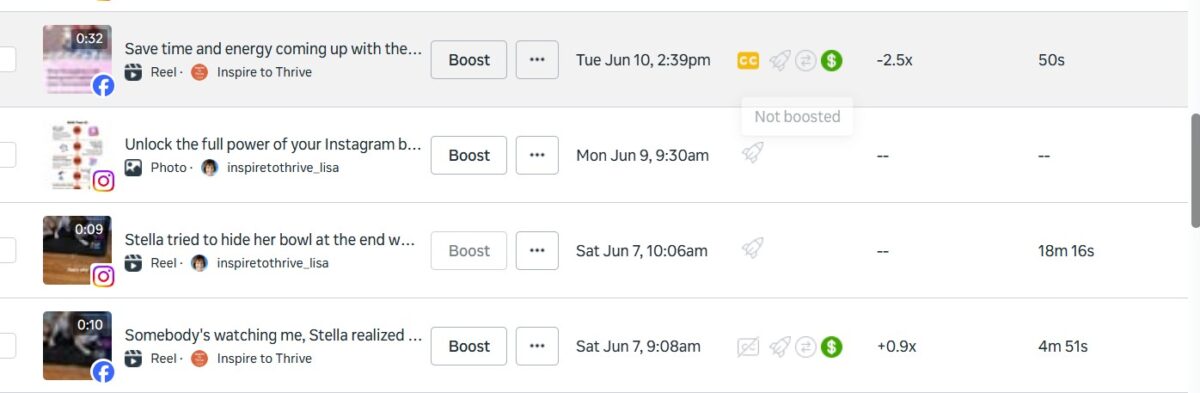
I use clear calls to action in each reel to boost engagement and encourage likes, shares, and comments. If you’re used to posting threads on X, try short-form reels with hooks in the first few seconds.
Check Facebook’s official guide for updates and payout info. Earning through reels takes patience, but I see steady growth when I stay active and post often.
Ready to try reels? Start small, track your results, and tweak what works. If you already have an audience on X, invite them over to Facebook for your next big push.
Conclusion: Facebook Videos = All Reels Now
The right Facebook video format can push your Reels to the next level. By following optimal specs and creative editing tips, you give your content a real shot at catching the spotlight.
Clean visuals, crisp sound, and thoughtful captions do more than just look nice—they drive up shares, comments, and followers.
If you’re serious about growing your presence with Facebook videos and reels, take the time to get these basics right. Keep testing and keep having fun with your content. Your next viral Reel might be just one great upload away.
For more tips, resources, and support to build your online presence, be sure to check out Inspire To Thrive for expert guidance and proven strategies.
Facebook Video Format FAQ
MP4 with H.264 video and AAC audio. It’s the most reliable and highest-quality option Facebook recommends.
MP4 is better for most people. Both work, but MP4 is more widely supported and usually produces smaller files.
1080 × 1920 pixels. It’s the ideal Full HD vertical size for sharp mobile playback.
9:16 (vertical) performs best because every video is now a Reel and most people watch on phones.
Up to 10 GB is allowed, but keep files under 4 GB for faster uploads and fewer issues.
No. One good MP4 (H.264 + AAC) works for almost everything. Just choose the right aspect ratio.
30 fps or lower. A bitrate of 5–10 Mbps is plenty for clean 1080p video.
15–30 seconds still performs best, even though longer Reels are now allowed.
Disclosure: This Inspire To Thrive blog post contains affiliate links. I may earn a commission from qualifying purchases at no extra cost to you. Some sections were drafted with AI tools and carefully reviewed/edited by me.

- TikTok Viewer: How to Watch Public Videos Anonymously (2026 Guide) - October 16, 2026
- Find Broken Links on Site Fast: Scan, Fix, and Protect Your SEO - October 15, 2026
- 8 Best AI Ranking & Visibility Tracking Tools for Bloggers (2026) - October 15, 2026
Enjoy this content? Help me show up more often in Google by adding Inspire To Thrive as a Preferred Source: