Have you ever wanted to jump into a live conversation with industry leaders, thought leaders, or your target audience without typing a single word? X Spaces (formerly Twitter Spaces) make that possible.
These live audio rooms let you listen, react, ask questions, or even speak, all in real time. In 2026, X has made Spaces even better with a dedicated Spaces Tab, built-in podcast-style recordings, captions, and seamless web listening.
Whether you’re a solopreneur, coach, marketer, or content creator, learning how to listen to X Spaces is one of the fastest ways to stay on top of trends, build genuine connections, and grow your account organically.
In this updated guide (refreshed for 2026), you’ll discover exactly how to find, join, and get the most out of X Spaces on mobile and desktop.
Estimated reading time: 8 minutes
Table of Contents
Spaces Key Takeaways
- Listen to X Spaces (formerly Twitter Spaces) for free. Join live audio rooms on mobile or web with no follower minimum.
- Discover Spaces easily via the dedicated Spaces tab in the X app (bottom nav on mobile) or search “filter: spaces” to include live, scheduled, and personalized podcast recommendations.
- Go anonymous if you want. Toggle “Listen anonymously” before joining to hide your profile (great for research or privacy; note: you can’t react or speak while anonymous).
- Recordings & replays are now more powerful: Many Spaces record indefinitely (on iOS 9.15+/Android 9.46+), appear as podcast-style episodes in the Spaces tab, and support 30-second clips for sharing.
- Engage actively. React with emojis, raise your hand to speak (up to 13 speakers), chat, and build connections that drive followers and collaborations.
- Web/desktop support lets you listen (and in some cases speak) directly on x.com — no app required for passive listening.
- Accessibility is built in. Auto-captions for live audio, inclusive for all users.
- Amplify your account. Consistent listening + thoughtful participation boosts profile visits, organic follows, and business opportunities like coaching inquiries.
- Troubleshoot fast. Common fixes include updating the app, checking volume/permissions, or re-joining if audio drops.
- Repurpose content. Download/host recordings or clips to turn one Space into blog posts, podcasts, or evergreen value.
What Are X Spaces?
X Spaces are live audio conversations hosted directly on the X platform (iOS, Android, and web). Anyone can join as a listener for free. Hosts can invite up to 13 speakers (including 2 co-hosts), while thousands can listen simultaneously.
Spaces are public by default. You can listen even if you don’t follow the host. Private accounts can listen (they can’t host or co-host).

Key Benefits of X Spaces in 2026
- Real-time networking — Connect with influencers and customers in a more personal way than comments or DMs.
- Content goldmine — Discover trending topics, customer pain points, and fresh ideas for your own posts or offers.
- Audience growth — Listeners see who’s in the Space; active participants often gain followers fast.
- Podcast-style replay value — Many hosts now record Spaces, turning one live event into evergreen content.
- Accessibility — Built-in captions, emoji reactions, and anonymous listening options make it inclusive.
How to Find X Spaces
The easiest ways in 2026:
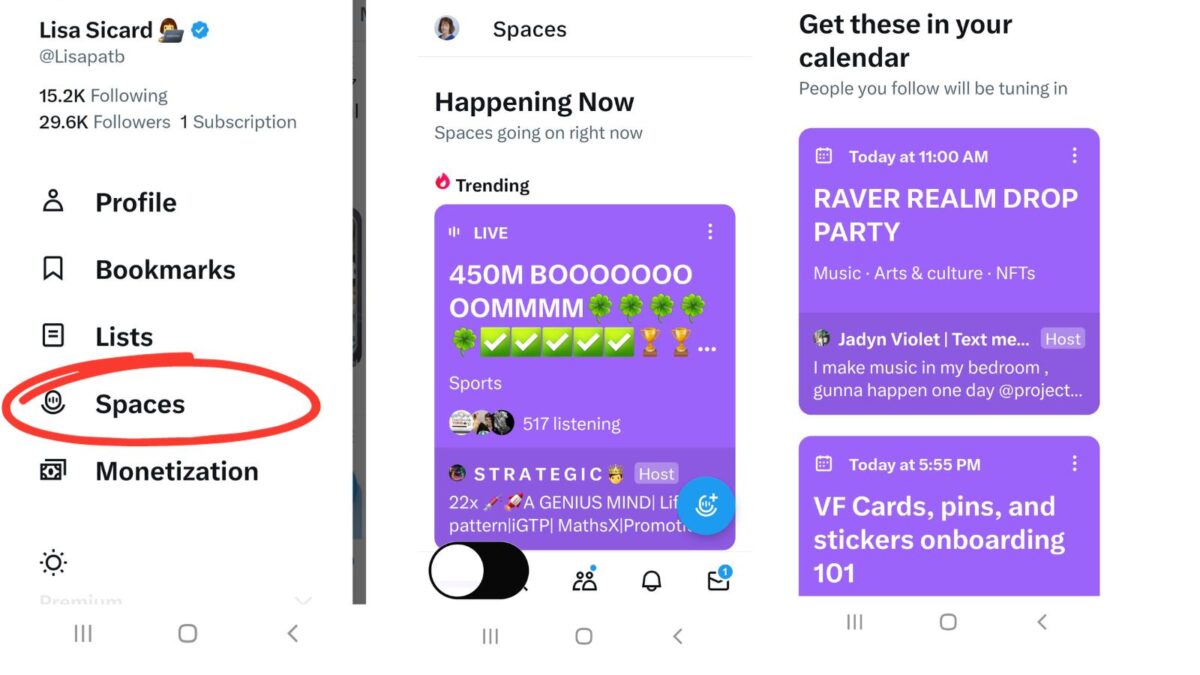
- Open the X app → tap the Spaces tab (bottom navigation bar on mobile). This is the #1 discovery hub. It shows live Spaces, scheduled events, and personalized podcast recommendations.
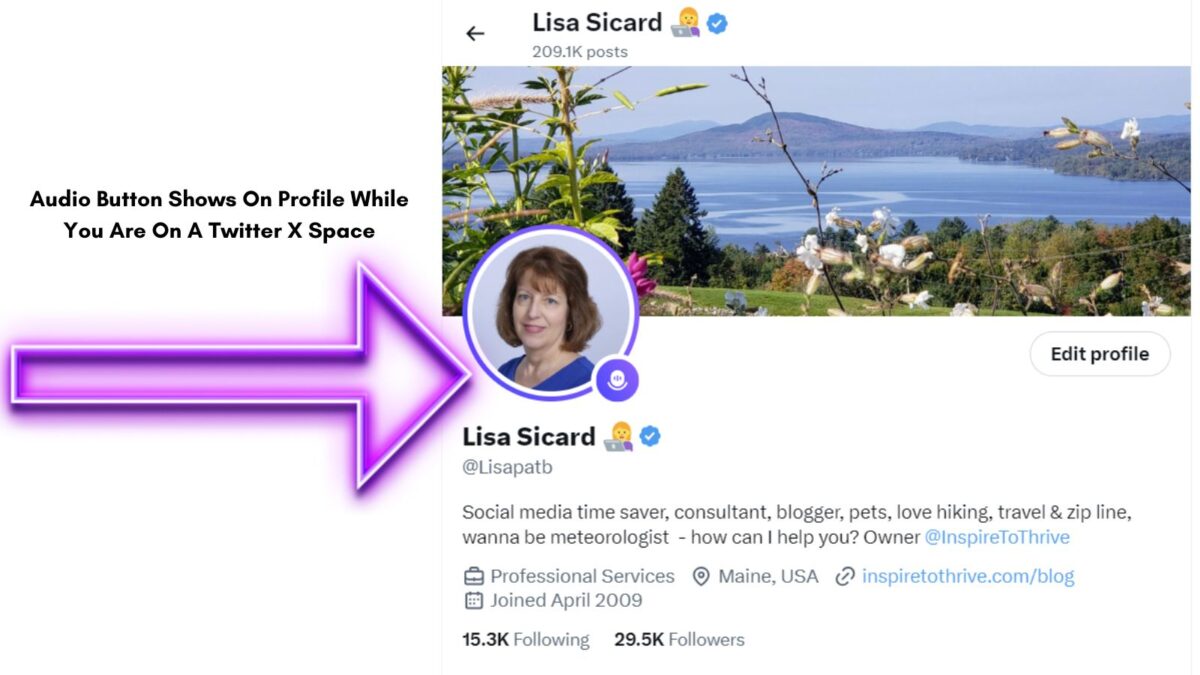
- Scroll your Home timeline: look for purple pulsing rings around profile pictures (live) or Space announcements.
- Search “filter: spaces” on X (works great on web too).
- Click any shared Space link in a post or DM.
Pro tip: Turn on notifications for hosts you love so you never miss their next Space.
How to Join & Listen to X Spaces (Mobile + Desktop)
On the X mobile app (iOS/Android) – Recommended
- Tap a live Space from the timeline, Spaces tab, or a shared link.
- Tap “Start listening” (or the purple bubble).
- You join instantly as a listener — mic off by default.
On desktop/web (new in 2026)
- Go to x.com and log in.
- Search “filter: spaces” or click a shared link.
- Click “Listen” — audio plays right in your browser while you scroll your feed.
Anonymous listening (new option): Toggle it on before joining. Your name and profile stay hidden from other participants (great for research or privacy), though X still tracks and listens for recommendations.
Navigating the X Spaces Interface
Once inside, you’ll see:
- Top — Profile photos of host + current speakers.
- Middle — Live captions (auto-generated) + pinned posts.
- Bottom — Emoji reaction bar, “Request” mic button, volume controls, and “Leave” button.
You can mute individual speakers, adjust overall volume, or react with clapping, hearts, laughs, etc.
How to Engage & Interact
Listening is great — engaging is better:
- Tap any emoji to react (everyone sees it).
- Raise your hand (Request to speak icon) — hosts love thoughtful contributors.
- Send text comments in the chat area.
- Share the Space with your followers or DM the link to colleagues.
Best Practices for Maximum Impact
- Listen first for 5–10 minutes before requesting to speak.
- Prepare a concise 30-second value bomb.
- Follow up after the Space: reply to the host’s recap post or connect with new followers.
- Use Spaces for market research — note questions listeners ask.
Listening to Recordings & Podcasts on the Spaces Tab
Many Spaces are now recorded automatically. After a Space ends:
- The recording appears instantly in the Spaces Tab.
- Anyone can replay it (even months later).
- Perfect for catching missed conversations or turning them into blog/podcast content.
You can also find full podcast series under “Stations” in the Spaces Tab — all free and playable in the background.
Troubleshooting: Can’t Hear or Join a Space?
Quick fixes that solve 95% of issues:
- Check your phone volume and app permissions.
- Force-close and reopen the X app.
- Update the X app.
- Leave and re-join the Space.
- Switch to Wi-Fi or check your internet connection.
- On the web: try a different browser or clear the cache.
Still stuck? Search “filter: spaces” again — sometimes the link refreshes.
How X Spaces Amplify Your Account & Business
The original reason I fell in love with Spaces still holds: they turn passive scrolling into real relationships.
Regular listeners who request to speak or react consistently see:
- More profile visits
- New followers
- Collaboration invites
- Direct sales or coaching inquiries
Pro strategy: Host your own Space every month, then listen to others in your niche to cross-promote. One well-timed comment in an industry leader’s Space can lead to a guest spot or joint venture.
Ready to Start Listening?
X Spaces are one of the most underused (yet powerful) tools on the platform in 2026. Whether you want to learn, network, or grow your business, all it takes is one tap.
Your next step: Open the X app right now, tap the Spaces tab, and join one live conversation. You’ll be amazed how quickly it feels natural — and how many new connections you’ll make.
Updated March 2026 for the latest X features (formerly Twitter Spaces)
X Spaces FAQ: Common Questions Answered (Updated March 2026)
Live audio conversations on X, where anyone can listen for free, react, request to speak, or host (mobile-only for hosting).
Yes. Toggle “Listen anonymously” before joining (off by default). Your profile hides from participants (hosts/speakers/listeners), but X tracks listens for stats/recommendations. You can’t react or speak anonymously.
No. All Spaces are public. Join any live one, even if you’re not following.
Yes. Search “filter: spaces” on x.com or click a shared link. Audio plays in-browser; some newer updates also allow speaking from the web.
Hosts can enable recording. Replays appear in the Spaces tab (often indefinitely on updated apps). Many become podcast-style episodes with background play.
Unlimited listeners; up to 13 speakers (host + 2 co-hosts + others).
Yes. They can listen to public Spaces but can’t host or co-host.
Yes. They are auto-generated live captions for accessibility (though clips may not always show them yet).
Enable notifications for hosts you follow. The Spaces tab personalizes suggestions based on your activity.
No minimum for listening or requesting to speak. Hosting is open to most accounts on mobile.
Yes. Eligible X users can capture 30-second clips from live/recorded Spaces (if the host allows) and share as posts with audio + transcription.
Hosting is still mobile-only (iOS/Android), but listening and some participation work on the web.
Disclosure: This Inspire To Thrive blog post contains affiliate links. I may earn a commission from qualifying purchases at no extra cost to you. Some sections were drafted with AI tools and carefully reviewed/edited by me.

- Agorapulse Social Listening: Monitor Mentions Without A Separate Tool - September 21, 2026
- Best Social Media Automation Tools: Agorapulse vs Buffer (2026) - September 20, 2026
- Why Making A Personal Connection Is Marketing Gold Dust - September 19, 2026
Enjoy this content? Help me show up more often in Google by adding Inspire To Thrive as a Preferred Source: