
Have you found that it’s often very tricky to get your Facebook boosted post approved quickly? Writing Facebook posts may come naturally to many people for their personal pages.
However, there comes a time when you may post something and may want to edit it on your business page. This poses a problem, however, if it’s already been boosted.
if you’re like me, you will do what you think would work on your own personal Facebook post, but it soon becomes apparent that it doesn’t work with a Facebook business page. You may wonder, why? How can I edit this post on my Facebook page?
Then what if you try to boost a great post you made for your company page, and Facebook denies your boost? Again, you wonder why?
Let me show you how to edit Facebook page posts before you try to boost them, and how to do it even after they have been boosted.

Estimated reading time: 6 minutes
Table of Contents
Facebook Post Mishaps
Oh yes, I’ve had it all happen. When you are doing social media posts every day, you are bound to make a mistake at some point. We are all human, after all.
Even the best spell checkers and grammar checkers can miss something.
Names and special terms do not make it past Grammarly or any other spell-check tool. It can happen to anyone. But don’t let it stop you from posting again.
Learn some tips here on how to recover quickly and what you can do when a mistake does happen on your Facebook business page.
The Old Days of Print Errors
After being in the newspaper advertising business for many years, it’s refreshing to see that an online error can be fixed quickly. With print, the error lasted forever.
It was awful. I would see the Sunday paper, and the error would be glaring, ruining my day.
Not only mine, but my customers’ as well. The office phone would have messages awaiting me on Monday morning.
It may not have even been my fault; it could have been the production department’s failure to correct something I had submitted. Or the pressroom pulls the old page and not the corrected version for print.
But no matter how or what, it was my fault to my customers. I had to find a way to make it up to them. Sometimes you could not make it up back in the day.
But if you knew in advance and let the customer know, that went a long way. Just a tidbit for you if it happens on social media and you catch it first.
How To Avoid Facebook Post Mistakes
One of the newer ways I’ve learned to avoid this is to make sure your images don’t include text, or, if they must, only a few words. This is for 2 reasons:
- You cannot edit images on a Facebook post. If the image contains text, you cannot edit it.
- Therefore, Facebook only approves boosts and ads on images that contain 20% or less of text. Hence, the image must be 80% text free.
Schedule your posts in the Facebook Creator Studio or with a tool like Agorapulse, Missing Lttr, or Buffer. Then click it to make the post larger.
Do this later on so you have fresh eyes on the post. Of course, you could have a proofreader check it out, too.
How To Correct a Facebook Post Error
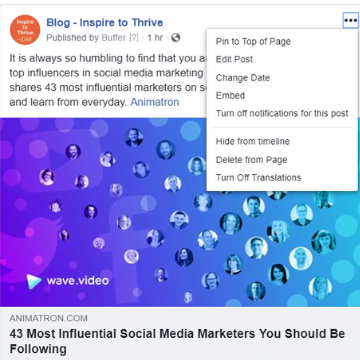
Text Errors – If it’s in the text, it is quick and easy to do. Just click the buttons near the top of the post, in the upper right-hand side. This will quickly get your Facebook boosted post approved. See the sample below.
You can do it on mobile or desktop. Fix the error and save. Done.
Hint – Many times, there are things you cannot do on a mobile device that you can do on your desktop.
Also, be sure to have your Pages App installed on your mobile phone. It makes it much easier to manage a Facebook page.
At least on Facebook, you can make edits. On Twitter X, you must delete tweets or leave them with the errors since the Twitter timeline moves so fast unless you have a subscription. With the Blue subscription you have an hour to edit any posts there.
How To Deal With Image Errors
- Delete the post if it just happened and no one engaged with the post.
- Instead of deleting a Facebook post with activity, you can hide it. Hide the incorrect post from the timeline by clicking the 3 buttons in the upper-right corner of the post.
- Lastly, you could just add a notice in the text of the post about the error. Once you have a new post, the old one will be moved down the page.
How To Quickly Get Your Facebook Boosted Post Approved Now
Why do these boosted Facebook posts get denied?
- Facebook has its own ad policies. They can deny your boosted posts or Facebook ads for those reasons. Hence, be sure to read all of their ad policies, as you may be surprised.
- You cannot show images from Facebook or Instagram on a boosted post. So if you are writing a blog post about these topics, be careful which images you use to boost (I’ve always said you can learn from my mistakes, right?) See below for my example.
- If your business involves anything Facebook considers against its policies, such as body image. (Anything that could be related to body shaming, etc.)
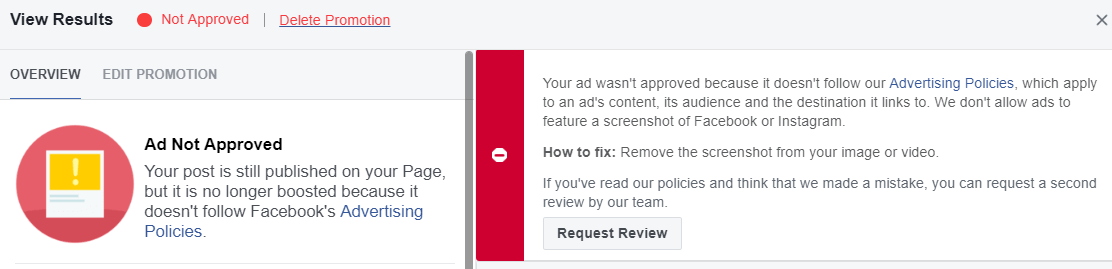
You may remember the last post on Facebook and why boosts are worthwhile today.
How To Edit A Boosted Meta Post
You must cancel the boost before you can edit it. Once the Meta-boosted post is canceled, you can make your edits and boost it again. If all else fails, and it may with Facebook, schedule another post and boost it.
Many people who like your page may not have seen the first one. You can always check your insights to double-check.
Conclusion – How to Quickly Get Your Facebook Boosted Post Approved Fast
I’d love to know if you have had any errors posting on your business’s Facebook page. What did you do to correct it?
I’d also love to know if you have had any ads or Facebook boosted posts denied by Meta.


- Instagram Reels Not Posting or Uploading in 2026? 12 Fixes That Work - July 31, 2026
- Twitter Jail / X Suspension 2026: How Long It Lasts + How to Get Out - July 30, 2026
- Google Search Console Reports Bloggers Should Check Weekly - July 30, 2026



Good to know Lisa. I only boosted 1 or 2 Facebook Page posts way in the past but if I muck up, a cancel and edit works A-OK. Definitely helpful since I imagine once folks boost a post they believe it is live and cannot be edited. Facebook gives us some wriggle room in this regard.