
I still remember the client who fell three months behind on payments. After the usual follow-ups, we switched them to bank pay, and the problem was solved. That experience is one reason PaymentKit for SaaS teams caught my attention. Running a service business is different from running a SaaS company, but the cash-flow pressure feels similar. When you’re the one chasing renewals or matching invoices, product work gets pushed aside.
That’s why several small SaaS founders I talk to have started using PaymentKit for SaaS. Failed renewals used to eat Tuesday mornings. They’d open the list, dig through processor logs, write personal notes, and track replies in a shared sheet.
That single job could steal three hours a week. Looking for something better is what led them to PaymentKit. The change reduced the manual load without adding headcount.
Estimated reading time: 6 minutes
Table of Contents
The Cost of Owning Every Renewal
I still hear versions of the same story: an afternoon spent matching one mismatched invoice against three different processor reports while the rest of the team waited on a release decision. The numbers refused to line up until someone rebuilt the calculation by hand.
That kind of detective work feels productive in the moment, yet leaves nothing finished on the product side. Small teams absorb these interruptions because no specialist exists to handle them.
Over time, they become an accepted part of the working week.
How duties split when the team stays tiny
Product owns the code. Support answers tickets. Someone (usually the founder) handles billing because there’s no one else. One team tried rotating the billing checks.
The rotation lasted two cycles before everyone agreed the context switch hurt more than it helped. Accuracy suffered when the person least familiar with the accounts ran the process. No one wanted to own the awkward customer conversations that follow a decline.
Automation stepped in after the third quarter of missed forecasts. They set rules once, and the system followed them. Upgrades and pauses now process without anyone opening a dashboard most days.
The first week felt strange because the silence after the usual fire drill left empty calendar blocks they’d forgotten how to use.
Someone (usually the founder) handles billing because there’s no one else. PaymentKit for SaaS takes that load off by automating the routine work.
Watching recovery rates climb without extra hands
Declined cards once meant lost months of revenue and long apology threads. The recovery sequence now runs on its own schedule. Retries occur at intervals that match the reasons for decline. Customers receive clear messages without anyone drafting each one. The founder still reviews the weekly summary to catch anything that needs attention.
Their pricing includes a base fee plus usage overages. Calculating those mid-cycle adjustments used to require a spreadsheet and a careful double-check. Errors occurred twice last year and resulted in goodwill impairment.
The current setup applies the numbers correctly the first time.
Time freed from the weekly chase now goes into customer interviews and feature prioritization. Revenue numbers arrive in one view instead of three exports that never matched. They check the authorization trends once a week and move on.
What changed for teams using PaymentKit for SaaS:
- Authorization rates rose after the first full month (one case study went from 63% to 76%).
- Failed payments recovered at a higher percentage than previous manual efforts.
- Weekly summaries replaced the need to stitch together multiple processor exports.
- Mid-cycle upgrades, pauses, and usage calculations happened automatically.
- Less time spent on awkward decline follow-ups and more time on product or client work.
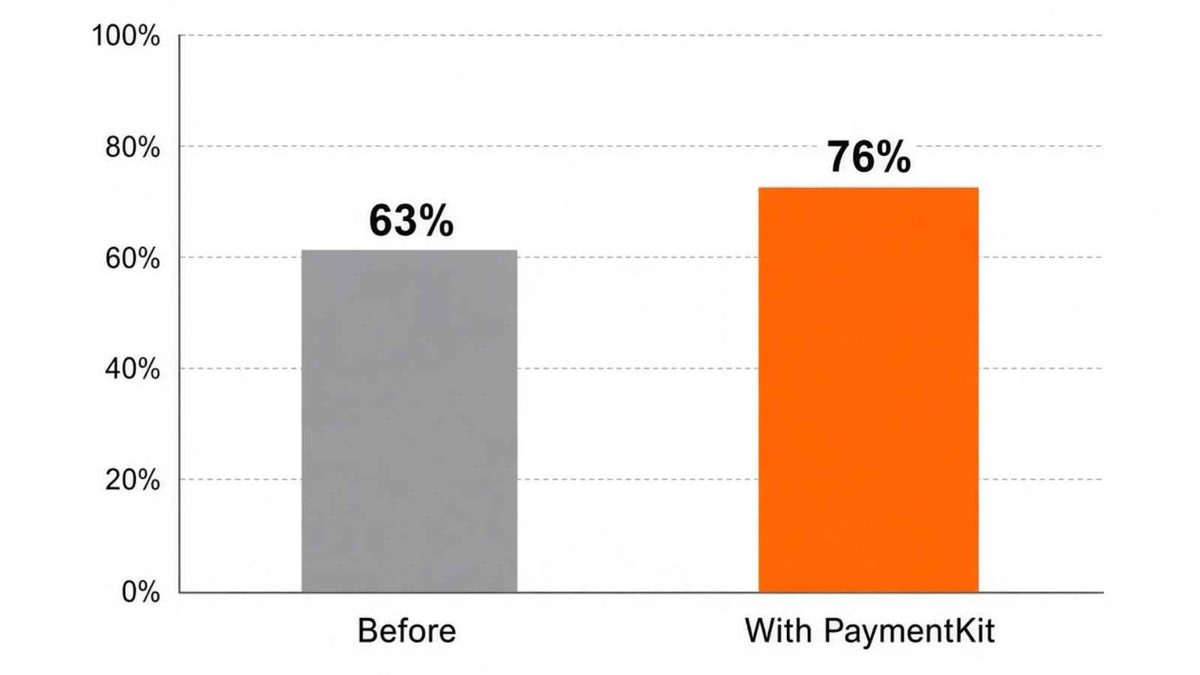
Example from a PaymentKit case study: authorization rates increased from 63% to 76%.
The shift also changed how they talk about growth. They no longer treat billing as a necessary evil. New customers bring their own questions and support needs, but routine subscription management has become far more predictable.
(If you’re still in the “nudge them politely every month” stage as I describe in Managing Money Tips for Blogging, this kind of automation is the next step a lot of subscription businesses take.)
Early friction that never fully left
Integration required one focused afternoon and a short test period. They expected more pushback from the existing payment connections.
The transition stayed quiet. Occasional edge cases still surface when a customer uses an uncommon card network. Those cases take minutes instead of hours.
What the numbers quietly revealed
Authorization rates rose after the first full month. Failed payments recovered at a higher percentage than any previous manual effort. The weekly summary makes payment trends easier to spot. They no longer guess at the health of the subscriber base.
The real shift sits in the daily rhythm. The team stays small because the routine work no longer multiplies with each new customer. The founder still owns the final responsibility, but can make billing decisions based on the numbers rather than spend mornings reconstructing them from separate reports.
Frequently Asked Questions
PaymentKit for SaaS is a multi-processor billing platform that automates subscription management, failed-payment recovery, and revenue tracking so small teams don’t have to chase renewals manually.
Yes. It uses smart retries, routing across processors, and automated dunning to recover declined cards. Some teams have seen authorization rates rise (in one case study, from 63% to 76%).
Most small teams report that integration takes one focused afternoon plus a short test period. Edge cases still exist, but they usually take minutes instead of hours.
Yes. It is processor-agnostic and routes transactions across the processors you already use while vaulting tokens independently.
No. It’s built for small teams that don’t have a dedicated finance person and want to stop losing time (and revenue) to manual billing work.
Conclusion: Using PaymentKit for SaaS
Bank pay solved my three-months-behind client situation. For SaaS teams dealing with failed cards, usage overages, and recurring renewals at scale, something like PaymentKit is often a cleaner long-term fix.
→ You can learn more here if the same pattern shows up in your own week.
Disclosure: This Inspire To Thrive blog post may contain affiliate links. I may earn a commission from qualifying purchases at no extra cost to you. Some sections were drafted with AI tools and carefully reviewed/edited by me.
Enjoy this content? Help me show up more often in Google by adding Inspire To Thrive as a Preferred Source:
