You sit down to publish a post or schedule social content, then lose an hour fighting with graphics. Canva tabs everywhere, stock sites open, nothing looks quite right. This is where AI Image Generators for Bloggers help.
You type a short sentence about what you want, the tool handles image generation to create images that match your words, and you pick your favorite. In a few minutes, you have social posts, blog headers, and even simple ads ready to go.
Not every tool feels the same though. Some focus on art, some on design, and a few on pure speed for content creators. My own favorite for blogging workflows is the Right Blogger AI image generator, and I often compare it to Canva, Grok AI and other big names.
The goal here is simple: help you pick the best AI image generator for how you already work, not just the one that everyone talks about.
Estimated reading time: 15 minutes
Table of Contents
Key Takeaways
- AI image generators save time by creating images from simple text prompts, ideal for bloggers.
- The Right Blogger AI image generator integrates seamlessly with blogging workflows, offering fast creation of on-brand images.
- Canva excels in full design projects but may slow down quick tasks due to its complex features.
- Choosing the right ai image generators for bloggers depends on your publication frequency, comfort with design, and content needs.
- Creating a repeatable image workflow helps streamline the process, ensuring a consistent output of quality graphics.
What AI Image Generators Do (And How They Save You Hours Every Week)
At a basic level, AI image generators perform text-to-image magic; they read your words through a sophisticated neural network powered by advanced AI models and turn them into pictures.
You type a clear text prompt like, “bright flat lay photo of a laptop, coffee, and planner for a productivity blog,” then the tool handles image generation and creates several versions of that idea.
You do not need drawing skills. You do not need graphic design knowledge. You just explain what you want, in plain language, and the tool handles the rest.
For bloggers, AI image generators can cover a lot of daily work with AI-generated images that come with commercial usage rights, safe for business use:
- Blog feature images and headers
- Instagram, Facebook, X, and Pinterest posts
- YouTube thumbnails
- Simple ads and promo graphics
- Product mockups and eBook covers
Images to Match Your Branding
Instead of scrolling stock photos, you can create images that match your brand colors, topics, and style in a few minutes with rapid image generation.
Tools like the broader AI art generators and AI tools for bloggers on RightBlogger help you keep that content flow going in one place.
You go from “I need a graphic and have no idea where to start” to “I have four options ready to post” in the time it takes to make coffee, speeding up the creative process.
From Blank Screen to Ready-to-Post Image in a Few Clicks
Here is how a simple workflow might look.
You just finished a blog post about Instagram growth tips. You open your AI image generator and type:
“Instagram growth tips, realistic photography style flat lay of a phone with social media icons, pink and purple, clean blog header.”
The tool creates a few versions. You scroll through, pick the one that fits your brand, maybe run one more prompt to adjust colors, then download.
A process that used to involve picking a Canva template, hunting for the right photo, trying different fonts, and resizing now becomes a handful of clicks.
The blank page is no longer a problem. You always have something to react to, which makes design feel lighter and less stressful.
Why the “Best” AI Image Generator is the One that Fits Your Workflow
The fanciest samples on a sales page do not matter if you never use the tool. What matters is how the tool fits your real life with seamless workflow integration:
- How often you publish (a few times a month or daily)
- Where you publish (blog, Instagram, X, Pinterest, email)
- How comfortable you are with design
- What you can spend each month
If you publish often and want fast blog and social graphics, a focused tool like the Right Blogger will likely feel easier. If you do heavy design work or client presentations, Canva may still sit at the center.
You want the tool that slips into your existing process, so you barely notice you are using it.
Right Blogger vs Canva and Other AI Image Tools: Which Is Best For You?
For content-focused creators, the choice of AI image generator can decide whether you stay consistent or fall behind on visuals.
Let us look at how RightBlogger, Canva, and a few big AI image generators feel in real weekly use.
Why Right Blogger’s AI image Generator Feels Built for Bloggers and Content Creators
The Right Blogger is an all in one platform for bloggers and marketers. You can brainstorm post ideas, write drafts, and create images in the same place, especially with its AI-powered editor for bloggers.
That alone saves time. You do not have to jump between tools, upload images, or copy and paste text all day.
A few clear benefits:
- One space for words and visuals
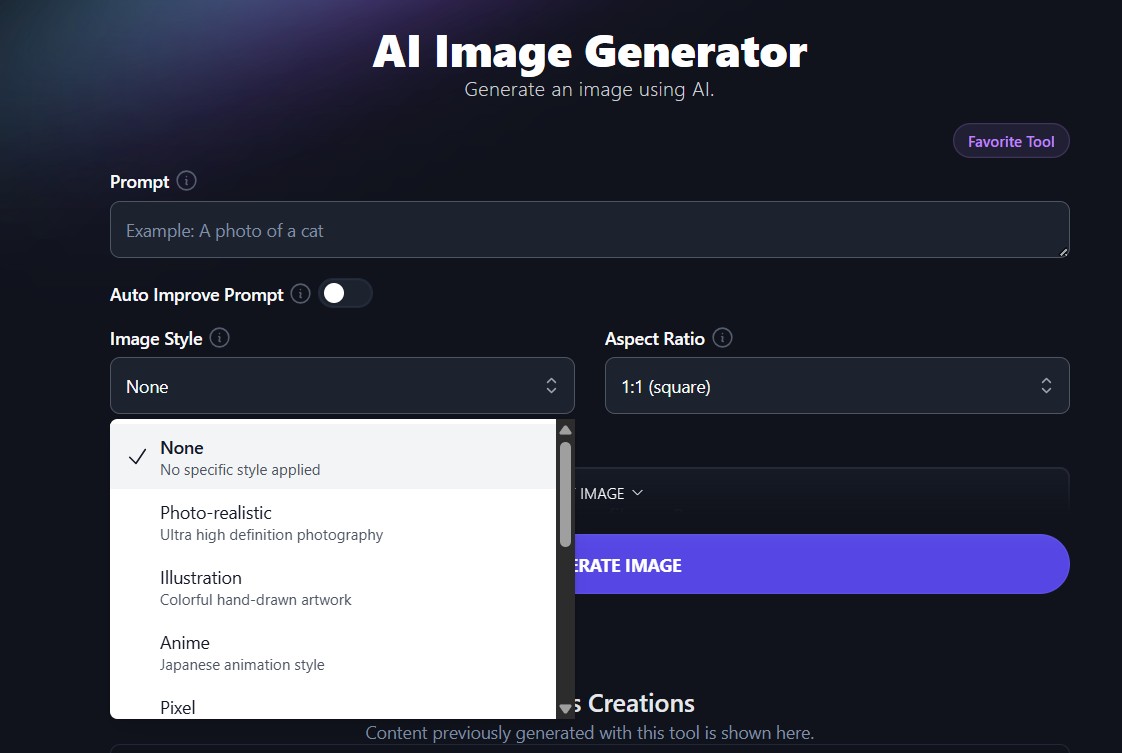
You can write a blog post, then generate a matching header image in the Right Blogger AI image generator without leaving the editor. This streamlined image generation process delivers AI-generated images quickly. - Consistent brand styles
Once you find a style you like, you can reuse a similar prompt and aspect ratio. Over time, your blog and social feeds start to look consistent, even if you are not a designer. - Content-friendly sizes and quick tweaks
The tool gives sizes that make sense for blog posts and social platforms. If an image is close but not perfect, you can reprompt or adjust without building a whole design from scratch. - Auto improve prompt – No need to write fancy or complicated prompts with the RightBlogger image generator saving you time!
Because the tools are all under one roof, it often takes less time than opening Canva, picking a template, and rebuilding your layout for each new post. And a big bonus: The owners Ryan and Andy always respond to questions or concerns you may have along the way using their tool. (They have a Discord group for users too!)
Where Canva’s AI Image Features Still Shine (and Where They Slow You Down)
Canva is still excellent for full graphic design. If you need:
- Slide decks
- Detailed social carousels although I now prefer Gamma AI now for those
- Brand kits, logos, or long form PDFs
then Canva is hard to beat. Its text-to-image AI image features help you generate photos or art inside that layout, which is handy, and its image editor allows for post-generation refinements.
The tradeoff is speed. For a simple task like three images for a new blog post, this is what happens:
- In Canva, you open a design, pick a template, adjust fonts, add your logo, generate or upload an image, then resize for each platform. It looks great, but it can take 30 to 60 minutes if you are picky.
- In Right Blogger, you write your post, run one or two prompts for a header and social variation, download, and post. If you want text on top, you can still jump into Canva, but the heavy lifting is already done.
So Canva shines when design polish matters more than speed. For daily content, all those extra choices can slow you down.
Grok AI Image Generator with Video
X Grok AI’s image generator with video support is still early, and tends to feel more experimental than polished, especially when you compare it to RightBlogger and Canva.
Grok leans on its core strength, fast text understanding, so it can help you brainstorm visuals, scenes, and hooks for short clips, but the visual output often needs extra editing in another tool.
The Right Blogger focuses on bloggers, so its image features are more about quick post graphics and thumbnails that match your content workflow, not full video projects.
Canva sits in a different league for visuals, with ready-made templates, drag-and-drop timelines, brand kits, and social-ready exports that save a lot of time.
For most bloggers, Grok works best as the “idea engine”, and Canva or RightBlogger handle the final images and video assets you actually publish.
Other Popular AI image Generators: When Tools Like DALL·E or Midjourney Make Sense
You have probably heard of Midjourney, DALL·E, Adobe Firefly, Stable Diffusion, or even ChatGPT GPT-4o and Grok4 . These tools, powered by advanced AI models, create very detailed, artistic images with high quality images in various artistic styles.
They are great if you run a creative brand, a YouTube channel with strong visuals, or you love experimenting, thanks to their diffusion process and deep customization options.
They also come with tradeoffs, including text rendering accuracy challenges for text-heavy visuals:
- Some run through Discord or special apps
- Prompts are more technical
- Getting a “brand safe” style can take trial and error, though features like watermark free downloads and commercial usage rights make them suitable for business assets
If you already use Adobe tools, something like Firefly can fit well, especially with upscaling resolution for pro needs. If you enjoy prompt art in specific artistic styles, Midjourney can be fun.
Some offer API access for advanced integration. For a busy blogger who just wants strong, on brand graphics in minutes powered by reliable AI models, they can feel a bit heavy.
How to Pick the Best AI Image Generator for Bloggers in 10 Minutes
Here is a quick way to decide without overthinking it:
- Set your budget. Decide what you can spend each month on content tools, including whether a free plan fits your needs.
- Be honest about your tech comfort. If you dislike complex settings, skip tools that require Discord or deep prompt tricks.
- List your main platforms. Blog, Instagram, Pinterest, X, or email. Pick the top two.
- Estimate image needs. How many images do you want per week for each?
- Decide how much design polish you need. Simple and clean, or full layouts and fancy effects?
Then test one or two tools on a single blog post. For example, make all the images for your next article in both Canva and RightBlogger. Time yourself and note which felt easier.
If you are a busy blogger, starting with a focused content tool like the Right Blogger AI image generator usually gives the best balance of speed and quality.
Simple Tips To Get Better AI Images Fast (So You Actually Save Time)
Once you pick a tool, small habits in how you write prompts and organize your work can double your results.
Write Clear Prompts That Match Your Blog and Brand Style
You do not need long text prompts for text-to-image tools. You just need the right pieces in your text prompt:
- Type of image (blog header, Instagram square or portrait, Pinterest pin)
- Subject
- Mood or style with customization options like artistic styles
- Brand colors or key details such as camera angle
For example:
“Blog header image, woman working on laptop at kitchen table, warm and friendly, soft orange and navy colors, for small business blog.”
Save this text prompt. Next time, swap “woman working on laptop” with “small business owner checking social media stats” and you have a fresh image that still fits your brand.
Good text prompts like this lead to high quality images quickly, thanks to strong prompt adherence in AI image generators. However, you may need some practice to get it just right for your blog.

If you ever feel stuck, try ChatGPT GPT-4o to refine or generate initial prompt ideas, or use tools like the Image to Prompt generator to turn a reference image into a detailed prompt you can reuse.
Create a Repeatable Image Workflow You Can Use Every Week
A simple weekly system makes AI images feel easy:
- Pick your main post or campaign for the week.
- Write one or two base prompts that match your brand style.
- Use Right Blogger to generate a batch of images in the sizes you need.
- Pick favorites and download.
- Only open an image editor like Canva or another tool if you need text overlays or layout tweaks.
Store your best prompts, color notes, and style ideas in a simple doc or inside RightBlogger. Over time, you build your own mini “brand kit” that any AI image generator can follow.
You get faster every week, and graphics stop blocking your content schedule.
Conclusion: Best AI Generators For Bloggers
The real “best” among AI Image Generators for bloggers is the one that fits your life, not the one with the flashiest samples. For many bloggers, a focused tool like Right Blogger pairs better with daily writing, scheduling, and SEO work than heavyweights like Midjourney or Adobe Firefly.
Right Blogger’s image generation works side by side with your blog drafts, social posts, and other AI tools, so you get AI-generated images with commercial usage rights (critical for business users needing legal assurance) and spend more time publishing, less time pushing boxes around in Canva.
Canva still has a strong place when you need full designs and rich layouts as well as quick resizes of an image.
For your next blog post or social campaign, test a focused tool such as the Right Blogger AI image generator, which offers a Free Plan, against your current process. Track how long you spend and how happy you are with the results.
You might be surprised how much faster your content pipeline feels!
Smart FAQ For Busy Bloggers Using AI Image Generators
Start with speed, ease of use, and licensing. If a tool takes you 10 minutes per image, it will slow your content schedule. Look for a clean interface, clear buttons, and simple settings so you can generate and download images in a few clicks. Make sure the platform clearly states that you can use images for commercial work, since your blog likely earns money or supports a business. Finally, check image quality at different sizes, because you want graphics that still look sharp in featured images, social shares, and pins.
Free plans help you test tools and see what fits your style, but they usually come with limits. You may face caps on the number of images per month, watermarks, or lower priority during busy times. Paid plans for tools like Midjourney, Firefly, and ChatGPT Plus with DALL-E 3 usually add higher resolution, more control, and faster generation. If you blog often and use images on social media, a modest paid plan such as the Right Blogger can pay off in saved time and stronger visuals.
In many cases, yes, but only if the tool gives clear commercial rights. Adobe Firefly, The Right Blogger, Midjourney subscriptions, and DALL-E 3 through a paid ChatGPT plan currently allow commercial use of generated images. Stable Diffusion is open source, so rights depend on the model and the platform you use. Always read the license page and terms of service before you commit to a tool, and save a copy or screenshot of key licensing text for your records. Treat your blog as a business asset and avoid tools that feel vague about copyright.
AI images by themselves do not hurt rankings. What matters most is page speed, relevance, and user experience. Compress your images, use the right file format, and add descriptive alt text that matches the content of the page. Google still cares about helpful content, so use AI visuals to support your message, not to distract from it. When your images load quickly, match the topic, and help readers understand your post, they support your SEO rather than hurt it.
Start by defining a simple visual style that suits your blog. Decide on color tones, level of realism, and whether you prefer photos, illustrations, or flat graphics. Then, repeat a short style phrase in your prompts, such as “soft neutral colors, clean blog graphic style” or “bright, bold colors, minimalist flat illustration.”
If you usually spend 20 to 30 minutes hunting for stock photos, AI can cut that down to a few minutes per image once you know your prompts. You can batch-create graphics for several posts in one sitting, then schedule them in your blog and social media planner. Over a month of active blogging, this often saves several hours that you can put back into writing, promotion, or client work. The key is to save your best prompts, templates, and image sizes so each future session is faster.
Good prompts describe the subject, mood, style, and format in plain language. Instead of saying “dog,” try “smiling golden retriever sitting on a couch, soft natural light, friendly blog photo style.” Add context that fits your post, such as “for a small business blog about productivity” or “for a tutorial post about Pinterest marketing.” Once you find a prompt that fits your brand, reuse it and only change the subject of the image. This keeps your output both fast and consistent.
AI works very well for concept illustrations, background images, thumbnails, and social graphics. It is less ideal for sensitive topics, medical claims, or real people who must be accurate and trustworthy. For case studies, testimonials, or real-life events, you may still want original photos or screenshots. Many bloggers use a mix, AI for generic visuals and stock or original images for anything that needs proof, trust, or clear real-world detail.

- Facebook Page Likes Are Gone in 2026: What Matters Now? - April 10, 2026
- How to View Private Instagram Accounts Anonymously — Traditional Methods and Proven Tools - April 10, 2026
- Blog Growth Case Study: What Actually Moves Traffic and Leads - April 9, 2026